Kupu Whakataki
Welcome to the ARCADE1UP At-Home Arcade experience! This manual provides essential information for the assembly, operation, and maintenance of your new ARCADE1UP 6650 Asteroids arcade cabinet. Please read these instructions carefully before assembly and use to ensure safe and optimal performance.
Your ARCADE1UP cabinet brings classic arcade gaming into your home, featuring iconic titles such as Asteroids, Major Havoc, Lunar Lander, and Tempest.
Nga korero haumaru
- Huihuinga Pakeke e hiahiatia ana: He iti ngā wāhanga o tēnei hua, ā, me huihui e te pakeke.
- Haumaru Hiko: Ensure the power cord is not damaged. Plug into a grounded outlet. Do not expose to water or excessive moisture.
- Turanga: Place the arcade cabinet on a flat, stable surface. Avoid placing in direct sunlight or near heat sources.
- Whakahau: Kaua e araia nga whakatuwheratanga hau. Me whakarite kia pai te rere o te hau huri noa i te waahanga.
- Te horoi: Momotuhia te hiko i mua i te horoinga. Whakamahia he kakahu ngohengohe, maroke. Kaua e whakamahi i ngā wai horoi, i ngā wai rānei hei horoi.
- Tamariki: Supervise children during use. This product is not a toy and is intended for users aged 14 and up.
Ihirangi mokete
Please refer to the packaging for a complete list of included components. Ensure all parts are present before beginning assembly. If any parts are missing or damaged, contact ARCADE1UP customer support.

Image: The ARCADE1UP Asteroids arcade cabinet packaging, showing the product box with graphics and key features.
Tatūnga me te Runanga
Assembly typically requires two adults and takes approximately 1-2 hours. Follow the step-by-step instructions provided in the separate assembly guide included with your product. The general process involves:
- Wewete ana: Kia ata tangohia nga waahanga katoa mai i te kete.
- Huihuinga Paewhiri: Connect the side panels, back panel, and base using the provided hardware.
- Aroturuki Tāutatanga: Securely mount the LCD monitor into the cabinet.
- Āpitihanga o te Paewhiri Mana: Attach the control panel to the cabinet, ensuring all cables are properly connected.
- Marquee and Top Panel: Install the illuminated marquee and top panel.
- Hononga Hiko: Connect the power adapter to the cabinet and then to a wall outlet.

Whakaahua: Mua view of the fully assembled ARCADE1UP Asteroids arcade cabinet, showcasing the screen, control panel, and artwork.
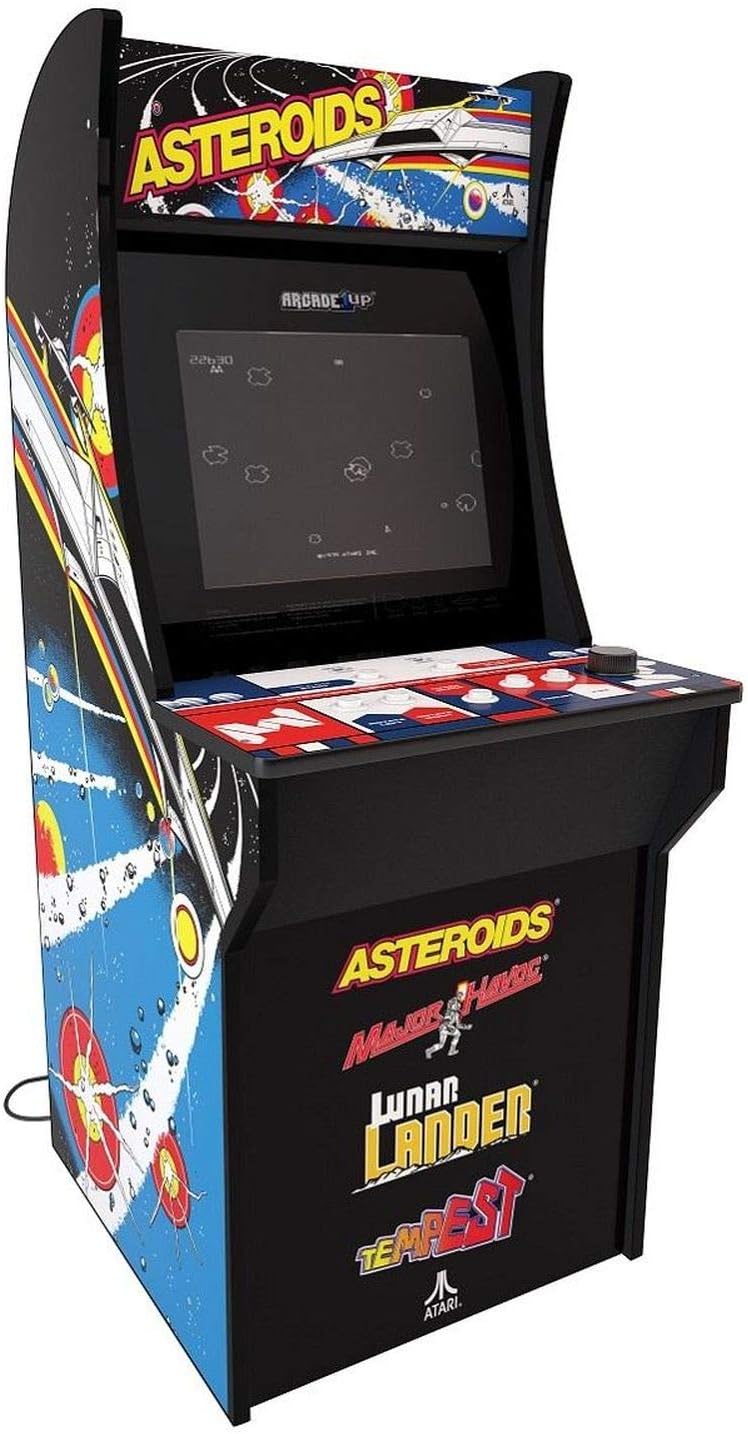
Whakaahua: Koki view of the fully assembled ARCADE1UP Asteroids arcade cabinet, highlighting the side panel artwork and overall design.

Whakaahua: Taha view of the ARCADE1UP Asteroids arcade cabinet, showing the detailed side panel artwork and the power cord exiting the back.

Whakaahua: Kati-ake view of the ARCADE1UP Asteroids control panel, displaying the joystick, buttons, and game instructions printed on the surface.
Nga Tohutohu Whakahaere
- Whakahiko: Plug the power adapter into a wall outlet. The arcade cabinet will automatically power on.
- Kōwhiringa Kēmu: Use the joystick and buttons on the control panel to navigate the game selection menu.
- Tīmata Kēmu: Once a game is selected, press the "1 Player Start" or "2 Player Start" button to begin.
- Mana:
- Ririhiko: Movement (e.g., steering your ship in Asteroids).
- Patene Ahi: Shoots projectiles.
- Thrust Button: Propels your ship forward.
- Hyperspace Button: Teleports your ship to a random location (use sparingly, as it can be risky).
- Rotate Left/Right Buttons: For games like Tempest, these buttons control rotation.
- Mana Rōrahi: Adjust the volume using the dedicated volume buttons or switch, typically located on the control panel or back of the unit.
- Exiting a Game: To return to the main menu, press the "Option" or "Menu" button (refer to your specific control panel layout).
- Weto Whakakore: Unplug the power adapter from the wall outlet to power off the unit.
Ngā Kēmu
Your ARCADE1UP 6650 cabinet includes the following classic Atari titles:
- Asteroids: The original space shooter where you destroy asteroids and flying saucers.
- Major Havoc: A vector graphics arcade game with multiple gameplay styles.
- Lunar Lander: A classic game of precision, guiding a lunar module to a safe landing.
- Tempest: A fast-paced tube shooter with vibrant vector graphics.
Te tiaki
- Te horoi i te rūnanga: Whakamahia he ngohengohe, paku damp cloth to wipe down the exterior surfaces. Avoid abrasive cleaners or solvents.
- Te horoi i te Mata: Use a microfiber cloth specifically designed for electronics screens. Do not spray cleaners directly onto the screen.
- Te Manaaki i te Paewhiri Mana: Keep the control panel clean and dry. Avoid spills. For stubborn grime, a small amount of isopropyl alcohol on a cloth can be used, but test in an inconspicuous area first.
- Tirohanga Waea Hiko: Tirohia te taura hiko i ia wā, i ia wā, mō ngā tohu pakaru. Mēnā kua pakaru, kati te whakamahi, ka whakapā atu ki te ratonga kiritaki.
Raparongoā
| Raruraru | Rongoa pea |
|---|---|
| Karekau he Hiko / Waehe Kaore e Hurihia |
|
| Kore Oro |
|
| Screen Display Issues (No Picture, Flickering) |
|
| Nga Mana Kore Whakautu |
|
If you encounter issues not listed here or if the suggested solutions do not resolve the problem, please contact ARCADE1UP customer support for further assistance.
Whakatakotoranga
- Tauira: ARCADE1UP 6650 Asteroids At-Home Arcade Game
- Tauwehe Puka: Rahi Katoa
- Rahi Hua: 119.38 cm (H) x 58.42 cm (W) x 48.26 cm (D)
- Taumaha Tūemi: 26.76 Kirokaramu
- Rahi Mata: 17 Inihi LCD
- Puna Hiko: Hiko Hiko
- Te maha o nga kaitakaro: 1
- Momo Kaitatau: Joystick and Buttons
- Ngā Kēmu kei roto: Asteroids, Major Havoc, Lunar Lander, Tempest
- Whakaahuatanga Awhe Ake: Tamariki (E taunakitia ana mō te 14 tau neke atu rānei)
Pūtāhui me te Tautoko
For warranty information, technical support, or to order replacement parts, please visit the official ARCADE1UP webpaetukutuku, whakapā atu ranei ki ta raatau tari ratonga kaihoko. Puritia to tohu hoko mo nga kereme whakamana.
ARCADE1UP Official Webpae: www.arcade1up.com


