1. Kupu Whakataki
This manual provides detailed instructions for the proper use and maintenance of your Edifier W820BT Bluetooth Headphones. Please read this manual thoroughly before using the product to ensure optimal performance and longevity.
2. Ihirangi mokete
Verify that all items listed below are included in your package. If any items are missing or damaged, please contact Edifier customer support.
- Edifier W820BT Bluetooth Headphones
- Uira Uira (USB)
- Waea Ororongo (3.5mm)
- Pukapuka Kaiwhakamahi (tenei tuhinga)
3. Hua Neke Atuview
The Edifier W820BT headphones are designed for comfort and extended listening, featuring Bluetooth v4.1 connectivity and a long-lasting battery.
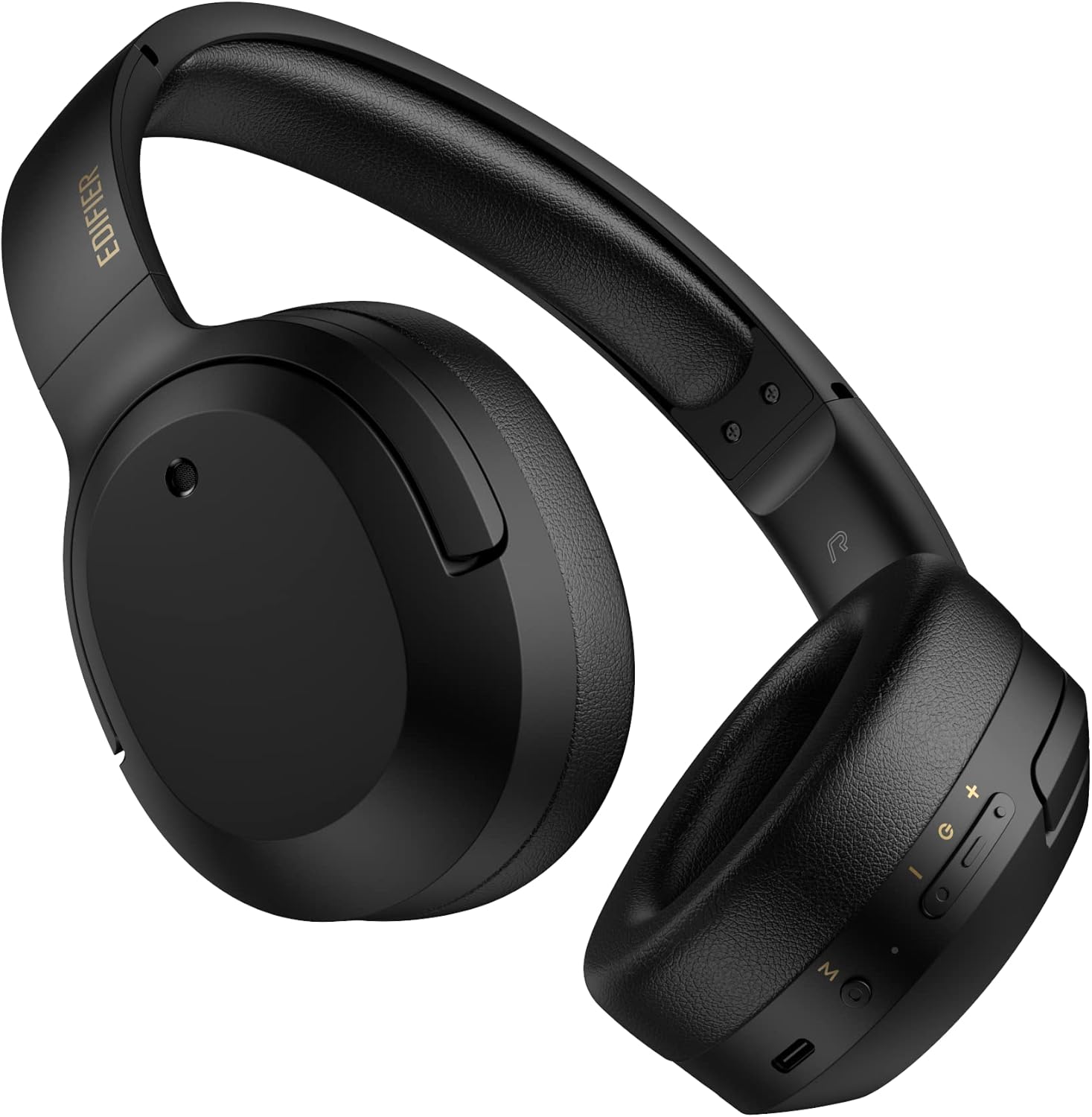
Whakaahua 3.1: Mua view of the Edifier W820BT Bluetooth Headphones.

Whakaahua 3.2: Taha view of the Edifier W820BT Bluetooth Headphones, highlighting the control buttons.
Āhuatanga matua:
- Bluetooth V4.1 with CSR Technology for stable wireless connection.
- Tae atu ki te 80 haora o te ora o te pākahiko.
- Hoahoa takai mō te kawe.
- Soft leather ear pads for comfort.
- Durable and flexible steel headband.
- On-ear controls for media playback and calls.
4. Tatūnga
4.1 Te Whakataki i nga Waea
I mua i te whakamahinga tuatahi, whakakīia katoatia ngā pane whakarongo.
- Connect the micro-USB end of the charging cable to the charging port on the headphone (located on the right earcup).
- Honoa te pito USB-A o te taura utu ki tētahi urutau hiko USB (kāore i te whakaurua) ki te tauranga USB rānei o te rorohiko.
- The LED indicator will illuminate during charging and turn off once fully charged.
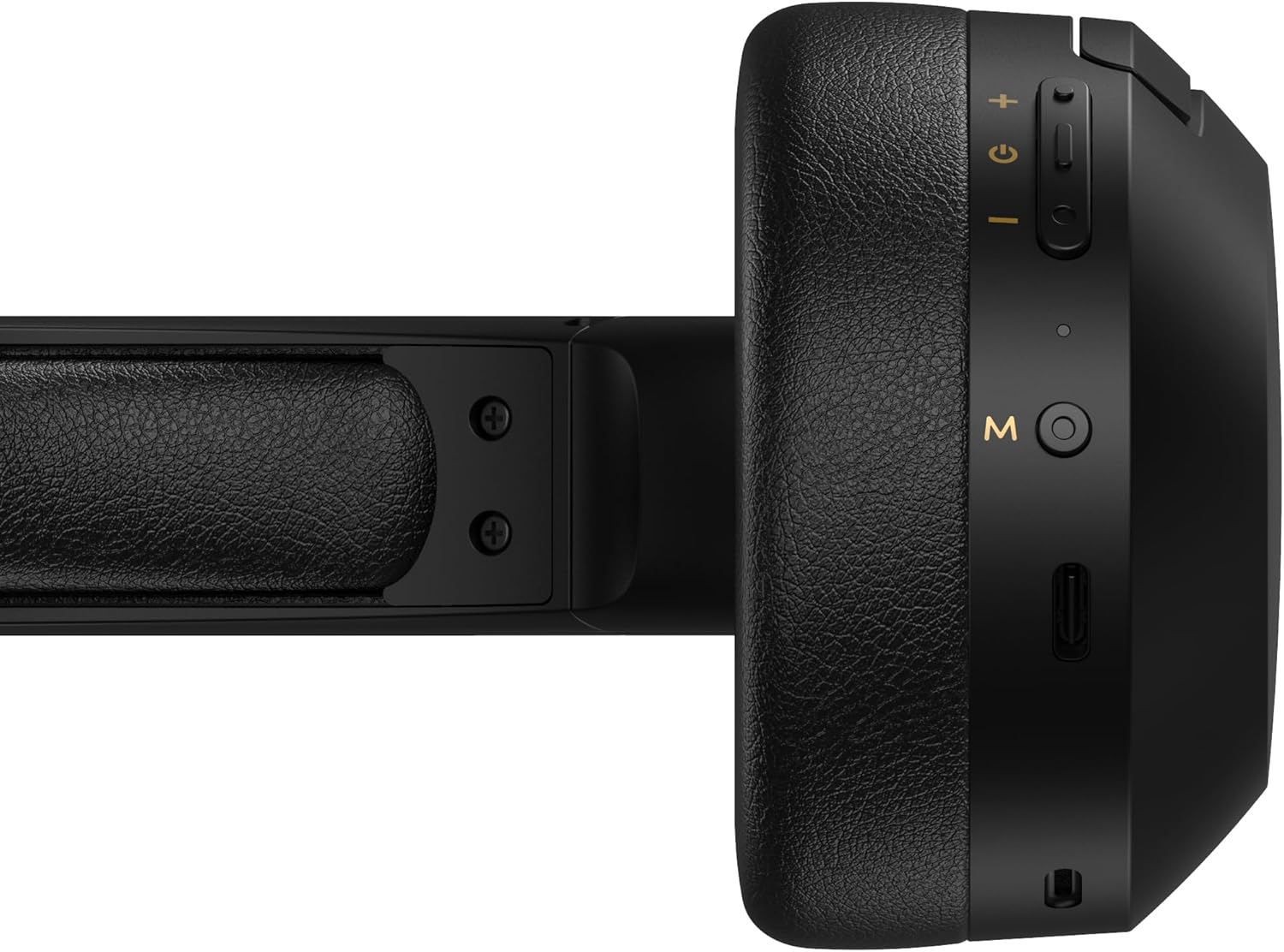
Figure 4.1: Close-up of the charging port and control buttons on the right earcup.
4.2 Kei te Hiko / Weto
- Hei Whakahiko: Press and hold the multi-function button (usually marked with a power icon or 'M') for approximately 3 seconds until the LED indicator flashes blue.
- Hei Whakaweto: Press and hold the multi-function button for approximately 5 seconds until the LED indicator flashes red and then turns off.
4.3 Takirua Nihokikorangi
Hei hono i o taringa ki tetahi taputapu Bluetooth-whakahohea:
- Me mohio kua weto nga taringa.
- Press and hold the multi-function button for approximately 5-7 seconds until the LED indicator flashes red and blue alternately. This indicates pairing mode.
- I runga i to taputapu (papa atamai, papa, rorohiko), whakaahei i te Nihokikorangi me te rapu mo nga taputapu e waatea ana.
- Select "EDIFIER W820BT" from the list of found devices.
- Kia honoa, ka mura mārire te tohu LED ki te kikorangi.
Tuhipoka: Ka ngana aunoa nga taringa ki te hono ano ki te taputapu takirua whakamutunga ina ka ana.
5. Nga Tohutohu Whakahaere
5.1 Mana i-taringa
The control buttons are located on the right earcup.
| Patene/Mahi | Mahi |
|---|---|
| Multi-function Button (M) |
|
| Rōrahi Whakarunga (+) |
|
| Raro Whakararo (-) |
|
5.2 Hononga Waea
The W820BT headphones can also be used with a wired connection.
- Connect one end of the 3.5mm audio cable to the audio input jack on the left earcup of the headphones.
- Honoa te pito kē atu o te taura oro 3.5mm ki te hononga putanga oro o tō pūrere.
- Ka huri aunoa nga taringa ki te aratau waea. Ka monoa te mahi Nihokikorangi.

Figure 5.1: Connecting the 3.5mm audio cable for wired listening.
6. Tiaki
- Horoia ngā paneoro ki te kakahu ngohengohe, maroke. Kaua e whakamahi i ngā kaihoroi whakakoi, i ngā whakarewa rānei.
- A ape i te tuku i nga taringa ki te wera nui, te makuku, te ra tika ranei.
- Whakaorangia nga taringa ki te waahi makariri, maroke ka kore e whakamahia. Ko te hoahoa kopaki ka taea te rokiroki kiato.
- Do not disassemble the headphones. This will void the warranty.
7. Te Raru
If you encounter issues with your Edifier W820BT headphones, refer to the following common problems and solutions:
| Raruraru | Rongoā |
|---|---|
| Kaore e taea te hiko | Ensure the headphones are charged. Connect to a power source using the charging cable. |
| Kaore e taea te hono ma te Nihokikorangi |
|
| Karekau he tangi |
|
| He kino te kounga oro |
|
8. Whakatakotoranga
| Āhuahira | Taipitopito |
|---|---|
| Ingoa Tauira | W820BT |
| Hangarau Hononga | Ahokore (Nihokikorangi), Waea (3.5mm Jack) |
| Putanga Nihokikorangi | 4.1 |
| Ora Pūhiko | Tae atu ki te 80 haora |
| Hanga Whakatangitangi | Ki runga Taringa |
| Rauemi | Steel (headband) |
| Taumaha Tūemi | 1.14 pauna (tata ki te 517g) |
| Hunga Hua | 9.25 x 7.64 x 3.41 inihi |
| Kaihanga | Kaiwhakatika |
9. Pūtāhui me te Tautoko
Edifier provides a pūtāhui kotahi tau in the USA and Canada for the W820BT headphones. For warranty claims or technical support, please contact Edifier customer service.
For more information, visit the official Edifier webpaetukutuku, tirohia rānei ō tuhinga hoko.
10. Whakaaturanga Ataata
Watch the official product video for a visual guide on the Edifier W820BT Bluetooth Headphones' features and usage.
Ataata 10.1: Kua mutu te hua whaimanaview of the Edifier W820BT Bluetooth Headphones, demonstrating features like battery life, comfort, foldable design, and on-ear controls.


