Kupu Whakataki
This manual provides essential information for the safe and effective operation of your Ampeg BA-210V2 450-Watt Bass Combo Amplifier. The BA-210V2 is designed to deliver classic Ampeg bass tone with features optimized for stage performance. It includes a Bass Scrambler overdrive, a true 60-degree monitoring angle, front-facing controls, auxiliary inputs, and a headphone jack.
Please read this manual thoroughly before using the amplifier to ensure proper setup and to maximize your experience with this product.
Nga Tohutohu Haumaru Nui
- Pānuihia enei tohutohu.
- Kia mau ki enei tohutohu.
- Whakarongo ki nga whakatupato katoa.
- Whaia nga tohutohu katoa.
- Kaua e whakamahia tenei taputapu tata ki te wai.
- Horoia ki te kakahu maroke anake.
- Kaua e araia nga whakatuwheratanga hau. Tāutahia kia rite ki nga tohutohu a te kaihanga.
- Kaua e whakauruhia ki te taha o nga puna wera penei i nga radiators, nga rehita wera, nga umu, me etahi atu taputapu (tae atu ki ampkaiwhakaora) e whakaputa ana i te wera.
- Kaua e hinga te kaupapa haumaru o te mono polarized, momo-tuwhera ranei. E rua nga mata o te mono polarized, he whanui ake tetahi i tetahi. E rua nga mata o te momo momo-tuara, me te peka tuatoru. Ko te mata whanui, te peka tuatoru ranei e whakaratohia ana mo to haumaru. Mena karekau te mono i uru ki roto i to putanga, me toro atu ki tetahi kaitoi hiko mo te whakakapi i te putanga tawhito.
- Tiakihia te taura hiko kia kaua e hikoi, ka kowhakina mai ranei, ina koa ki nga moko, nga waahi waatea, me te waahi ka puta mai i te taputapu.
- Me whakamahi noa i nga taapiri / taputapu kua tohua e te kaiwhakanao.
- Whakamahia me te kaata, te turanga, te tripod, te taiapa, te teepu ranei i tohua e te kaihanga, i hokona ranei me te taputapu. Ina whakamahia he kaata, kia tupato ki te neke i te huinga o te kaata/taputapu kia kore ai e whara mai i te piko.
- Wewetehia tenei taputapu i te wa e uira ana te tupuhi, i te kore ranei e whakamahia mo te wa roa.
- Tukuna nga ratonga katoa ki nga kaimahi ratonga whai tohu. Ka hiahiatia he ratonga ina kua pakaru nga taputapu i tetahi huarahi, penei i te taura hiko, te mono ranei kua pakaru, kua maringi te wai, kua taka ranei nga taonga ki roto i te taputapu, kua kitea te taputapu ki te ua, ki te makuku ranei, kaore e mahi noa. , kua tukuna ranei.
Ngā āhuatanga
Ko te Ampeg BA-210V2 Bass Combo Amplifier offers a range of features designed for bass players seeking powerful tone and versatility:
- 450 Watts RMS Power: Delivers substantial power suitable for stage mahi.
- 2x10" Ampeg Custom Speakers: Equipped with two 10-inch Ampeg Custom speakers for clear and robust bass reproduction.
- Bass Scrambler Overdrive: Provides a classic tube-like grind, allowing for versatile tonal options.
- Ultra Hi/Lo Tone Shaping: Offers enhanced tonal flexibility for sculpting your sound.
- 1" HF Tweeter: Includes a 1-inch high-frequency tweeter for extended treble response.
- 60° Monitoring Angle: The cabinet design allows for a true 60-degree monitoring angle, directing sound towards the player.
- Front-Facing Controls: All controls are conveniently located on the front panel for easy access.
- Tāuru Āwhina: Allows connection of external audio devices for practice.
- Tihakihihi Enables silent practice.
Nga Mana me nga Hononga
Mana Paewhiri Mua
The front panel provides all necessary controls for shaping your sound and connecting your instrument and other devices.

Whakaahua 1: Paewhiri o mua ki rungaview of the BA-210V2 Ampkaikawe
- Tāuru: Honoa to kita bass ki konei.
- Papa -15 dB: Engages a 15 dB attenuation for active basses or high-output instruments to prevent input clipping.
- Scrambler (Drive, Blend):
- Puku: Adjusts the amount of overdrive/distortion.
- Whakaranu: Mixes the overdriven signal with the clean signal.
- Rōrahi: Ka whakahaere i te taumata whakaputa katoa o te ampkaikawe
- Tino Hi: Boosts high frequencies for added clarity and presence.
- Ultra Lo: Boosts low frequencies for a deeper, fuller bass tone.
- Paoro: Adjusts the low-frequency equalization.
- Waenganui: Adjusts the mid-frequency equalization.
- Takitoru: Adjusts the high-frequency equalization.
- AUX Level: Controls the volume of the auxiliary input.
- AUX ki roto: 3.5mm stereo input for connecting external audio devices like MP3 players or phones.
- Raina Atu: XLR balanced output for connecting to a mixing console or recording interface.
- Tukuna: Output for sending signal to external effects processors.
- Whakahoki: Input for receiving signal from external effects processors.
- Waea: 1/4-inch stereo headphone output for silent practice.
- HF Mute: Mutes the high-frequency tweeter. Useful for certain tones or when using external cabinets without tweeters.
- Takawaenga: Input for an optional footswitch to control the Scrambler and HF Mute functions.
- Mana: Pātene Whakakā/Whakaweto mō te ampkaikawe
Hononga Paewhiri Whakamuri
The rear panel provides connections for power and external speaker options.
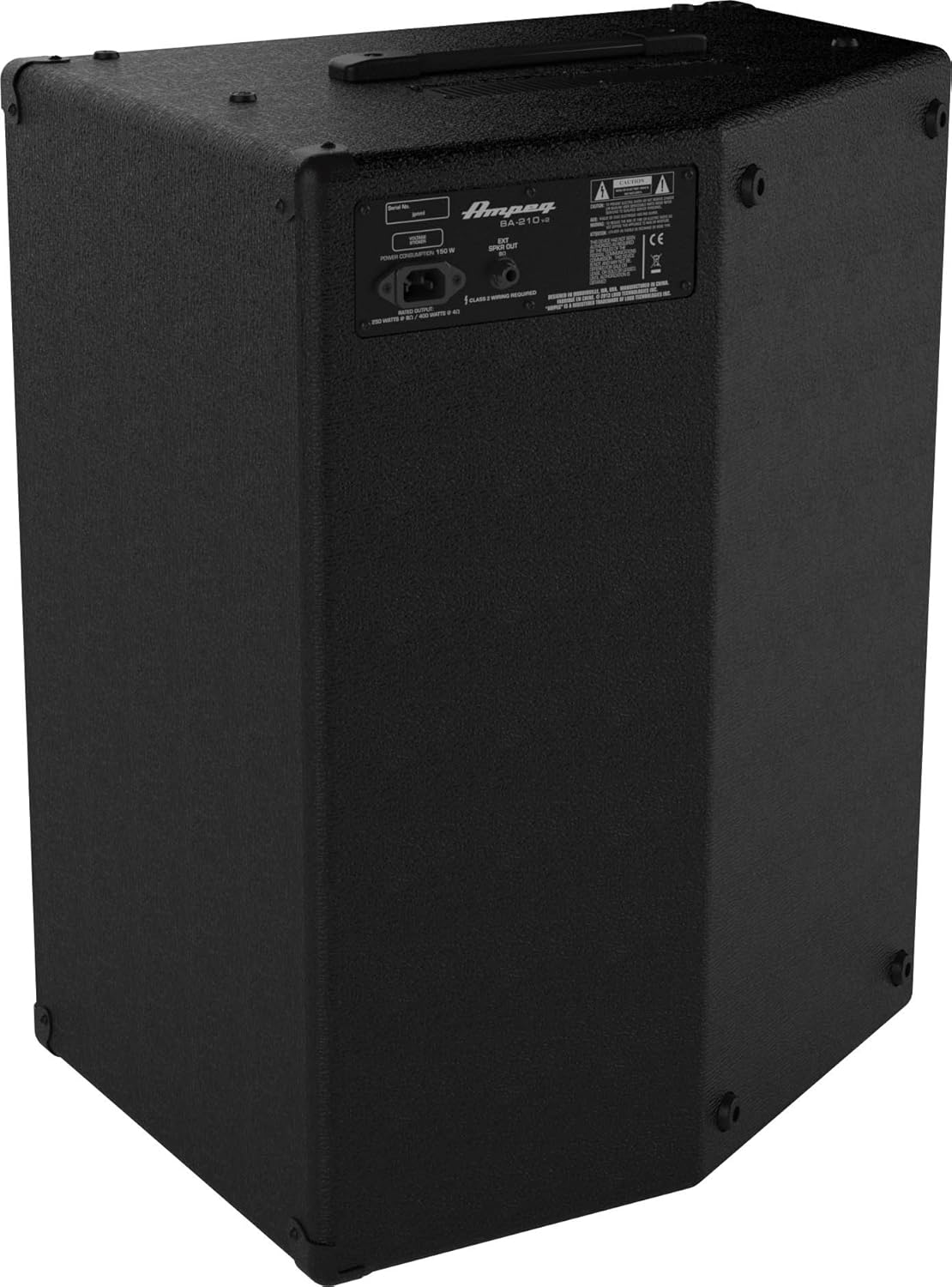
Whakaahua 2: Paewhiri Whakamuri Ki rungaview of the BA-210V2 Ampkaikawe
- Whakauru Hiko AC: Connect the supplied AC power cord here.
- External Speaker Output: 1/4-inch output for connecting an external speaker cabinet. Ensure the impedance matches the ampngā whakaritenga a te kaiwhakaora.
Tatūnga
Te Wetewete me te Whakanoho
- Tango tupato te ampwhakapūkara mai i tana takai.
- Whakanohoia te amplifier on a stable, level surface.
- Me whakarite kia pai te hau huri noa i te waahanga. Kaua e aukati i nga hau.
- The BA-210V2 can be used in a standard upright position or tilted back at a 60-degree angle for use as a floor monitor.
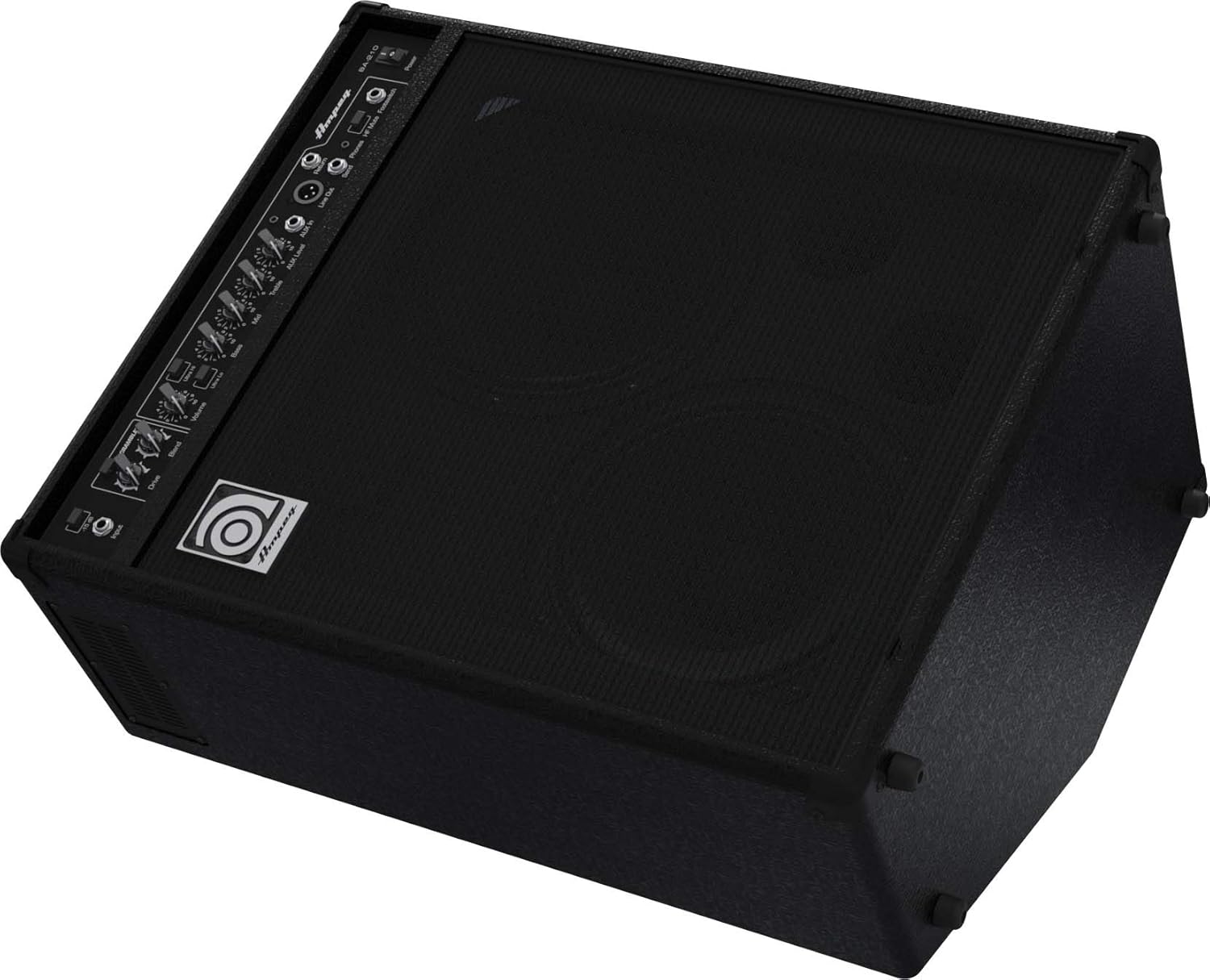
Figure 3: BA-210V2 in 60-degree monitoring position.
Te Hono i tō Pūoro
- Me whakarite te ampKo te whakakā hiko a Lifier kei te OFF.
- Honoa to kita bass ki te Whakauru Jack te whakamahi i te taura taputapu 1/4-inihi paerewa.
- If using an active bass or a high-output instrument, engage the -15 dB Papa switch to prevent input clipping.
Te Hia/Weto
- Before powering on, ensure all volume controls are set to their minimum.
- Honoa te taura hiko AC kua tukuna ki te Whakauru Mana AC on the rear panel and then to a grounded electrical outlet.
- Porehia te Mana switch to the ON position. The power indicator light will illuminate.
- To power off, turn down all volume controls, then flip the Mana huri ki te tūnga OFF.
Nga Tohutohu Whakahaere
Basic Tone Setting
- Tīmata ki te Paoro, Waenganui, a Takahuri controls at their center (12 o'clock) positions.
- Whakarei ake i te Rōrahi control to a desired listening level.
- Whakaritea te Paoro, Waenganui, a Takahuri controls to achieve your preferred tone.
- Whakamātauria te Ultra Hi a Ultra Lo switches to further shape your sound.
Using the Bass Scrambler Overdrive
- Whakauruhia te Kaipupuri switch to activate the overdrive circuit.
- Whakaritea te Peia knob to control the amount of distortion.
- Whakamahia te Whakaranu knob to mix the overdriven signal with your clean bass tone. A lower blend setting will retain more of your original signal, while a higher setting will emphasize the overdrive.
Auxiliary Input and Headphone Use
- Connect an external audio source (e.g., smartphone, MP3 player) to the AUX Kei roto jack using a 3.5mm stereo cable.
- Adjust the playback volume on your external device and the AUX Level puku i runga i te amplifier to balance the sound with your bass.
- Mō te mahi puku, honoa ngā pane whakarongo ki te Waea jack. This will mute the amplifier's internal speakers.
Hononga Kaikorero a-Waho
- The BA-210V2 can power an external speaker cabinet. Connect a speaker cable from the Putanga Pika o waho on the rear panel to your external cabinet.
- Ensure the impedance of the external cabinet matches the amplifier's requirements (typically 8 ohms). Refer to the specifications section for details.
DI Output and Effects Loop
- Ko te Raina ki waho (XLR) provides a balanced signal for direct connection to a mixing console or recording device.
- Ko te Tukua a Hoki mai jacks form an effects loop, allowing you to integrate external effects processors into your signal chain. Connect the Send to the input of your effect and the output of your effect to the Return.
Te tiaki
- Te horoi: Horoia te amplifier with a dry, lint-free cloth. Do not use liquid cleaners or solvents.
- Rokiroki: Ki te kore e whakamahia mo te wa roa, penapenahia te amplifier in a dry, temperature-controlled environment.
- Whakahau: Me whakarite i nga wa katoa ko te amplifier's ventilation openings are clear and unobstructed to prevent overheating.
- Ratonga: Tukuna ngā mahi tiaki katoa ki ngā kaimahi tiaki whai tohu. Kaua e ngana ki te mahi i te taputapu māu ake.
Raparongoā
| Raruraru | Take pea | Rongoā |
|---|---|---|
| Karekau he tangi | Power cord not connected; Power switch off; Volume controls at minimum; Instrument cable faulty; Speaker cable faulty (if external speaker used); HF Mute engaged. | Check power connections; Turn power switch ON; Increase volume; Test/replace cables; Check HF Mute switch. |
| Oro kerekere | Input signal too hot; Volume too high; Scrambler Drive too high; Faulty instrument or cable. | Engage -15 dB pad; Reduce input gain or instrument volume; Lower amplifier volume; Adjust Scrambler Drive/Blend; Test with another instrument/cable. |
| Hamama, haruru ranei | Ground loop; Faulty cables; Nearby electrical interference. | Ensure proper grounding; Use shielded cables; Try different power outlets; Move ampka wehe atu i etahi atu taputapu hiko. |
Whakatakotoranga
| Āhuahira | Whakatakotoranga |
|---|---|
| Tauira | BA-210v2 |
| Wat Putangatage | 450 Wati RMS |
| Kaikōrero | 2 x 10" Ampeg Custom Speakers, 1 x 1" HF Tweeter |
| Ahu (H x W x D) | 25.7 x 15.7 x 20.7 inihi (65.3 x 39.9 x 52.6 cm) |
| Taumaha | 50 pauna (22.7 kg) |
| Papa whakauru | -15 dB |
| Whakauru Awhina | 3.5mm Tirooro Jack |
| Putanga Puoro | 1/4" Stereo Jack |
| Raina ki waho | XLR Taurite |
| Nga Raru Whakatika | Send/Return 1/4" Jacks |
| Mana Waewae | Scrambler On/Off, HF Mute On/Off |
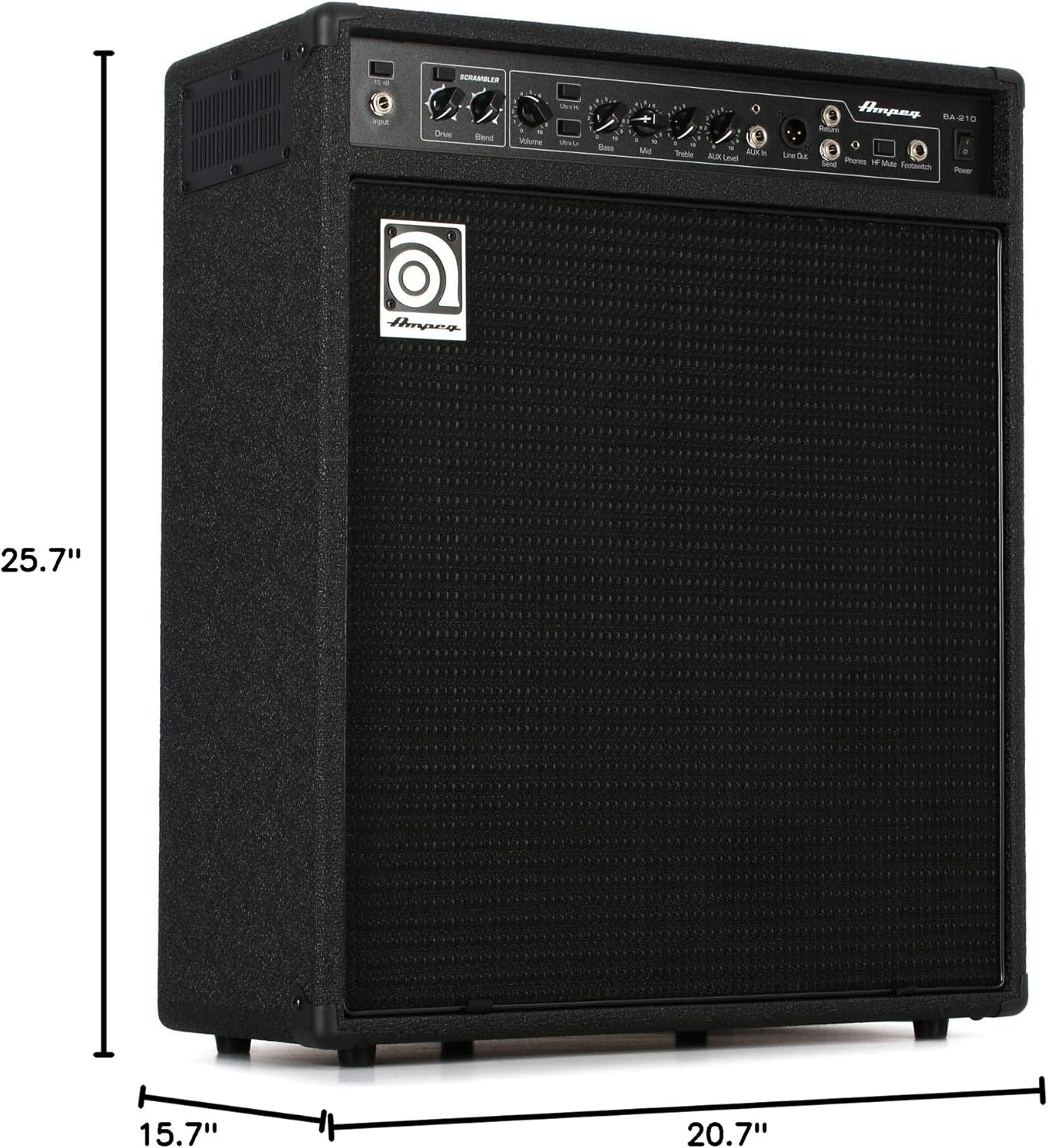
Figure 4: Dimensions of the BA-210V2 Ampkaikawe
Pūtāhui me te Tautoko
For warranty information and technical support, please refer to the warranty card included with your product or visit the official Ampeg webpae. Kaua e ngana ki te whakatika i te waeine maau ano, na te mea ka kore to whakamana.
Mo etahi atu awhina, whakapaa mai Ampeg customer support through their official channels.


