1. Kupu Whakataki
The Snakebyte GAME:PAD 4S Wireless controller is designed to provide a seamless and immersive gaming experience on your PlayStation 4 console. This manual provides essential information on setting up, operating, maintaining, and troubleshooting your new gamepad.

Whakaahua 1: Mua view of the Snakebyte GAME:PAD 4S Wireless Controller in blue camo.
2. Nga waahanga matua
- Lag-Free Wireless Connectivity: Utilizes Bluetooth technology for a responsive and uninterrupted gaming experience on Sony PlayStation 4.
- Immersive Dual Vibration: Equipped with dual vibration motors that provide haptic feedback, making in-game actions feel more realistic.
- Mana Tika: Features twin analog joysticks and responsive trigger buttons for accurate and precise gameplay.
- Integrated Audio Jack: Includes a 3.5mm headphone jack for connecting headsets, allowing for in-game audio and communication.
- LED Status Home Button: A central LED-illuminated home button indicates controller status.
- Hoahoa Ergonomic: Crafted for comfort during extended gaming sessions, reducing hand fatigue.
- Pūoko Nekehanga: Built-in accelerometer and gyroscope enable motion-sensing gameplay for enhanced immersion.
3. Tatūnga me te Hononga
3.1 Initial Pairing with PlayStation 4
- Me mohio kei te kaha to papatohu PlayStation 4.
- Connect the Snakebyte GAME:PAD 4S Wireless controller to the PS4 using the supplied micro-USB cable.
- Patohia te paatene PS (Patene Home) i runga i te kaiwhakahaere. Ka takirua aunoa te kaiwhakahaere ki te papatohu.
- Once paired, you can disconnect the USB cable, and the controller will maintain its wireless connection.

Figure 2: Controller connected via micro-USB for initial pairing and charging.
3.2 Te Whakataki i te Kaiwhakahaere
To charge the controller, connect it to your PlayStation 4 console or a USB power adapter using the provided micro-USB cable. The LED on the home button will indicate charging status. A full charge typically takes approximately 2 hours and provides about 7-8 hours of playtime.
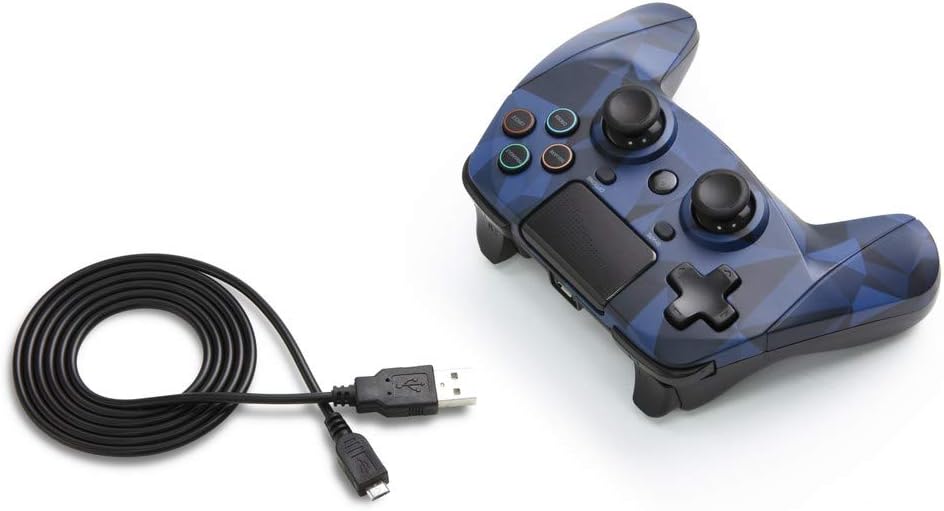
Figure 3: The Snakebyte GAME:PAD 4S Wireless Controller shown with its included micro-USB charging cable.
4. Nga Tohutohu Whakahaere
4.1 Patene Tahora me nga Mahi
The controller features a familiar layout with dual analog sticks, a D-pad, action buttons (Triangle, Square, Circle, Cross), Share, Options, and a Home button. The action buttons are labeled with their names rather than symbols, but are color-coded similarly to standard PlayStation controllers.

Whakaahua 4: Koki view highlighting the button layout and ergonomic design.
4.2 Touchpad and Motion Sensors
The integrated touchpad is fully functional and can be used for navigation and specific in-game interactions. The highly sensitive built-in accelerometer and gyroscope detect motion, tilt, and rotation, providing an immersive gaming experience for titles that utilize motion controls.
4.3 Haki Ororongo
Connect any standard 3.5mm headset to the controller's audio jack for private listening of game audio and voice chat. Ensure your headset is properly inserted for optimal sound quality.
5. Tiaki me te Tiaki
- Puritia te pūmana kia ma mā te muru ki te kakahu ngohengohe, maroke. Āta karohia te whakamahi i ngā matū kaha, i ngā rauemi whakakoi rānei.
- Whakaorangia te pūmana ki te wahi matao, maroke atu i te ra tika me te wera nui.
- A ape i te tuku i te kaiwhakahaere, te tuku ranei ki nga paanga kaha, na te mea ka pakaru nga waahanga o roto.
- Kaua e ngana ki te wetewete i te pūmana whakahaere, nā te mea ka whakakorea te pūtāhui.
6. Te Raru
6.1 Nga Take Hononga
- If the controller does not connect, ensure it is fully charged.
- Try re-pairing the controller by connecting it via USB cable and pressing the PS button.
- Ensure there are no strong interferences (e.g., other Bluetooth devices, Wi-Fi routers) nearby.
6.2 Button Unresponsiveness
- If buttons are unresponsive, try resetting the controller. Locate the small reset button on the back of the controller (often near the L2 shoulder button) and press it with a thin object like a paperclip.
- Ensure the controller's firmware is up to date (check the Snakebyte support webpaetukutuku mō ngā whakahōutanga).
7. Whakatakotoranga Hangarau
| Āhuahira | Whakatakotoranga |
|---|---|
| Waitohu | Snakebyte |
| Ingoa Tauira | GAME:PAD 4 S WIRELESS |
| Tauira Tuemi | SB912726 |
| Pūrere Hototahi | Teihana purei 4 |
| Hangarau Hononga | Ahokore (Nihokikorangi) |
| Momo Kaiwhakahaere | Papa takaro |
| Puna Mana | Ma te Puhiko (1 te pākahiko Lithium Polymer kei roto) |
| Voltage | 3.7 Volts |
| Taumaha Tūemi | 11.2 hekere |
| Rahi Hua (LxWxH) | 4.53 x 2.95 x 6.1 inihi |
| Tae | Blue Camo |
8. Pūtāhui me te Tautoko
The Snakebyte GAME:PAD 4S Wireless controller is covered by a 5-Tau Whai Rarangi Kaihanga Kaihanga. For warranty claims or technical support, please refer to the contact information provided on the product packaging or visit the official Snakebyte webpae.


