1. Kupu Whakataki
This manual provides essential information for the proper use, setup, and maintenance of your PerfectPrime TL2300 K-Type Thermocouple Sensor Extension Cable. Please read these instructions carefully before use to ensure optimal performance and longevity of the product.
2. Hua Neke Atuview
The PerfectPrime TL2300 is a K-Type thermocouple extension cable designed to extend the reach of your K-Type thermocouple sensors to compatible measuring devices. It features standard K-Type flat connectors for reliable and accurate temperature signal transmission.
2.1 Nga waahanga matua
- Momo Tuhono: Female to Male K-Type Flat connector
- Whakatauranga Temperature Mahana: 300 °C (for the cable insulation)
- Roa: 3 mita / 9.8 putu
- Waea Waea: Polytetrafluoroethylene (PTFE) insulated wire
- Taumaha: Tata ki te 35g
2.2 Waehanga
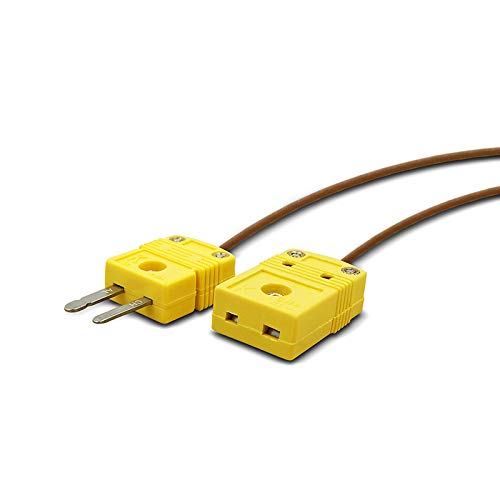
The TL2300 cable consists of a K-Type thermocouple wire terminated with a male flat pin connector on one end and a female flat socket connector on the other.

Image 1: The PerfectPrime TL2300 K-Type Thermocouple Sensor Extension Cable, showing the full length of the brown PTFE-insulated cable with yellow male and female flat connectors at each end.
Whakaahua 2: He koki view of the yellow K-Type male and female flat connectors, highlighting their design and connection points.
3. Tatūnga
Follow these steps to properly connect your TL2300 extension cable with a K-Type thermocouple sensor and a compatible measuring device.
- Tautuhia nga Hono: The TL2300 cable has a male flat pin connector and a female flat socket connector. K-Type connectors are typically yellow.
- Hononga Pūoko: Plug the male flat pin connector of your K-Type thermocouple sensor into the female flat socket connector of the TL2300 extension cable. Ensure a firm connection.
- Tūhono ki te Pūrere: Plug the male flat pin connector of the TL2300 extension cable into the K-Type input port of your compatible temperature measuring device (e.g., thermometer, datalogger). Observe polarity: the wider pin/socket typically corresponds to the positive (+) terminal, and the narrower pin/socket to the negative (-) terminal. K-Type connectors are designed to prevent incorrect polarity connection, but always verify.
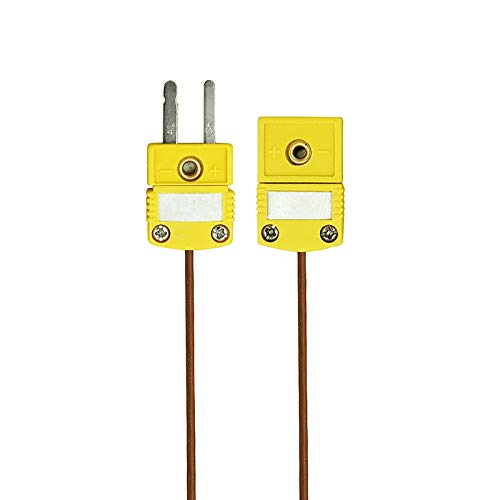
Whakaahua 3: He tata view of the yellow K-Type male and female flat connectors, showing the positive (+) and negative (-) polarity markings for correct connection.

Whakaahua 4: He example of a compatible K-Type thermometer with multiple probes connected, illustrating how the extension cable would integrate into a measurement setup.
4. Nga Tohutohu Whakahaere
Once the TL2300 extension cable is correctly connected between your K-Type thermocouple sensor and measuring device, operation is straightforward.
- Whakahiko: Turn on your temperature measuring device.
- Manatokohia te Hononga: Ensure the device recognizes the connected thermocouple and displays a temperature reading. If the reading is erratic or shows an error, check all connections.
- Tangohia inenga: Position your K-Type thermocouple sensor at the desired measurement point. The extension cable allows for greater flexibility in sensor placement.
- Tirohia ngā Pānui: Monitor the temperature readings on your device. The TL2300 cable is designed to transmit the thermocouple signal accurately over its length.
Whakaaro nui:
- Avoid bending the cable sharply, as this can damage the internal wiring.
- Do not exceed the maximum temperature rating of the cable insulation (300 °C).
- Ensure the environment where the cable is used is free from excessive moisture or corrosive substances unless the cable is specifically rated for such conditions.
5. Tiaki
Proper care and maintenance will help prolong the life and accuracy of your TL2300 extension cable.
- Te horoi: Wipe the cable and connectors with a clean, dry cloth. If necessary, use a slightly damp cloth with mild soap, then dry thoroughly. Do not immerse the connectors in liquid.
- Rokiroki: Store the cable in a clean, dry environment, away from direct sunlight and extreme temperatures. Avoid coiling the cable too tightly.
- Tirotiro: Periodically inspect the cable and connectors for any signs of wear, damage, or corrosion. Replace the cable if any damage is observed to prevent inaccurate readings or electrical hazards.
- Te whakahaere: Always handle the connectors by their plastic housing, not by pulling on the cable itself.
6. Te Raru
If you encounter issues with your TL2300 extension cable, consider the following troubleshooting steps:
- Kāore he Pānui, he Pānui Hē rānei:
- Ensure all connections (sensor to cable, cable to device) are secure and fully inserted.
- Verify that the thermocouple sensor itself is functioning correctly by testing it directly with the measuring device if possible.
- Tirohia mēnā he kino e kitea ana ki te taura, ki ngā hononga rānei.
- He Te Panui Pawera:
- Confirm that both the sensor and the measuring device are set to the correct thermocouple type (K-Type).
- Ensure there are no strong electromagnetic fields near the cable, which can interfere with the signal.
- Verify that the cable is not exposed to temperatures exceeding its maximum rating, which could affect its insulation and signal integrity.
If problems persist after following these steps, contact PerfectPrime customer support for further assistance.
7. Whakatakotoranga
| Āhuahira | Whakatakotoranga |
|---|---|
| Tau tauira | TL2300 |
| Momo Tuhono | K-Type Flat (Female to Male) |
| Te roa o te taura | 3 mita / 9.8 putu |
| Wire Insulation Material | Polytetrafluoroethylene (PTFE) |
| Paemahana Mahi Morahi | 300 °C (for cable insulation) |
| Taumaha | 35g |
| Ahu mōkihi | 5.24 x 5.04 x 0.63 inihi |
8. Pūtāhui me te Tautoko
PerfectPrime products are manufactured to high-quality standards. For warranty information, technical support, or any inquiries regarding your TL2300 K-Type Thermocouple Sensor Extension Cable, please refer to the contact information provided with your purchase or visit the official PerfectPrime webpae.
Tena koa pupurihia to tohu mo te hoko mo nga kereme whakamana.


