Ka mutu te huaview
The Amazon Basics Traditional Electronic Keyless Keypad Deadbolt Door Lock offers a secure and convenient way to manage access to your home or office. This electronic deadbolt features a keypad for keyless entry, along with a traditional key option for backup. It supports up to six customizable user codes and temporary single-use codes, providing flexible access control. The lock also includes an automatic locking feature, which can be set to engage between 10 to 99 seconds after entry, enhancing security and peace of mind.

Whakaahua 1: Mua view of the Amazon Basics Traditional Electronic Keyless Keypad Deadbolt Door Lock, showcasing the keypad and keyhole in a satin nickel finish.

Figure 2: Key features of the deadbolt, including programmable user codes, door compatibility, and dual operation options.
Tatūnga me te Tāuta
Before beginning installation, ensure all components are present and your door meets the compatibility requirements. Refer to the detailed installation manual for step-by-step instructions.
1. Te Wetewete me te Tirohanga Waa
Carefully unpack all items from the box and verify that all parts are included as shown in the diagram below. If any parts are missing or damaged, do not proceed with installation and contact customer support.

Figure 3: All components included in the product package, essential for a complete installation.
2. Door Preparation and Compatibility
This lock is designed to fit standard door preparations. Ensure your door thickness is between 1-3/8 to 1-3/4 inches (35.1 mm to 50.8 mm) and the door holes are suitable for 2-1/8 inches (54.1 mm). The backset should be 2-3/8 or 2-3/4 inches (60.5 mm or 69.9 mm).
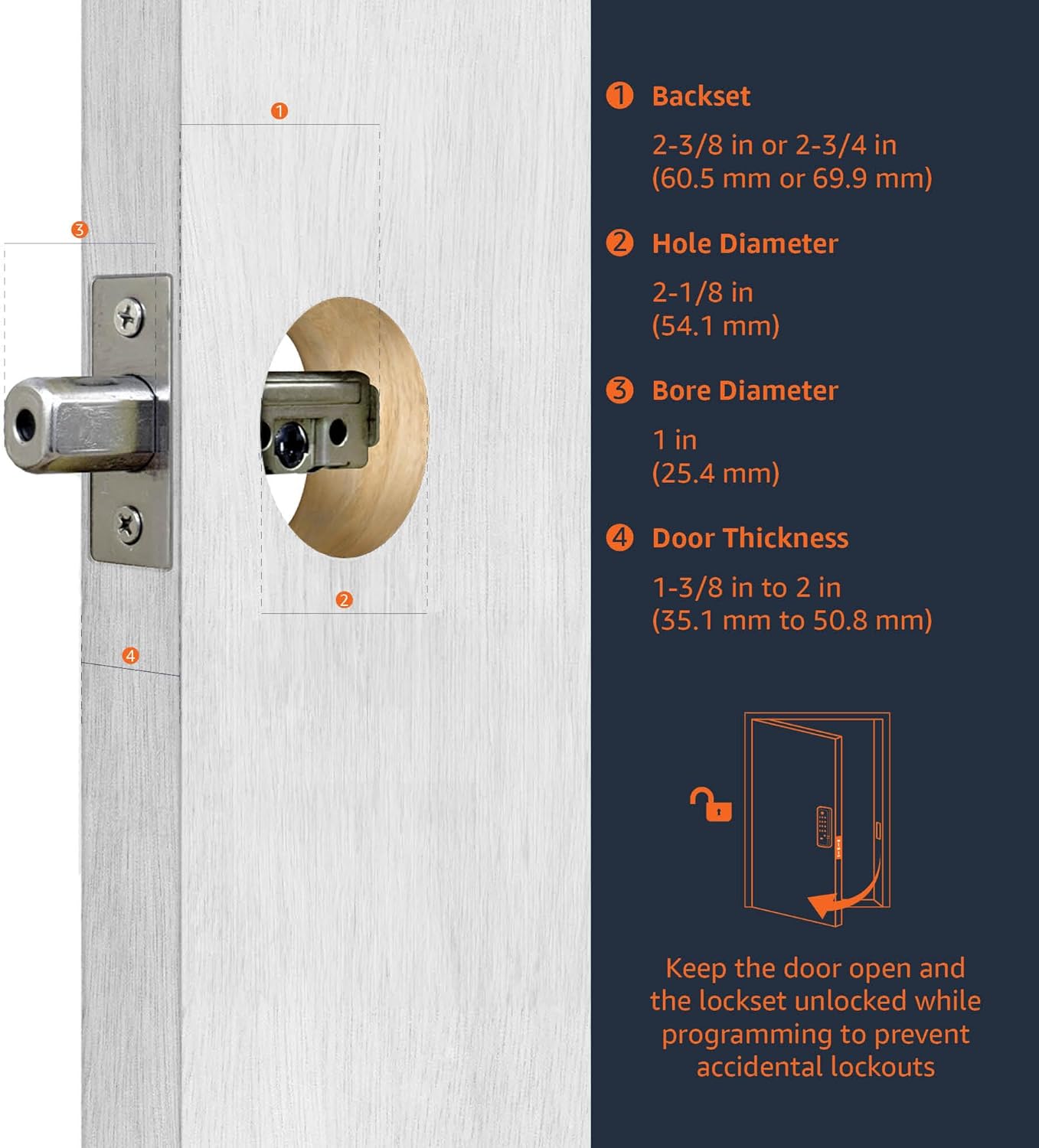
Figure 4: Detailed door measurement requirements for proper installation, including backset and hole dimensions.

Figure 5: Visual guide for door compatibility, showing lock dimensions and suitable door types.
3. Tāuta Pūhiko
The lock requires 4 AA batteries (not included). Install them into the interior assembly following the polarity indicators. Ensure the batteries are fresh for optimal performance.
Nga Tohutohu Whakahaere
1. Maukati me te Wewete
- Hei Wewete: Enter a valid user code on the keypad, then press the Lock button. The deadbolt will retract.
- Hei Maukati: Press the Lock button on the keypad. The deadbolt will extend.
- Mahi ā-ringa: Use the traditional key from the outside or the thumb turn from the inside to lock or unlock the deadbolt.
2. Programming User Codes
The lock supports up to 6 unique user codes. To program new codes or modify existing ones, refer to the detailed programming instructions in the full user manual. It is recommended to program codes with the door open to prevent accidental lockouts.
3. Temporary Single-Use Codes
For visitors or temporary access, you can generate single-use codes that expire after one use. Consult the user manual for the procedure to create and manage these codes.
4. Automatic Locking Feature
The automatic locking feature can be enabled to re-lock the door automatically after a set period (10 to 99 seconds) following a successful unlock. This feature can be configured or disabled via the programming mode.
5. Resetting the Lock
If you need to reset the lock to factory default settings, locate the reset button on the interior assembly (refer to Figure 5 for location). Follow the specific reset procedure outlined in the user manual. This will erase all programmed user codes.
Te tiaki
1. Whakakapinga Pūhiko
When the batteries are low, the lock will provide an audible and/or visual indicator. Replace all four AA batteries simultaneously with new, high-quality alkaline batteries. Do not mix old and new batteries or different battery types.
2. Te horoi
Horoia te taha o waho o te raka ki te ngohengohe, damp cloth. Avoid using abrasive cleaners, solvents, or chemical sprays, as these can damage the finish and electronic components.
3. Tiaki Whānui
Periodically check the screws and mounting to ensure the lock remains securely fastened. Avoid excessive force when operating the keypad or turning the thumb turn.
Raparongoā
If you encounter issues with your Amazon Basics Electronic Keypad Deadbolt, try the following common troubleshooting steps:
- Papapātuhi Kāore e Urupare: Check battery levels and replace if necessary. Ensure the battery pack is correctly seated.
- Kāore te Maukati e Mau/Wetewete: Verify that the deadbolt latch is aligned correctly with the strike plate on the door frame. Ensure there are no obstructions.
- Nga Waehere Kaore i te Mahi: Re-enter the programming mode and verify the user codes. If issues persist, perform a factory reset and reprogram all codes.
- Nga tangi tangi: Refer to the user manual for specific beep codes, which often indicate low battery or programming errors.
For more detailed troubleshooting guides and solutions, please consult the comprehensive User Guide (PDF) available for download.
Whakatakotoranga
| Āhuahira | Whakatakotoranga |
|---|---|
| Waitohu | Amazon Basics |
| Ingoa Tauira | PL10S10 |
| Momo Maukati | Papamahi Patapata |
| Āhuahira Motuhake | Urunga Kīkore |
| Rauemi | Nickel |
| Tae | Satin Nickel |
| Ahu (L x W x H) | 7.42 x 5.28 x 4.76 inihi |
| Taumaha Tūemi | 2.04 Pauna |
| Puna Mana | 4 x Pahiko AA (kaore i whakauruhia) |
| Hototahi Matotoru Kuaha | 1-3/8 to 1-3/4 inches (35.1 mm to 50.8 mm) |
| Waehere Kaiwhakamahi | Up to 6 customizable codes + temporary single-use codes |
| Maukati Aunoa | Ka taea te whakarite mai i te 10 ki te 99 hēkona |
| Nga Waahanga kei roto | Exterior keypad, interior assembly, deadbolt latch, strike plate, mounting plate, screws, keys |
Nga korero Whakaputanga
This Amazon Basics product is covered by a limited warranty. For detailed information regarding warranty coverage, terms, and conditions, please refer to the official Tuhinga Pūtāhui (PDF) provided by the manufacturer. Please retain your proof of purchase for warranty claims.
Tautoko Kiritaki
For further assistance, technical support, or inquiries not covered in this manual, please visit the Amazon Basics support page or refer to the comprehensive Aratohu Kaiwhakamahi (PDF). You may also find helpful information on the product's Amazon listing page.


