1. Hua Neke Atuview
The KEF LSX Wireless Music System is a compact, high-resolution stereo audio system designed for versatile connectivity and exceptional sound quality. It features a 4-inch Uni-Q driver for wide sound dispersion and a custom-designed cabinet.
Ko nga ahuatanga matua ko:
- 4-inch Uni-Q driver for clear, wide-ranging sound.
- Dual-band Wi-Fi, Bluetooth 4.2, optical, and 3.5mm auxiliary connectivity.
- Compatibility with popular music streaming services like TIDAL.
- Subwoofer output for enhanced bass, controllable via the KEF Control app.
- Wireless or wired (RJ45 Ethernet) connection between speakers.

Whakaahua 1: Mua-maui view of a KEF LSX speaker, highlighting the Uni-Q driver and sleek design.
2. Tohutohu Tatūnga
2.1 Te Wetewete me te Whakanoho
Carefully remove the speakers and accessories from the packaging. The system includes two speakers and a manual. Place the speakers in your desired listening area, ensuring adequate space for ventilation and cable connections.

Whakaahua 2: Example placement of KEF LSX speakers in a living environment.
2.2 Te hono i nga Kai-korero
The LSX speakers can be connected wirelessly or via an RJ45 Ethernet cable for optimal performance. For wired connection, use the provided Ethernet cable to link the 'Master' speaker to the 'Slave' speaker.
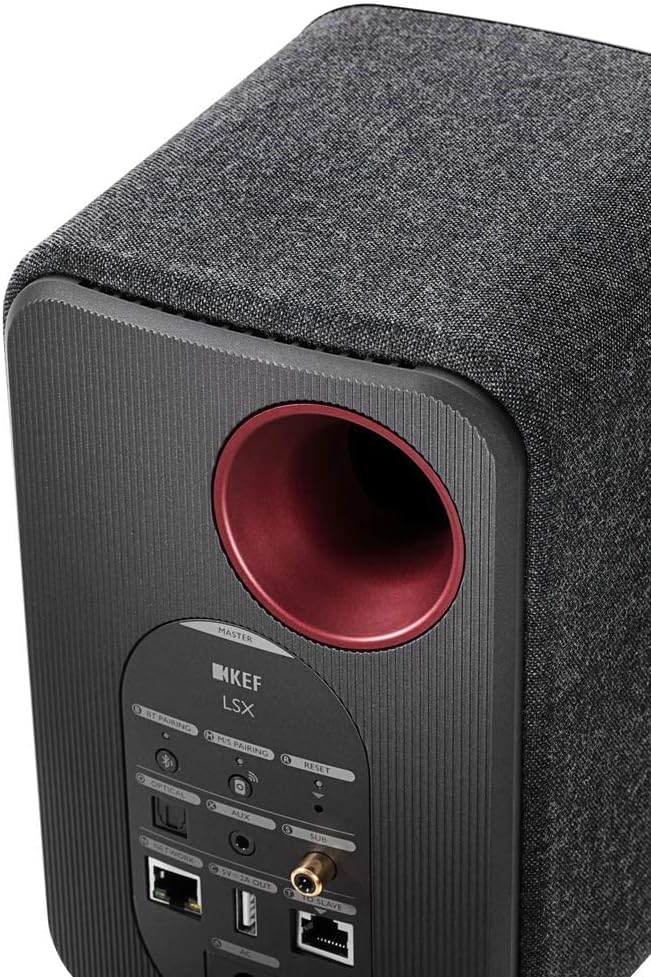
Figure 3: Rear panel of the Master speaker with various connection options.
2.3 Hononga Hiko
Connect both speakers to a power outlet using the supplied power cables. The speakers are powered by AC.
2.4 Tatūnga Whatunga (Wi-Fi)
For wireless connectivity, download the KEF Control app on your smartphone or tablet. Follow the in-app instructions to connect your LSX system to your dual-band Wi-Fi network. Ensure your mobile device is connected to the same network during setup.
Tuhipoka: Some users have reported Wi-Fi setup hiccups, especially with mesh Wi-Fi networks. If you encounter issues, try temporarily disconnecting from mesh Wi-Fi or ensuring your phone is on the same 5GHz band as the speakers.
3. Nga Tohutohu Whakahaere
3.1 Powering On/Off and Source Selection
Use the included remote control to power the speakers on or off and to switch between input sources (Wi-Fi, Bluetooth, Optical, Aux). A physical power button is not available on the speakers themselves.
3.2 Wireless Audio Streaming
- Wi-Fi: Connect to your home network via the KEF Control app to stream music from services like TIDAL.
- Nihokikorangi: Activate Bluetooth on your device and select "KEF LSX" from the available devices. The Bluetooth range is approximately 10 meters.
Hiranga: The KEF Control app is essential for initial setup, EQ adjustments, and controlling the subwoofer output. Ensure the speakers maintain a stable Wi-Fi connection for full app functionality.
3.3 Wired Audio Input
The LSX system supports digital optical input and a 3.5mm auxiliary connection for connecting external audio sources like televisions or other media players.
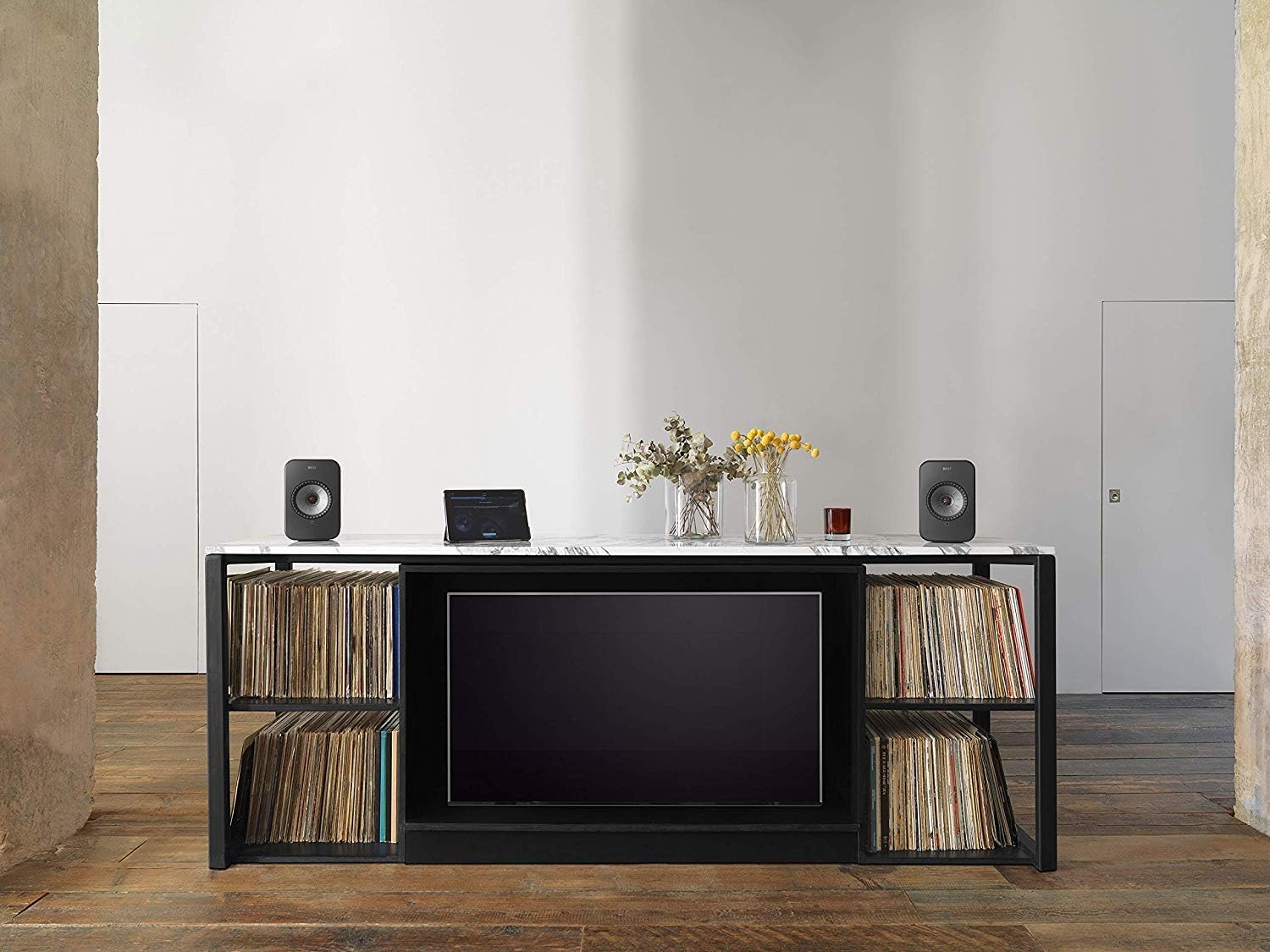
Figure 4: LSX speakers integrated with a television for enhanced audio.
3.4 Hononga Wūruiti
For additional bass, connect an external subwoofer to the LSX system. The subwoofer output is controlled and adjusted through the KEF Control app.
4. Tiaki
To ensure the longevity and optimal performance of your KEF LSX Wireless Music System, follow these maintenance guidelines:
- Te horoi: Gently wipe the speaker surfaces with a soft, dry cloth. Avoid using abrasive cleaners, solvents, or sprays directly on the speakers.
- Turanga: Keep speakers away from direct sunlight, heat sources, and excessive moisture. Ensure good air circulation around the speakers.
- Hononga: Periodically check all cable connections (power, Ethernet, audio) to ensure they are secure.
- Whakahōu Pūmanawa: Regularly check for firmware updates via the KEF Control app to ensure your speakers have the latest features and performance improvements.
5. Te Raru
This section addresses common issues you might encounter with your KEF LSX Wireless Music System.
5.1 Nga Take Hononga Wi-Fi
- Speakers lose Wi-Fi connection:
- Ensure the speakers are within range of your Wi-Fi router.
- Restart your Wi-Fi router and the LSX speakers.
- If using a mesh network, try connecting your phone to the same 5GHz band as the speakers during setup.
- Consider using a wired Ethernet connection between the speakers for more stable performance.
- KEF Control app cannot connect to speakers:
- Verify both your mobile device and the speakers are connected to the same Wi-Fi network.
- Close and reopen the KEF Control app.
- Perform a power cycle on the speakers (unplug and replug).
5.2 Nga Take Kounga oro
- Boomy, loud, or muddy sound:
- Use the KEF Control app to adjust the EQ settings. The speakers may require tuning based on placement and room acoustics.
- Connection drops between speakers (wireless mode):
- Ensure there are no obstructions between the master and slave speakers.
- Switch to a wired connection using the provided RJ45 Ethernet cable for improved stability.
5.3 Nga Take Mana Mamao
- Mana mamao kaore e mahi:
- Check and replace the CR2 battery in the remote control.
- Ensure there is a clear line of sight between the remote and the master speaker.
6. Whakatakotoranga
| Ingoa Tauira | LSX |
| Tau tauira | SP3994BX |
| Momo Kaikorero | Multi-Room, Subwoofer, Computer |
| Hangarau Hononga | Wi-Fi, Bluetooth, Auxiliary, Ethernet |
| Whakawhitiwhiti Ahokore | Wi-Fi; Bluetooth; Auxiliary; Ethernet |
| Awhe Nihokikorangi | 10 Mita |
| Rahi Kaioro | 4 Inihi |
| Kaikorero Te Mana Putanga Morahi | 70 Watts |
| Aratau Putanga Ororongo | Tirooro |
| Rahi Hua (D x W x H) | 7"D x 6"W x 9.5"H |
| Taumaha Tūemi | 15.6 Pauna (mō te takirua) |
| Puna Mana | AC |
| Nga Waahanga kei roto | Speaker (2); Manual |
| Tikanga Mana | Mamao |
| Rauemi | Fiber, Metal |
| Tae | Pango |

Figure 5: KEF LSX speaker dimensions.
7. Pūtāhui me te Tautoko
For warranty information and technical support, please refer to the official KEF website or contact KEF customer service directly. Keep your proof of purchase for warranty claims.
Online resources and contact information can typically be found at us.kef.com.
8. Hua Ataata
KEF LSX Overview
Ataata 1: Kua mutuview of the KEF LSX Wireless Music System, showcasing tona hoahoa me ona ahuatanga.
KEF LSX Setup Guide
Video 2: A guide on how to set up the KEF LSX speakers, including connections and app configuration.
KEF LSX Features Deep Dive
Video 3: Detailed explanation of the KEF LSX system's various features and functionalities.


