Kupu Whakataki
Thank you for choosing the MIFA A3 Soundbox Bluetooth Portable Speaker. This manual provides essential information for the safe and efficient use of your device. Please read it thoroughly before operating the speaker and retain it for future reference.
Nga korero haumaru
- Kaua e tukuna te kaikorero ki te wera nui, te ra tika, te makuku nui ranei.
- A ape i te tuku, te tuku ranei i te kaikorero ki nga paanga kaha.
- Kaua e wetewete, kaua hoki e ngana ki te whakatika i te kaikorero māu ake. Whakapā atu ki ngā kaimahi ratonga whai tohu.
- Keep the speaker away from water and liquids, despite its waterproof rating, to prevent damage to charging ports or internal components.
- Whakamahia anake te taura utu me te urutau kua tohua.
Ihirangi mokete
Tena koa tirohia te kete mo nga mea e whai ake nei:
- MIFA A3 Bluetooth Portable Speaker
- Tauira Whakatau USB
- AUX Waea Ororongo
- Pukapuka Kaiwhakamahi (tenei tuhinga)
Ka mutu te huaview
The MIFA A3 speaker features intuitive touch controls and multiple connectivity options. Familiarize yourself with the speaker's layout:
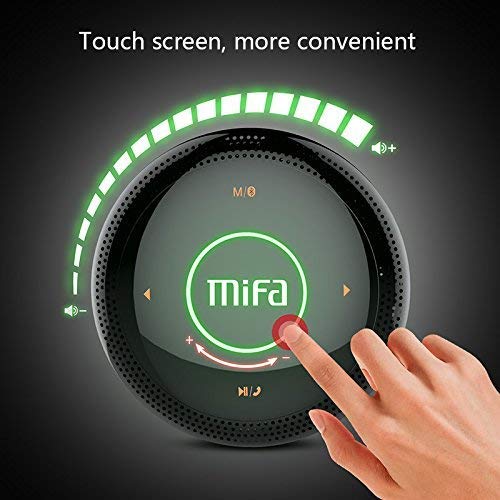
Whakaahua 1: Runga view of the MIFA A3 speaker, highlighting the touch-sensitive control panel. The panel displays volume indicators, play/pause, and track navigation buttons. A central 'Mifa' logo is also visible.
- Paewhiri Mana Pa: Located on the top surface for volume adjustment, playback control, and mode selection.
- hopuoro: Mo te waea kore-ringa.
- Tauranga Whakatau: Putanga micro USB mō te utu.
- Tāuru AUX: He hononga oro 3.5mm mō te hononga waea.
- Kāniwha SD Kāri SD: Mō te purei puoro tika mai i te kāri mahara.
Tatūnga
1. Whakakii i te Tukuoro
I mua i te whakamahinga tuatahi, whakakīia katoatia te pūoro. Honoa te taura utu USB kua whakaratohia ki te tauranga utu o te pūoro, me te pito kē atu ki te urutau hiko USB (kāore i roto) ki te tauranga USB rānei o te rorohiko.
- Ka marama te rama tohu utu i te wa e utu ana.
- The indicator will turn off or change color once fully charged.
- A full charge provides approximately 8 hours of continuous playtime.
2. Te Hiko / Whakaweto
- Hei Whakahiko: Press and hold the Power button (usually integrated into the touch panel or a dedicated button) for 2-3 seconds until you hear an audible prompt or see an indicator light.
- Hei Whakaweto: Press and hold the Power button again for 2-3 seconds.
Nga Tohutohu Whakahaere
1. Takirua Nihokikorangi
- Ensure the speaker is powered on and in Bluetooth pairing mode (indicated by a flashing blue light or audible prompt).
- I runga i to taputapu (waea atamai, papa, PC), whakaahei i te Nihokikorangi me te rapu mo nga taputapu e waatea ana.
- Select "MIFA A3" from the list of devices.
- Once paired, the speaker will provide an audible confirmation, and the indicator light will become solid blue.
- The speaker will automatically connect to the last-paired device when powered on, if that device's Bluetooth is active and within range.
2. Hononga AUX
For devices without Bluetooth, use the provided 3.5mm AUX audio cable:
- Connect one end of the AUX cable to the speaker's AUX input port.
- Whakauruhia tetahi atu pito ki te puoro taringa o to taputapu oro.
- Ka huri aunoa te kaikorero ki te aratau AUX.
3. Whakahoki Kari SD Micro
Insert a Micro SD card (up to 32GB, FAT32 format) with music files into the designated slot. The speaker will automatically detect the card and begin playback.
4. Touch Control Operations
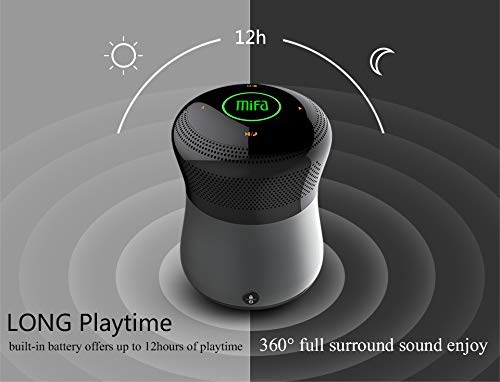
Whakaahua 2: The MIFA A3 speaker shown with an overlay indicating "LONG Playtime" (up to 12 hours) and "360° full surround sound enjoy." This image emphasizes the speaker's battery life and audio dispersion.
- Mana Rōrahi: Slide your finger clockwise on the touch panel to increase volume, counter-clockwise to decrease.
- Purei/Tatari: Tap the central Play/Pause icon.
- Riu Panuku: Tap the "Next" arrow icon.
- Riu o mua: Tap the "Previous" arrow icon.
- Whakawhiti Aratau: Tap the "M/O" icon to cycle between Bluetooth, AUX, and Micro SD card modes.
- Pātene Maukati: Press the lock icon to prevent accidental touch inputs.
5. Call Handling (Bluetooth Mode)
- Whakautu Waea: Tap the Play/Pause icon when a call comes in.
- Whakamutu Waea: Tap the Play/Pause icon again.
- Whakakore Waea: Press and hold the Play/Pause icon for 2 seconds.
Te tiaki
- Horoia te kaikorero ki te kakahu ngohengohe, maroke. Kaua e whakamahi i nga kai horoi me nga whakarewa.
- Whakaorangia te kaikorero ki te waahi makariri, maroke ina kore e whakamahia mo te wa roa.
- Whakautua te pākahiko kia kotahi i te iti rawa i roto i ngā marama e toru hei pupuri i te hauora o te pākahiko.
Raparongoā
| Raruraru | Rongoa pea |
|---|---|
| Karekau te kaikorero e kaha ana. | Me whakarite kua utaina te pākahiko. Tūhono ki tētahi puna hiko ka ngana anō. |
| Kaore e taea te hono ma te Nihokikorangi. |
|
| Karekau he tangi. |
|
| He iti te kounga tangi. |
|
Whakatakotoranga
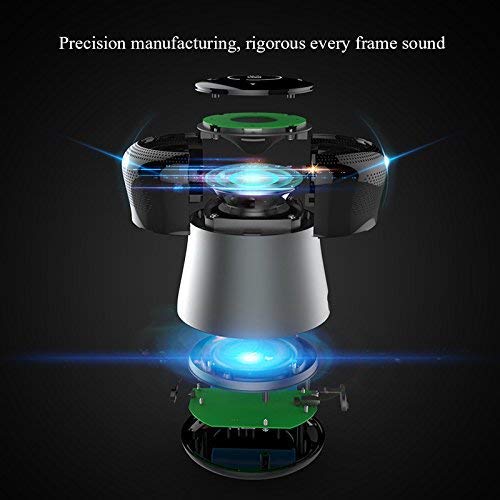
Whakaahua 3: An exploded diagram of the MIFA A3 speaker, illustrating its internal components and structural design, emphasizing precision manufacturing.
| Tauira | MIFA A3 |
| Te Mana Putanga | 10W |
| Hononga | Bluetooth 4.2, AUX, Micro SD Card |
| Pūhiko | 1800 mAh Li-ion |
| Te wa takaro | Tae atu ki te 8 haora (i te 60% rōrahi) |
| Waa Whakatau | Tata ki te 3-4 haora |
| hopuoro | Hanga-i roto mo nga waea kore-ringa |
| parewai | Yes (as per product specifications, but general caution advised for ports) |
| Tikanga Mana | Paa |
| Pūrere Hototahi | Pona, PC, Waea atamai, Papa |
Pūtāhui me te Tautoko
MIFA products are designed to provide reliable performance. For warranty information or technical support, please refer to the warranty card included with your purchase or visit the official MIFA webpae. Puritia to tohu hoko mo nga kereme whakamana.
For further assistance, you may contact MIFA customer support through their official channels.


