1. Hua Neke Atuview
The MIFA A20 is a portable Bluetooth speaker designed to deliver high-quality audio with powerful bass and True Wireless Stereo (TWS) capabilities. Its robust aluminum alloy housing ensures durability and a premium aesthetic. This manual will guide you through its features, setup, and operation.


2. Nga ahuatanga
- Exceptional Wireless Stereo: Connect two A20 speakers via a single device for huge stereo sound and double the volume; two exposed radiators let you see the sound.
- Impressive Bass: Dual drivers, triple radiators and Class-D chips ensure distortion-free crystal loud sound and strong bass with 30W peak power output.
- Whakahoki Roa: 4000 mAh rechargeable Li-ion battery offers 12 hours playtime at 70% volume; LED indicators to tell you the battery remaining; can play while charging.
- Endless Audio Options: Aux capability for non-Bluetooth devices; 32GB Micro SD card supported to save your phone's battery; built-in microphone for HD hands-free calls.
- Nihokikorangi 4.2: Instantly pairs with your Smartphone, Tablet, Laptop, iPhone, Samsung, etc.; auto-reconnects to the last used device within 66 feets away.
3. Ihirangi mokete
Tena koa tirohia te pouaka mo nga mea e whai ake nei:
- MIFA A20 Bluetooth Speaker
- Tauira Whakatau USB
- Taura Ororongo 3.5mm (AUX)
- Pukapuka Kaiwhakamahi
4. Product Diagram and Controls
Familiarize yourself with the speaker's layout and control buttons.
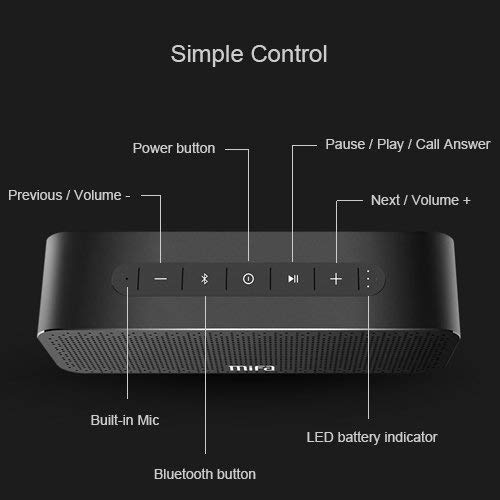
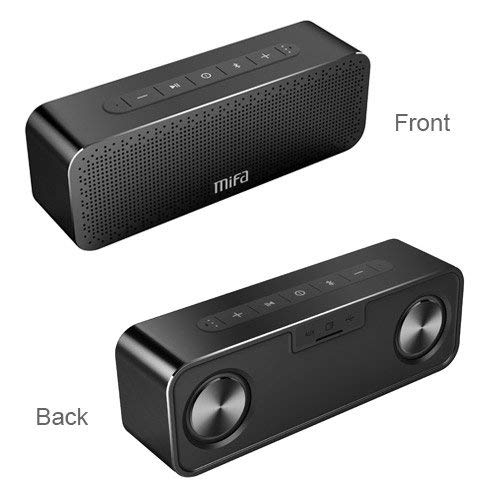
Patene Mana:
- Pātene Hiko: Pēhi me te pupuri kia whakakā/whakaweto.
- Pātene Nihokikorangi: Pēhia kia uru ki te aratau takirua Nihokikorangi.
- Play/Pause / Call Answer Button: Press to play/pause music; press to answer/end calls.
- Previous / Volume - Button: Press to go to previous track; press and hold to decrease volume.
- Next / Volume + Button: Press to go to next track; press and hold to increase volume.
Indicators and Ports:
- Kua hangaia i roto i te Mic: Mo nga waea kore-ringa.
- Tohu Pūhiko LED: Ka whakaatu i te mana o te pākahiko.
- Tauranga Whakatau: Tauranga USB mo te utu.
- Tāuru AUX: 3.5mm Jack mo te hononga ororongo waea.
- Kāniwha SD Kāri SD: Mō te purei puoro tika mai i tētahi kāri Micro SD (tae atu ki te 32GB).
5. Tatūnga
5.1 Te Whakataki i te Kaikorero
Before first use, fully charge the speaker. Connect the provided USB charging cable to the speaker's charging port and the other end to a USB power adapter (not included) or a computer's USB port. The LED indicator will show charging status and turn off when fully charged.
5.2 Takirua Nihokikorangi
- Turn on the MIFA A20 speaker by pressing and holding the Power button.
- The speaker will automatically enter Bluetooth pairing mode, indicated by a flashing blue LED. If not, press the Bluetooth button.
- I runga i to taputapu (smartphone, tablet, pona), whakaahei i te Nihokikorangi me te rapu mo nga taputapu e waatea ana.
- Select "MIFA A20" from the list of devices.
- Kia takirua, ka huri te tohu LED ki te kikorangi kikorangi, ka rongo koe i te tangi whakau.
- The speaker will automatically reconnect to the last paired device when turned on, if within range.
5.3 Whakahoahoa Waea Ahokore Tika (TWS).
To achieve a wider stereo soundstage, you can pair two MIFA A20 speakers together.
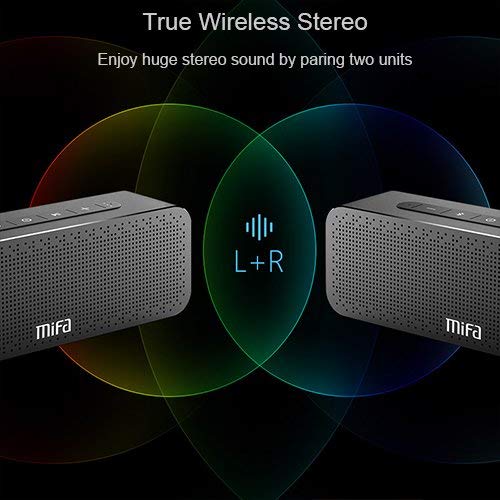
- Ensure both MIFA A20 speakers are turned on and not connected to any Bluetooth device.
- On one speaker (this will be the primary speaker), press and hold the Bluetooth button until you hear a prompt indicating TWS pairing mode.
- The two speakers will automatically search for and connect to each other. This may take a few seconds.
- Once connected, you will hear a confirmation sound, and the LED indicators on both speakers will change to reflect the TWS connection.
- Nā, honoa tō pūrere ki te kaikorero matua mā te Nihokikorangi e ai ki te whakaahuatanga i te wāhanga 5.2. Ka purei te oro mā ngā kaikorero e rua i te reo irirangi.
5.4 Te Whakamahi i te Kāri Micro SD
Insert a Micro SD card (up to 32GB, formatted to FAT32) with your music files into the Micro SD card slot. The speaker will automatically switch to Micro SD card mode and begin playing music.
5.5 Using AUX Input
Connect one end of the 3.5mm audio cable to the AUX input port on the speaker and the other end to the audio output jack of your non-Bluetooth device. The speaker will automatically switch to AUX mode.
6. Te whakahaere i te Kai-korero
6.1 Purei Waiata
- Purei/Tatari: Patohia te paatene Play/Pause.
- Runga Runga: Patohia me te pupuri i te Volume + pātene.
- Raro Raro: Pēhia me te pupuri i te Volume - pātene.
- Riu Panuku: Short press the Next / Volume + button.
- Riu o mua: Short press the Previous / Volume - button.
6.2 Waea-Waea-a-ringa
Ina honoa mā te Nihokikorangi, ka taea te whakamahi i te kaikorero mō ngā waea kore-ringa.
- Whakautu Waea: Press the Play/Pause / Call Answer button.
- Whakamutu Waea: Press the Play/Pause / Call Answer button during a call.
- Whakakore Waea: Press and hold the Play/Pause / Call Answer button when a call comes in.
7. Tiaki
- Te horoi: Whakamahia he kakahu ngohengohe, maroke hei horoi i te korero. Kaua e whakamahi i nga kai horoi me nga whakarewa.
- Tiaki Pūhiko: Hei whakaroa i te ora o te pākahiko, kaua e tukua kia pau katoa te pākahiko i ngā wā katoa. Utuhia i ia wā, ahakoa kāore e whakamahia ana mō ngā wā roa.
- Rokiroki: Whakaorangia te kaikorero ki te waahi makariri, maroke atu i te ra tika me te wera nui.
- Ātete wai: The speaker is designed to be waterproof (as per specifications). However, avoid submerging it in water for extended periods or exposing it to high-pressure water jets. Ensure charging port cover is securely closed when near water.
8. Te Raru
| Raruraru | Take pea | Rongoā |
|---|---|---|
| Kare te kaikorero e ka ana | He iti te pākahiko | Me utu katoa te kaikōrero. |
| Karekau he tangi | He iti rawa te oro; Kāore te pūrere i hono; Aratau tāuru hē | Increase volume on speaker and device; Ensure successful Bluetooth pairing or AUX connection; Check if correct input mode (Bluetooth/AUX/SD card) is selected. |
| Kaore e taea te hono ma te Nihokikorangi | Speaker not in pairing mode; Device Bluetooth off; Too far from speaker; Interference | Ensure speaker is in pairing mode (flashing blue LED); Turn on Bluetooth on your device; Move device closer to speaker; Turn off other Bluetooth devices nearby. |
| Oro kerekere | Volume too high; Low battery; Device too far | Reduce volume; Charge speaker; Move device closer to speaker. |
| Kua rahua te takirua TWS | Speakers already connected to a device; Not in TWS pairing mode | Disconnect both speakers from any Bluetooth devices; Ensure both speakers are in TWS pairing mode. |
9. Whakatakotoranga

| Āhuahira | Taipitopito |
|---|---|
| Ingoa Tauira | A20 |
| Rauemi | Konumohe |
| Momo Kaikorero | Woofer |
| Hangarau Hononga | Bluetooth, Auxiliary, Wireless |
| Putanga Nihokikorangi | 4.2 |
| Mokowoko Korekore | Tae atu ki te 66 putu (20 mita) |
| Kaikorero Te Mana Putanga Morahi | 30 Watts |
| Aratau Putanga Ororongo | Tirooro |
| Whirihoranga Hongere oro a tawhio noa | 2.0 |
| Pūhiko Raukaha | 4000 mah |
| Ora Pūhiko | Tae atu ki te 12 Haora (i te 70% rōrahi) |
| Tautoko Micro SD Card | Tae atu ki te 32GB |
| Puoro-roto | Ae |
| He parewai | Ae |
| Tae | Pango |
10. Pūtāhui me te Tautoko
Nga korero Whakaputanga
The MIFA A20 Bluetooth Speaker comes with a 30-ra whakamana mai i te ra o te hokonga, e kapi ana i nga hapa hangahanga. Tena koa pupurihia to tohu mo te hoko mo nga kereme whakamana.
Tautoko Kiritaki
For any questions, technical assistance, or warranty inquiries, please contact MIFA customer support through the retailer's platform or the official MIFA webpae. Tena koa kia rite to tauira hua me nga taipitopito hoko ina whakapā atu ki te tautoko.


