Kupu Whakataki
The Insignia NS-SPBTWAVE2-BK Wave 2 Portable Bluetooth Speaker provides high-quality wireless audio streaming from your compatible devices. Designed for versatility, its robust construction and rubberized feet allow for stable placement in both horizontal and vertical orientations. Enjoy hands-free communication with the built-in speakerphone and extended listening sessions thanks to its 12-hour battery life.
This manual provides essential information for setting up, operating, maintaining, and troubleshooting your speaker. Please read it thoroughly before use and retain it for future reference.
Ihirangi mokete
Me mohio kei roto katoa nga mea kei roto i te kete:
- Insignia NS-SPBTWAVE2-BK Wave 2 Portable Bluetooth Speaker
- Tauira Whakatau USB
- 3.5mm Audio Cable (Auxiliary)
- Quick Setup Guide (or similar documentation)
Nga waahanga hua
- Hononga Ahokore: Connects wirelessly to smartphones, tablets, and other Bluetooth-enabled devices.
- Roa te Ora o te Pūhiko: Features a rechargeable 2,000 mAh battery, providing up to 12 hours of playback on a full charge.
- Puoro-roto: Enables hands-free calling directly through the speaker.
- Tāuru Ororongo Āwhina: Allows for wired connection to audio devices via a 3.5mm audio cable.
- Whakatakotoranga maha: Designed to stand securely in both horizontal and vertical positions.
Nga wahanga o te Kai-korero
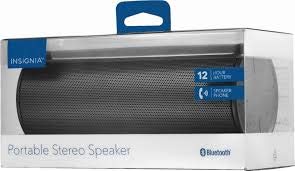
Whakaahua 1: Mua view of the Insignia Wave 2 Speaker in horizontal orientation.

Figure 2: Vertical view of the speaker, illustrating the power button, charging port, and auxiliary input port at the bottom.
Refer to the images above for the location of key components such as the power button, volume controls, Bluetooth indicator, charging port, and auxiliary input.
Tatūnga
1. Whakakii i te Tukuoro
- Connect the small end of the USB charging cable to the charging port on the speaker (refer to Figure 2).
- Connect the large end of the USB charging cable to a USB power adapter (not included) or a powered USB port on a computer.
- The charging indicator light will illuminate. Allow approximately 12 hours for a full charge before first use. The indicator light will change or turn off once charging is complete.
2. Takirua Nihokikorangi
- Ensure the speaker is fully charged. Press and hold the Power button to turn on the speaker. The Bluetooth indicator light will begin to flash, indicating it is in pairing mode.
- On your Bluetooth-enabled device (smartphone, tablet, etc.), navigate to the Bluetooth settings and ensure Bluetooth is enabled.
- Rapua available devices. Select "Insignia Wave 2" from the list.
- Once paired, the Bluetooth indicator light on the speaker will become solid, and you may hear an audible confirmation.
- Mena ka tonohia he kupuhipa, whakauruhia "0000".
3. Auxiliary (Wired) Connection
- Connect one end of the 3.5mm audio cable to the AUX input port on the speaker (refer to Figure 2).
- Connect the other end of the 3.5mm audio cable to the headphone jack or audio output port of your audio device.
- The speaker will automatically switch to auxiliary mode when a cable is detected.
Te whakahaere i te Kai-korero
Te Hiko / Whakaweto
- To turn on: Press and hold the Power button until the indicator lights illuminate.
- To turn off: Press and hold the Power button until the indicator lights turn off.
Mana Rōrahi
- Whakaritea te rōrahi mā te whakamahi i ngā pātene rōrahi o te kaikōrero.
- You can also control the volume from your connected Bluetooth device or auxiliary audio source.
Waea-a-ringa
Ina honoa mā te Nihokikorangi, ka taea te whakamahi i te kaikorero mō ngā waea kore-ringa:
- Whakautu waea: Press the Play/Pause/Call button once.
- Whakamutua he waea: Pēhia te pātene Purei/Whakamutu/Waea kotahi i te wā e waea ana.
- Whakakahoretia he waea: Press and hold the Play/Pause/Call button.
- Speak clearly towards the speaker's built-in microphone for optimal voice pickup.
Te tiaki
- Te horoi: Whakamahia he kakahu ngohengohe, maroke, kore-miro hei horoi i te taha waho o te kaikorero. Kaua e whakamahi i ngā wai horoi, i ngā waikura, i ngā whakarewa rānei.
- Tiaki Pūhiko: To prolong battery life, avoid fully discharging the battery frequently. Recharge the speaker regularly, even if not in use. Avoid exposing the speaker to extreme temperatures (hot or cold).
- Rokiroki: When not in use for extended periods, store the speaker in a cool, dry place away from direct sunlight and moisture.
- Ātete wai: Ko tenei kaikorero KORE ārai wai. Āraia te pā ki te wai, te makuku nui rānei.
Raparongoā
| Raruraru | Rongoa pea |
|---|---|
| Kare te kaikorero e ka ana. | Me whakarite kei te utaina te pākahiko. Honoa te kaikorero ki tetahi puna hiko ma te whakamahi i te taura utu USB. |
| Kaore he tangi mai i te kaikorero. | Check the volume level on both the speaker and the connected device. Ensure the correct input source (Bluetooth or AUX) is selected. Verify the Bluetooth connection or auxiliary cable. |
| Kaore e taea te hono ma te Nihokikorangi. | Ensure the speaker is in pairing mode (flashing Bluetooth indicator). Turn off and on Bluetooth on your device. Move the speaker closer to your device. Forget the speaker from your device's Bluetooth list and try pairing again. |
| He koretake te tangi o te tangi, o te whakapohehe ranei | Ensure the speaker is within Bluetooth range (approx. 33 ft / 10 m). Reduce the volume on the source device or speaker. Check for interference from other wireless devices. Try a different audio source or file. |
| Kaore e mahi te hopuoro i te wa e waea ana. | Ensure the speaker is properly connected via Bluetooth. Speak directly towards the speaker. Check your phone's call settings to ensure audio is routed to the Bluetooth speaker. |
Whakatakotoranga
- Ingoa Tauira: Ngaru 2
- Tau tauira: NS-SPBTWAVE2-BK
- Hangarau Hononga: Nihokikorangi
- Ora Pūhiko: Tae atu ki te 12 haora
- Momo Pūhiko: 1 Lithium Ion (kei roto)
- Wā Whakataki: Tata ki te 12 haora
- Rahi Hua: 6.8 x 2.8 x 2.8 inihi (17.3 x 7.1 x 7.1 cm)
- Taumaha Tūemi: 1 pauna (0.45 kg)
- Aratau Putanga Ororongo: Tirooro
- Waitohu Tohu-ki-Toi: 80 dB
- Puoro-roto: Ae
- Tāuru Āwhina: Āe (3.5mm)
- parewai: Kao
- Rauemi: Kirihou
- UPC: 600603230455
Pūtāhui me te Tautoko
This Insignia NS-SPBTWAVE2-BK Wave 2 Portable Bluetooth Speaker comes with a Rarangi Whakaiti. For specific terms and conditions of your warranty, please refer to the warranty card included with your purchase or visit the official Insignia webpae.
For technical support, troubleshooting assistance, or warranty claims, please contact Insignia Customer Service. Contact information can typically be found on the Insignia webpae, i roto ranei i to tuhinga hua.


