Kupu Whakataki
Thank you for choosing the Donner MW-1 2.4Ghz Wireless Guitar System. This system provides a low-latency, high-quality audio transmission solution for electric guitars, bass, keyboards, and other electric musical instruments. Featuring 10 channels and 5 built-in guitar effects, the MW-1 offers versatility and convenience for musicians. This manual will guide you through the setup, operation, and maintenance of your new wireless system.
Ataata: Ka mutuview of the Donner MW-1 Wireless Guitar System. This video demonstrates the basic functionality and features of the system.
Ihirangi mokete
- 1 x MW-1TX Transmitter Unit
- 1 x MW-1RX Receiver Unit
- 1 x USB Charging Cable (Y-cable for simultaneous charging)
- 1 x 3.5mm Auxiliary Audio Cable
- 1 x Peke Kawe
- 1 x Manual Kaiwhakamahi (tenei tuhinga)

Image: The Donner MW-1 Wireless Guitar System units displayed with their included accessories: a USB charging cable, a 3.5mm auxiliary cable, and a portable carrying pouch.
Ka mutu te huaview
The Donner MW-1 system consists of a transmitter (MW-1TX) and a receiver (MW-1RX), both designed for ease of use and portability. Each unit features a 220° rotatable plug for compatibility with various instrument jack positions.
MW-1TX Transmitter
- Instrument Input Jack: Connects to your electric instrument.
- Power/Channel Button: Long press to power on/off, short press to change wireless channel.
- Pātene MODE: Short press to cycle through 5 built-in guitar effects (Clean, Bluesy, Flanger, Tremolo, Metal).
- Mana Rōrahi: Adjusts the output volume of the instrument.
- Effect Indicators: LEDs for Clean, Bluesy, Flanger, Tremolo, Metal.
- Tohu Pūhiko/Kaiha: Shows battery status and charging progress.
MW-1RX Receiver
- Jack Huaputa: Ka hono ki amplifier, headphones, or other audio devices.
- Power/Channel Button: Long press to power on/off, short press to change wireless channel.
- Pātene BT: Short press to activate Bluetooth mode for external audio input.
- Mana Rōrahi: Adjusts the volume of Bluetooth or Line-In audio.
- RX Indicator: Shows signal reception status.
- Tohu BT: Ka whakaatu i te mana hononga Nihokikorangi.
- Line Indicator: Shows Line-In audio input status.
- Tohu Pūhiko Iti: Alerts when battery is low.
- Tohu Pūhiko/Kaiha: Shows battery status and charging progress.

Whakaahua: Taipitopito view of the MW-1TX Transmitter and MW-1RX Receiver units, highlighting their compact size and rotatable plugs.

Image: The MW-1TX Transmitter connected to an electric guitar, demonstrating its discreet placement during play. The receiver is shown near an ampkaikawe

Image: A diagram illustrating various connection possibilities for the MW-1RX Receiver, including an amplifier, headphones, and external audio sources via Bluetooth or a 3.5mm AUX cable.
Nga waahanga matua
- Built-in 5 Guitar Effects: Original Clean, Bluesy, Flanger, Tremolo, Metal.
- Rooputanga Iti: UHF wireless ID pairing technology supports 10 channels, with a latency time of 3.5ms.
- Widespread Use: 220° rotatable plug design, compatible with most electric guitars, bass, keyboards, and other electric music instruments with pickups.
- Mono me te Purei: Simple operation; long press the signal key to match transmitter and receiver.
- Watea te utu: Built-in rechargeable lithium battery provides up to 5 hours of working time after a 1.5-2 hour charge. Includes a USB Y-cable for simultaneous recharging.

Image: An illustration demonstrating the widespread compatibility of the Donner MW-1 system with different musical instruments and audio equipment.
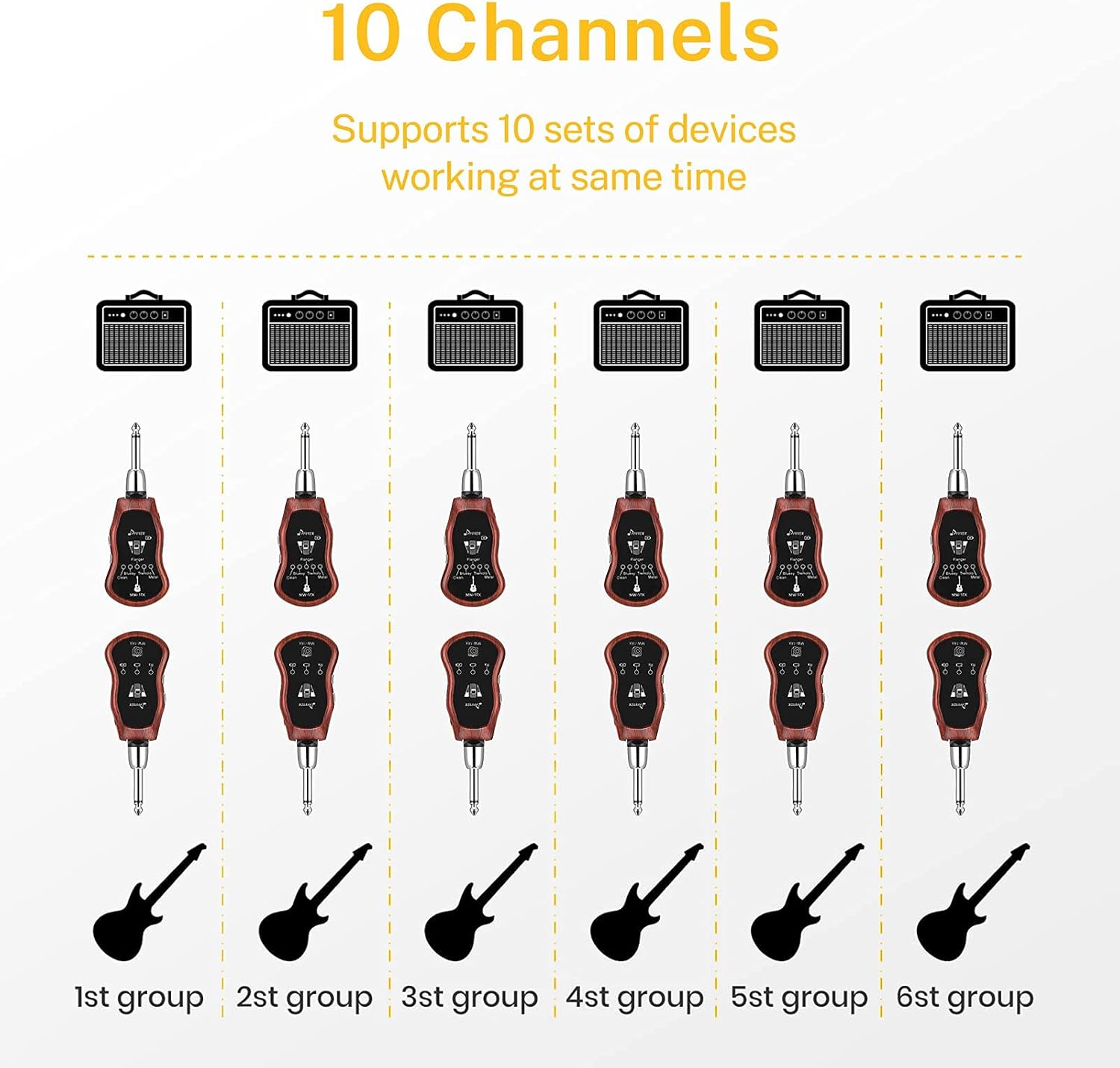
Image: A visual representation of the MW-1 system's 10-channel capability, allowing multiple devices to operate simultaneously without interference.
Tohutohu Tatūnga
- Charging the Units: Connect both the MW-1TX Transmitter and MW-1RX Receiver to a USB power source (e.g., computer USB port, USB wall adapter) using the provided USB Y-cable. The charging indicator LED will light up during charging and turn off when fully charged. A full charge typically takes 1.5-2 hours.
- Hiko Whakaka/Weto: Long press the Power/Channel button on both the transmitter and receiver for approximately 2 seconds to turn them on or off.
- Pairing (Initial Setup or Re-pairing): The units are pre-paired from the factory. If re-pairing is necessary (e.g., after a factory reset or if connection is lost), long press the Power/Channel button on both units simultaneously until their indicator lights flash rapidly. Release the buttons, and the units will automatically pair. A solid indicator light confirms successful pairing.
- Connecting to Instrument and AmpKaiwhakaora:
- Plug the MW-1TX Transmitter into your electric instrument's output jack. Adjust the rotatable plug for optimal fit.
- Plug the MW-1RX Receiver into your amplifier's input jack or other audio device. Adjust the rotatable plug as needed.
- Tīpakonga Hongere: Briefly press the Power/Channel button on the transmitter (MW-1TX) to cycle through the 10 available wireless channels. Ensure that both the transmitter and receiver are set to the same channel for proper operation.
Nga Tohutohu Whakahaere
- Kōwhiringa Pānga: On the transmitter (MW-1TX), briefly press the "MODE" button to cycle through the 5 built-in guitar effects: Clean, Bluesy, Flanger, Tremolo, and Metal. The corresponding LED indicator will light up to show the active effect.
- Instrument Volume Adjustment: Use the dedicated volume control on the transmitter (MW-1TX) to adjust the output level of your instrument.
- External Audio Input (Receiver - MW-1RX):
- Nihokikorangi: Briefly press the "BT" button on the receiver to activate Bluetooth mode. The BT indicator will flash, indicating it's ready for pairing. Rapua "MW-1RX" on your smartphone or other Bluetooth device and connect. Once connected, the BT indicator will be solid. Use the volume control on the receiver to adjust the Bluetooth audio level.
- Raina-Mai: Connect an external audio source (e.g., computer, MP3 player) to the 3.5mm Line-In jack on the receiver using the provided auxiliary cable. The Line indicator will light up. Use the volume control on the receiver to adjust the Line-In audio level.
- Putanga o te Paneoro/Kaikōrero: Connect headphones or external speakers to the 3.5mm output jack on the receiver for independent monitoring of your instrument and any external audio.
Video: Demonstration of the five built-in guitar effects (Clean, Bluesy, Flanger, Tremolo, Metal) available on the Donner MW-1 Wireless Guitar System.

Image: A user enjoying the built-in amplifier feature of the MW-1 system, allowing for private practice with headphones anytime, anywhere.
Te tiaki
- Keep the units clean and dry. Use a soft, dry cloth for cleaning.
- Avoid exposing the units to extreme temperatures, direct sunlight, or high humidity.
- Charge the units regularly, even if not in frequent use, to maintain optimal battery health.
- Store the units in the provided pouch when not in use to protect them from dust and scratches.
Raparongoā
| Putanga | Rongoa pea |
|---|---|
| Kaore he putanga oro. | Ensure both transmitter and receiver are powered on. Verify that both units are paired and set to the same channel. Check all cable connections (instrument to transmitter, receiver to amplifier/headphones). Confirm instrument and amplifier volume levels are adequate. |
| Signal interference or dropouts. | Change to a different wireless channel. Move the transmitter and receiver closer to each other. Avoid operating near strong electromagnetic interference sources (e.g., Wi-Fi routers, microwaves). |
| Units not charging. | Ensure the USB Y-cable is securely connected to both units and the USB power source. Try using a different USB port or power adapter. Check if the charging indicator LED lights up. |
| Built-in effects not changing. | Ensure you are pressing the "MODE" button on the transmitter (MW-1TX). Check that the corresponding effect LED lights up. |
| Kāore te pūrere Nihokikorangi e hono ana. | Ensure Bluetooth mode is activated on the receiver (BT indicator flashing). Make sure your external device's Bluetooth is on and visible. Try forgetting the device on your phone and re-pairing. |
Whakatakotoranga
| Āhuahira | Whakatakotoranga |
|---|---|
| Tau tauira | MW-1 |
| Auau Ahokore | 2.4Ghz UHF |
| Nga hongere | 10 |
| Puka Hanga-i roto i | Clean, Bluesy, Flanger, Tremolo, Metal |
| Wā Roopuu | 3.5ms |
| Momo Pūhiko | Pūhiko Lithium Rechargeable |
| Wā Utu | 1.5-2 haora |
| Wā Mahi | Tae atu ki te 5 haora |
| Rauemi tinana | Kirihou |
| Atanga Pūmārō | USB |
| Hōputu Tohu | Tauritenga |
| Taumaha Tūemi | 9.1 hekere |
| Ahu mōkihi | 5.87 x 4.88 x 2.24 inihi |
Nga korero haumaru
- Do not attempt to disassemble, repair, or modify the units. This may void the warranty and pose a safety risk.
- Keep the units away from water, moisture, and any liquids to prevent electric shock or damage.
- Use only the provided USB charging cable and a compatible USB power source (5V/1A recommended) for charging.
- Avoid exposing the units to extreme heat, open flames, or direct sunlight for prolonged periods.
- Makahia nga pākahiko me nga waahanga hiko kia rite ki nga ture o te rohe.
Pūtāhui me te Tautoko
Donner provides a limited warranty for this product. For detailed warranty information, technical support, and customer service inquiries, please visit the official Donner webte paetukutuku, whakapā atu ranei ki to kaitoha o to rohe. Tena koa pupurihia to tohu mo te hoko mo nga kereme whakamana.


