1. Kupu Whakataki
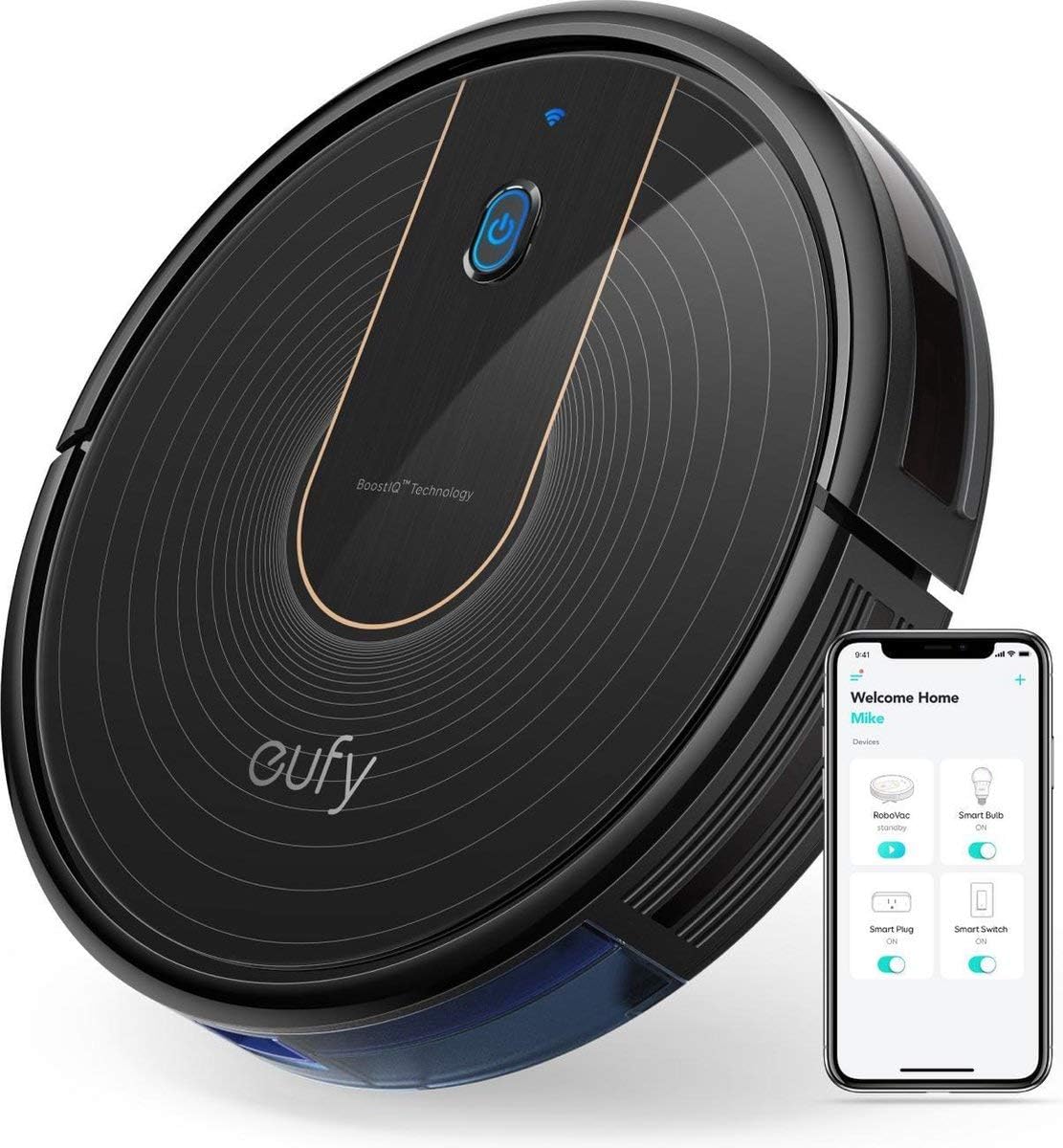
Thank you for choosing the eufy RoboVac 15C. This robot vacuum cleaner is designed to provide efficient and convenient automated cleaning for your home. Featuring BoostIQ technology, Wi-Fi connectivity, and a slim design, the RoboVac 15C offers powerful suction and quiet operation to maintain clean floors with minimal effort. This manual provides essential information for setup, operation, maintenance, and troubleshooting to ensure optimal performance of your device.
2. Nga Tohutohu Haumaru Nui
Before using this product, please read all safety instructions. Failure to follow these instructions may result in electric shock, fire, or serious injury.
- This appliance is for indoor use only. Do not use outdoors or on commercial surfaces.
- Do not allow children to operate the RoboVac. Supervise children and pets when the RoboVac is operating.
- Whakamahia anake te urutau hiko taketake me te turanga utunga i whakaratohia e te kaihanga.
- Do not handle the power adapter or RoboVac with wet hands.
- Tiakina nga makawe, nga kakahu taratara, nga maihao, me nga wahanga katoa o te tinana mai i nga tuwhera me nga waahanga neke.
- Kaua e kohia tetahi mea e wera ana, e kai paipa ana ranei, penei i te hikareti, te mati, te pungarehu wera ranei.
- Do not use the RoboVac to pick up large objects, sharp objects, or liquids.
- Ensure the cleaning area is clear of loose cables, small objects, and fragile items that could be tangled or knocked over.
- Do not sit on the RoboVac or place heavy objects on it.
- Store the RoboVac in a cool, dry place when not in use.
3. Ihirangi mokete
Manatokohia kei roto katoa nga waahanga ki to kete:
- eufy RoboVac 15C
- Mana Mamao (2 nga pākahiko AAA kei roto)
- Turanga Whakatau
- Pouaka AC
- Utauta horoi
- Additional Set of Filters
- 4 Paraihe Taha
- 5 here taura
- Pukapuka Kaiwhakamahi
4. Hua Neke Atuview
The RoboVac 15C features a sleek, low-profile design allowing it to clean under most furniture. Key components include the main power button, Wi-Fi indicator, dust collector, and various sensors for navigation.
Runga View
- Pātene Hiko: Press to start/pause cleaning. Hold to power on/off.
- Tohu Wi-Fi: Ka whakaatu i te tūnga hononga Wi-Fi.
- BoostIQ Technology Logo: Indicates the presence of automatic suction power adjustment.
Raro View
- Paraihe Taha: Two rotating brushes to sweep debris into the suction path.
- Rolling Brush: Main brush for deep cleaning carpets and hard floors.
- Ngā Pūoko Taka: Detects edges and prevents falls.
- Kei te utu Hoapā: Connects with the charging base for automatic recharging.
- Wira Ao Whānui: Ka taea te nekeneke 360-tohu.
5. Tatūnga
5.1 Te Whakaritenga i te Wahi Whakapai
- Remove any power cords, small objects, or fragile items from the floor that could obstruct the RoboVac's path or cause it to get stuck. Five cable ties are provided to help organize cables.
- Ensure furniture has sufficient clearance for the RoboVac to pass underneath without getting trapped.
- The RoboVac is suitable for low and medium pile carpets, tiles, laminates, or hard floors. It is not recommended for very high pile carpets.
5.2 Te Tāuta i ngā Paraihe Taha
Attach the side brushes to the posts on the bottom of the RoboVac until they click into place.
5.3 Te Whakatakoto i te Pūtake Utu
- Place the charging base on a hard, level surface against a wall.
- Ensure there is at least 1 meter (3 feet) of clear space to the front and 0.5 meters (1.5 feet) to each side of the charging base.
- Connect the AC power adapter to the charging base and plug it into a wall outlet.
5.4 Whakataki Tuatahi
Place the RoboVac onto the charging base, ensuring the charging contacts align. The indicator light on the RoboVac will pulse orange during charging and turn solid blue when fully charged. For first-time use, charge the RoboVac for at least 6 hours.
5.5 Wi-Fi Connection (eufyHome App)
- Download the 'eufyHome' app from the App Store (iOS devices) or Google Play (Android devices).
- Follow the in-app instructions to connect your RoboVac to your home Wi-Fi network. This enables remote control, scheduling, and mode selection via your smartphone.
6. Te Whakahaere i tō RoboVac
6.1 Hiko / Whakaweto
Press and hold the power button on the RoboVac for 3 seconds to power it on or off. A short press will start or pause cleaning.
6.2 Aratau horoi
- Whakapai Aunoa: The RoboVac cleans automatically using a semi-random path. It will return to the charging base when the battery is low or cleaning is complete.
- Hangarau BoostIQ: In Auto Cleaning mode, the RoboVac automatically increases suction power within 1.5 seconds when it detects heavily soiled areas or transitions to carpets.
- Whakapai Maama: The RoboVac intensely cleans a specific area in a spiral pattern. Useful for concentrated dirt.
- Whakapai Tapa: The RoboVac cleans along walls and furniture edges to ensure thorough coverage.
6.3 Te whakamahi i te Mana Mamao
The remote control allows you to start/pause cleaning, select cleaning modes, manually control the RoboVac's direction, and send it back to the charging base.
6.4 Using the eufyHome App
The eufyHome app provides advanced control features, including:
- Starting and stopping cleaning remotely.
- Scheduling cleaning times for specific days.
- Selecting cleaning modes.
- Monitoring cleaning status.
6.5 Mana Reo (Alexa)
The RoboVac 15C is compatible with Amazon Alexa. Once connected through the eufyHome app and Alexa app, you can use voice commands such as, "Alexa, tell RoboVac to start cleaning." (Alexa devices are sold separately).
7. Tiaki
Regular maintenance ensures your RoboVac operates at peak performance. Perform these steps regularly:
7.1 Te Putea i te Puehu
Press the dustbin release button and pull out the dustbin. Open the dustbin cover and empty its contents into a trash can. The 0.6-liter dustbin is designed for extended cleaning sessions.
7.2 Te horoi i nga whiriwhiringa
Remove the primary filter and high-performance filter from the dustbin. Tap them to remove dust. Do not wash the high-performance filter. The primary filter can be rinsed with water; ensure it is completely dry before reinstallation. Replace filters every 2-3 months, or as needed.
7.3 Cleaning the Rolling Brush
Remove the brush guard and then the rolling brush. Use the provided cleaning tool to cut and remove any hair or debris wrapped around the brush.
7.4 Te horoi i nga Paraihe Taha
Periodically remove the side brushes and clean any hair or debris. If brushes are worn or damaged, replace them with the spare brushes provided.
7.5 Te Whakapai i nga Pukoro me te Utu Hoapā
Wipe the drop sensors, infrared sensors, and charging contacts on both the RoboVac and the charging base with a dry cloth to ensure proper function.
8. Te Raru
If your RoboVac encounters issues, refer to the following common problems and solutions:
| Raruraru | Take pea | Rongoā |
|---|---|---|
| Kaore a RoboVac e huri, e utu ranei. | Battery is completely drained; charging contacts are dirty; power adapter not connected. | Ensure RoboVac is properly seated on the charging base. Clean charging contacts. Verify power adapter is plugged in. |
| Ka mau tonu a RoboVac. | Loose cables, low furniture, or obstacles in the cleaning path. | Clear the cleaning area of obstacles. Use cable ties to manage cords. Ensure furniture has adequate clearance. |
| Kaore a RoboVac e hoki ki te turanga utu. | Charging base is obstructed or too far; RoboVac is stuck. | Ensure charging base has clear space around it. Manually place RoboVac on base if stuck. |
| He kino te mahi horoi. | Dustbin full; brushes tangled; filters clogged; sensors dirty. | Empty dustbin. Clean rolling brush and side brushes. Clean or replace filters. Wipe all sensors. |
| He oro rerekē ngā haruru a RoboVac. | Debris caught in brushes or wheels. | Inspect and clean the rolling brush, side brushes, and universal wheel for any trapped debris. |
9. Whakatakotoranga
| Āhuahira | Taipitopito |
|---|---|
| Waitohu | eufi |
| Tau tauira | AK-T2120311 |
| Tae | Pango |
| Ahu | 32.5 x 32.5 x 7.2 cm |
| Taumaha | 2.6 kg |
| Mana | 25 W |
| Taumata Haruru | 55 dB |
| Te Mana Momo | 1300 Pa |
| Te Puehu Puehu | 0.6 rita |
| Ora Pūhiko | Up to 100 minutes (Standard mode on hard floors) |
| Nga waahanga motuhake | BoostIQ with Wi-Fi, advanced sensor technology, three-filter system, ultra-slim design, self-charging |
| ASIN | B07KXR92NJ |
| Date of First Availability | Hanuere 14, 2019 |
10. Pūtāhui me te Tautoko
10.1 Nga Korero Whakaputanga
The eufy RoboVac 15C comes with a 12-month manufacturer's warranty from the date of purchase. This warranty covers manufacturing defects and workmanship under normal use. Please retain your proof of purchase for warranty claims.
10.2 Tautoko Kiritaki
For technical support, warranty inquiries, or other assistance, please contact eufy customer service. You can find contact details on the official eufy website or through the eufyHome app. Please have your model number (RoboVac 15C) and purchase information ready when contacting support.


