1. Kupu Whakataki
Mauruuru koe mo te hokoasing the Alpha EK-60 61-Key Electronic Piano Keyboard. This manual provides detailed instructions for the proper setup, operation, and maintenance of your new instrument. The EK-60 is designed to offer a rich musical experience with its versatile features, including a wide range of tones and rhythms, intelligent teaching functions, and various connectivity options. Please read this manual thoroughly before using the product to ensure optimal performance and longevity.
2. Nga korero haumaru
To prevent electric shock, fire, or damage to the unit, please observe the following precautions:
- Do not expose the keyboard to rain or moisture.
- Do not place objects filled with liquids, such as vases, on the keyboard.
- Kaua e araia nga whakatuwheratanga hau.
- Whakamahia anake te urutau hiko kua tohua.
- Kaua e wetewete, whakarereke ranei i te waahanga. Tukuna atu nga ratonga katoa ki nga kaimahi whai tohu.
- Kaua e taea e nga tamariki iti.
3. Ihirangi mokete
Tena koa tirohia nga mea katoa e whai ake nei kei roto i to kete:
- 1 x Alpha 61-Key Standard Keyboard EK-60
- 1 x Adjustable Stand
- 1 x Kaipupuri Pepa Waiata
- 1 x Pūurutau Hiko
- 1 x Manual Kaiwhakamahi (tenei tuhinga)
4. Hua Neke Atuview
Familiarize yourself with the components of your Alpha EK-60 keyboard.
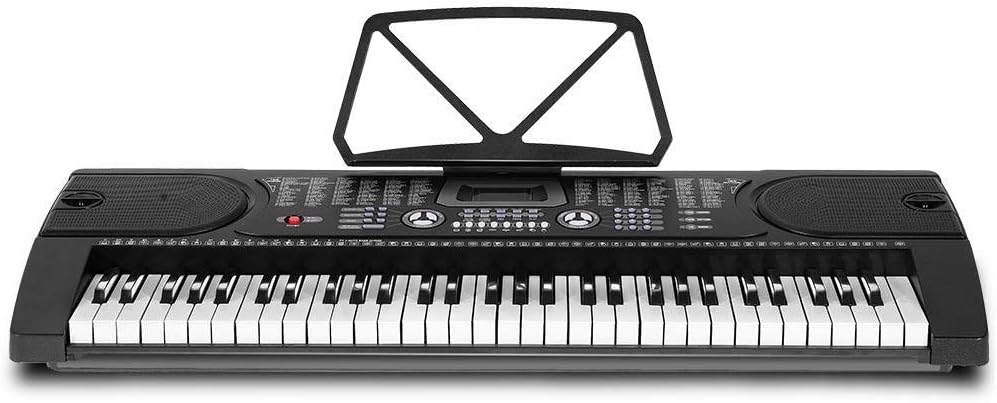
Whakaahua 4.1: Runga-raro view of the Alpha EK-60 keyboard, highlighting the control panel, integrated speakers, and the 61 standard piano keys.

Figure 4.2: Detail of the LED display for convenient settings adjustment and the battery compartment for portable use.

Whakaahua 4.3: View of the multiple jacks including Audio Input, Microphone Input, and Headphone Output for versatile connectivity.
Āhuatanga matua:
- 61-Key Standard Piano Keyboard
- LED display for easy navigation
- 24 waiata demo
- 255 timbres (instrument sounds)
- 255 rhythms (accompaniment styles)
- 61 kinds of keyboard percussions
- 8 Panel Percussions
- Master volume, accompaniment volume, and tempo control
- Intelligent teaching function: one-key, follow and ensemble function
- Taumahi hotaka orooro
- Auto chord and chord timbre option
- Rekoata me te mahi purei hoki
- Sustain and vibrato effects
- Microphone input and speaker output
- Headphone jack for silent practice
- Battery powered option (6 x AA-size batteries, not included)
5. Tatūnga
5.1 Huihui i te Tu
- Unpack all components of the adjustable stand.
- Connect the horizontal support bars to the vertical legs, ensuring they are securely fastened.
- Adjust the height of the stand to your preferred playing position using the adjustment knobs. The stand is adjustable from 59cm to 79cm in height.
- Whakatakotoria te papapātuhi kia mau ki runga i te tūnga kua huihuia.
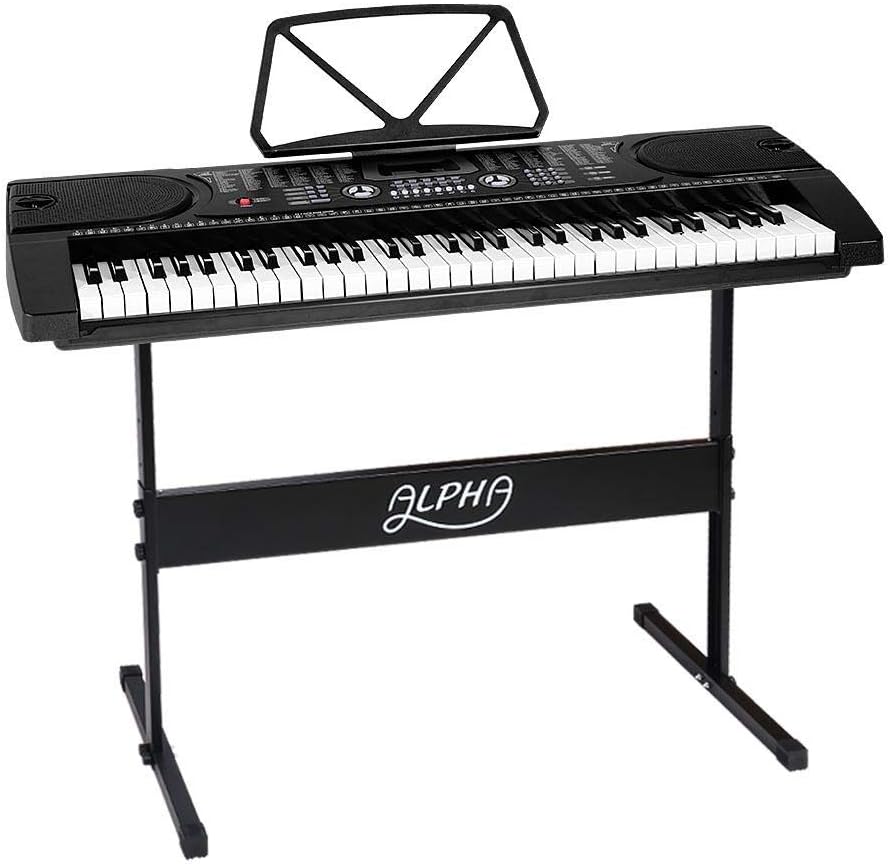
Figure 5.1: The Alpha EK-60 keyboard fully assembled on its adjustable stand, ready for use.
5.2 Te Whakakaha i te Papapātuhi
The Alpha EK-60 can be powered by the included AC adaptor or by batteries.
Ma te whakamahi i te Adapter AC:
- Connect the DC plug of the power adaptor to the DC 9V input jack on the rear of the keyboard.
- Plug the AC adaptor into a standard wall outlet.
Whakamahi Pūhiko:
- Kimihia te wahanga pākahiko kei raro o te papapātuhi.
- Whakatuwheratia te uhi o te wahanga pākahiko.
- Insert 6 x AA-size batteries (not included), ensuring correct polarity (+/-).
- Katia kia mau te uhi o te wahanga pākahiko.
Note: When using batteries, disconnect the AC adaptor. The keyboard will automatically switch to battery power if the adaptor is removed.
6. Nga Tohutohu Whakahaere
6.1 Mahi Taketake
- Hiko Whakaka/Weto: Pehia te MANA pātene hei whakakā, whakaweto rānei i te papapātuhi.
- Mana Rōrahi: Whakamahia te Tuhinga o mua knob to adjust the overall sound level.
- Mana Tempo: Whakamahia te TEMPO buttons to adjust the speed of rhythms and demo songs.
6.2 Selecting Tones and Rhythms
- Tones (Timbre): Pehia te Ko TIMBRE button, then use the number pad or +/- buttons to select from 255 different instrument sounds. The selected timbre number will appear on the LED display.
- Ngateri: Pehia te WAIATA button, then use the number pad or +/- buttons to select from 255 accompaniment rhythms. Press TITIAKI/TATA hei tīmata, hei whakamutu rānei i te manawataki.
6.3 Intelligent Teaching Function
The EK-60 features a 3-step intelligent teaching system to help you learn to play.
- Kī-Kotahi: Plays the melody of a demo song by pressing any key.
- Whai: Waits for you to play the correct note before proceeding with the melody.
- Whakariterite: Plays the accompaniment while you play the melody.
To use, select a demo song, then press the desired teaching mode button (KOTAHI-KEY, WHAIA, ranei WHAKANUI).
6.4 Te Rekoata me te Purei
The keyboard allows you to record your performances.
- Pehia te REC button to start recording. The LED display will indicate recording mode.
- Whakatangihia te rangi waiata e hiahiatia ana e koe.
- Pehia te TAKARO button to stop recording and play back your recorded performance.
6.5 Hononga
- Tihakihihi Honoa nga taringa ki te KAUPAPA jack for silent practice.
- Whakauru Whakaoho: Honoa he hopuoro ki te MIC INPUT jack to sing along while playing.
- Ororongo Whakauru/Putanga: Whakamahia te INPUTU AUDIO to connect external audio devices (e.g., MP3 player) and the Tuhinga o mua to connect to external speakers or an ampkaikawe
7. Tiaki
Proper care will ensure the longevity of your Alpha EK-60 keyboard.
- Te horoi: Wipe the keyboard with a soft, dry cloth. For stubborn dirt, use a slightly damp cloth and then wipe dry immediately. Do not use abrasive cleaners, waxes, or solvents.
- Rokiroki: When not in use for extended periods, store the keyboard in a cool, dry place away from direct sunlight and extreme temperatures. If using batteries, remove them before long-term storage to prevent leakage.
- Te whakahaere: A ape i te tuku i te papapātuhi, te tuku ranei ki nga paanga kaha.
8. Te Raru
If you encounter any issues with your keyboard, refer to the following table for common problems and solutions.
| Raruraru | Take pea | Rongoā |
|---|---|---|
| Karekau he tangi | Volume is too low; Power is off; Headphones connected; Faulty power connection. | Increase master volume; Turn on power; Disconnect headphones; Check power adaptor or replace batteries. |
| Kī kore whakautu | Keyboard is in a teaching mode; Internal malfunction. | Exit teaching mode; Power cycle the keyboard. If issue persists, contact support. |
| Rhythm/Demo song not playing | Rhythm/Demo song not selected; START/STOP button not pressed. | Select a rhythm/demo song; Press START/STOP. |
| Oro kerekere | Volume too high; External device connected incorrectly. | Reduce volume; Check connections of external devices. |
Mena ka mau tonu te raru i muri i te whakamatau i enei otinga, tena koa whakapā atu ki te tautoko a te kaihoko.
9. Whakatakotoranga
| Āhuahira | Whakaahuatanga |
|---|---|
| Tauira | EK-60 |
| Kī | 61 Standard Piano Keys |
| Key Width | 1.9 cm |
| Tones (Timbres) | 255 |
| Waiata | 255 |
| Waiata Whakaaturanga | 24 |
| Polyphony mōrahi | 8 |
| Hononga | Audio Input, Audio Output, Headphone Jack (3.5mm), Microphone Input (3.5mm) |
| Tuku Hiko | AC Adaptor (DC 9V) or 6 x AA-size batteries (not included) |
| Ahu (Papatuhi) | 86cm (L) x 32.5cm (W) |
| Dimensions (Overall with Stand) | 86cm (L) x 32.5cm (W) x 59-79cm (H) |
| Taumaha | 6.2 Kirokaramu |
| Tae | Pango |

Figure 9.1: Detailed dimensions of the Alpha EK-60 keyboard and its adjustable stand.
10. Pūtāhui me te Tautoko
10.1 Nga Korero Whakaputanga
The Alpha EK-60 keyboard comes with a 1-tau pūtāhui from the date of purchase. This warranty covers manufacturing defects and ensures the product is free from defects in material and workmanship under normal use. It does not cover damage caused by misuse, accident, unauthorized modification, or normal wear and tear.
10.2 Tautoko Kiritaki
For any queries, technical assistance, or warranty claims, please contact the seller or manufacturer directly. Please have your purchase receipt and product model number (EK-60) ready when contacting support.


