1. Kupu Whakataki
The Brinno Empower TLC2000 is a versatile time lapse camera designed for capturing long-term projects, creative videos, and monitoring activities. It offers three distinct capture modes: Time Lapse, Step Video, and Stop Motion, delivering high-quality footage in HDR and Full HD resolutions. With its flexible scheduling capabilities and long-lasting battery, the TLC2000 is suitable for various indoor and outdoor applications.
2. He aha kei roto i te Pouaka
Tena koa tirohia kei roto katoa nga taonga kei roto i to kete:
- Brinno Empower TLC2000 Time Lapse Camera
- Te Kawe i te Keehi
- Tauira USB
- Pukapuka Kaiwhakamahi (tenei tuhinga)
- Te Here Whakamau
- Panui Kuti
- 2 Pahiko AA (kei roto)
3. Hua Neke Atuview
Familiarize yourself with the components of your Brinno TLC2000 camera.

Whakaahua 3.1: Mua View. This image displays the front of the Brinno TLC2000 camera, highlighting the central lens and the Brinno branding at the bottom.

Whakaahua 3.2: Whakamuri View. This image shows the back of the camera, featuring the LCD screen and the 'Previous', 'OK/Return', and 'Next' control buttons below it.

Whakaahua 3.3: Taha View (Ports). This image illustrates the side of the camera with the MicroSD card slot and USB port clearly visible.
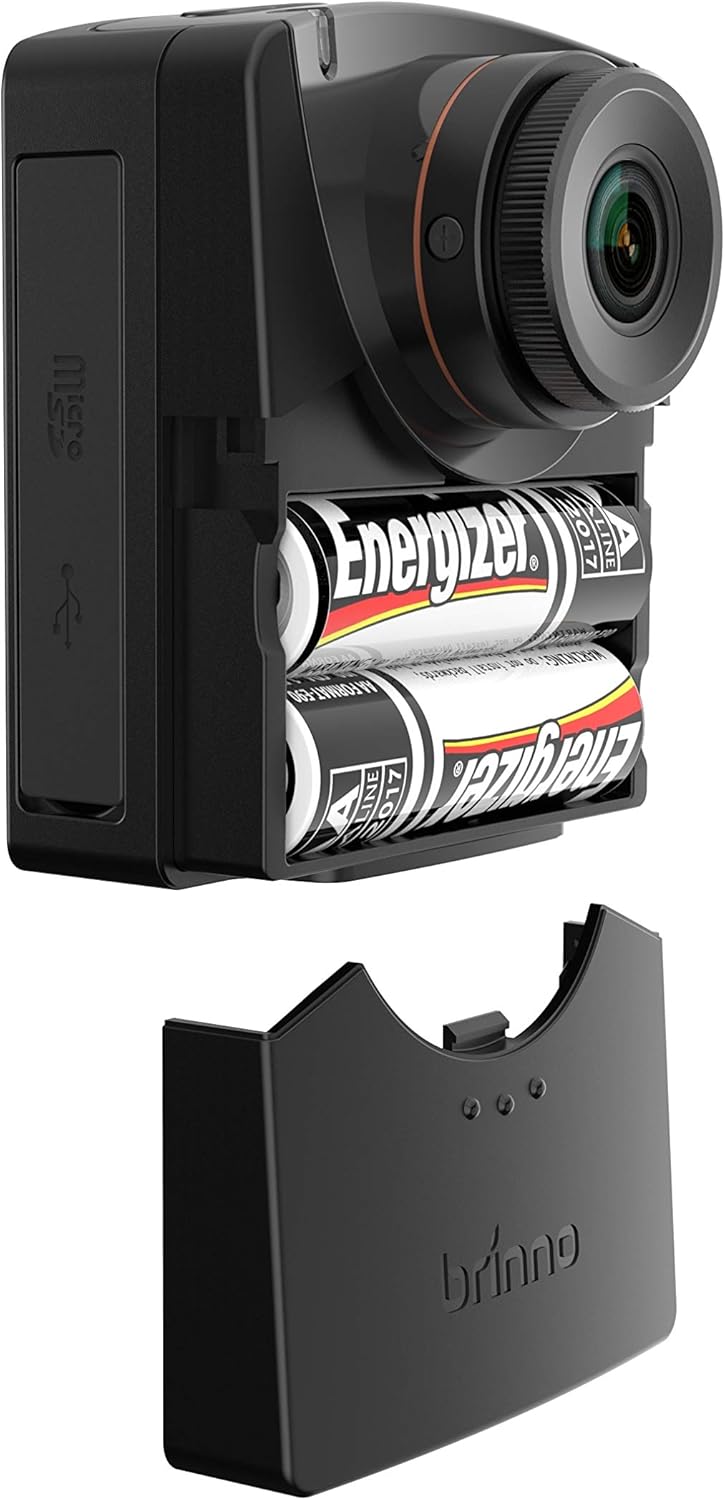
Whakaatu 3.4: Wāhanga Pūhiko. This image shows the camera with its battery compartment open, revealing the two AA batteries required for operation.
4. Tatūnga
4.1. Tāuta Pūhiko
- Open the battery compartment cover located on the side of the camera (refer to Figure 3.4).
- Whakauruhia kia rua (2) nga pākahiko AA, kia tika te polarity (+/-) kua tohua ki roto i te waahanga.
- Katia kia mau te uhi o te wahanga pākahiko.
4.2. Tāuta Kāri MicroSD
- Locate the MicroSD card slot on the side of the camera (refer to Figure 3.3).
- Gently insert a compatible MicroSD card (up to 128GB, Class 10 or higher recommended) into the slot until it clicks into place.
- Hei tango, pēhia te kāri ki roto kia pūwhera rā anō ki waho.
4.3. Te Whakakaha/Weto
- Hei Whakahiko: Press and hold the power button (usually located on the top or side) until the LCD screen illuminates.
- Hei Whakaweto: Pēhia me te pupuri i te pātene mana kia whakaweto rā anō te mata.
4.4. Tautuhinga Tuatahi
Upon first power-on or after battery replacement, you may need to set the date, time, and language. Use the 'Previous' and 'Next' buttons to navigate and the 'OK/Return' button to confirm selections on the LCD screen.
5. Aratau Mahi
The Brinno TLC2000 offers three primary recording modes:
- Te Waahi: Captures still images at predefined intervals (e.g., every 5 seconds, 1 minute) and automatically stitches them into a video file. Ideal for documenting construction projects, plant growth, or weather changes.
- Step Video: Records short video clips at set intervals. This mode is suitable for capturing events with more motion between frames, such as traffic flow or crowd movements.
- Stop Motion: Allows for manual capture of individual frames, providing precise control for creating animated sequences. Each press of the capture button records one frame.
5.1. Flexible Schedule Setup
The camera supports a flexible scheduling feature, allowing you to specify recording days of the week and specific hours. This ensures the camera only records when needed, conserving battery life and storage space. Access this feature through the camera's menu settings on the LCD screen.
5.2. Image Quality and Lenses
The TLC2000 captures images in HDR (High Dynamic Range) and Full HD (1080p) resolutions, providing clear and detailed visuals. It features a CS-mount interface, making it compatible with Brinno BCS zoom-in lenses for enhanced optical flexibility and framing precision.
6. Tiaki
6.1. Te horoi
- Whakamahia he kakahu ngohengohe, maroke hei horoi i te tinana o te kamera.
- Mō te arotahi, whakamahia he kakahu horoi arotahi me te wai horoi arotahi motuhake. Āta karohia ngā rauemi whakakoi.
6.2. Whakahoutanga Firmware
Brinno periodically releases firmware updates to improve camera performance and address issues. It is recommended to check the official Brinno website for the latest firmware version (e.g., 2020 Updated Firmware) and follow the provided instructions for installation. Keeping your firmware updated ensures optimal functionality.
7. Te Raru
- Putanga: Poto Puhiko Ora
- Rongoā: While the TLC2000 features a proprietary power control system, actual battery life can vary based on recording intervals, temperature, and battery quality. For extended projects, especially outdoors, consider using an external power source or Brinno's ATH2000 housing which accommodates additional AA batteries.
- Issue: Settings Reset After Battery Change
- Rongoā: This is a known characteristic of some firmware versions. Always re-check and re-apply your desired settings (date, time, recording mode, schedule) after replacing batteries.
- Issue: Video Files Split into Multiple Segments
- Rongoā: The camera may split video files into segments (e.g., around 500MB) during long recordings. This is often due to file system limitations. You may need to use video editing software to combine these segments into a single continuous video.
- Issue: Corrupted or Intermittent Footage
- Rongoā: Ensure you are using a high-quality, genuine MicroSD card (Class 10 or higher). Format the MicroSD card regularly within the camera's settings. If the issue persists, try a different MicroSD card. Ensure the camera's firmware is up to date.
- Issue: Display is Dim or Difficult to See
- Rongoā: The LCD screen's brightness may be limited, especially in bright sunlight. Try to shade the screen when framing shots or reviewingo footage. Ensure the screen protection film (if any) has been removed.
8. Whakatakotoranga
| Āhuahira | Taipitopito |
|---|---|
| Hunga Hua | 1.65 x 2.36 x 2.76 inihi |
| Taumaha Tūemi | 3 hekere |
| Tauira Tuemi | TLC 2000 |
| Pūhiko | 2 nga pākahiko AA e hiahiatia ana (kei roto) |
| Hangarau Pūoko Whakaahua | CMOS |
| Whakataunga Hopu Ataata | 1080p (Katoa HD) |
| Roa Arotahi Morahi | 35 Mirimita |
| Aperture Morahi | 2 Mirimita |
| Momo Mahara Kohiko | Micro SD |
| Rahi Mata | 2 Inihi |
| Hangarau Hononga | USB |
| Tae | Pango |
| Kaihanga | Brinno |
| Te Ra Tuatahi Wātea | Hakihea 5, 2018 |
9. Raihana me te Tautoko
The Brinno Empower TLC2000 camera comes with a 30-ra taurangi moni-hoki me a iti raihana 1-tau mai i te ra o te hokonga. Ka kapi tenei raihana i nga hapa o te hanga me te whakarite kia pai te mahi o nga hua i raro i te whakamahinga noa.
For technical support, warranty claims, or to access the latest firmware updates, please visit the official Brinno website or contact Brinno customer service directly. Keep your proof of purchase for warranty validation.
Mo etahi atu korero, ka taea e koe te toro ki te Brinno Store on Amazon.


