1. Kupu Whakataki
The Edifier W860NB are Active Noise Cancelling (ANC) Over-Ear Bluetooth aptX Headphones designed to provide an immersive audio experience by reducing external noise. Featuring smart touch controls and a comfortable over-ear design with 40mm neodymium drivers, these headphones offer extended battery life for continuous playback. This manual provides detailed instructions for setup, operation, maintenance, and troubleshooting to ensure optimal performance and longevity of your device.
2. Ihirangi mokete
Tena koa tirohia kei roto nga taonga katoa kei roto i te kete:
- Edifier W860NB Headphones
- Waea Ororongo
- Clamshell Travel Case

Image: Edifier W860NB headphones neatly stored inside their protective clamshell travel case, ready for transport.
3. Hua Neke Atuview
Familiarize yourself with the various components and controls of your Edifier W860NB headphones.

Ataahua: He maamaa o mua view of the Edifier W860NB headphones, highlighting their elegant gold finish and over-ear design.
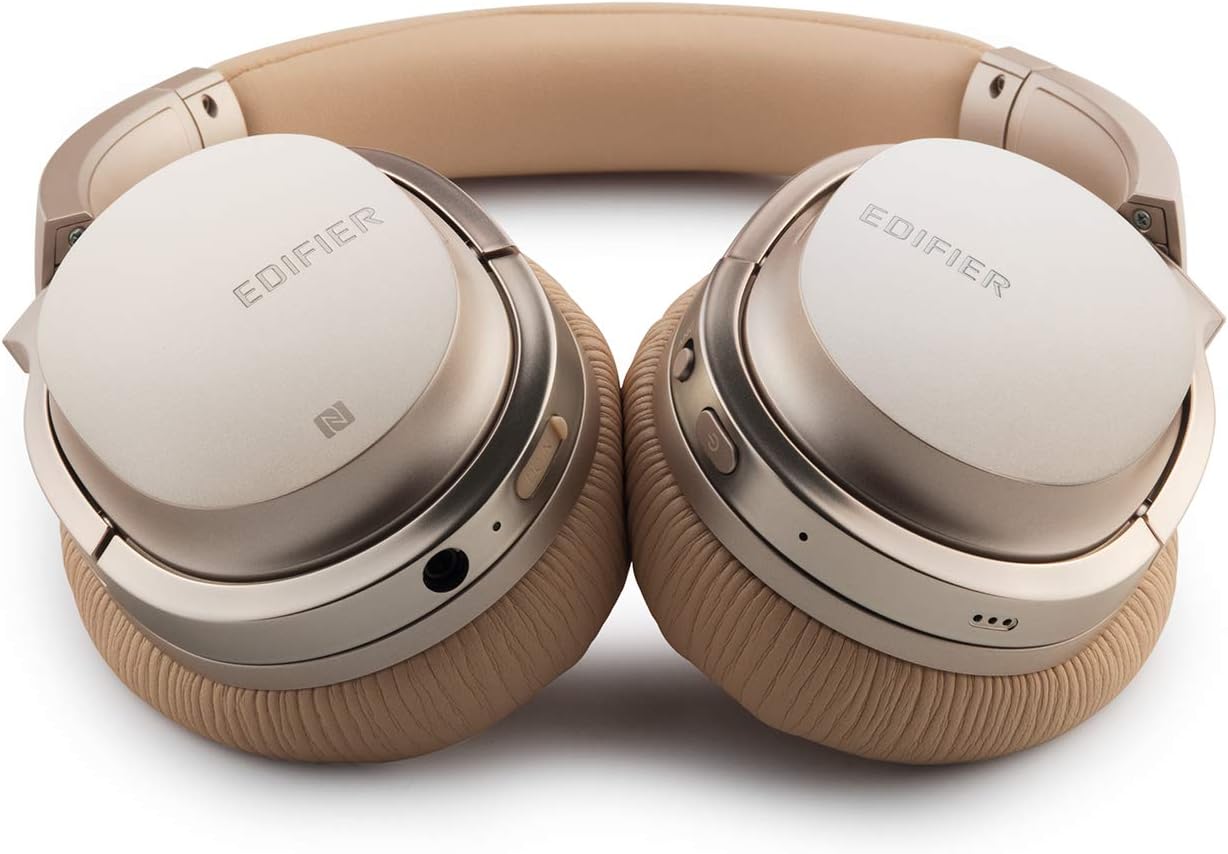
Image: A detailed shot of the right earcup, showing the power button, volume controls, and audio jack.

Image: A close-up on the plush, faux leather earcup, emphasizing the comfort-oriented design.

Image: The adjustable headband mechanism, showing the model designation 'W860NB' on the side.
4. Tatūnga
4.1 Te Whakataki i nga Waea
Before first use, fully charge your headphones. Connect the provided USB charging cable to the charging port on the headphones and to a USB power source (e.g., computer USB port or wall adapter). The LED indicator will show charging status and turn off when fully charged. A full charge provides approximately 25 hours of playback with both Bluetooth and ANC active, or 45 hours with only wireless use.
4.2 Hiko / Whakaweto
- Hei Whakahiko: Patohia me te pupuri i te paatene hiko kia whiti te tohu LED.
- Hei Whakaweto: Patohia me te pupuri i te paatene hiko kia mutu ra ano te tohu LED.
4.3 Takirua Nihokikorangi
- Me mohio kua weto nga taringa.
- Pēhia, pupuritia hoki te pātene mana mō te 5 hēkona pea tae noa ki te mura o te tohu LED ki te kikorangi me te whero, e tohu ana i te aratau takirua.
- I runga i to taputapu (smartphone, tablet, etc.), whakahohea te Nihokikorangi me te rapu mo nga taputapu e waatea ana.
- Select "Edifier W860NB" from the list of found devices.
- Kia honoa, ka mura mārire te tohu LED ki te kikorangi.
Hononga NFC: If your device supports NFC, simply tap your NFC-enabled phone against the NFC area on the left earcup to pair instantly.
4.4 Hononga Waea
To use the headphones with a wired connection, connect one end of the included 3.5mm audio cable to the audio jack on the headphones and the other end to your audio source. The headphones can be used passively in wired mode even if the battery is depleted.
5. Nga Tohutohu Whakahaere
5.1 Mana Paa Ataata
The right earcup features smart touch controls for convenient operation:
- Runga Runga: Swipe up on the earcup.
- Raro Raro: Swipe down on the earcup.
- Purei/Tatari: Double-tap the earcup.
- Riu Panuku: Swipe forward (towards the front of the earcup).
- Riu o mua: Swipe backward (towards the back of the earcup).
5.2 Whakakahoretanga Hapa Kaha (ANC)
The W860NB headphones feature Active Noise Cancelling technology to reduce ambient noise.
- Whakahohe ANC: Press the ANC button located on the earcup. The ANC indicator light will illuminate.
- Whakawetohia ANC: Pēhia anō te pātene ANC. Ka tineia te rama tohu ANC.
5.3 Whakahaere Waea
When connected to a smartphone, you can manage calls using the headphones:
- Whakautu/Whakamutu Waea: Double-tap the earcup.
- Whakakore Waea: Press and hold the earcup for 2 seconds.
6. Tiaki
- Te horoi: Whakamahia he kakahu ngohengohe, maroke hei horoi i nga taringa. Kaua e whakamahi i nga kai horoi me nga whakarewa.
- Rokiroki: When not in use, store the headphones in the provided clamshell case to protect them from dust and damage. Avoid storing in extreme temperatures.
- Tiaki Pūhiko: Hei whakaroa i te ora o te pākahiko, kaua e tukua kia pau katoa te pākahiko i ngā wā katoa. Whakautua ngā paneoro i ia wā, ahakoa kāore e whakamahia ana mō ngā wā roa.
- Ātete wai: Ko enei taringa kaore i te wai atete. A ape i te rongo ki te wai.
7. Te Raru
| Raruraru | Take pea | Rongoā |
|---|---|---|
| Karekau e kaha ana nga waea. | Kua iti, kua pau ranei te pākahiko. | Me utu katoa nga taringa. |
| Kaore e taea te hono ki te taputapu. | Ko nga taringa kaore i te aratau takirua; pūrere Nihokikorangi weto; he maha rawa nga taputapu takirua. | Ensure headphones are in pairing mode (flashing blue/red). Turn device Bluetooth off/on. Clear Bluetooth list on device or headphones. |
| Karekau he tangi. | He iti rawa te rōrahi; puna ororongo hē; nga taringa kaore i te hono. | Increase volume on headphones and device. Ensure headphones are properly paired or wired. Check audio output settings on device. |
| Ko te ANC kaore e mahi pai. | ANC kaore i te whakahohe; nui rawa te haruru o te taiao. | Me mohio kei te whakahohehia te ANC (kei te rama tohu). Ko te ANC he tino whai hua mo te iti-auau, te haruru tonu. |
| Kāore ngā mana pā e aro mai. | Temporary software glitch; dirty earcup surface. | Power off and on the headphones. Clean the earcup surface with a soft, dry cloth. |
8. Whakatakotoranga Hangarau
| Āhuahira | Whakatakotoranga |
|---|---|
| Ingoa Tauira | ed-w860nb-gold-us-fbm |
| Hangarau Hononga | Ahokore (Nihokikorangi) |
| Hangarau Whakawhitiwhiti Ahokore | Nihokikorangi 4.0 |
| Pooro Jack | 3.5 mm Jack |
| Mana Haruru | Whakakore Haruru Hohe |
| Tikanga Mana | Paa |
| Momo Atekōkiri Ororongo | Atekōkiri Hihiko |
| Awhe Auautanga | 20 Hz - 20,000 Hz |
| Hanga Whakatangitangi | Ki runga Taringa |
| Tauwehe Puka | Ki runga Taringa |
| Rauemi | Kirihou |
| Tae | Koura |
| Taumaha Tūemi | 1.76 pauna (800 Karamu) |
| Hunga Hua | 10 x 4 x 11 inihi |
| Pūhiko | 1 He pākahiko e hiahiatia ana |
| UPC | 875674004438 |
| Kaihanga | Kaiwhakatika |
| Te Ra Tuatahi Wātea | Maehe 27, 2019 |
9. Raihana me te Tautoko
9.1 Nga Korero Whakaputanga
The Edifier W860NB headphones come with a 1-year US and Canada Warranty. Please retain your proof of purchase for warranty claims. For specific terms and conditions, refer to the warranty card included with your product or visit the official Edifier webpae.
9.2 Tautoko Kiritaki
For further assistance, technical support, or inquiries regarding your Edifier W860NB headphones, please visit the official Edifier support website or contact their customer service department. Contact details can typically be found on the Edifier webte waahi kei roto ranei i te kohinga hua.


