Kupu Whakataki
This manual provides instructions for the safe and effective use of your Spigen S540 Selfie Stick Tripod. Please read this manual thoroughly before operating the device and retain it for future reference.
Ka mutu te huaview
The Spigen S540 is a versatile 2-in-1 device designed to function as both a selfie stick and a tripod, featuring a wireless Bluetooth remote for convenient photo and video capture.
Āhuatanga matua:
- Innovative tripod-base design for hands-free photos and videos.
- Bluetooth connection with a wireless remote for easy control.
- Quick 45-minute charge for the remote with built-in sleep & quick wake function.
- 360-degree rotation for both portrait and landscape orientations.
- Lightweight yet durable aluminum body for portability.
- Adjustable phone clamp compatible with devices from 2.1" to 3.4" width.
Waehanga:
- Selfie Stick/Tripod Unit
- Mamao Nihokikorangi Ahokore
- Micro USB Charging Cable (for remote)
- Pukapuka Kaiwhakamahi (tenei tuhinga)

Image: The Spigen S540 device shown in both its extended selfie stick configuration and its tripod configuration, demonstrating its dual functionality.

Image: Illustration of the Spigen S540 being used as a tripod for a group photo and as a selfie stick for an individual shot, highlighting its 2-in-1 combination feature.

Image: The package contents including the Spigen S540 Selfie Stick Tripod, a Micro USB charging cable, and a user manual.
Tatūnga
1. Charging the Remote Control:
- Locate the Micro USB charging port on the side of the wireless remote.
- Connect the provided Micro USB cable to the remote and a USB power source (e.g., computer, wall adapter).
- The remote typically charges in approximately 45 minutes. A full charge provides extended usage.
2. Pairing the Bluetooth Remote:
- Me whakarite kua utua te mana mamao.
- Patohia me te pupuri i te paatene i runga i te mana mamao kia timata ra ano te rama tohu ki te kanapa, e tohu ana kei te aratau takirua.
- On your smartphone (iOS or Android), navigate to your Bluetooth settings.
- Rapua available devices and select "Spigen S540" or a similar name.
- Once paired, the indicator light on the remote will stop flashing and remain solid or turn off, depending on the model.
- The remote will automatically reconnect to your device when turned on and within range after initial pairing.

Image: A hand holding the wireless Bluetooth remote control, with a phone mounted on the selfie stick tripod in the background, illustrating the remote's function.
3. Attaching Your Smartphone:
- Gently pull apart the spring-loaded phone clamp at the top of the stick.
- Me ata whakauru to waea atamai ki te clamp, me te whakarite kia mau tonu. Ko te clamp is adjustable for phones between 2.1 inches and 3.4 inches in width.
- Ensure the phone is centered to maintain balance, especially when using the tripod function.

Image: Two smartphones of different sizes mounted in the Spigen S540 phone clamp, demonstrating its adjustable compatibility from 2.1 to 3.4 inches.
Nga Tohutohu Whakahaere
Using as a Selfie Stick:
- With your phone securely attached, extend the telescopic aluminum rod to your desired length (up to 38 inches).
- Hold the handle firmly and use the Bluetooth remote to capture photos or start/stop video recording.
Using as a Tripod:
- Kimihia nga waewae tripod ki te take o te kakau.
- Tuwhera marietia nga waewae e toru ki waho kia kati ra ano, ka hanga he turanga pumau.
- Whakanohoia te tripod ki runga i te mata papatahi, pumau.
- Extend the telescopic rod to adjust the height as needed.
- Use the Bluetooth remote to capture photos or videos from a distance.

Image: The Spigen S540 Selfie Stick Tripod deployed in tripod mode with a smartphone mounted, ready for hands-free use.
Adjusting Phone Orientation:
- The phone holder allows for 360-degree rotation. Loosen the adjustment knob if present, rotate your phone to portrait or landscape mode, and then tighten to secure.
- Ko te waea clamp itself can also be tilted up to 295 degrees to achieve the desired angle.

Image: A smartphone mounted on the Spigen S540, demonstrating the ability to switch between landscape and portrait orientations for photography.

Image: An illustration showing the Spigen S540 phone holder's ability to rotate up to 295 degrees, allowing for flexible camera angles.
Te tiaki
- Te horoi: Horoia te taputapu ki te kakahu ngohengohe, maroke. A ape i te whakamahi i nga matū kino, i nga horoi horoi ranei.
- Rokiroki: When not in use, collapse the selfie stick and fold the tripod legs. Store in a cool, dry place away from direct sunlight and extreme temperatures.
- Te Tiaki Pūhiko (Mamao): Recharge the remote control regularly, even if not frequently used, to maintain battery health. Avoid fully depleting the battery for extended periods.
Raparongoā
- Mana Mamao Kaore i te Tauhoa:
- Me mohio kei te utuhia te mamao.
- Me mohio kei te whakahohea te Nihokikorangi i runga i to waea atamai.
- Turn off and on the remote, then try pairing again.
- Warewaretia te pūrere i ngā tautuhinga Nihokikorangi o tō waea, ka hono anō.
- Kia tino mohio kei te pokanoa ētahi atu taputapu Nihokikorangi.
- Remote Not Triggering Camera:
- Confirm the remote is successfully paired with your phone.
- Check your phone's camera settings; some phones may require specific settings for external shutter buttons.
- Ensure your phone's volume buttons are not set to control zoom instead of shutter.
- Te kore pumau o te tūru:
- Me whakarite kia tino totoro ngā waewae o te tūāpapa, kia mau hoki ki tōna tūranga i runga i te mata papatahi, pumau.
- Avoid extending the telescopic rod to its maximum length with heavier phones, as this can affect stability.
- Center your phone securely in the clamp kia rite te tohatoha taumaha.
- Be mindful of wind or uneven surfaces when using the tripod outdoors.
Whakatakotoranga
| Āhuahira | Taipitopito |
|---|---|
| Waitohu | Spigen |
| Ingoa Tauira | S540 |
| Tau tauira | 000SS24111 |
| Rauemi | Konumohe |
| Ahu Hua (Kopa) | 25.4 x 5.08 x 38.1 cm (approx. 8.2 inches folded length, 38 inches extended) |
| Taumaha Tūemi | 280 g |
| Pūrere Hototahi | iOS/Android smartphones (2.1" to 3.4" width) |
| Nga waahanga motuhake | Wireless Remote, 360-degree Rotation, Tripod Stand |
| Pūhiko (Mamamao) | 1 Lithium Ion battery (required for remote) |
| Charging Time (Remote) | Approx. 45 meneti |
| Whenua Taketake | Haina |
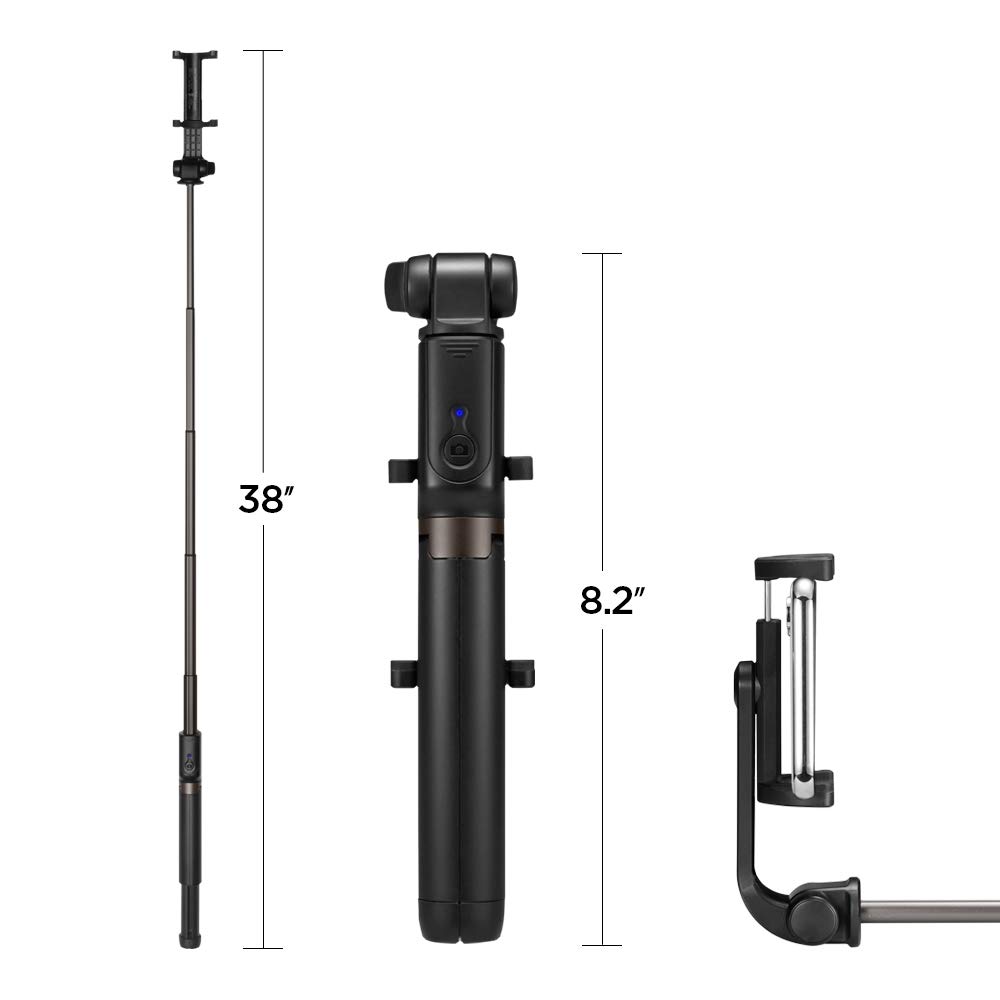
Image: Diagram illustrating the dimensions of the Spigen S540, showing its extended length of 38 inches and folded length of 8.2 inches.
Pūtāhui me te Tautoko
Spigen products are manufactured to high-quality standards. For warranty information or technical support, please refer to the official Spigen website or contact Spigen customer service directly. Keep your purchase receipt as proof of purchase.
Manufacturer/Importer: Spigen India Private Limited


