Kupu Whakataki
This manual provides instructions for the ZdalaMit RC282 Replacement Remote Control, designed for use with various TCL Roku TV models. This remote control offers a straightforward solution for replacing your original remote without the need for complex programming.
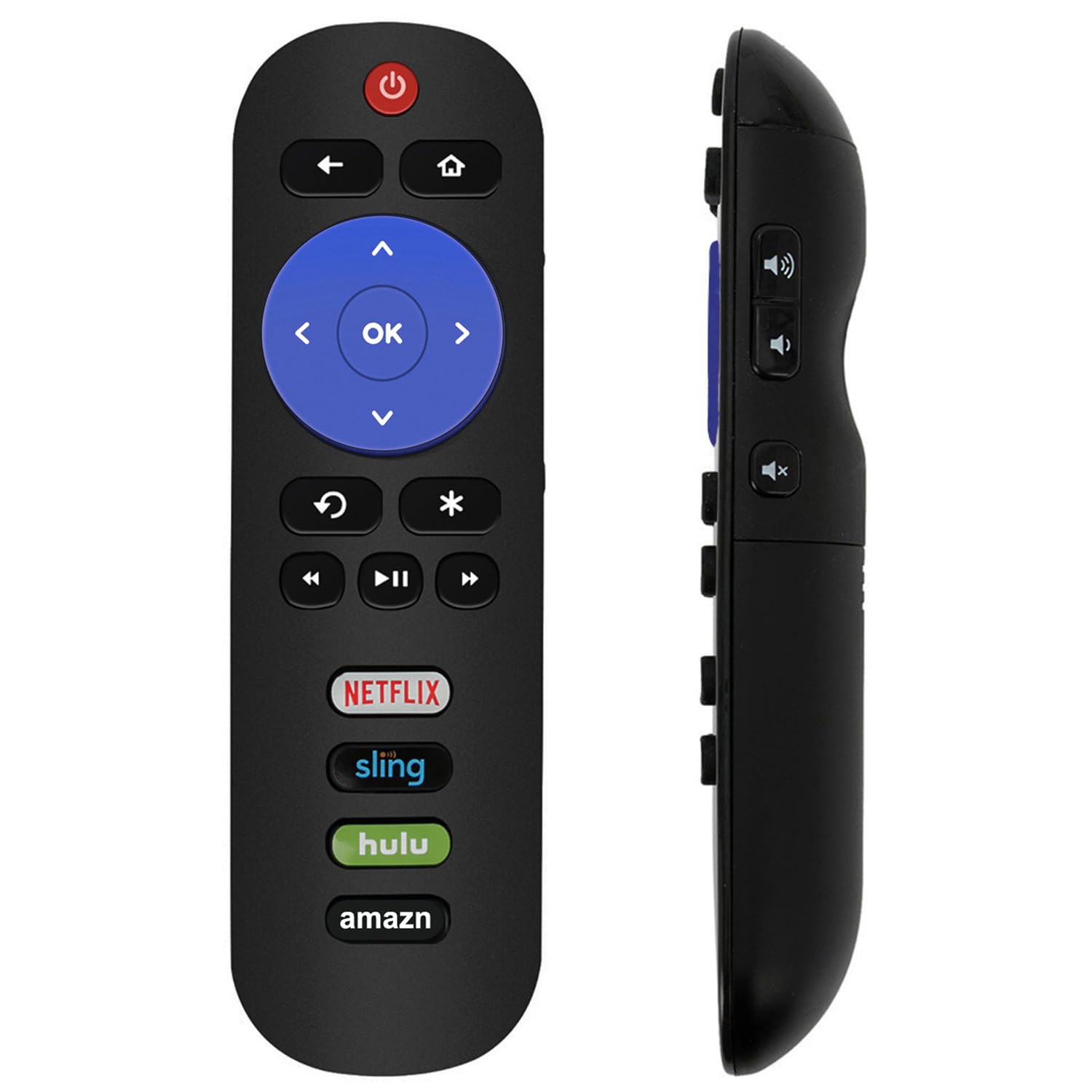
Whakaahua: Mua view of the ZdalaMit RC282 Replacement Remote Control, showing all buttons including power, navigation, and dedicated app buttons.
Tatūnga
The ZdalaMit RC282 remote control is pre-programmed and does not require any additional setup or pairing with your TCL Roku TV. Simply install the batteries, and it will be ready for use.
- Whakatuwheratia te Wāhanga Pūhiko: Locate the battery compartment cover on the back of the remote control. Slide or press the latch to open it.
- Kōkuhu Pūhiko: Insert two (2) 1.5V AAA alkaline batteries into the compartment. Ensure the positive (+) and negative (-) terminals align correctly with the indicators inside the compartment.
- Katia te Wāhanga Pūhiko: Whakakapihia te uhi o te wahanga pākahiko, kia pai te pao ki te waahi.
- Whakamātauria te Mamao: Point the remote control towards your TCL Roku TV and press the Power button. The TV should respond.
Kia mōhio: Kāore ngā pākahiko i roto i te mana mamao.

Whakaahua: Koki view of the ZdalaMit RC282 Remote Control, highlighting its ergonomic design.
Nga Tohutohu Whakahaere
The ZdalaMit RC282 remote control provides standard functions for navigating your TCL Roku TV. Familiarize yourself with the button layout for optimal use.
- Pātene Hiko (⏻): Ka whakakā, whakaweto rānei i te pouaka whakaata.
- Pātene Whakamuri (←): Ka hoki ki te mata o mua, ki te tahua ranei.
- Pihi Kaainga (⌂): Ka whakatere ki te mata Kāinga o Roku.
- Papa Aronga (Runga, Raro, Mauī, Matau): Used to navigate through menus and content.
- Pene OK: Selects highlighted items or confirms actions.
- Whakahoki (◀◀), Purei/Whakamutu (▶⏺), Tere Whakamua (▶▶): Whakahaerehia te purei pāpāho.
- Replay Button (↺): Ka peke whakamuri mo etahi hēkona i roto i te purei ataata.
- Star Button (*): Accesses options or settings within certain apps or menus.
- Patene Runga / Raro: Located on the side of the remote, control the TV's volume.
- Patene Whakakore: Located on the side of the remote, mutes or unmutes the TV audio.
- Dedicated App Buttons (Netflix, Sling, Hulu, Amazon): Provide quick access to these streaming services.

Image: A hand holding the ZdalaMit RC282 Remote Control, pointing towards a TCL Roku TV, demonstrating typical usage.
Te tiaki
Mā te tiaki tika ka roa te ora me te mahi tino pai o tō mana mamao.
- Whakakapinga Pūhiko: Whakakapia ngā pākahiko ina puhoi te urupare a te mana mamao, ina mutu rānei te mahi. Whakakapia ngā pākahiko e rua i te wā kotahi ki ngā pākahiko kawakore 1.5V AAA hou. Kaua e whakaranua ngā pākahiko tawhito me ngā pākahiko hou, ngā momo pākahiko rerekē rānei.
- Te horoi: Use a soft, dry cloth to clean the surface of the remote control. For stubborn dirt, slightly dampen the cloth with water or a mild cleaning solution, then wipe dry immediately. Avoid using harsh chemicals or abrasive cleaners.
- Rokiroki: Penapenahia te mana mamao ki te wāhi hauhautanga, maroke, kia matara atu i te rā tika me te pāmahana tino kino. Ki te kore e whakamahia te mana mamao mō te wā roa, tangohia ngā pākahiko hei ārai i te turuturu.
Raparongoā
If you encounter issues with your ZdalaMit RC282 remote control, refer to the following common solutions:
| Raruraru | Rongoā |
|---|---|
| Karekau a Mamao i te whakautu. |
|
| Kāore ētahi pātene e mahi ana. |
|
| Remote does not control Roku player/box/stick. | This ZdalaMit replacement remote is designed specifically for TCL Roku TVs and is kore hototahi with standalone Roku players, Roku boxes, or Roku sticks. Please ensure your device is a TCL Roku TV. |
Whakatakotoranga
| Āhuahira | Taipitopito |
|---|---|
| Hunga Hua | 6 x 1.5 x 0.5 inihi (tata ki te 15.24 x 3.81 x 1.27 cm) |
| Taumaha Tūemi | 1.25 hekere (tata ki te 35.4 karamu) |
| Tuku Hiko | 2 x 1.5V AAA Pūhiko Kawakore (kāore i roto) |
| Hototahi | TCL Roku TV models, including: 32S301, 40FS3700, 55S401, 65S401, 43S403, 49S403, 55S403, 65S403, 43S515, 49S515, 55S515, 65S515, 49S405, 32S305, 40FS4610R, 43S405, 32S3750, 40S305, 43S305, 55S405, 32FS4610R, 32S800, 32S3850B, 55R615, 65R615, 55P605, 55C803, 65C803, 75C803, 40S303, 43S303, 49S303, 40S3750, 48S3750, 55S3750, 40S3800, 55US57, 50UP120, 28S3750, 49S305, 65S405, 50FS3800, 40FS3750, 32S3850P, 40FS3850, 50FS3850, 50S3800, 50FS3750, 55FS3800, 50FS3700, 50FS3750, 32FS3700, 43FP110, 49FP110, 55FS3850, 40FS3800, 48FS3750, 55FS4610R, 55UP120, 32S4610R, 55US5800, 65US5800, 55FS3750, 32S3700, 32S3800, 48FS3700, 48FS4610R, 55FS3700, 32S850, 32S3850, 32S3850A, 28S305. |
| Āhuahira Motuhake | Pre-Programmed (No pairing required) |

Image: ZdalaMit RC282 Remote Control shown with its approximate dimensions (length, width, thickness).
Pūtāhui me te Tautoko
While specific warranty details are not provided, for any questions or concerns regarding your ZdalaMit RC282 Replacement Remote Control, please contact the seller or manufacturer directly. They can provide assistance with product inquiries, troubleshooting, or potential replacements.
For support, refer to the contact information provided at the point of purchase or on the product packaging.


