Kupu Whakataki
Mauruuru koe mo te hokoasing the VONYX AM8A 8-Channel Mixer Amplifier. This integrated mixer and amplifier unit is designed for professional sound reinforcement applications, offering 8 input channels, a powerful 1000W amplifier, Bluetooth connectivity, MP3/USB/SD playback, and 16 digital effects. Please read this manual thoroughly to understand the product's features and ensure safe and optimal operation.
Nga Tohutohu Haumaru
- Tuku Hiko: Connect the unit only to a grounded mains outlet with the specified voltage (230Vac/50Hz). Ensure the power cord is not damaged or pinched.
- makuku: Do not expose the unit to rain, moisture, dripping, or splashing liquids. Do not place objects filled with liquids on the unit.
- Whakahau: Ensure adequate ventilation. Do not block ventilation openings. Avoid placing the unit on soft surfaces that may obstruct airflow.
- wera: Tiakina te waeine mai i nga puna wera penei i nga radiators, nga rehita wera, nga umu, me etahi atu taputapu e whakaputa wera ana.
- Ratonga: Kaua e ngana ki te mahi i a koe ake. Tukuna nga ratonga katoa ki nga kaimahi ratonga whai tohu.
- Te horoi: Disconnect the unit from the power supply before cleaning. Use a dry cloth for cleaning.
- Turanga: Whakanohoia te waeine ki runga i te mata papatahi kia kore ai e taka.
Ka mutu te huaview
The VONYX AM8A combines an 8-channel mixer with a powerful amplifier, offering versatile audio control and output capabilities. Key features include:
- Integrated 2x 500W (4 Ohm) / 2x 300W (8 Ohm) power ampkaikawe
- Built-in MP3 player with USB and SD card slots.
- Bluetooth receiver for wireless audio streaming.
- +48V Phantom power for condenser microphones.
- He pūtāhui whakairoiro 5-roopu mō te putanga matua.
- DSP with 16 digital effects.
- PFL (Pre-Fader Listen) function per channel.
- Multiple input options: XLR microphone, 6.3mm jack line, RCA line.
- Tone control (Hi/Low) per channel.
- Speaker outputs (6.3mm jack) and XLR line outputs.

Whakaahua 1: Mua view of the VONYX AM8A 8-Channel Mixer Amplifier, showing all input channels, controls, and the master section.

Whakaahua 2: Close-up of the VONYX AM8A's graphic equalizer and master controls, including the DSP effects section.
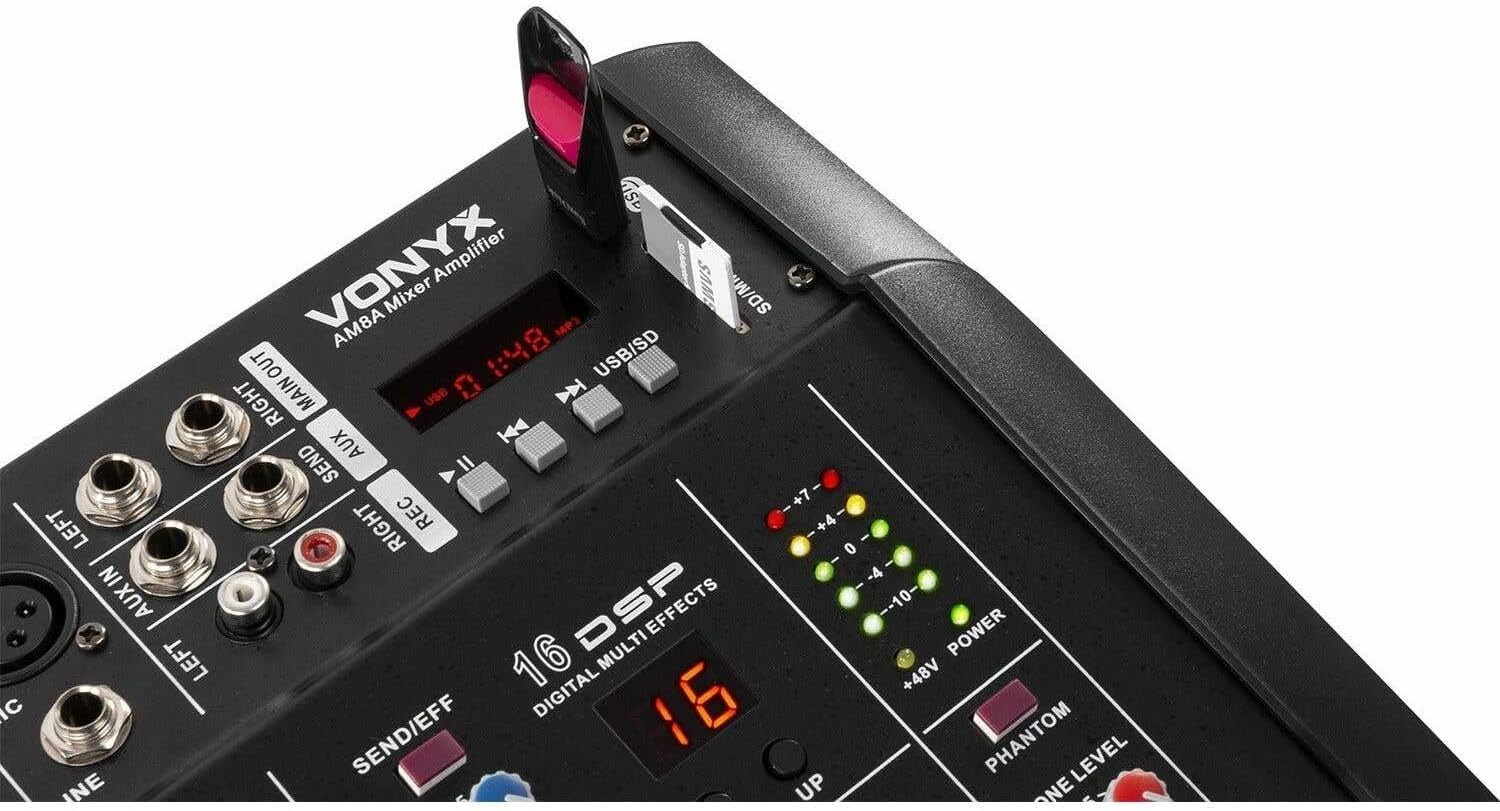
Whakaahua 3: Detail of the integrated MP3 player with USB and SD card slots, and Bluetooth functionality on the VONYX AM8A.
Tatūnga
1. Te wetewete
Carefully remove the mixer amplifier from its packaging. Inspect the unit for any signs of damage during transit. Retain the original packaging for future transport or storage.
2. Hononga Mana
- Me whakarite kei te tūranga OFF te pana hiko i te papa o muri.
- Connect the supplied power cable to the AC IN socket on the rear panel of the mixer ampkaikawe
- Plug the other end of the power cable into a suitable grounded 230Vac/50Hz mains outlet.
3. Hononga Whakauru
The AM8A features 8 input channels, each with XLR microphone inputs and 6.3mm jack line inputs. Additional RCA inputs are available for stereo sources.
- Pūorooro: Connect microphones to the XLR inputs (CH1-CH8). If using condenser microphones, activate the +48V Phantom Power switch (located near the master section) after all microphones are connected and before powering on.
- Pūrere Taumata Raina: Connect instruments, keyboards, or other line-level devices to the 6.3mm jack inputs (CH1-CH8). For stereo sources, use the RCA inputs.
4. Hononga Huaputa
Connect your passive speakers and monitoring devices to the appropriate outputs.
- Kaikōrero: Connect passive speakers to the 6.3mm jack SPEAKER OUTPUTS (LEFT and RIGHT) on the rear panel. Ensure the impedance of your speakers matches the amplifier's specifications (4-8 Ohm).
- Waho Amplifiers/Recording Devices: Use the XLR MAIN OUTPUTS (LEFT and RIGHT) to connect to external power amphe taputapu rekoata ranei.
- Pūoro: Plug headphones into the 6.3mm jack HEADPHONES output on the front panel for monitoring.

Whakaahua 4: Rear panel of the VONYX AM8A, showing power input, main outputs, and speaker outputs.
Nga Tohutohu Whakahaere
1. Te Whakakaha/Weto
- Before powering on, ensure all channel faders and the main fader are set to their minimum positions.
- Flip the POWER switch on the rear panel to the ON position.
- To power off, reverse the process: lower all faders, then switch off the unit.
2. Channel Controls (CH1-CH8)
- MAU: Adjusts the input sensitivity for each channel. Set this to achieve a strong signal without clipping (distortion).
- HI/LOW EQ: He pūtāhui rua-roopu hei whakarite i ngā auau teitei me ngā auau iti o ia hongere.
- EFF: Controls the amount of signal sent to the internal DSP effects processor.
- PAN: Adjusts the stereo position (left to right) of the channel's signal.
- PFL: (Pre-Fader Listen) Activates monitoring of the channel's signal through headphones, independent of the channel fader.
- TE WHAKAMĀRAMA O TE HONGERE: Controls the output level of each individual channel to the main mix.
3. Ngā Mana Matua
- MAIN FADER (L+R): Controls the overall output volume of the mixer ampkaikawe
- WAea: Whakaritea te rōrahi o te putanga o te taringa.
- GRAPHIC EQUALIZER: A 5-band equalizer (70Hz, 250Hz, 1KHz, 4KHz, 12KHz) to fine-tune the overall frequency response of the main mix.
- DSP EFFECTS: Select from 16 digital effects using the 'UP' and 'DOWN' buttons. Adjust the 'EFF LEVEL' knob to control the wet/dry mix of the effects.
- +48V PHANTOM: Ka whakahohe i te mana mariko mō ngā hopuoro whakapūmau e hono ana ki ngā tāurunga XLR.
4. MP3/USB/SD Player & Bluetooth
The integrated media player supports USB drives and SD cards for MP3 playback, and also features Bluetooth connectivity.
- Whakahoki USB/SD: Insert a USB drive or SD card into the respective slot. The unit will automatically detect and begin playing compatible audio files. Use the transport controls (Play/Pause, Skip) to navigate.
- Tauira Nihokikorangi: Activate Bluetooth on your mobile device. Select 'VONYX AM8A' from the list of available devices. Once paired, you can stream audio wirelessly to the mixer ampkaikawe
- Kōwhiringa Aratau: Use the 'MODE' button to switch between USB, SD, and Bluetooth input sources.
Te tiaki
- Te horoi: Regularly clean the unit with a soft, dry, lint-free cloth. Do not use abrasive cleaners, solvents, or chemical sprays.
- Whakahau: Ensure the ventilation grilles are free from dust and debris to maintain proper cooling.
- Rokiroki: When not in use for extended periods, store the unit in a cool, dry place, preferably in its original packaging, away from direct sunlight and extreme temperatures.
- Whakaha Uepu: Puritia nga taura kia kore e pakaru, kia kore e pakaru.
Raparongoā
| Raruraru | Take pea | Rongoā |
|---|---|---|
| Karekau he kaha | Power cable disconnected; Power switch off; Blown fuse | Check power cable connection; Ensure power switch is ON; Replace fuse if necessary (refer to qualified technician). |
| Kaore he putanga oro | Main fader down; Channel fader down; Speaker cables disconnected/faulty; Incorrect input selection; Amparatau tiaki whakamātao | Raise main and channel faders; Check speaker connections; Verify input source; Power cycle the unit. |
| Oro kerekere | Input gain too high; Output level too high; Faulty cable/speaker | Reduce input GAIN; Lower main fader; Check all cables and speakers. |
| Kaore e mahi ana te hopuoro | Microphone not connected; Phantom power off (for condenser mics); Channel fader down; Faulty microphone/cable | Check microphone connection; Activate +48V Phantom Power; Raise channel fader; Test with another microphone/cable. |
| Nihokikorangi kore hono | Bluetooth not enabled on device; Unit not in Bluetooth mode; Device too far | Ensure Bluetooth is active on your device; Press MODE button to select Bluetooth; Move device closer to the mixer. |
Whakatakotoranga
| Āhuahira | Whakatakotoranga |
|---|---|
| Tau tauira | 172.574 |
| Power Output (4 Ohm) | 2x 500W |
| Power Output (8 Ohm) | 2x 300W |
| Awhe Auautanga | 20 Hz - 20 KHz |
| THD (Tapeke Harmonic Distortion) | <0.1% |
| EQ Kia ora | ± 15 dB / 12 kHz |
| EQ Lo | ± 15 dB / 70 Hz |
| Raukaha Whakauru Raina | +5dB ~ -40dB |
| Maharahara Whakauru Mic | -15dB ~ -60dB |
| Taumata Putanga | +12 dB (3 V) |
| Putanga Puoro | 300mW @ 32 Ohm |
| Hononga Voltage | 230Vac / 50Hz |
| Ahu (L x W x H) | 320 x 300 x 140 mm |
| Taumaha | 12 kg |
| Te maha o nga hongere | 8 |
| Hangarau Hononga | USB, Nihokikorangi |
| Ororongo Whakauru | XLR, RCA, 6.35mm Jack, USB |
| Momo Tuhono Huaputa | XLR, 6.35mm TRS |
Pūtāhui me te Tautoko
VONYX products are designed for reliability and performance. For warranty information, please refer to the terms and conditions provided at the point of purchase or contact your local VONYX dealer. For technical support or service inquiries, please visit the official VONYX webpaetukutuku, whakapā atu ranei ki ta raatau tari ratonga kaihoko.


