1. Hua Neke Atuview
The Compex Mini Wireless Electric Muscle Stimulator is a compact and portable device designed to assist active individuals with muscle stimulation for workouts, training, and recovery. It utilizes EMS (Electrical Muscle Stimulation) and TENS (Transcutaneous Electrical Nerve Stimulation) technologies to help manage muscle soreness, increase blood circulation, loosen stiff muscles, and temporarily reduce pain. The device connects wirelessly to your smartphone via a dedicated mobile application for easy control and program selection.

Image 1.1: Compex Mini Wireless pods alongside a smartphone, illustrating the device's compact design and app connectivity.
2. Ihirangi mokete
Verify that all the following items are included in your Compex Mini Wireless package:
- Two (2) Compex Mini Wireless Pods
- Electrode Pads (various sizes)
- Uira Uira (USB)
- Pukapuka Kaiwhakamahi (tenei tuhinga)

Image 2.1: Contents of the Compex Mini Wireless package, showing the pods, electrode pads, and charging cable.
3. Aratohu Tatūnga
- Charge the Pods: Connect the charging cable to the Compex Mini Wireless pods and a USB power source. The indicator lights on the pods will show charging status. A full charge provides up to seven hours of use.
- Tikiake i te Taupānga: Rapua the "Compex Mini" app on your smartphone's app store (Apple App Store for iOS or Google Play Store for Android) and install it.
- Tauhoa me te Waea atamai: Open the Compex Mini app. Ensure Bluetooth is enabled on your smartphone. Turn on the Compex Mini pods by pressing the power button. Follow the in-app instructions to pair the pods with your smartphone.
- Attach Electrode Pads: Securely attach the electrode pads to the designated connectors on the pods. Ensure the pads are clean and have good adhesive quality for optimal performance.
4. Nga Tohutohu Whakahaere
The Compex Mini Wireless offers six unique programs to help you achieve your fitness goals. All operations are controlled via the smartphone application.
- Kōwhiria he Kaupapa: From the main screen of the Compex Mini app, navigate to the "Programs" section. Choose the desired program based on your activity or recovery needs (e.g., Warm-up, Endurance, Resistance, Recovery, Pain Relief, Massage).
- Hoatu Papa: Place the electrode pads on the target muscle group according to the pad placement guidelines provided within the app or in the included quick start guide. Ensure good skin contact.
- Tīmata Wātū: Once the program is selected and pads are applied, press the "Start" button in the app.
- Whakaritea te Kaha: Gradually increase the intensity using the "+" button in the app until you feel a strong, comfortable muscle contraction. Decrease intensity with the "-" button if the sensation becomes uncomfortable. The intensity can also be adjusted directly on the pods using the physical buttons.
- Aroturuki i te ahunga whakamua: The app displays the remaining time for your session and the current intensity level. You can pause or stop the session at any time.
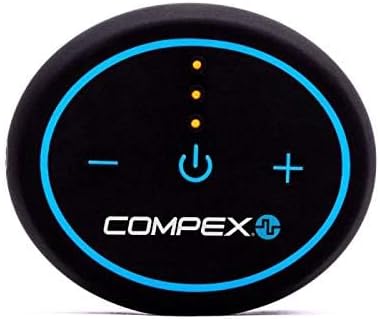
Image 4.1: Detail of the Compex Mini Wireless pod, highlighting the power and intensity adjustment buttons.
5. Nga waahi tono
The Compex Mini Wireless can be applied to various muscle groups for different purposes:
- Waewae: Quadriceps, Hamstrings, Calves for strength, endurance, and recovery.
- Nga ringa: Biceps, Triceps for muscle activation and recovery.
- Matua: Abdominals, Lower Back for strengthening and pain relief.
- Pakihiwi: Deltoids, Trapezius for recovery and pain management.

Whakaahua 5.1: Example of Compex Mini Wireless application on arm and abdominal muscles.

Whakaahua 5.2: Example of Compex Mini Wireless application on the thigh.
6. Tiaki
- Cleaning the Pods: Wipe the pods with a soft, damp cloth. Do not use abrasive cleaners or immerse them in water.
- Electrode Pad Care: After each use, place the electrode pads back on their protective plastic film. Store them in a cool, dry place. Replace pads when they lose their adhesiveness or if they become dirty.
- Ora Pūhiko: Recharge the pods regularly to maintain optimal battery performance. Avoid fully discharging the battery for extended periods.
7. Te Raru
| Raruraru | Take pea | Rongoā |
|---|---|---|
| Kaore te taputapu e huri ana | He iti te pākahiko | Charge the pods fully. |
| Kāore e taea te hono atu ki te taupānga | Bluetooth off, pods not in pairing mode, app issue | Ensure Bluetooth is on. Restart pods and app. Try re-pairing. |
| Kāore he kare ā-roto, he ngoikore rānei te kare ā-roto | Pads not adhering, intensity too low, pads worn out | Ensure pads are firmly attached to clean skin. Increase intensity gradually. Replace old pads. |
| Pads losing stickiness | Pads are dirty or old | Clean skin before application. Replace pads as needed. |
8. Whakatakotoranga
- Tau tauira: CX192WI04
- Puna Hiko: 1 pākahiko Lithium Polymer (kei roto)
- Ora Pūhiko: Tae atu ki te 7 haora mo ia utu
- Hononga: Bluetooth (Smartphone Compatible)
- Ahu: Tata ki te 7.05 x 6.18 x 1.93 inihi (Pake)
- Taumaha: Tata ki te 0.4 hekere
- Kaihanga: DonJoy Global
- Te Ra Tuatahi Wātea: Paenga-whāwhā 1, 2019
9. Whakaputanga me nga korero tautoko
For warranty information and customer support, please refer to the official Compex website or contact your retailer. Keep your proof of purchase for any warranty claims. Specific warranty terms and conditions may vary by region.


