1. Kupu Whakataki
The LAUNCH CR319 is a handheld On-Board Diagnostics II (OBD2) code reader designed to assist in diagnosing vehicle engine issues. It provides access to various diagnostic functions to help users identify and clear trouble codes, monitor vehicle performance data, and check emission readiness status. This manual provides detailed instructions for the proper use and maintenance of your CR319 device.
2. Hua Neke Atuview
2.1 Nga waahanga matua
- Ngā Mahi OBD2 Katoa: Tautokohia ngā aratau whakamātautau OBD2 e 10 katoa.
- Whare Pukapuka Rapu DTC: Built-in database with over 3000 code definitions.
- Tautoko reo-maha: Available in English, Portuguese, Russian, Italian, Spanish, French, and German.
- Mono me te Purei: No batteries or charger required; powered directly from the vehicle's OBD2 port.
- Hoahoa Kiato: He ngawari ki te hapai me te penapena.
2.2 Waenga Pūrere
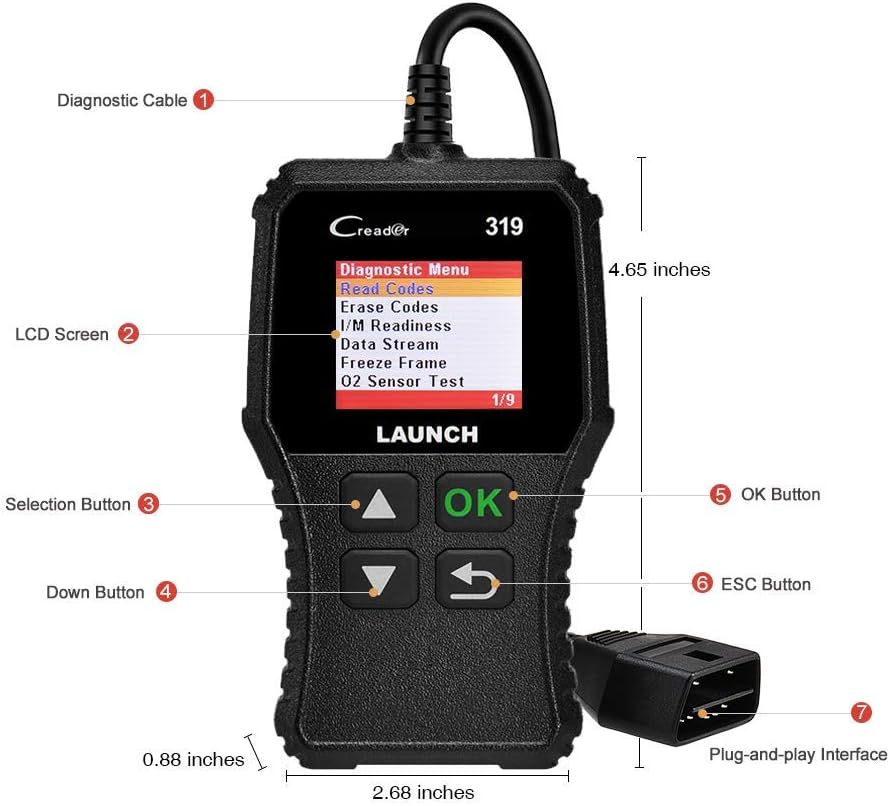
The image above illustrates the main components of the LAUNCH CR319 OBD2 Scanner. Key parts include the Diagnostic Cable (1) for connecting to the vehicle, the LCD Screen (2) for displaying information, Selection Buttons (3) for navigation, the Down Button (4), the OK Button (5) for confirmation, the ESC Button (6) to return to the previous screen, and the Plug-and-Play Interface (7) which is the OBD2 connector.
3. Tatūnga
- Kimihia te tauranga OBD2: The OBD2 port is typically located under the dashboard on the driver's side of the vehicle. Refer to your vehicle's owner's manual if you cannot locate it.
- Honoa te Matawai: Plug the CR319's diagnostic cable connector firmly into the vehicle's OBD2 port. The device will power on automatically.
- Tīmatahia te Waka: Turn the vehicle's ignition to the 'ON' position (engine off) or start the engine, depending on the diagnostic function you intend to perform.
4. Nga Tohutohu Whakahaere
After connecting the CR319 to your vehicle, the main menu will appear. Use the Up/Down selection buttons to navigate through the options and the OK button to confirm a selection. The ESC button returns to the previous screen.
4.1 Panui Waehere
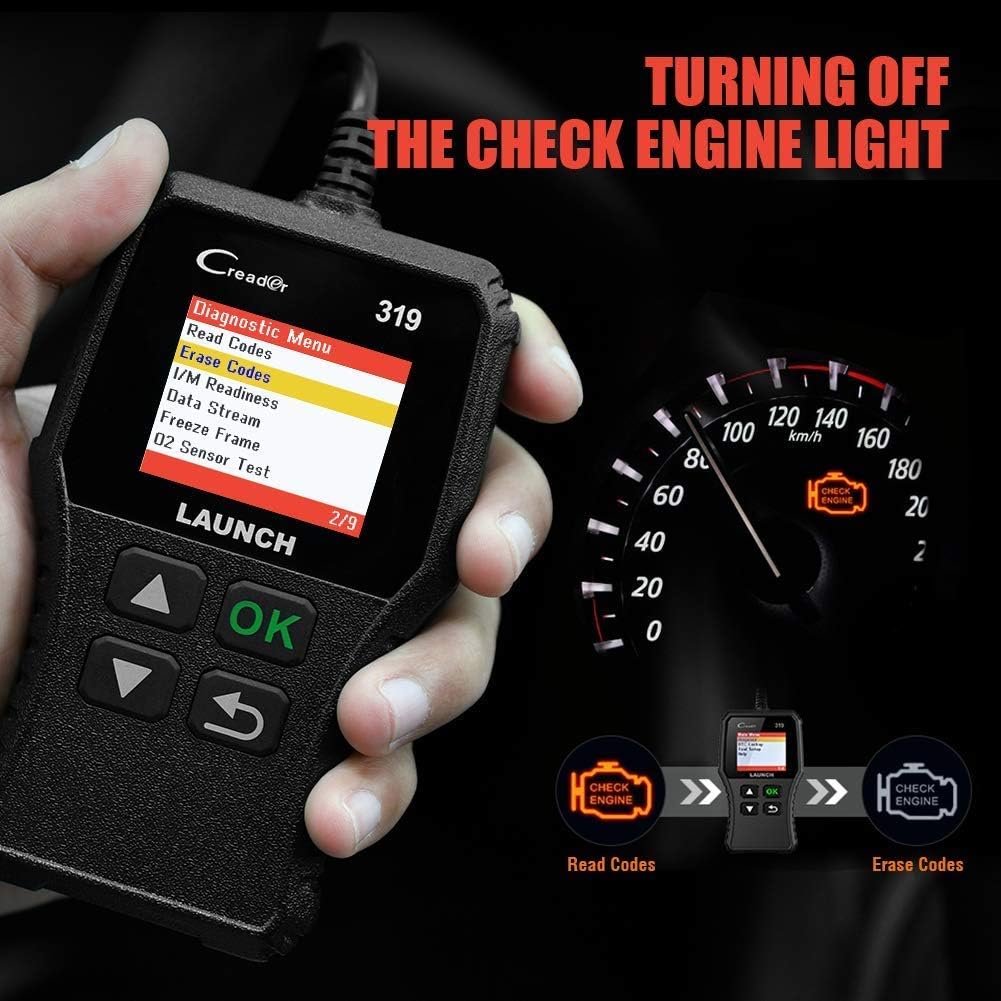
Ka tikina e tēnei mahi ngā Waehere Raru Tātaritanga (DTC) mai i te rorohiko o te waka. E tohu ana ēnei waehere i ngā take motuhake kua kitea e te pūnaha tātaritanga-ā-roto o te waka.
- Mai i te tahua matua, tohua 'Diagnose'.
- Tīpakohia 'Pānuihia ngā Waehere'.
- The scanner will display any stored, pending, or permanent codes along with their descriptions.
4.2 Maama Waehere
This function erases DTCs from the vehicle's computer and turns off the Check Engine Light (MIL). Ensure any underlying issues are resolved before clearing codes, as they may reappear.
- Mai i te tahua matua, tohua 'Diagnose'.
- Tīpakohia 'Mukua ngā Waehere'.
- Confirm the action when prompted. The Check Engine Light should turn off.
4.3 Ahau / M Te hihiko
This function checks the status of the vehicle's emission-related monitoring systems to determine if they are ready for an emissions test.
- Mai i te tahua matua, tohua 'Diagnose'.
- Tīpakohia 'Te Ritenga o Au/Āku'.
- The screen will display the status of various monitors (e.g., Misfire Monitor, Fuel System Monitor). 'OK' or 'Complete' indicates the monitor has run and passed; 'INC' or 'Incomplete' means the monitor has not yet run or completed its diagnostic cycle.
4.4 Data Stream (Live Data)

This function displays real-time operational data from the vehicle's engine control unit (ECU). This data can include engine RPM, vehicle speed, oxygen sensor readings, coolant temperature, and more.
- Mai i te tahua matua, tohua 'Diagnose'.
- Tīpakohia 'Data Stream'.
- Use the Up/Down buttons to scroll through the various data parameters.
4.5 Whakatio Tāpare
When an emission-related fault occurs, the vehicle's computer records a snapshot of operating conditions at the time of the fault. This data is called Freeze Frame data.
- Mai i te tahua matua, tohua 'Diagnose'.
- Tīpakohia 'Freeze Frame'.
- Review ngā tawhā kua tuhia kia mārama ai ki ngā āhuatanga i puta ai te hapa.
4.6 Tirohanga DTC

This feature allows you to manually enter a Diagnostic Trouble Code and view its definition from the scanner's internal database.
- Mai i te tahua matua, tohua 'Raputanga DTC'.
- Use the navigation buttons to input the desired DTC.
- Perehi 'OK' ki view the code definition.
4.7 Other OBD2 Functions
The CR319 also supports the following OBD2 functions, accessible through the 'Diagnose' menu:
- O2 Whakamatau Whakamatau: Retrieves oxygen sensor monitor test results for the most recently completed tests.
- EVAP System Test (Mode 8): Ka tīmata i te whakamātautau o te Pūnaha Whakahaere Tukunga Whakamoho.
- On-Board Monitor Test (Mode 6): Retrieves test results for emission-related powertrain components and systems that are not continuously monitored.
- Mōhiohio Waka: Displays the vehicle identification number (VIN), calibration ID (CALID), and calibration verification number (CVN).
5. Hototahi

The LAUNCH CR319 OBD2 Scanner is compatible with most American, European, and Asian vehicles manufactured from 1996 and newer that are OBDII-compliant. It supports all standard OBDII protocols, including KWP2000, ISO9141, J1850 VPW, J1850 PWM, and CAN (Controller Area Network).
5.1 Supported Vehicles
- 12V Gasoline cars.
- Vehicles compliant with OBDII standards (1996 US-based, 2000 EU-based, and newer Asian cars).
5.2 Not Supported Vehicles
- Diesel cars.
- 24V Heavy duty vehicles.
- Hybrid vehicles.
- Electric vehicles.
6. Whakatakotoranga
| Āhuahira | Whakatakotoranga |
|---|---|
| Tauira | CR319 |
| Whakaatu | LCD Tae |
| Mahinga Mahi Voltage | 9-18V (via OBD2 port) |
| Kawa Tautokohia | KWP2000, ISO9141, J1850 VPW, J1850 PWM, CAN |
| Ahu (L x W x H) | 1.5 x 6 x 10.8 inihi |
| Taumaha | 7.4 hekere |
| Te Waahi Mahi | 0°C ki te 50°C (32°F ki te 122°F) |
| Paemahana Rokiroki | -20°C ki te 70°C (-4°F ki te 158°F) |
| Nga Reo Tautokona | English, Portuguese, Russian, Italian, Spanish, French, German |
7. Te Raru
7.1 Kāore te Pūrere e Whakakā
- Ensure the diagnostic cable is securely connected to the vehicle's OBD2 port.
- Verify the vehicle's ignition is in the 'ON' position or the engine is running.
- Check the vehicle's fuse for the OBD2 port (consult your vehicle's owner's manual).
7.2 Hapa Whakawhitiwhiti Kōrero ki te Waka
- Confirm the vehicle is OBDII-compliant (generally 1996 and newer for gasoline vehicles).
- Ensure the diagnostic cable is properly connected.
- Turn off the ignition, wait 10 seconds, then turn it back to 'ON' and try again.
- If possible, test the scanner on another compatible vehicle to rule out a device malfunction.
7.3 Codes Cannot Be Cleared
- Me whakarite kei te tūranga 'ON' (whakaweto) te mura o te waka.
- If the underlying fault that triggered the code is still present, the code may not clear or will reappear immediately. Address the vehicle's issue first.
8. Tiaki
- Te horoi: Whakamahia he kakahu maeneene, maroke hei horoi i te taputapu. A ape i te kai horoi, te whakarewa ranei.
- Rokiroki: Penapenahia te matawai ki tētahi wāhi ma, maroke, kia matara atu i ngā pāmahana tino kino me te rā tika.
- Tiaki taura: Do not pull the cable forcefully or bend it sharply. Inspect the cable for damage before each use.
9. Pūtāhui me te Tautoko
For warranty information, technical support, or service inquiries, please contact LAUNCH customer support. Refer to the product packaging or the official LAUNCH webpae mo nga taipitopito whakapā o naianei.


