1. Kupu Whakataki
This manual provides detailed instructions for the setup, operation, and maintenance of your Zalman T6 ATX Mid Tower Computer PC Case. Please read this manual thoroughly before beginning installation to ensure proper assembly and optimal performance.
Nga waahanga matua
- Optimized Cooling Performance: Hairline pattern front and side mesh design along with a 120mm rear fan provides optimal air circulation. Total of 4 fans can be installed, including on the side panel.
- Powder Coated Steel: The T6’s chassis is made of high strength steel sheets to withstand high pressure and heat. The black powder coating applied throughout the chassis is corrosion resistant.
- Versatile Layout: T6’s internal layout design provides great workspace for building various types of PC whether for a home workstation, office, or gaming. Will fit ATX, mATX, and mini-ITX motherboards.
- Bays and Ports: (2) 2.5” and (2) 3.5/2.5" drives, external bay for a 5.25" drive, I/O port with 1x USB 3.0, 2x USB 2.0, 1x Audio In, 1x Audio Out.
2. He aha kei roto i te Pouaka
- Zalman T6 ATX Mid Tower Computer PC Case (1 piece)
- Kete taputapu (ngā tīwiri, ngā whakapūmau, ngā here taura)
- Pre-installed 120mm rear fan
3. Tatūnga me te Tāuta
3.1. Hua Neke Atuview
Tirohia tenei ataata mo te tere tereview of the Zalman T6 PC case.
Ataata: Hua Kua Mutuview of the Zalman T6 ATX Mid Tower Computer PC Case.
3.2. Internal Layout and Component Compatibility
The Zalman T6 case offers a versatile internal layout to accommodate various PC components. Refer to the diagrams below for component placement and maximum dimensions.

Image: Internal dimensions of the Zalman T6 PC case, showing overall measurements (377mm length, 200mm width, 430mm height) and internal component clearances.
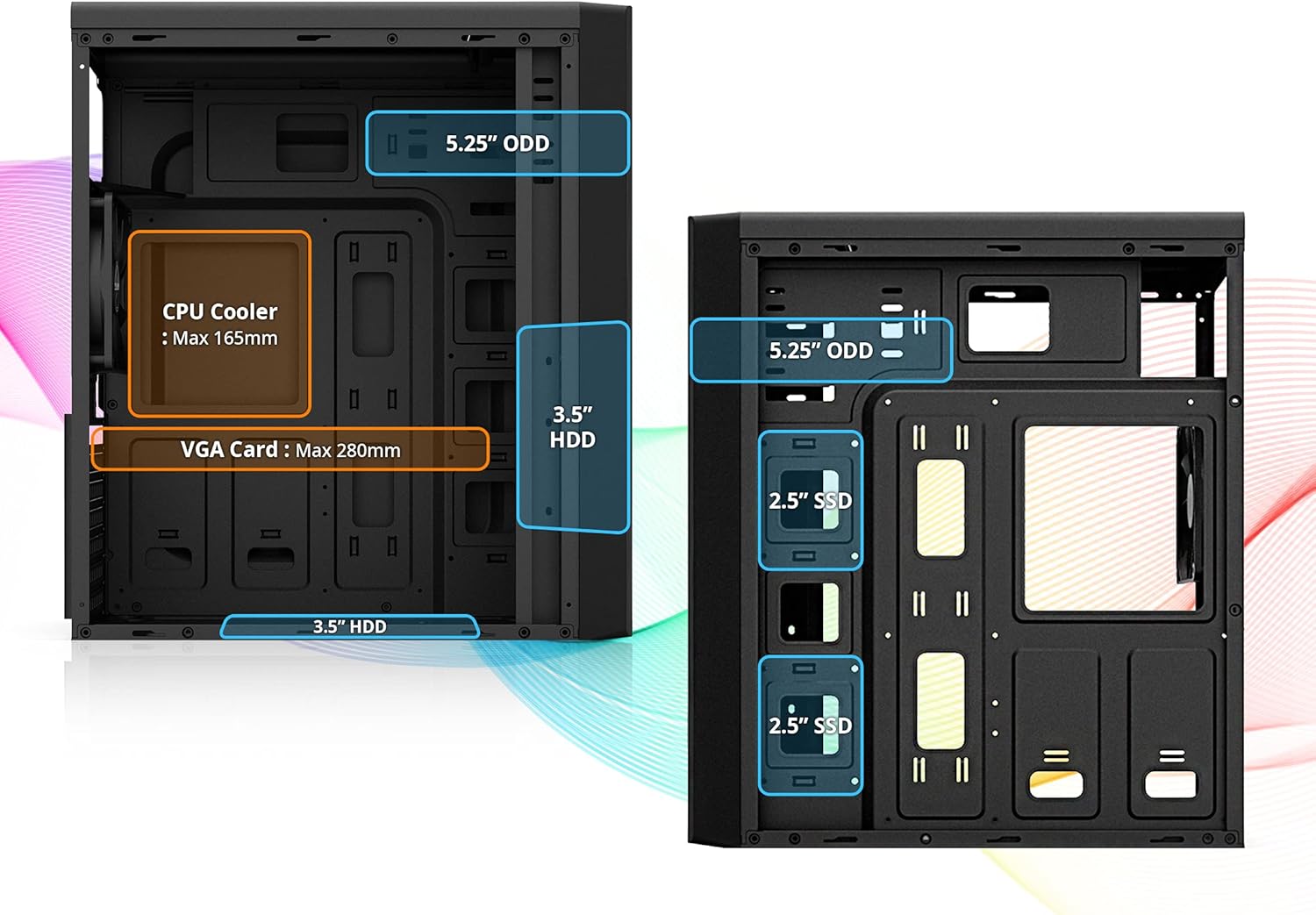
Image: Detailed internal layout of the Zalman T6, indicating maximum CPU cooler height (165mm) and VGA card length (280mm), along with drive bay locations.

Image: Diagram showing the placement of the power supply unit (Max 160mm) and compatible motherboard form factors (ATX, mATX, Mini-ITX) within the Zalman T6 case.
3.3. Puku Tāuta
The T6 case supports multiple storage drives. Install your 2.5" SSDs, 3.5" HDDs, and 5.25" optical drives into their designated bays.

Atahanga: View of the drive bays in the Zalman T6 case, showing mounts for two 2.5" drives, two 3.5/2.5" drives, and one external 5.25" optical drive bay.
3.4. Fan Installation and Airflow
The case comes with one pre-installed 120mm rear fan. Additional fans can be installed for enhanced cooling.

Image: Illustration of the optional 120mm side cooling fan mount on the side panel of the Zalman T6 case.

Image: Diagram showing fan placement options: one pre-installed 120mm rear fan, two optional 120mm front fans, and one optional 120mm side fan. Note: CPU cooler height is limited to 140mm if a side fan is installed.
4. Operating the PC Case
4.1. Paewhiri Whakauru/Whakaputa o Mua
The front I/O panel provides convenient access to essential controls and ports.

Image: Labeled diagram of the Zalman T6 front I/O panel, showing the Power button, Headphone jack, Microphone jack, USB 2.0 ports (x2), USB 3.0 port (x1), HDD & Power LED, and Reset button.
4.2. Te Mana me te Tautuhi
- Pātene Hiko: Pēhia hei whakakā, hei whakaweto rānei i te rorohiko.
- Patene Tautuhi Anō: Press to restart the computer. Use only when necessary.
4.3. Mana Tere Fan
The fan speed control switch allows adjustment of connected fans for optimal balance between cooling and noise levels.
5. Tiaki
5.1. Te horoi i nga whiriwhiringa puehu
Regular cleaning of dust filters is crucial for maintaining optimal airflow and preventing dust buildup inside the case. Dust filters are typically located on the front, top, and bottom of the case. Gently remove and clean them with compressed air or water, ensuring they are completely dry before reinstallation.
6. Te Raru
6.1. Nga take noa
- Papamatua Hototahi: Caution: This case will not fit ATX motherboards with side-facing SATA ports. Ensure your motherboard's SATA port orientation is compatible before installation.
- Te wera nui: Ensure all fans are properly installed and functioning. Check for dust buildup on filters and components. Verify correct airflow direction.
- Kore Mana: Double-check all power connections from the power supply to the motherboard and components. Ensure the power supply switch is in the 'ON' position.
7. Whakatakotoranga Hangarau
| Āhuahira | Whakatakotoranga |
|---|---|
| Waitohu | Taramana |
| Ingoa Tauira | T6 |
| Tauira Tuemi | T6 |
| Taumaha Tūemi | 8 pauna |
| Rahi Hua (LxWxH) | 7.87 x 16.93 x 14.84 inihi |
| Tae | Pango |
| Tautoko Papamatua | ATX, mATX, Mini-ITX |
| Peia Bays | (2) 2.5” and (2) 3.5/2.5" drives, (1) 5.25" external bay |
| Paanui kua whakauruhia i mua | 1x Pā Whakamuri 120mm |
| Tautoko Kaiwhaiwhai | Up to 4 fans (1x Rear, 2x Front, 1x Side) |
| Max CPU Cooler Teitei | 165mm (140mm with side fan) |
| Max VGA Card Roa | 280mm |
| Tauranga I/O | 1x USB 3.0, 2x USB 2.0, 1x Audio In, 1x Audio Out |
| Nga waahanga motuhake | Built-In Fan, Dust Filter, USB 3.0 |
8. Pūtāhui me te Tautoko
Mō ngā mōhiohio pūtāhui me te tautoko hangarau, tirohia te paetukutuku mana o Zalman webpaetukutuku, whakapā atu ranei ki ta raatau ratonga kaihoko. Puritia to rihiti hoko mo nga kereme whakamana.
Zalman Whaimana Webpae: www.zalman.com


