1. Neke atu i teview
The Motorola M700 is a cordless landline phone designed for clear communication and ease of use. It features DECT 6.0 technology for enhanced sound quality and security, along with essential functions like caller ID and a built-in phonebook.
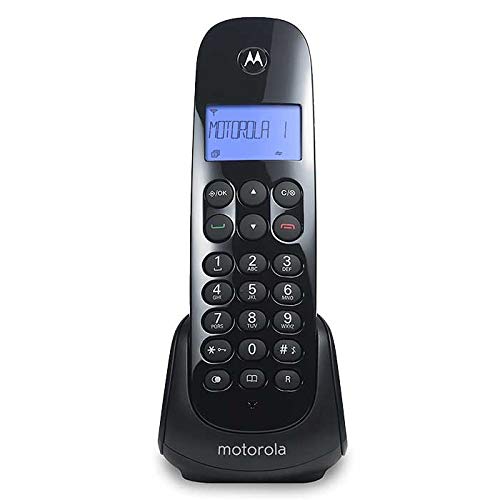
Figure 1: Motorola M700 Cordless Phone and Base
2. Ihirangi mokete
Me mohio kei roto katoa nga mea kei roto i te kete:
- Motorola M700 Handset
- Waeine turanga
- Pouaka AC
- Waea Waea Waea
- 2 x Pūhiko Whakahoki Anō AAA
- Pukapuka Kaiwhakamahi (tenei tuhinga)
3. Tatūnga
3.1. Tāuta Pūhiko
- Kimihia te taupoki o te wāhanga pākahiko kei muri o te waea pūkoro.
- Peia te uhi ki raro kia tuwhera.
- Whakauruhia nga pākahiko AAA e rua ka taea te utu, me te tirotiro i te polarity tika (+ me te -).
- Whakakapihia te uhi o te wahanga pākahiko, paheke ki runga kia paato noa ki te waahi.
3.2. Te hono i te Waeine turanga
- Honoa tetahi pito o te taura waea ki te hononga TEL LINE i te waeine turanga.
- Honoa te pito kē atu o te taura waea ki te hononga waea i te pakitara.
- Plug the small end of the AC power adapter into the POWER jack on the base unit.
- Monohia te pito nui o te urutau hiko AC ki tētahi putanga hiko noa.
3.3. Whakataki Tuatahi
Place the handset on the base unit. The handset will begin charging. For optimal battery performance, allow the handset to charge continuously for at least 15-20 hours before its first use.
4. Mahi Taketake
4.1. Te Waea
- Pick up the handset from the base or press the KORERO / MAHI pātene.
- Waea te nama waea e hiahiatia ana.
- Hei whakamutu i te waea, pehia te MUTU te patene, whakahokia ranei te ringaringa ki runga i te turanga.
4.2. Whakautu Waea
Ka tangi te waea:
- Pehia te KORERO / MAHI pātene.
- Alternatively, if the Auto Answer feature is enabled, simply pick up the handset from the base.
4.3. Whakaritea Rōrahi
I te wa e waea ana, whakamahia te UP a RARO arrow buttons on the handset to adjust the earpiece volume.
5. Āhuatanga Arā
5.1. Kaiwaea ID
The phone displays the caller's name and number (if available and subscribed to Caller ID service) before you answer. You can review the list of the last 10 received calls using the navigation buttons.
5.2. Phonebook (Agenda)
The Motorola M700 allows you to store up to 20 contacts in its phonebook. Refer to the on-screen menu for instructions on adding, editing, and deleting entries.
5.3. Ringtones
Customize your phone's ringtone by selecting from various available melodies in the settings menu.
5.4. Paging (Handset Locator)
Ki te ngaro tō waea pūkoro, pēhia te PAGE pātene i runga i te waeine turanga. Ka tangi te ringaringa, ka taea e koe te kimi.
5.5. Reminder Alarm
Set a reminder alarm through the handset's menu options.
6. Tiaki
- Clean the handset and base unit with a soft, damp kakahu. Kaua e whakamahi i nga kai horoi me nga whakarewa.
- Avoid exposing the phone to direct sunlight, moisture, or extreme temperatures.
- Ensure the battery contacts on the handset and base are clean for proper charging.
7. Te Raru
7.1. Kāore he Oro Waea
- Check that the telephone line cord is securely connected to both the base unit and the wall jack.
- Ensure the AC power adapter is properly connected to the base unit and a working electrical outlet.
- Manatokohia kei te kaha to ratonga waea.
7.2. Kāore te Waea Pūkoro e Utu ana
- Make sure the handset is correctly seated in the base unit.
- Clean the charging contacts on both the handset and base with a dry cloth.
- Confirm that the AC power adapter is connected and the outlet is functional.
7.3. He Rawe te Kounga oro
- Neke atu ki te waeine turanga hei whakapai ake i te kaha o te tohu.
- Kia tino mohio kāore he mea whakarewa nunui, he taputapu hiko rānei e whakararuraru ana i te tohu.
- Check for any damage to the telephone line cord.
8. Whakatakotoranga
| Waitohu | Motorola |
| Tau tauira | M700 |
| Tae | Pango |
| Momo Waea | Ahokore |
| Hangarau | DECT 6.0 |
| ID Kaiwaea | Ae |
| Te Puka Waea Te kaha | 20 Hoapā |
| Waea History | Last 10 received calls |
| Pūhiko | 2 x AAA (kei roto) |
| Ahu (Pukoro) | 11.3 x 8.3 x 17.9 cm |
| Taumaha | 490 g |
9. Pūtāhui me te Tautoko
Mō ngā mōhiohio pūtāhui me te tautoko hangarau, tirohia ngā tuhinga kua tāpirihia mai i tō hoko, tirohia rānei te tautoko mana a Motorola. webpae. Puritia to tohu hoko mo nga kereme whakamana.


