1. Kupu Whakataki
The PAC CH1A-RSX Radio Installation Adapter is designed to facilitate the installation of an aftermarket radio in select Chrysler, Dodge, Jeep, and RAM vehicles equipped with CAN-Bus systems. This adapter retains essential factory features such as steering wheel controls and provides data-controlled accessory and navigation outputs, including 12V ACC, illumination, reverse, and parking brake signals. This manual provides comprehensive instructions for proper installation, operation, and troubleshooting to ensure optimal performance of your new audio system.
2. Nga korero haumaru
Always disconnect the vehicle's negative battery terminal before beginning any electrical installation to prevent short circuits and damage to the vehicle's electrical system. Ensure all connections are secure and properly insulated. Consult a professional installer if you are unsure about any part of the installation process. Do not modify the adapter or its wiring, as this may void the warranty and cause damage.
3. Ihirangi mokete
Manatokona kei te noho nga waahanga katoa i mua i te tiimata o te whakaurunga:
- PAC CH1A-RSX Interface Module
- Vehicle-specific wiring harnesses (main power/speaker harness, secondary data harness)
- Steering Wheel Control (SWC) interface cable
- USB programming cable (if applicable)
- Antenna adapter (if applicable, not explicitly shown but common)

Figure 3.1: Contents of the PAC CH1A-RSX package. This image displays the central PAC interface module, two distinct multi-pin wiring harnesses for vehicle integration, a USB cable for potential firmware updates or configuration, and two additional smaller adapter cables, likely for specific audio or data connections.
4. Waka Hototahi
The CH1A-RSX adapter is compatible with a wide range of Chrysler, Dodge, Jeep, RAM, and select Mitsubishi and Volkswagen vehicles. Please refer to the detailed compatibility list below to confirm your vehicle's eligibility. Compatibility may vary based on specific trim levels and factory options.
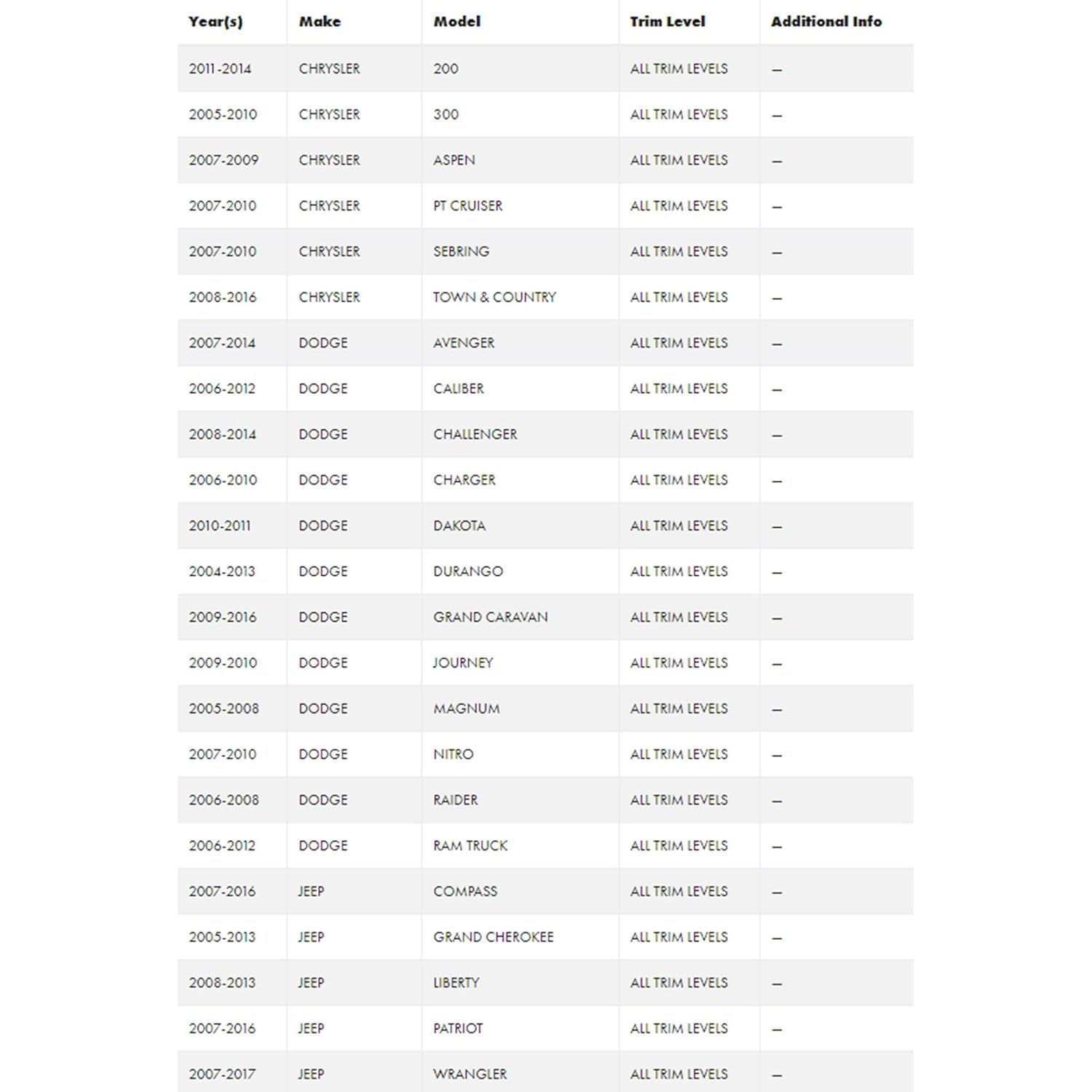
Figure 4.1: Partial compatibility chart for the PAC CH1A-RSX, showing various Chrysler and Dodge models from 2004 to 2016, including specific years, models like 200, 300, Aspen, PT Cruiser, Sebring, Town & Country, Avenger, Caliber, Challenger, Charger, Durango, Grand Caravan, Journey, Magnum, Nitro, and Raider. Most entries indicate "ALL TRIM LEVELS".

Figure 4.2: Continuation of the compatibility chart for the PAC CH1A-RSX, detailing Jeep models (Compass, Grand Cherokee, Liberty, Patriot, Wrangler, Wrangler Unlimited) from 2005 to 2018, Mitsubishi Raider (2009), RAM Truck (2010-2012), and Volkswagen Routan (2009-2013). Specific Jeep Wrangler models are noted with "JK" trim levels.
Specific Compatible Vehicles (as per product features):
- Chrysler: 2011-2014 200, 2005-2010 300, 2007-2009 Aspen, 2007-2010 PT Cruiser, 2007-2010 Sebring, 2008-2016 Town & Country
- Dodge: 2007-2014 Avenger, 2006-2012 Caliber, 2008-2014 Challenger, 2006-2010 Charger, 2004-2013 Durango, 2009-2016 Grand Caravan, 2009-2010 Journey, 2005-2008 Magnum, 2007-2010 Nitro, 2006-2008 Raider
- Jeep: 2007-2016 Compass, 2005-2013 Grand Cherokee, 2008-2013 Liberty, 2007-2016 Patriot, 2007-2017 Wrangler, 2018 Wrangler, 2007-2017 Wrangler Unlimited, 2018 Wrangler Unlimited
- Mitsubishi: 2009 Raider
- RAM: 2010-2012 RAM Taraka
- Volkswagen: 2009-2013 Routan
5. Tatūnga me te Tāuta
This section outlines the general steps for installing the PAC CH1A-RSX adapter. Refer to the detailed wiring diagram included with your product for specific wire color codes and connections. Professional installation is recommended.
- Whakaritenga: Disconnect the vehicle's negative battery terminal. Remove the factory radio from the dashboard.
- Hononga Waea:
- Connect the aftermarket radio's wiring harness to the PAC CH1A-RSX main harness. Match wire functions (e.g., constant 12V, accessory 12V, ground, speaker wires).
- Connect the steering wheel control wires from your aftermarket radio to the designated SWC wires on the PAC harness. Refer to your radio's manual for specific SWC input connections.
- Connect any additional data outputs from the PAC module (illumination, reverse, parking brake) to the corresponding inputs on your aftermarket radio, if your radio supports these features.
- Hononga Waka: Plug the vehicle-specific connectors from the PAC harness into the factory wiring harnesses in the vehicle's dashboard.
- Tauranga Kōwae: Secure the PAC CH1A-RSX module in a safe location behind the dashboard, ensuring it will not interfere with other components or be damaged.
- Whakamātautau: Reconnect the vehicle's negative battery terminal. Turn on the vehicle and test the aftermarket radio's functionality, including power, audio, and all retained features like steering wheel controls and navigation outputs.
- Huinga Anō: Carefully reassemble the dashboard components.
6. Nga Tohutohu Whakahaere
The PAC CH1A-RSX adapter operates passively, translating vehicle data signals for your aftermarket radio. Once installed correctly, it enables the following functionalities:
- Te Pupuri Mana o te Wira Urunga: Your factory steering wheel audio controls (volume, track, mode, etc.) will function with your new aftermarket radio. Specific button mapping may be configurable through your aftermarket radio's settings.
- Data Controlled Accessory Output (12V ACC): Provides a reliable 12V accessory output that turns on and off with the vehicle's ignition, eliminating the need to find a separate ignition wire.
- Ngā Putanga Whakatere: Supplies essential signals for aftermarket navigation systems, including illumination (headlight status), reverse gear engagement, and parking brake status. These signals are crucial for proper navigation unit operation and safety features.
No direct user interaction with the PAC module is typically required after installation, as its operation is automatic based on vehicle data.
7. Tiaki
The PAC CH1A-RSX adapter is designed for long-term, maintenance-free operation. To ensure its longevity and reliable performance:
- Keep the module and its connections dry and free from moisture.
- Me whakarite kia mau tonu ngā hononga waea katoa, kia kore hoki e waikura.
- Avoid exposing the module to extreme temperatures or direct physical impact.
- Do not attempt to open or repair the module yourself, as this will void the warranty.
8. Te Raru
If you encounter issues with your PAC CH1A-RSX adapter, refer to the following common problems and solutions:
| Raruraru | Take pea | Rongoā |
|---|---|---|
| Aftermarket radio does not power on. | Incorrect wiring for 12V constant or accessory power; blown fuse; faulty PAC module. | Verify all power and ground connections. Check vehicle and radio fuses. Ensure the PAC module is receiving power from the vehicle harness. If the yellow wire (constant 12V) is hot but the accessory wire to the radio is not, the module may be faulty or not properly initialized. |
| Steering wheel controls do not function. | Incorrect SWC wiring; aftermarket radio not configured for SWC; incompatible radio. | Ensure the SWC wire from the PAC harness is correctly connected to the aftermarket radio's SWC input. Consult your radio's manual for SWC programming/learning procedures. Confirm your radio supports external SWC interfaces. |
| Navigation outputs (reverse, parking brake, illumination) are not working. | Incorrect wiring to navigation unit; navigation unit not configured. | Verify connections from the PAC module's output wires to the navigation unit's corresponding inputs. Check the navigation unit's settings for proper input recognition. |
| Adapter does not fit or connect to vehicle wiring. | Incorrect adapter model for vehicle; vehicle has a non-standard factory system (e.g., premium audio). | Double-check the vehicle compatibility list (Section 4) against your specific vehicle year, make, model, and factory options. Some premium sound systems may require different adapters. |
If problems persist after following these steps, contact PAC technical support or consult a certified car audio installer.
9. Whakatakotoranga
| Āhuahira | Taipitopito |
|---|---|
| Tau tauira | CH1A-RSX |
| Waitohu | PAC |
| Rahi Hua (L x W x H) | 9 x 9 x 2 inihi |
| Taumaha Tūemi | 10.56 hekere |
| Rauemi | Acrylonitrile Butadiene Styrene |
| Momo Tuhono | USB (for programming/updates) |
| Te Ra Wātea Tuatahi | Hanuere 24, 2019 |
| Kaihanga | Ororongo PAC |
10. Pūtāhui me te Tautoko
For detailed warranty information regarding your PAC CH1A-RSX adapter, please refer to the documentation provided with your purchase or visit the official PAC Audio webpae. Ko nga kupu whakamana ka kapi i nga hapa whakangao mo te waa kua tohua mai i te ra o te hokonga.
For technical support, installation assistance, or to inquire about product updates, please contact PAC Audio customer service directly. Contact information can usually be found on the manufacturer's webte waahi kei roto ranei i te kohinga hua.


