Kupu Whakataki
The Amazon Echo Show 8 (1st Gen, 2019 release) is a smart display designed to enhance your daily life with Alexa. Featuring an 8-inch HD screen and stereo sound, it allows you to manage your day, connect with loved ones through video calls, enjoy entertainment, control smart home devices, and personalize your experience. This manual provides detailed instructions to help you get the most out of your device.
He aha kei roto i te Pouaka
Upon unboxing your Echo Show 8, ensure all components are present:
- Echo Show 8 taputapu
- Pūrere hiko (30W) me te taura (4.9 putu)
- He aratohu timata tere
Tatūnga
Setting up your Echo Show 8 is a straightforward process, often simplified by Amazon Wi-Fi simple setup technology.
- Whakahiko: Connect the power adapter to your Echo Show 8 and plug it into a wall outlet. The device will power on automatically.
- Tīpakonga Reo: Whaia nga tohu o runga-mata hei kowhiri i to reo pai.
- Hononga Wi-Fi: Select your Wi-Fi network from the list and enter the password. The Echo Show 8 supports dual-band Wi-Fi (802.11a/b/g/n/ac).
- Takiuru Pūkete Amazon: Takiuru mā te whakamahi i ō taipitopito pūkete Amazon. Ki te kore āu, ka tonoa koe kia waihanga i tētahi.
- Rēhita Pūrere: Your device will register to your Amazon account.
- Time Zone and Location: Confirm your time zone and location settings.
- Akoranga: The device may offer a brief tutorial on how to navigate and use its features.
He hototahi te taupānga Alexa ki te Fire OS, Android, me nga taputapu iOS, ka taea hoki te uru atu ma to web browser for further management and customization.
Te whakahaere i to Whakaaturanga Echo 8
The Echo Show 8 can be operated using voice commands with Alexa or through its touch screen interface.
Voice Commands (Alexa)
Simply say "Alexa" followed by your command. Exampkei roto ko:
- "Alexa, he aha te rangi?"
- "Alexa, purei puoro."
- "Alexa, call [contact name]."
- "Alexa, show me my photos."
- "Alexa, whakawetohia ngā rama."

Image: Echo Show 8 displaying current weather conditions, demonstrating its ability to provide glanceable information.
Paa Whakaterenga Mata
Swipe down from the top of the screen to access quick settings and the home menu. Swipe left from the right edge to view cards with suggestions and information. Tap on icons and options to interact with the device.
Ngā āhuatanga
The Echo Show 8 offers a wide range of features to simplify and enrich your daily routines:
- Video Calling & Messaging: Connect with friends and family who have the Alexa app or an Echo device with a screen. Make announcements to other devices in your home.

Image: A user making a video call on the Echo Show 8, highlighting its communication capabilities.
- Whakangahau: Ask Alexa to show you movie trailers, TV shows, movies, or the news. Listen to radio stations, podcasts, and audiobooks.
- Mana Kainga Ataata: Voice control compatible devices or manage them on the easy-to-use display. Ask Alexa to show you security cameras, control lights, and adjust thermostats.

Image: The Echo Show 8 displaying a live feed from a nursery camera, illustrating its smart home monitoring feature.
- Whakawhaiaro: Show off your albums from Amazon Photos. Customize your home screen. Create morning routines to start your day.
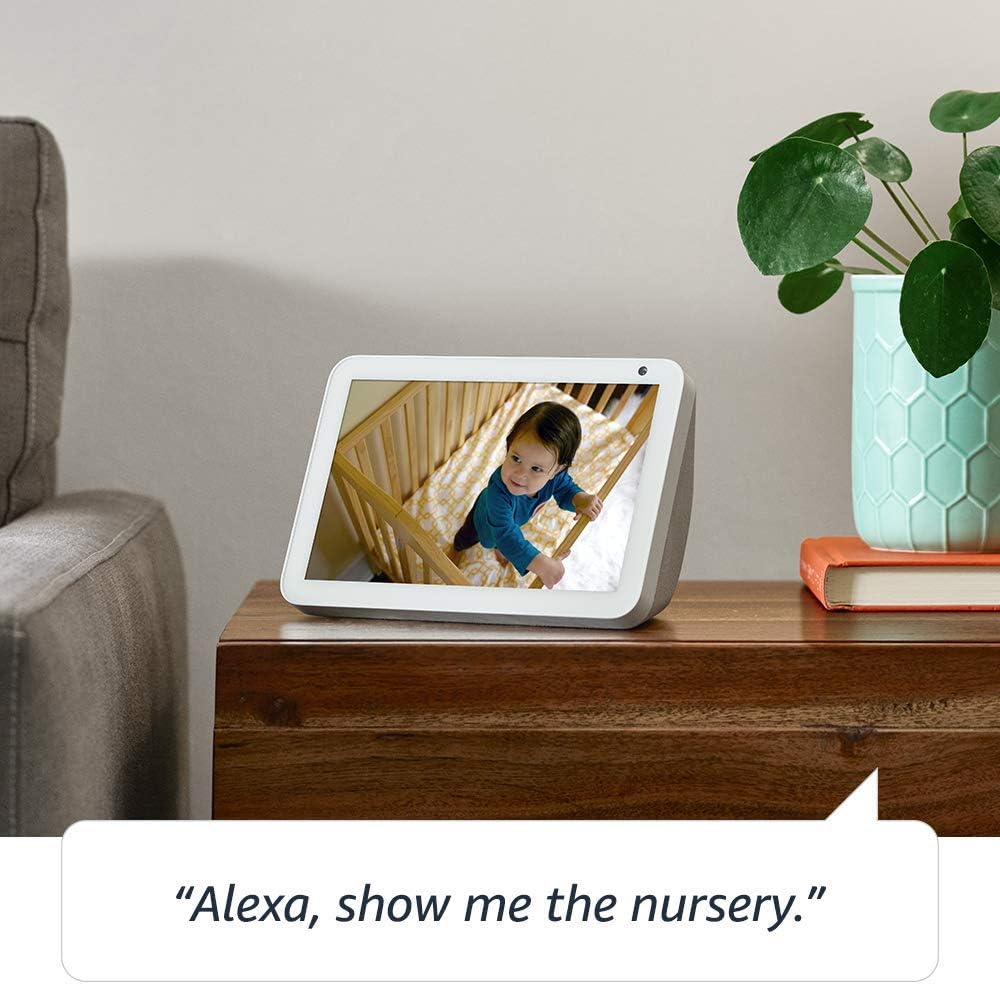
Image: The Echo Show 8 displaying a scenic photo from a user's Amazon Photos album, demonstrating its personalization options.
- Daily Assistance: Cook along to step-by-step recipes. Easily update to-do lists and calendars. Glance at weather and traffic on your way out.
Ngā Āhuatanga Tūmataitinga
The Echo Show 8 is designed with privacy in mind, offering several controls:
- Patene Waeaoro/Kamera Weto: Electronically disconnect the microphones and camera with one press of a button.
- Ārai Kāmera Whakauru: Slide the built-in shutter to physically cover the camera lens.

Image: A finger activating the physical camera shutter on the Echo Show 8, demonstrating a privacy control feature.
- Hangarau Wake Word: Alexa devices are designed to detect only your chosen wake word (e.g., "Alexa").
- Tohu Rere: Visual indicators show when Alexa is streaming your request to the cloud.
- Whakahaere Hopu Reo: Te kaha ki te view and delete your voice recordings through the Alexa app or Alexa Privacy Hub.
Mō ētahi atu kōrero, tirohia te Alexa Privacy Hub.
Te tiaki
To ensure the longevity and optimal performance of your Echo Show 8, follow these maintenance guidelines:
- Te horoi: Whakamahia he kakahu ngohengohe, kore-puru hei horoi i te mata me waho. A ape i nga kaihoroi awhiowhio me nga rehu tika ki runga i te taputapu.
- Turanga: Whakatakotoria te taputapu ki runga i tētahi mata pumau, papatahi, kia matara atu i te rā tika, i ngā pūtake wera, i te makuku hoki. Me whakarite kia tika te hauhautanga.
- Whakahōu Pūmanawa: The device automatically receives software updates. Ensure it is connected to Wi-Fi to receive these updates, which improve performance and add new features.
Raparongoā
If you encounter issues with your Echo Show 8, try the following steps:
- Kore Mana:
- Me mohio kei te hono pai te urutau hiko ki te taputapu me te putanga hiko mahi.
- Whakamātauria he putanga hiko rerekē.
- Nga Take Hononga Wi-Fi:
- Tirohia kei te tika to kupuhipa Wi-Fi.
- Tīmataria anō tō pouara Wi-Fi me tō pouwhanga.
- Nukuhia te Echo Show 8 kia tata atu ki to pouara Wi-Fi.
- Kare a Alexa e whakautu:
- Ensure the microphone is not muted (check the microphone/camera off button).
- Korero marama me te reo oro noa.
- Whakamātauria te tīmata anō i te pūrere mā te momotu mō tētahi hēkona ruarua, kātahi ka mono anō.
- Nga Take Mata:
- Ki te kore te mata e aro mai, ngana ki te tīmata anō i te pūrere.
- Ensure the screen is clean and free of smudges.
- Tautuhi wheketere: As a last resort, you can perform a factory reset. This will erase all your personal data and settings. To do this, go to Settings > Device Options > Reset to Factory Defaults.
Whakatakotoranga
| Āhuahira | Taipitopito |
|---|---|
| Rahi | 7.9”x 5.4”x 3.9” (200mm x 135mm x 99mm) |
| Taumaha | 36.6 oz (1037 karamu) |
| Whakaatu | 8.0 ”mata pa |
| Kāmera | 1MP camera with built-in shutter |
| Hononga Wi-Fi | Ka tautoko te Wi-Fi takirua-rua i nga whatunga Wi-Fi 802.11a/b/g/n/ac. Kaore e tautoko i te hono ki nga whatunga Wi-Fi ad-hoc (peer-to-peer ranei). |
| Hononga Nihokikorangi | Pro tohatoha Ororongo Arāfile Tautoko (A2DP) mō te rere oro mai i tō pūrere pūkoro ki Echo Show 8, mai i Echo Show 8 rānei ki tō kaikorero Nihokikorangi. Mana Mamao Oro/Ataata Profile (AVRCP) mō te whakahaere reo o ngā taputapu pūkoro hono. Kāore e tautokona te whakahaere reo kore-ringa mō ngā taputapu Mac OS X. Kāore e tautokona ngā kaikorero Nihokikorangi e hiahia ana ki ngā waehere PIN. |
| Ororongo | 2.0” (52 mm) neodymium speakers with passive bass radiator |
| Nga Whakaritenga Pūnaha | Echo Show 8 comes ready to connect to your WiFi. The Alexa app is compatible with Fire OS, Android, and iOS devices and also accessible via your web browser. Supported operating systems. Certain skills and services may require subscription or other fees. |
| Tukatuka | MediaTek MT 8163 |
| Reo | Ka korero a Alexa i te reo Ingarihi me te Paniora |
Ngā Āhuatanga Āheitanga
The Echo Show 8 includes various accessibility features to personalize Alexa to your abilities:
- Pato ki a Alexa: Whakauru atu ki a Alexa mā te pā atu mā roto i ngā taera mata, i te papapātuhi rānei.
- Whakarongo Urutau: Ka nui ake te wa ki te whakaoti korero i mua i te whakautu a Alexa.
- Rereke Korero Manakohia: Whakahaerehia te tere, te puhoi ranei o te korero a Alexa.
- Te Whakahua Kuputuhi a Alexa, Te Whakahua Kuputuhi Waea, Te Whakahua Kuputuhi Kati: Provide text captions for supported content.
- Whakaatu me te Kōrero: Helps customers who are blind or visually impaired identify products by saying “Alexa, what am I holding.”
- ReoView Kaipānui Mata: Enables access for customers who are blind or visually impaired.
- Whakarahi Mata: Enables zooming in/out and panning around the screen.
- Whakamōhio Ina Tata: Plays notification sounds when you’re detected near your Echo device.
- Kindle Panui Nui: Ka taea e Alexa te pānui i ō pukapuka Kindle.
- Kuputuhi Wā Tūturu: Enables typing live text in a video call.
- Ko etahi atu tautuhinga ko te Hurihuri Tae, Te Whakatikatika Tae, Te Oro Tono, me etahi atu.
To enable these features, go to Settings → Accessibility on your Echo Show 8.
Pūtāhui me te Tautoko
Your Certified Refurbished Echo Show 8 comes with a 1-year limited warranty and service, similar to a new device. Use of Echo Show 8 is subject to Amazon's terms and conditions.
For further assistance, visit the Amazon Device Support page or contact Amazon Customer Service.


