1. Nga korero haumaru
Before using the Zipro Beat RS Magnetic Exercise Bike, please read and understand all safety instructions. Retain this manual for future reference.
- Me toro atu ki tetahi rata i mua i te tiimata i tetahi kaupapa whakangungu hou.
- Me whakarite kia mau te whakau o ngā pūtu me ngā nati katoa i mua i ia whakamahinga.
- Place the exercise bike on a flat, stable surface. Use a mat to protect the floor.
- Tiakina nga tamariki me nga kararehe mai i nga taputapu i te wa e mahi ana.
- Ko te taumaha mōrahi o tēnei taputapu mō te kaiwhakamahi he 120 kg.
- Mauria ngā kākahu whakakori tinana me ngā hu e tika ana.
- Kati tonu te korikori tinana mena ka ngenge koe, ka ngenge, ka mamae ranei.
2. Hua Neke Atuview
The Zipro Beat RS is a magnetic exercise bike designed for home fitness. It features an ergonomic design, adjustable resistance, and a multi-function computer to track your workout progress.

Whakaatu 1: Neke Atuview of the Zipro Beat RS Magnetic Exercise Bike. This image displays the full exercise bike with its main components, including the handlebars, seat, pedals, and central unit with the computer display.
3. Nga Tohutohu Huihuinga
Assembly of the Zipro Beat RS exercise bike typically involves attaching the base stabilizers, pedals, seat, handlebars, and the computer console. Refer to the included assembly diagram for detailed steps.
- Āpiti Pūmau: Secure the front and rear stabilizers to the main frame using the provided bolts and washers.
- Tāuta Pedals: Attach the left and right pedals to their respective crank arms. Note that pedals are often marked 'L' and 'R' and thread in opposite directions.
- Maunga Nohonga Pou me te nohoanga: Whakauruhia te pou nohoanga ki roto i te anga ka mau. Whakauruhia te nohoanga ki te pou nohoanga.
- Assemble Handlebars: Attach the handlebar post to the main frame, then secure the handlebars to the post. Connect any sensor cables if applicable.
- Install Computer Console: Mount the computer console onto the handlebar post. Connect the sensor cables (pulse, speed) and the battery.

Figure 2: A user exercising on the Zipro Beat RS bike, demonstrating its ergonomic design and compact size suitable for home use. This image highlights the bike's overall appearance and how it fits into a living space.
4. Nga Tohutohu Whakahaere
4.1 Te Whakatikatika i te Nohoanga
Proper seat height is crucial for comfort and effective exercise. Adjust the seat so that your leg is slightly bent at the knee when the pedal is at its lowest point.

Figure 3: Illustration of the seat height adjustment mechanism. The image shows how to raise or lower the seat to achieve the correct ergonomic position for the user.
4.2 Using the Multifunction Computer
The integrated computer displays various workout metrics. It is battery-powered.
- Hiko Whakaka/Weto: The computer typically turns on automatically when you start pedaling or press any button. It will power off after a period of inactivity.
- Aratau Whakaatu: Use the 'MODE' button to cycle through different display functions such as Time, Speed, Distance, Calories, and Pulse.
- Mahi MATAWAI: The 'SCAN' function automatically cycles through all metrics, providing a continuous overview of your workout without manual input.
- Tautuhi: Pēhia, ka pupuri i te pātene 'TAUTAHI ANŌ' hei ūkui i ngā raraunga whakangungu katoa o nāianei.
- Inenga Pulse: Grip the pulse sensors on the handlebars to display your heart rate. An alarm may sound if your heart rate exceeds a preset safety level.

Whakaahua 4: Whakatata view of the multifunction computer display, showing various metrics and control buttons. This image illustrates the interface for tracking workout data.
4.3 Te Whakatikatika Atete
The Zipro Beat RS features an 8-level manual magnetic resistance system. Turn the resistance knob located below the handlebars to increase or decrease the workout intensity.
- Turn the knob clockwise to increase resistance (higher numbers).
- Turn the knob counter-clockwise to decrease resistance (lower numbers).

Whakaatu 5: Taipitopito view of the manual resistance adjustment knob. The image shows the numbered dial (1-8) used to control the intensity of the magnetic resistance.
4.4 Te Whakamahi i te Pūmau Pūrere
A dedicated holder is provided on the console for your smartphone or tablet, allowing you to enjoy media during your workout.

Figure 6: The integrated smartphone or tablet holder on the exercise bike's console. This feature allows users to place their devices securely for entertainment or tracking during exercise.
5. Tiaki
Mā te tiaki auau ka roa te ora me te haumaru o te mahi a tō pahikara whakakori tinana.
- Te horoi: Horoia te pahikara me te panuiamp he kakahu i muri i ia whakamahinga hei tango i te werawera me te puehu. A ape i te horoi horoi.
- Tirotiro: Tirohia ngā pūtu, ngā nati, me ngā wāhanga e neke ana i ia wā, i ia wā, mō te piripono me te pakaru. Whakakīia ngā here e kore e herea.
- Whakahinuhinu: The magnetic resistance system is generally maintenance-free. If you notice any unusual noises from moving parts, consult the manufacturer's support.
- Rokiroki: When not in use, store the bike in a dry, cool place. The integrated transport wheels facilitate easy relocation.
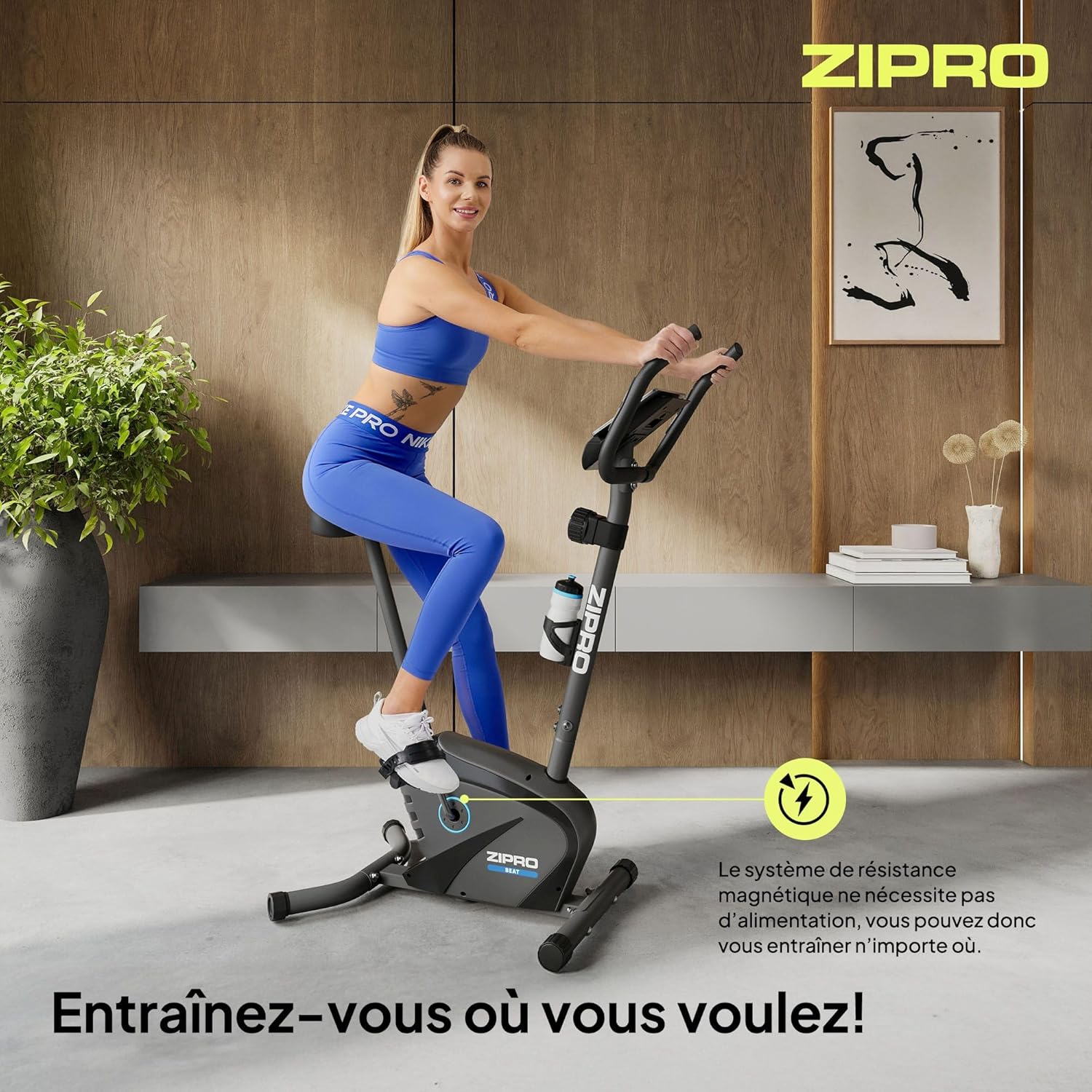
Figure 7: Close-up of the transport wheels located at the front base of the exercise bike. These wheels allow for easy movement and storage of the equipment.
6. Te Raru
This section addresses common issues you might encounter with your Zipro Beat RS exercise bike.
- Computer Display Not Working:
Rongoā: Check the batteries in the computer console. Replace them if necessary. Ensure all cables connecting to the console are securely plugged in. - No Resistance or Inconsistent Resistance:
Rongoā: Verify that the resistance adjustment knob is functioning correctly and is not stuck. Ensure no foreign objects are obstructing the magnetic flywheel. - Nga haruru rereke i te wa e mahi ana:
Rongoā: Stop exercising and inspect the bike for any loose parts, bolts, or connections. Tighten any loose components. If the noise persists, contact customer support. - Unstable During Use:
Rongoā: Ensure the bike is placed on a flat, level surface. Adjust the leveling feet (if present) on the stabilizers to eliminate wobbling.
7. Whakatakotoranga
Detailed technical specifications for the Zipro Beat RS Magnetic Exercise Bike.
| Āhuahira | Whakatakotoranga |
|---|---|
| Tauira | Beat RS |
| Waitohu | ZIPRO |
| Tikanga Atete | aukume |
| Taumata Atete | 8 (Whakatikatika ā-Ringa) |
| Taumaha Kaiwhakamahi Morahi | 120 kg |
| Rahi Hua (L x W x H) | 107 x 59 x 127 cm |
| Taumaha Hua | 20.5 kg |
| Nga Mahi Rorohiko | Time, Speed, Distance, Calories, Pulse, SCAN |
| Power Source (Computer) | Ma te pākahiko |
| Nga waahanga motuhake | Bottle holder, Transport wheels, Device holder |
| Suggested User Height | 155-200 cm |

Figure 8: Diagram illustrating the key dimensions of the Zipro Beat RS exercise bike and the suggested user height range. This provides visual context for the product's size and ergonomic fit.
8. Pūtāhui me te Tautoko
For warranty information, please refer to the documentation provided with your purchase or contact your retailer. Specific warranty terms may vary by region and retailer.
If you require technical assistance or have questions not covered in this manual, please contact the manufacturer's customer support or your point of purchase. Keep your purchase receipt and model number (1592574) handy for faster service.


