Kupu Whakataki
The Master & Dynamic MW07 Plus True Wireless Earphones represent the second generation of the MW07 series, designed for an exceptional audio experience. These earphones feature a handcrafted acetate body and a stainless steel charging case, combining durable materials with advanced technology. Key functionalities include extended battery life, Bluetooth 5.0 connectivity, Active Noise-Cancelling, and an Ambient Listening Mode, providing a versatile and high-quality listening solution.
This manual provides essential information for setting up, operating, maintaining, and troubleshooting your MW07 Plus earphones.
He aha kei roto i te Pouaka
- MW07 Plus True Wireless Earphones (Left and Right)
- Stainless Steel Charging Case
- USB-C ki te Waea Whakakona USB-C
- USB-C ki USB-A Pūurutau
- Protective Canvas Pouch
- 5 Pairs of Silicone Ear Tips (XS, S, M, L, XL)
- 3 Pairs of Fit Wings (S, M, L)
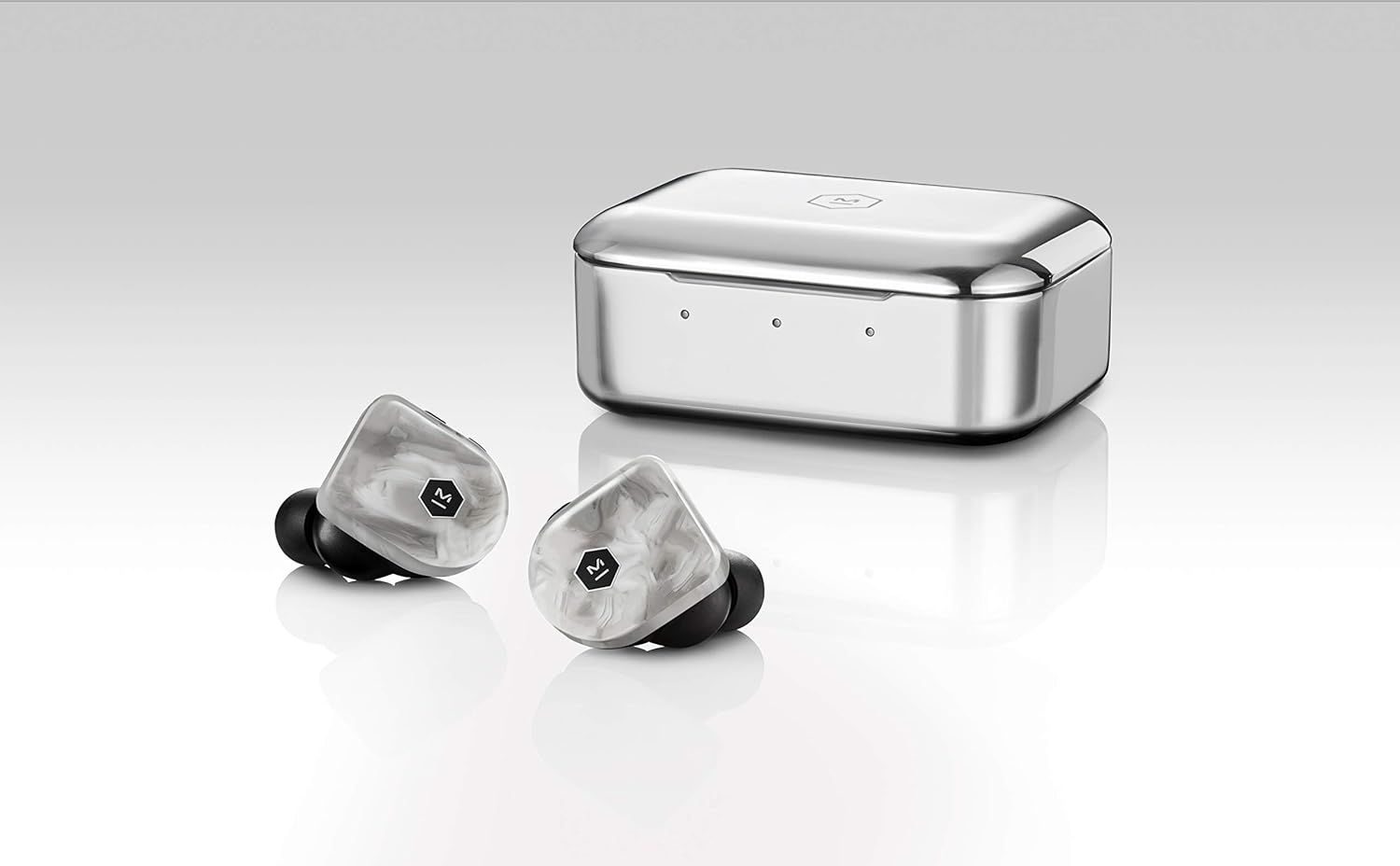
Tatūnga
1. Te utu
Before first use, fully charge your MW07 Plus earphones and the charging case. Use the provided USB-C cable to connect the charging case to a power source. The earphones charge inside the case.
- Te ora o te Pūhiko taringa: Tae atu ki te 10 haora i runga i te utu kotahi.
- Te Wā Tākaro Katoa me te Pouaka: Up to 40 hours (additional 3 charges from the case).
- Wā Whakataki: Approximately 1.5 hours for earphones and case.

2. Whakatau
Select the ear tips and fit wings that provide the most secure and comfortable fit for your ears. A proper seal is crucial for optimal sound quality and noise cancellation.

3. Takirua
- Tangohia ngā taringaoro e rua i te pouaka utu. Ka uru aunoa rāua ki te aratau takirua.
- On your device (smartphone, tablet, computer), enable Bluetooth and select "M&D MW07 PLUS" from the list of available devices.
- If prompted, confirm the pairing. The earphones will indicate successful connection.

Nga Tohutohu Whakahaere
Mana Waeaoro
The MW07 Plus earphones feature intuitive physical buttons for control. Refer to the diagram below for button locations and functions.

| Patene/Mahi | Mahi |
|---|---|
| Left Earphone: Vol+ / Vol- |
|
| Right Earphone: Multi-function Button |
|
Active Noise-Cancelling (ANC) and Ambient Listening Mode
The MW07 Plus features two distinct listening modes:
- Active Noise-Cancelling (ANC): Reduces external ambient noise, ideal for focused listening in noisy environments. Activate/deactivate by long-pressing the Vol- button on the left earphone.
- Ambient Listening Mode: Allows you to hear your surroundings while listening to audio, enhancing awareness. Activate/deactivate by long-pressing the Vol+ button on the left earphone.
Te tiaki
Proper care ensures the longevity and performance of your MW07 Plus earphones.
- Te horoi: Regularly wipe the earphones and charging case with a soft, dry, lint-free cloth. Do not use harsh chemicals or abrasive materials.
- Nga Tohu Taringa: Tangohia nga tohu taringa ka horoi ki te hopi ngawari me te wai mena ka tika. Me whakarite kua maroke katoa i mua i te whakapiri ano.
- Rokiroki: Always store the earphones in their charging case when not in use to protect them and keep them charged.
- Ātete wai: The earphones have an IPX5 water resistance rating, meaning they can withstand light splashes and sweat. Do not submerge them in water.
Raparongoā
If you encounter issues with your MW07 Plus earphones, try the following solutions:
- No Sound / Connectivity Issues:
- Me whakarite kia utua katoatia ngā pane taringa e rua.
- Place both earphones back into the charging case, close the lid, wait a few seconds, then remove them to re-establish connection.
- Check your device's Bluetooth settings to ensure "M&D MW07 PLUS" is selected and connected.
- Ngāna kia warewarehia te pūrere i roto i ō tautuhinga Nihokikorangi ka hono anō.
- Kāore tetahi taringaoro e mahi ana:
- Kia tino utua ngā taringaoro e rua.
- Place both earphones in the case, close the lid, and then remove them. This often re-syncs them.
- Perform a factory reset (refer to the diagram or manufacturer's website for specific steps if needed, as the provided diagram is in Japanese and not fully clear on factory reset).
- Kounga Oro Kino / Kore o te Pāoro:
- Ensure you have a proper seal with the ear tips. Try different sizes of ear tips and fit wings to find the best fit.
- Clean any debris from the ear tips or earphone nozzles.

Whakatakotoranga
| Āhuahira | Taipitopito |
|---|---|
| Ingoa Tauira | MW07 PLUS |
| Hangarau Hononga | Ahokore (Nihokikorangi 5.0) |
| Awhe Nihokikorangi | 30 mita (100 putu) |
| Momo Atekōkiri Ororongo | Atekōkiri Hihiko |
| Rahi Atekōkiri Ororongo | 10 Mirimita |
| Awhe Auautanga | 20 Hz - 20,000 Hz |
| Te Ora o te Pūhiko (Ngā Taringa) | 10 haora |
| Katoa te Ora o te Pūhiko (me te Puka) | Tae atu ki te 40 haora |
| Waa Whakatau | 1.5 Hours (Earphones & Case) |
| Taumata Atete Wai | IPX5 (Atete Wai) |
| Mana Haruru | Whakakore Haruru Hohe |
| Rauemi | Handcrafted Acetate (Earphones), Stainless Steel (Case) |
| Taumaha Tūemi | 9 Grams (each earphone) |
| Taumaha Take | 9 Karamu |
| Pūrere Hototahi | Cellphones, Desktops, Laptops, Tablets |
Ataata Hua Whaimana
Ko tenei ataata he korero potoview of the Master & Dynamic MW07 Plus True Wireless Earphones, highlighting key features such as sound quality, design, and battery life.
Pūtāhui me te Tautoko
For warranty information, technical support, or further assistance, please visit the official Master & Dynamic webpaetukutuku, whakapā atu ranei ki ta raatau ratonga kaihoko.
Ka taea hoki e koe te toro ki te MASTER & DYNAMIC Store on Amazon mo etahi atu korero hua me nga rauemi.


