Kupu Whakataki
Thank you for choosing APEKX True Wireless Bluetooth 5.0 Sports Earbuds. These earbuds are designed to provide a high-fidelity audio experience with the freedom of wireless connectivity, perfect for sports and active lifestyles. Featuring IPX7 waterproofing, a secure fit, and a portable charging case, they ensure your music accompanies you wherever you go. This manual provides detailed instructions on how to set up, operate, and maintain your earbuds for optimal performance.

Image: APEKX True Wireless Bluetooth 5.0 Sports Earbuds in their open charging case, showcasing the pink earhooks.
Ihirangi Packaging
Tena koa tirohia nga ihirangi o te kete kia mohio kei te noho katoa nga taonga:
- APEKX True Wireless Earbuds (Left and Right)
- Puhi Whakatau Kawe
- Tauira Whakatau USB
- Pukapuka Kaiwhakamahi
- Grey Over-Ear Earhooks (1 pair)
- Small Earhooks (2 pairs, pink)
- Ear Caps (multiple sizes)

Image: Display of all items included in the product packaging, including earbuds, charging case, cables, and various earhook and ear cap options.
Ka mutu te huaview
Familiarize yourself with the components of your APEKX earbuds and charging case:
- Power / Multi-function Button: Controls power, playback, calls, and voice assistant.
- Tohu LED: Displays status for power, pairing, and charging.
- hopuoro: Mo nga waea kore-ringa.
- Interchangeable Earhooks: Provide a secure fit for various activities.
- Whakataua titi: Connect to the charging case for power.
- Pouaka Whakatau: Provides additional battery life for on-the-go charging.

Image: Detailed diagram pointing out the Power/Multi-function Button, LED Indicator, Microphone, Interchangeable Earhooks, and Charging Pins on the earbuds. Also shows battery life information: 4 hours from a single charge, plus 18 hours from the charging box for a total of 22 hours playtime.

Image: The earbuds in their charging case, alongside various earhook and ear cap accessories, highlighting their comfortable design.
Tatūnga
Whakataunga Tuatahi
Before first use, fully charge both the earbuds and the charging case. Connect the USB charging cable to the charging case and a power source. The LED indicators on the earbuds and case will show charging status. A full charge typically takes 1-2 hours.
Takirua me o Pūrere
Follow these steps to pair your APEKX earbuds with your Bluetooth-enabled device:
- Ensure the charging case has power. Press the button on the charging case; both earbuds will show a red light.
- Take both earbuds out of the charging case. They will automatically enter pairing mode, indicated by flashing LED lights.
- I runga i to taputapu (smartphone, tablet, etc.), haere ki nga tautuhinga Nihokikorangi ka whakakaa te Nihokikorangi.
- Rapua available devices and select "TWS Earbuds-L" from the list.
- Confirm pairing if prompted. Once connected, the earbud LED indicators will stop flashing or show a steady light.
The earbuds will automatically turn off and recharge when placed back into the charging case after each use.
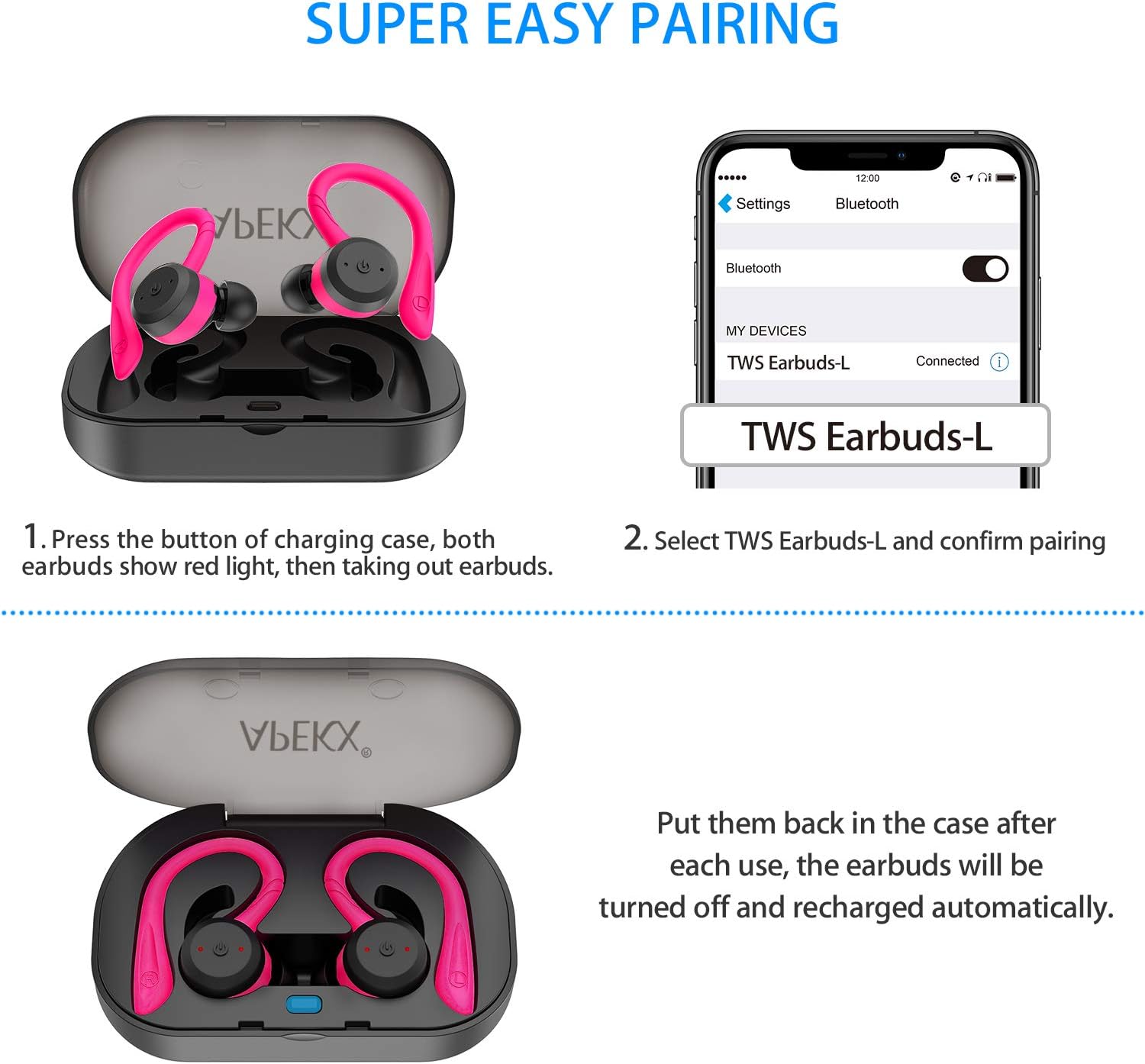
Image: Visual guide demonstrating the pairing process, showing the earbuds in the case with red lights, and a smartphone screen displaying "TWS Earbuds-L" as a connected Bluetooth device.
Nga Tohutohu Whakahaere
Te Hiko / Whakaweto
- Whakahiko: Take the earbuds out of the charging case, and they will power on automatically. Alternatively, press and hold the Multi-function Button on each earbud for 3 seconds.
- Weto Whakakore: Place the earbuds back into the charging case, and they will power off automatically. Alternatively, press and hold the Multi-function Button on each earbud for 5 seconds.
Purei Waiata
- Purei/Tatari: Press the Multi-function Button once on either earbud.
- Riu Panuku: Double-press the Multi-function Button on the Right earbud.
- Riu o mua: Double-press the Multi-function Button on the Left earbud.
- Runga Runga: Triple-press the Multi-function Button on the Right earbud.
- Raro Raro: Triple-press the Multi-function Button on the Left earbud.
Whakahaa Piiraa
- Whakautu/Whakamutu Waea: Press the Multi-function Button once on either earbud.
- Whakakore Waea: Press and hold the Multi-function Button for 2 seconds on either earbud.
Kaiāwhina reo
- Whakahohehia te Kaiāwhina Reo (Siri/Kaiāwhina Google): Press and hold the Multi-function Button for 1.5 seconds on either earbud.
Te tiaki
Te horoi
Regularly clean your earbuds and charging case to ensure optimal performance and hygiene. Use a soft, dry, lint-free cloth. For ear tips, you may gently wipe them with a slightly damp kakahu me te hopi ngawari, kātahi ka whakamaroke kia tino maroke i mua i te tāpiri anō. Kaua e whakamahi i ngā matū kaha, i ngā rauemi whakakoi rānei.
Rokiroki
Ki te kore e whakamahia, penapenahia nga purongo ki roto i o raatau pukoro hei tiaki i te puehu me te kino. Whakaorangia te pouaka ki te waahi makariri, maroke atu i te ra tika me te wera nui.
Ātete Wai (IPX7)
The APEKX earbuds feature an IPX7 waterproof rating, meaning they can withstand immersion in water up to 1 meter for 30 minutes. This makes them suitable for intense workouts and use in rainy conditions. However, the charging case is not waterproof. Do not submerge the charging case in water. Ensure earbuds are dry before placing them back into the charging case to prevent damage to the charging pins.

Image: APEKX Earbuds in their charging case, with text highlighting their IPX7 waterproof and sweat-proof capabilities, shown with water droplets.
Raparongoā
Mena ka pā mai he raruraru ki ō pane taringa, tirohia ngā otinga noa e whai ake nei:
| Raruraru | Take pea | Rongoā |
|---|---|---|
| Karekau nga taringa e hono ana ki te taputapu | Ko nga taringa kaore i te aratau takirua; Ka mutu te Nihokikorangi i runga i te taputapu; e pokanoa ana te taputapu o mua. | Ensure earbuds are taken out of case to enter pairing mode. Turn Bluetooth off and on again on your device. Forget previous pairings on your device. |
| Kotahi anake te pukoro e mahi ana | Earbuds not properly synced; one earbud out of battery. | Place both earbuds back into the charging case, then take them out together. Ensure both earbuds are charged. |
| Karekau nga taringa e utu ana | Charging pins dirty; charging cable faulty; case out of battery. | Clean charging pins on earbuds and case. Try a different USB cable. Ensure charging case is charged. |
| He iti te oro, he ngoikore ranei te oro | Ear tips not sealed properly; earbud grilles blocked; low battery. | Try different sized ear tips for a better seal. Clean earbud grilles. Charge earbuds fully. |
Whakatakotoranga
- Tauira: BE1018
- Hangarau Hononga: Ahokore
- Hangarau Whakawhitiwhiti Ahokore: Nihokikorangi 5.0
- Taumata Atete Wai: IPX7 (Ngā taringa anake)
- Ora Pūhiko: Approximately 4 hours (earbuds), up to 22 hours total with charging case
- Taumaha Tūemi: 4 Auneke (te katoa o te mōkihi)
- Rahi Hua: 4.7 x 3.4 x 2 inihi
- Pūhiko: 3 nga pākahiko Lithium Ion e hiahiatia ana (kei roto)
- Tae: Mawhero
- Whakatakoto Taringa: I te Taringa
- Tauwehe Puka: I te Taringa
- Mana Haruru: Whakakore Haruru Hohe
- Rauemi: Hikaona
Pūtāhui me te Tautoko
APEKX products are manufactured with high-quality standards. For any product-related inquiries, technical support, or warranty claims, please refer to the contact information provided on the product packaging or the official APEKX webpae. Puritia tō taunakitanga hoko mō te ratonga pūtāhui.
For further assistance, please visit the official APEKX store page: APEKX Store on Amazon