1. Kupu Whakataki
Thank you for choosing the Kaidi KD-750 Bluetooth Headphones. This manual provides essential information for the proper setup, operation, and maintenance of your device. Please read it thoroughly before use to ensure optimal performance and longevity of your headphones.
2. Ihirangi mokete
Manatokona kei roto katoa nga mea kei roto i to kete:
- 1 x Kaidi KD-750 Bluetooth Headphones
- 1 x USB Utaura Whakatau
- 1 x Reinforced 3.5mm Audio Cable with Microphone (P2 Cable)
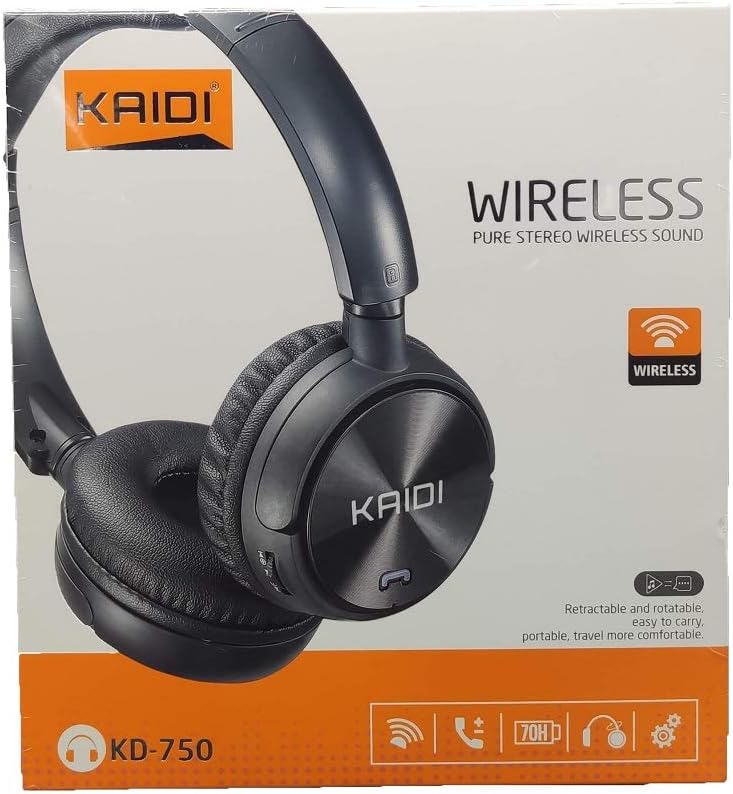
Whakaahua: Mua view of the Kaidi KD-750 retail packaging, showing the headphones and branding.
3. Hua Neke Atuview
Familiarize yourself with the various parts and controls of your Kaidi KD-750 headphones.

Whakaahua: Mua view of the Kaidi KD-750 Bluetooth Headphones, showcasing the earcups with Kaidi logo and the adjustable headband.
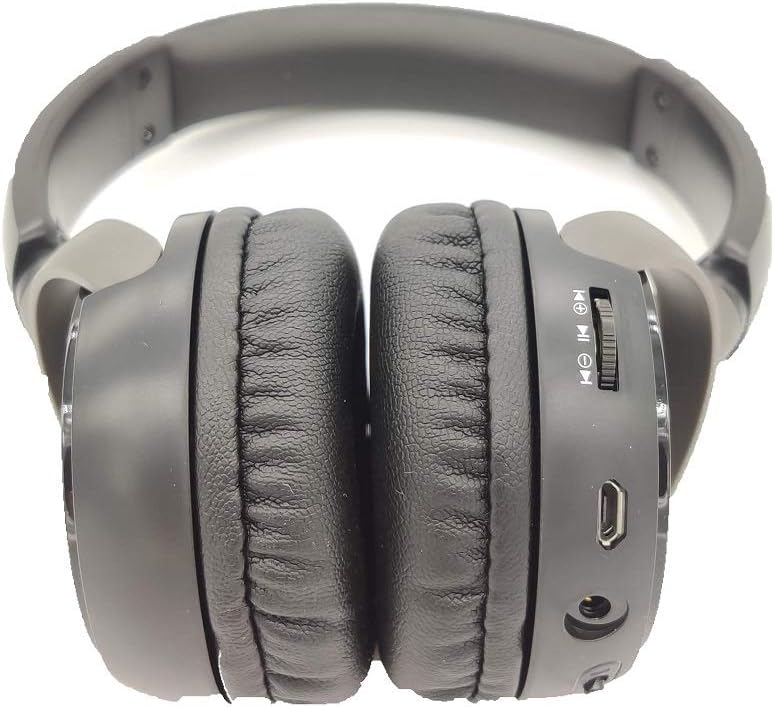
Whakaahua: Taha view of the Kaidi KD-750 Bluetooth Headphones, highlighting the control buttons, charging port, and audio jack on the earcup.

Image: Back of the Kaidi KD-750 retail box, featuring a diagram of the headphone controls and key product features.
3.1. Ngā Mana Whakahaere me ngā Tauranga
- Power Button / Multi-function Button: Whakakā/Whakaweto, Purei/Whakamutu, Whakautu/Whakamutu Waea.
- Rōrahi Whakarunga / Pātene Riu Panuku: Pihi poto mo te Rōrahi Whakarunga, Pehi roa mo te Riu Panuku.
- Rōrahi Whakararo / Pātene Riu Mua: Perehi poto mo te Volume Raro, Pehi roa mo te Riu o mua.
- Pātene Aratau (M): Switch between Bluetooth, FM Radio, and SD Card modes.
- Tauranga Whakatau USB Moroiti: Mo te utu i nga taringa.
- 3.5mm AUX Whakauru: Mo te hononga waea ma te whakamahi i te taura ororongo whakauru.
- Kāniwha SD Kāri SD: Mō te purei puoro tika mai i tētahi kāri Micro SD.
- hopuoro: Mo nga waea kore-ringa.
4. Tatūnga
4.1. Te Whakataki i nga Paneoro
I mua i te whakamahinga tuatahi, kia whakakiia katoatia o taringa.
- Connect the Micro USB end of the charging cable to the charging port on the headphones.
- Honoa te pito USB-A o te taura utu ki tētahi urutau hiko USB (kāore i te whakaurua) ki te tauranga USB rānei o te rorohiko.
- The LED indicator will illuminate (usually red) during charging.
- Once fully charged (approximately 2 hours), the LED indicator will change color or turn off (refer to specific LED behavior in the specifications).
Tuhipoka: Ko te ora o te pākahiko he 5 haora i runga i te utu katoa.
4.2. Takirua Nihokikorangi
Honoa ō pane whakarongo ki tētahi taputapu Bluetooth.
- Me mohio kua weto nga taringa.
- Press and hold the Power Button for approximately 3-5 seconds until the LED indicator flashes blue and red alternately, indicating pairing mode.
- I runga i to taputapu (papa atamai, papa, rorohiko), whakaahei i te Nihokikorangi me te rapu mo nga taputapu e waatea ana.
- Select "KD-750" from the list of found devices.
- Kia honoa, ka āta mura te tohu LED ki te kikorangi, ka noho kikorangi tonu rānei.
- Mena e hiahiatia ana he kupuhipa, tāuruhia "0000".
The effective Bluetooth range is approximately 10 meters (33 feet).
5. Nga Tohutohu Whakahaere
5.1. Te Hiko / Whakaweto
- Whakahiko: Press and hold the Power Button for 2-3 seconds until the LED indicator lights up.
- Weto Whakakore: Press and hold the Power Button for 3-4 seconds until the LED indicator turns off.
5.2. Purei Puoro (Aratau Nihokikorangi)
- Purei/Tatari: Patohia poto te Patene Hiko.
- Riu Panuku: Pēhia roa te pātene Volume Up.
- Riu o mua: Pēhia roa te pātene Volume Raro.
- Runga Runga: Patohia poto te paatene Volume Up.
- Raro Raro: Patohia poto te paatene Volume Raro.
5.3. Waea Waea
- Whakautu Waea: Short press the Power Button when an incoming call rings.
- Whakamutu Waea: Short press the Power Button during a call.
- Whakakore Waea: Long press the Power Button when an incoming call rings.
- Waea Anō te Tau Whakamutunga: Pēhia rua te Pātene Hiko.
5.4. Mode Switching (FM Radio / SD Card / AUX)
Pehia te Patene Aratau (M). to cycle through available modes: Bluetooth, FM Radio, and SD Card playback.
5.4.1. Aratau Reo Irirangi FM
- Switch to FM mode using the Mode (M) Button.
- Long press the Power Button to automatically scan and save available FM stations.
- Short press the Volume Up/Down buttons to adjust volume.
- Long press the Volume Up/Down buttons to switch between saved stations.
5.4.2. Whakahoki Kari SD Micro
- Insert a Micro SD card (with MP3 files) into the SD card slot.
- Switch to SD Card mode using the Mode (M) Button. The headphones will automatically begin playing music from the card.
- Use the Play/Pause, Volume Up/Down, and Next/Previous Track controls as in Bluetooth mode.

Whakaahua: Kati-ake view of the Micro SD card slot on the Kaidi KD-750 headphones.
5.4.3. AUX Wired Mode
- Connect one end of the included 3.5mm audio cable to the AUX input on the headphones.
- Honoa te tahi pito ki te putanga ororongo 3.5mm o to taputapu.
- Ka huri aunoa ngā pane whakarongo ki te aratau AUX.
- In AUX mode, controls on the headphones (volume, track control) may not function; use your connected device for control.
6. Tiaki me te Tiaki
- Horoia ngā paneoro ki te kakahu ngohengohe, maroke. Kaua e whakamahi i ngā kaihoroi whakakoi, i ngā whakarewa rānei.
- A ape i te tuku i nga taringa ki te wera nui, te makuku, te ra tika ranei.
- Kaua e rumakina nga taringa ki te wai, ki etahi atu wai ranei.
- Whakaorangia nga taringa ki te waahi makariri, maroke ka kore e whakamahia.
- Whakautua ngā paneoro i ia wā, ahakoa kāore e whakamahia mō te wā roa, kia mau tonu ai te hauora o te pākahiko.
7. Te Raru
7.1. Kāore ngā pane whakarongo e taea te whakakā.
Rongoā: The battery may be depleted. Connect the headphones to a power source using the USB charging cable and allow them to charge for at least 30 minutes before attempting to power on again.
7.2. Cannot pair with a Bluetooth device.
- Otinga 1: Ensure the headphones are in pairing mode (LED flashing blue and red alternately).
- Otinga 2: Me whakarite kei te whakahohea te Nihokikorangi i runga i tō pūrere, ā, kia 10 mita te tawhiti atu i ngā paneoro.
- Otinga 3: Turn off Bluetooth on your device, then turn it back on and try searching again.
- Otinga 4: If previously paired, try "forgetting" or "unpairing" the headphones from your device's Bluetooth list and then re-pairing.
7.3. Kāore he oro, kāore hoki he iti o te oro.
- Otinga 1: Tirohia nga taumata oro i runga i nga taringa me to taputapu hono.
- Otinga 2: Me whakarite kei te hono tika ngā paneoro mā te Nihokikorangi, mā te taura AUX 3.5mm rānei.
- Otinga 3: If using AUX mode, ensure the cable is fully inserted into both the headphones and the audio source.
7.4. FM radio reception is poor.
Rongoā: Move to an open area away from obstructions or electronic interference. The 3.5mm audio cable can sometimes act as an antenna; try connecting it even if not using AUX mode for improved reception.
8. Whakatakotoranga
| Putanga Nihokikorangi: | v4.2 |
| Kawa Tautoko: | AVRCP1.3, A2DP1.0, HFP1.5, HSP1.0 |
| Rangi Whanui: | 10 mita (33 putu) |
| Auau Mahi: | 2.402GHz - 2.480GHz |
| Momo Pūhiko: | Built-in 3.7V 300mAh Rechargeable Lithium Battery |
| Whakapae Voltage: | DC 4.2V - 5.5V |
| Wā Whakataki: | Tata ki te 2 haora |
| Roa Pūhiko: | Approximately 5 hours (playback) |
| Te Mana Whakakore: | 32 Ohm |
| Mana Haruru: | Whakakahoretanga Noise Haangai |
| Hangarau Hononga: | Nihokikorangi, 3.5mm Jack |
| Ngā Pūrere Hototahi: | Any device supporting Bluetooth connectivity |
| Taumaha Hua: | 190 g |
| Tae: | Pango |
9. Pūtāhui me te Tautoko
The Kaidi KD-750 Bluetooth Headphones come with a standard manufacturer's warranty against defects in materials and workmanship. Please refer to the warranty card included with your purchase for specific terms and conditions, including the warranty period.
For technical support, troubleshooting assistance, or warranty claims, please contact your retailer or the official Kaidi customer service. Contact information can typically be found on the product packaging or the official Kaidi webpae.
Tena koa pupurihia to tohu hoko mo nga kaupapa whakamana.


