1. Kupu Whakataki
The BenQ TK860i Smart Home Theater Projector delivers an authentic 4K HDR viewing experience, ideal for brightly lit living rooms. Featuring HDR-PRO technology, it projects a large 100-inch+ 4K UHD picture with striking clarity and defined details. This projector integrates Android TV with Netflix and Chromecast, along with Dolby Digital Plus for enhanced audio. Designed for ease of use, it includes 2D Keystone correction, built-in 10W speakers, and Wi-Fi connectivity.
Āhuatanga matua:
- 4K UHD Taumira: True 8.3 million pixels for sharp, detailed images.
- HDR-PRO (HDR10/HLG): Enhanced contrast and brightness for realistic visuals.
- Ngā Tae Kanapa: Over 3000 ANSI lumens and 98% Rec. 709 for use in various lighting conditions.
- Immersive Sports Experience: Dedicated Sport modes with CinemaMaster Audio+2.
- Tāutatanga ngawari: 1.3X big zoom and lens shift for flexible setup.
- TV Android: Integrated smart TV platform with streaming apps.
- Nga Kaikōrero Roa-roto: Dual 10W speakers for integrated audio.
2. Hua Neke Atuview

Whakaahua 2.1: Mua view of the BenQ TK860i projector, showcasing tona hoahoa kiko me te arotahi.

Whakaahua 2.2: Te taha view of the BenQ TK860i projector, highlighting its ventilation and compact form factor.
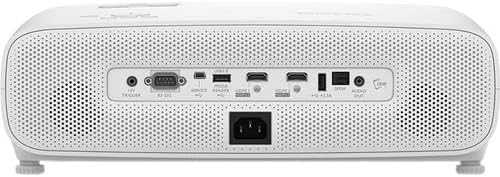
Whakaahua 2.3: Whakamuri view of the BenQ TK860i projector, displaying the various input and output ports for connectivity.
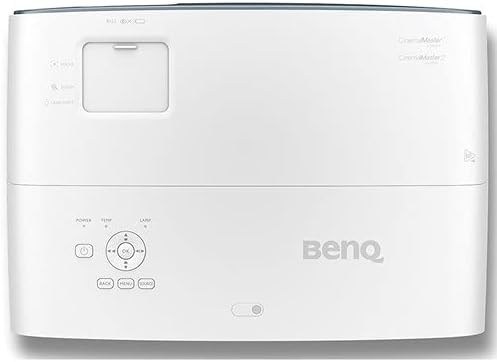
Whakaahua 2.4: Runga view of the BenQ TK860i projector, showing the control panel and adjustment dials.
3. Tatūnga
3.1 Whakanoho
Position the projector on a stable, flat surface or mount it to the ceiling. Ensure adequate ventilation around the unit. The TK860i features a 1.3X big zoom and lens shift, allowing for flexible placement and image adjustment without moving the projector itself. For a 100-inch screen, the projector can be placed approximately 8.2 feet away from the screen.
3.2 Hononga Hiko
- Connect the power cord to the projector's AC IN port.
- Monohia tetahi pito o te taura hiko ki tetahi putanga hiko kua oti te tu.
3.3 Hononga Pūrere
The TK860i offers multiple connectivity options:
- HDMI: Connect Blu-ray players, gaming consoles, streaming devices, or computers using HDMI cables. The projector features multiple HDMI ports.
- USB: Use the USB ports for media playback or to power compatible streaming dongles.
- Ororongo Kei: Connect external audio systems if desired.
4. Nga Tohutohu Whakahaere
4.1 Kei te Hiko / Weto
- Press the Power button on the projector or the remote control to turn the unit on.
- To turn off, press the Power button again. A confirmation message may appear; confirm to shut down.
4.2 Initial Setup and Image Adjustment
- Upon first power-on, follow the on-screen prompts to select your preferred language and projector position (e.g., Front, Rear, Front Ceiling, Rear Ceiling).
- Whakamahia te Arotahi a Topa rings near the lens to adjust the image clarity and size.
- Whakamahia te Raimana Whakawhiti feature (if available on your model) to vertically or horizontally adjust the image position without tilting the projector.
- Tonoa Kohatu Matua 2D correction via the menu to square the image if the projector is not perfectly perpendicular to the screen.
4.3 Kōwhiringa Pūtake Tāuru
Pehia te Puna button on the remote control or the projector's control panel to cycle through available input sources (HDMI1, HDMI2, USB, etc.).
4.4 Nga waahanga pouaka whakaata atamai (TV Android)
The integrated Android TV dongle provides access to a wide range of streaming applications, including Netflix, YouTube, and Prime Video. Use the remote control to navigate the Android TV interface, browse content, and launch apps.
5. Tiaki
5.1 Te horoi i te Arotahi
Āta horoia te karāhe o te pūwhakaata ki tētahi kakahu ngohengohe, kore-miro i hangaia mō ngā mata whatu. Āta karohia te whakamahi i ngā horoi whakakoi, te kaha nui rānei.
5.2 Te Whakapai i te Matarere
Regularly check and clean the air filter to ensure proper ventilation and prevent overheating. Refer to the full user manual for specific instructions on accessing and cleaning the filter.
5.3 Lamp Whakakapinga
Ko te pūwhiti lamp he iti noa te roa o te ora. Ina te lamp life indicator appears, replace the lamp according to the instructions in the full user manual. Always use genuine BenQ replacement lamps.
6. Te Raru
6.1 Kore Pikitia
- Me whakarite kei te whakakā te pūwhakaata, ā, kua tika te tīpakonga o te pūtake tāuru.
- Check all cable connections (HDMI, power) to ensure they are secure.
- Verify that the connected source device is powered on and outputting a signal.
6.2 Whakaahua Pōuriuri
- Whakaritea te mowhiti arotahi ki runga i te arotahi pūwhiti kia koi te atahanga.
- Ensure the projector is at the correct distance from the screen for optimal focus.
6.3 Kāore he Ororongo
- Check the volume level on both the projector and the connected source device.
- Ki te whakamahi koe i ngā kaikorero o waho, me whakarite kei te hono tika, kei te whakakā hoki.
- Verify audio settings in the projector's menu.
7. Whakatakotoranga
| Āhuahira | Whakatakotoranga |
|---|---|
| Hunga Hua | 19 x 15.1 x 7.7 inihi |
| Taumaha Tūemi | 9.26 pauna |
| Tauira Tuemi | TK850 |
| Waitohu | BenQ |
| Nga Whakamahinga Manakohia | Te petipeti |
| Āhuahira Motuhake | Kawe |
| Hangarau Hononga | HDMI |
| Whakaatu Whakatau | 3840 x 2160 (4K UHD) |
8. Ataata Hua Whaimana
Ataata 8.1: He mutuview of the BenQ TK850 projector, highlighting its 4K HDR-PRO capabilities and home entertainment features. This video provides a visual guide to the projector's design and core functionalities.
Ataata 8.2: A comparison video discussing the features and differences between the BenQ HT3550 and TK850 models, offering insights into their performance and suitability for various home theater setups.
9. Pūtāhui me te Tautoko
BenQ offers an industry-leading 3-year warranty, providing peace of mind with coverage that exceeds many competitors' 1-year warranties. Our US-based customer service team is available to assist with any inquiries or support needs.
For detailed support, troubleshooting, or warranty claims, please refer to the official BenQ webpaetukutuku, whakapā atu ranei ki ta raatau ratonga kaihoko.


