1. Kupu Whakataki
Thank you for choosing the Kaidi KD913 Wireless Stereo Headphone. This manual provides essential information for setting up, operating, and maintaining your new headphones. Please read it carefully before use to ensure optimal performance and longevity of the product.
2. Nga korero haumaru
- Mana Rōrahi: A ape i te whakarongo ki nga reanga teitei mo te wa roa kia kore ai e pakaru te rongo.
- Puranga wai: Do not expose the headphones to water or moisture. This product is not waterproof.
- Puranga Wera: Keep the headphones away from extreme temperatures, direct sunlight, and heat sources.
- Te horoi: Whakamahia he kakahu ngohengohe, maroke mo te horoi. Kaua e whakamahi i nga kai horoi me nga whakarewa.
- Whakakorea: Kaua e ngana ki te wetewete, ki te whakarerekē rānei i ngā paneoro. Ka whakakorea te pūtāhui.
3. Ihirangi mokete
Tena koa tirohia te kete mo nga mea e whai ake nei:
- Kaidi KD913 Wireless Stereo Headphone
- Tauira Whakatau USB
- Pukapuka Kaiwhakamahi
4. Hua Neke Atuview
Familiarize yourself with the components of your Kaidi KD913 headphones.
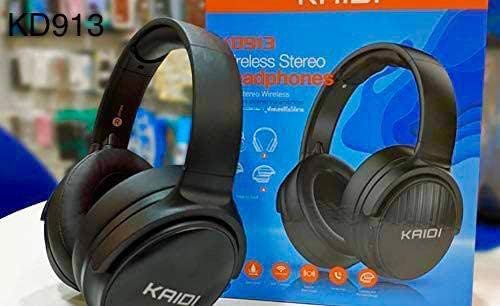
Image: Kaidi KD913 Headphone in a folded position, showcasing tona hoahoa kiato.
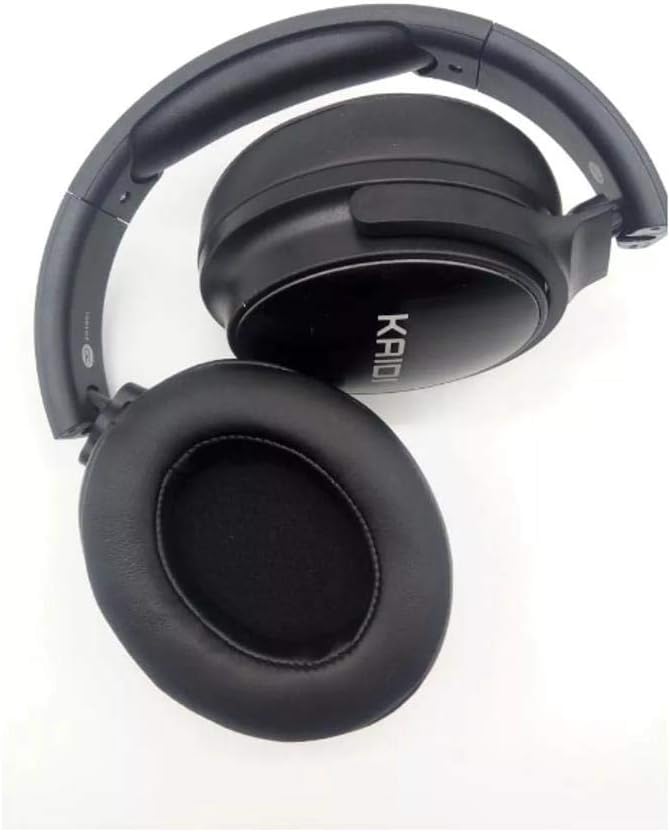
Whakaahua: Kati-ake view of a Kaidi KD913 Headphone earcup, highlighting the cushioning and 'KAIDI' branding.
Ngā Wāhanga o te Paneoro:
- Pātene Hiko/Mahinga-maha: Whakamahia mō te whakakā/whakaweto, te purei/te whakamutu, te whakautu/te whakamutu waea.
- Rōrahi Whakarunga/Pātene Riu Panuku: Increases volume, skips to the next track.
- Rōrahi Whakararo/Pātene Riro o mua: Decreases volume, goes to the previous track.
- Tohu LED: Ka whakaatu te mana, te utu, me te mana takirua.
- hopuoro: Mo nga waea kore-ringa.
- Tauranga Kaihoko USB: Mo te hono i te taura utu.
- Tauranga AUX-in: Mo te hononga ororongo waea.
5. Tatūnga
5.1. Te Whakataki i te Paneoro
- Connect the small end of the USB charging cable to the USB charging port on the headphone.
- Honoa te pito nui o te taura utu USB ki tētahi urutau hiko USB (kāore i roto) ki te tauranga USB rānei o te rorohiko.
- Ka tiaho te tohu LED (he whero te nuinga o te wā) i te wā e utu ana.
- Once fully charged, the LED indicator will change color (typically blue) or turn off. Disconnect the charging cable.
Note: For first-time use, fully charge the headphones before use.
5.2. Te Honohono ki ngā Pūrere (Nihokikorangi)
- Whakahiko: Press and hold the Power/Multi-function button for approximately 3-5 seconds until the LED indicator flashes blue and red alternately. This indicates the headphones are in pairing mode.
- Whakahohe Nihokikorangi: I runga i to taputapu (waea atamai, papa, pona), whakaahei i te Nihokikorangi.
- Rapua Pūrere: I ngā tautuhinga Nihokikorangi o tō pūrere, rapua ngā pūrere e wātea ana.
- Select 'KD913': From the list of found devices, select 'KD913'.
- Whakaū Tauhoa: Once successfully paired, the LED indicator on the headphones will flash blue slowly, and you will hear an audible confirmation.
Note: If a password is required, enter '0000'. The headphones will automatically connect to the last paired device when powered on, if Bluetooth is enabled on the device.
6. Nga Tohutohu Whakahaere
6.1. Te Hiko / Whakaweto
- Whakahiko: Press and hold the Power/Multi-function button for 3 seconds. The LED indicator will flash blue.
- Weto Whakakore: Press and hold the Power/Multi-function button for 3 seconds. The LED indicator will turn off.
6.2. Mana Whakahoki Waiata
- Purei/Tatari: Pēhia te pātene Mana/Maha-mahi kotahi.
- Riu Panuku: Patohia me te pupuri i te paatene Volume Up.
- Riu o mua: Pēhia me te pupuri i te pātene Volume Raro.
6.3. Whakahaere Waea
- Whakautu Waea: Pēhia te pātene Mana/Maha-mahi kotahi.
- Whakamutu Waea: Press the Power/Multi-function button once during a call.
- Whakakore Waea: Pēhia me te pupuri i te pātene Mana/Maha-mahi mō te 2 hēkona.
- Waea Anō te Tau Whakamutunga: Pēhia rua te pātene Mana/Maha-mahi.
6.4. Mana Rōrahi
- Whakanuia te Volume: Patohia poto te paatene Volume Up.
- Whakaheke Rahi: Patohia poto te paatene Volume Raro.
6.5. Wired Mode (AUX-in)
To use the headphones in wired mode, connect a 3.5mm audio cable (not included) from your audio source to the AUX-in port on the headphones. The Bluetooth function will automatically disable when an AUX cable is connected.
7. Tiaki
7.1. Te horoi
Wipe the headphones with a soft, dry, lint-free cloth. Do not use liquid cleaners, sprays, or harsh chemicals.
7.2. Rokiroki
When not in use, store the headphones in a cool, dry place, away from direct sunlight and extreme temperatures. If storing for an extended period, ensure the headphones are partially charged to maintain battery health.
8. Te Raru
| Raruraru | Take pea | Rongoā |
|---|---|---|
| Karekau e kaha ana nga waea. | He iti te pākahiko. | Me utu katoa nga taringa. |
| Kaore e taea te hono ki te taputapu. | Headphones not in pairing mode; Bluetooth not enabled on device; device too far. | Me whakarite kei roto ngā paneoro i te aratau takirua (e kanapa ana te whero/kikorangi). Whakahohehia te Nihokikorangi i runga i tō pūrere. Nekehia te pūrere kia tata atu ki ngā paneoro. |
| Karekau he tangi. | Volume too low; headphones not connected; incorrect audio output selected. | Increase volume on headphones and device. Re-pair headphones. Check audio output settings on your device. |
| He iti te kounga tangi. | Te pokanoa; tawhiti rawa te taputapu; iti pūhiko. | Move closer to the paired device. Avoid strong electromagnetic interference. Charge the headphones. |
9. Whakatakotoranga
- Waitohu: Kaidi
- Tauira: KD913
- Hangarau Hononga: Ahokore
- Hangarau Whakawhitiwhiti Ahokore: Nihokikorangi
- Waea Puka Puka: Over-ear (Circumaurais)
- Whakatakoto Taringa: Over-ear (Circumaurais)
- Tae: Pango
- Ngā Pūrere Hototahi: Cell phones, Notebooks, Tablets, Televisions
- Āhuatanga taura: Wireless (No cable)
10. Pūtāhui me te Tautoko
Kaidi products are designed for reliability and performance. For warranty information or technical support, please refer to the warranty card included with your purchase or contact your local retailer or Kaidi customer service.


