1. Hua Neke Atuview
The EARISE M37 is a portable 100W PA system designed for various audio applications, including home parties, small events, and karaoke. It features a wooden cabinet for enhanced acoustics, built-in Bluetooth connectivity, and comes with two wireless microphones for immediate use. The system supports multiple audio inputs including AUX and USB, offering versatile playback options.

Image: The EARISE M37 PA system, showcasing its wooden box design and two included wireless microphones.
2. Nga korero haumaru
- Kaua e tukuna te waahanga ki te ua, ki te makuku ranei hei aukati i te ahi me te ru hiko.
- Do not open the cabinet. There are no user-serviceable parts inside. Refer all servicing to qualified personnel.
- Me whakarite kia tika te hau huri noa i te waahanga. Kaua e araia nga whakatuwheratanga hau.
- A ape i te whakanoho i te waeine ki te taha o nga puna wera penei i nga radiators, rehita wera, umu, me etahi atu taputapu (tae atu ki ampkaiwhakaora) e whakaputa ana i te wera.
- Tiakihia te taura hiko kia kaua e hikoi, ka kowhakina mai ranei, ina koa ki nga moko, nga waahi waatea, me te waahi ka puta mai i te taputapu.
- Wewetehia tenei taputapu i te wa e uira ana te tupuhi, i te kore ranei e whakamahia mo te wa roa.
3. Ihirangi mokete
Tena koa tirohia te kete mo nga mea e whai ake nei:
- EARISE M37 PA System Unit
- 2 x Whaituhi Ahokore
- Kaiwhakahaere Mamao
- Pūurutau Hiko
- Pukapuka Kaiwhakamahi (tenei tuhinga)

Image: A visual representation of key features and included accessories: wireless microphone, Bluetooth 4.2, USB auto-play, and remote controller.
4. Nga waahanga hua me nga waahanga
Familiarize yourself with the main components and controls of your EARISE M37 PA System.

Image: The control panel of the EARISE M37, showing various inputs and adjustment knobs. Key controls include: Mode, Previous/Next Track, Play/Pause, Record, EQ, Light, Mic 1/2 inputs, AUX In/Out, USB, TF card slot, DC Power In, ON/OFF switch, Charging indicator, ECHO, DELAY, MIC VOL, MASTER VOL, TREBLE, EXTRA BASS, and BASS.
Nga Mahi Paewhiri Mana:
- AHUNGA: Ka huri i waenga i ngā aratau tāuru (Nihokikorangi, AUX, USB, Kāri TF).
- Riu o mua/panuku: Navigates tracks during media playback.
- Purei/Tatari: Whakahaerehia ai te purei ano i nga papaho.
- tuhi: Initiates or stops recording (requires USB/TF storage).
- EQ: Ka whakatika i nga tautuhinga whakaorite.
- Maama: Controls the integrated LED lighting.
- MIC 1 / MIC 2: Inputs for wired microphones (if used).
- AUX IN / AUX OUT: Audio input and output jacks for external devices.
- USB: USB port for media playback or recording.
- TF: TF (MicroSD) card slot for media playback or recording.
- DC Power IN: Tāuru mana mō te utu me te mahi.
- KIA/WATA: Pana hiko mō te waeine.
- Tohu Whakatau: Light indicating charging status.
- ECHO: Whakaritea ai te awe oro mo nga hopuoro.
- TATAU: Ka whakarerekē i te pānga whakaroa mō ngā hopuoro.
- MIC VOL: Ka whakarerekē i te oro o ngā hopuoro.
- MASTER VOL: Controls the overall master volume of the system.
- TREBLE: Whakaritea te putanga ororongo auau teitei.
- PAHE ATU: Whakarei ake i te putanga ororongo iti-auau.
- BASS: Whakaritea te putanga ororongo iti-auau.
5. Tatūnga
5.1 Charging the PA System
Before first use, fully charge the PA system. Connect the provided power adapter to the "DC Power IN" port on the unit and plug it into a standard wall outlet. The charging indicator light will show the charging status. A full charge provides up to 7 hours of play time.

Image: Illustration highlighting the 3600mAh battery capacity, providing up to 7 hours of continuous play time.
5.2 Tatūnga Waea Waea Ahokore
The two wireless microphones are pre-paired with the PA system. Insert AA batteries (not included) into each microphone. Turn on the microphones using their respective power switches. They should automatically connect to the PA system.
5.3 Te Hono i nga Puna Ororongo
Hononga Nihokikorangi:
- Turn on the EARISE M37 PA system.
- Pehia te MODE button until the display shows "Bluetooth" or a Bluetooth icon.
- I runga i to taputapu pūkoro (smartphone, tablet, etc.), whakahohea te Nihokikorangi me te rapu mo nga taputapu e waatea ana.
- Select "EARISE M37" from the list. Once connected, you will hear a confirmation sound.

Image: A hand holding a smartphone displaying a Bluetooth connection screen, indicating the ease of pairing with the EARISE M37 PA system.
Whakahoki Kaari USB/TF:
Whakauruhia he puku kohiko USB, he kāri TF (MicroSD) rānei kei roto ngā oro MP3 files into the respective port. The system will automatically detect and begin playing music. Use the Previous/Next Track and Play/Pause buttons to control playback.
Tāuru AUX:
Honoa he taputapu oro o waho (hei tauira, te purei MP3, rorohiko) ki te AUX IN port using a 3.5mm audio cable (not included). Press the MODE button until AUX input is selected.
6. Nga Tohutohu Whakahaere
6.1 Hiko / Whakaweto
To turn the unit on or off, use the ON/OFF switch located on the control panel.
6.2 Adjusting Volume and Effects
- MASTER VOL: Rotate this knob to adjust the overall volume of the PA system.
- MIC VOL: Whakaritea te rōrahi o ngā hopuoro tūhonohono.
- ECHO / DELAY: Use these knobs to add or reduce echo and delay effects to the microphone sound.
- TREBLE / BASS / EXTRA BASS: Adjust these knobs to fine-tune the high and low frequencies of the audio output.
6.3 Using Microphones
Once the wireless microphones are powered on and connected, speak into them. Adjust the MIC VOL, ECHO, a WHAKATOARO knobs on the PA system to achieve the desired sound. For optimal performance, hold the microphone a few inches from your mouth.

Image: Two individuals enjoying karaoke with the EARISE M37 PA system and its wireless microphones, demonstrating typical usage.
6.4 Mahinga Rekoata
To record audio (e.g., microphone input or music playback), ensure a USB flash drive or TF card is inserted into the corresponding slot. Press the REKOTI button to start recording. Press it again to stop. Recorded files will be saved to the inserted storage device.
7. Tiaki
- Horoia te waeine ki te kakahu ngohengohe, maroke. Kaua e whakamahi i nga kai horoi me nga whakarewa.
- Store the PA system in a cool, dry place away from direct sunlight and extreme temperatures.
- If the unit will not be used for an extended period, fully charge the battery before storage and recharge it every few months to maintain battery health.
8. Te Raru
| Raruraru | Take pea | Rongoā |
|---|---|---|
| Karekau he kaha | Kua pau te pākahiko; Kāore te taura hiko i hono. | Charge the unit; Ensure power cable is securely connected. |
| Kaore he tangi mai i nga hopuoro | Microphones off; Batteries low/dead; MIC VOL too low. | Turn on microphones; Replace batteries; Increase MIC VOL. |
| Nihokikorangi kore hono | PA system not in Bluetooth mode; Device too far; Interference. | Press MODE button to select Bluetooth; Move device closer; Restart both devices. |
| Kāore te kāri USB/TF e purei | He hē file hōputu; Kāore i tika te whakaurunga o te kāri/puku; Kua pirau files. | Whakaritea files are MP3; Reinsert card/drive; Try different files/device. |
9. Whakatakotoranga
| Āhuahira | Taipitopito |
|---|---|
| Waitohu | PANUI |
| Tauira | M37 |
| Wat Putangatage | 100 Watts |
| Puna Mana | Pūhiko Powered |
| Hangarau Hononga | Nihokikorangi, USB, AUX |
| Putanga Nihokikorangi | 4.2 (from image) |
| Whakauru Ororongo | Hopuoro Ahokore, AUX |
| Te maha o nga hongere | 2 |
| Taumaha Tūemi | 11.62 pauna |
| Ahu mōkihi | 18.7 x 12 x 11.9 inihi |
| Rahi Hua (tata.) | 32.5 cm (12.8 in) H x 25.5 cm (10 in) W x 23.8 cm (9.4 in) D |
| Tae | Pango |
| Momo Whakaeke | Ripanga |
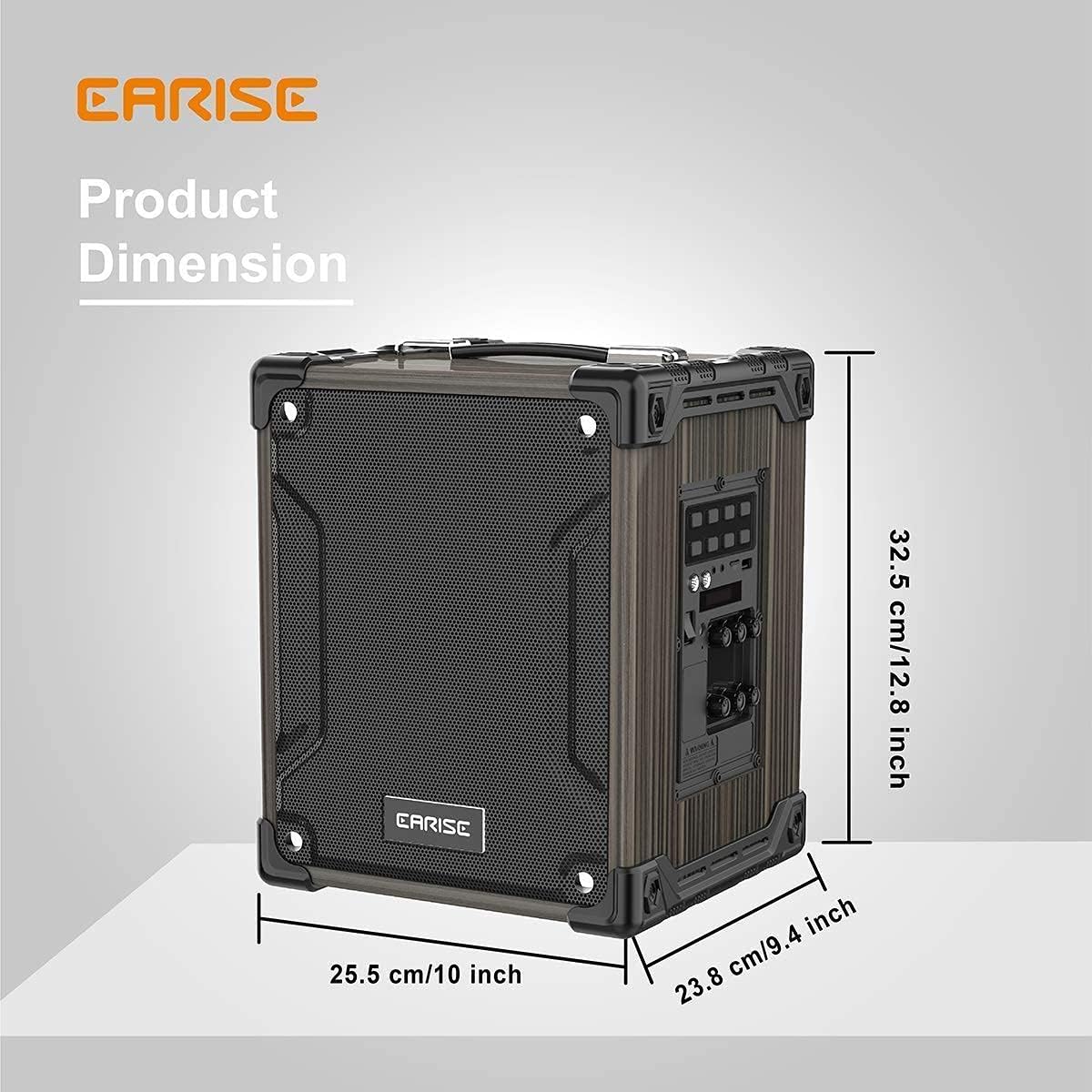
Image: Product dimensions of the EARISE M37, measuring approximately 32.5 cm (12.8 inches) in height, 25.5 cm (10 inches) in width, and 23.8 cm (9.4 inches) in depth.
10. Pūtāhui me te Tautoko
For warranty information or technical support, please refer to the contact details provided with your purchase or visit the official EARISE webpae. Puritia to tohu hoko mo nga kereme whakamana.


