Kupu Whakataki
Mauruuru koe mo te hokoasing the Caliber Alarm Clock with QI Charging Station. This device combines a digital alarm clock with a convenient wireless charging pad and a USB charging port, designed to simplify your bedside setup. It also features an adjustable night light and a large LED display for clear visibility.
This manual provides detailed instructions on how to set up, operate, maintain, and troubleshoot your new alarm clock. Please read it thoroughly before use to ensure optimal performance and longevity of the product.
Tatūnga
Wewete ana: Carefully remove the alarm clock from its packaging. Ensure all components are present: the alarm clock unit and the power adapter.
Hononga Hiko: Connect the provided power adapter to the DC input port on the back of the alarm clock. Plug the other end of the adapter into a standard wall outlet. The display will illuminate.
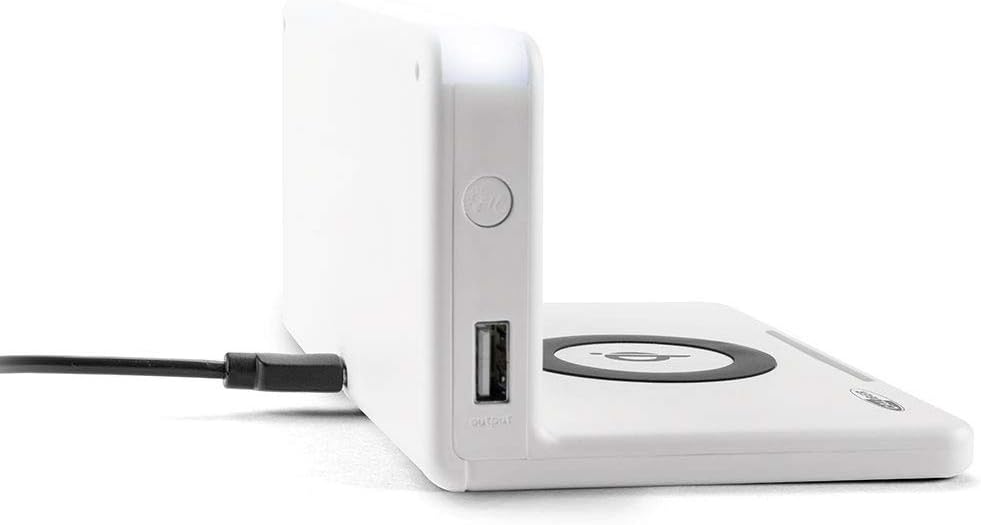
Whakaahua: Taha view of the alarm clock, illustrating the power input port (left) and the USB output port (right).
Tāuta Pūhiko (Pūrua): The unit includes 1 Lithium Ion battery for backup. This battery maintains time settings during power outages. Kāore e hiahiatia he tāutanga kaiwhakamahi mō tēnei pākahiko kua tāutahia i mua.
Tautuhinga Wā Tuatahi: Upon first power-up, the clock may display a default time or require manual setting. Refer to the "Operating" section for detailed instructions on setting the time.
Nga Tohutohu Whakahaere
Tautuhi Wā me te Rā
- Patohia me te pupuri i te PANUITANGA TIME button (location may vary, typically on the back or top) until the hour digits flash.
- Whakamahia te + or - nga paatene hei whakatika i te haora.
- Perehi PANUITANGA TIME kia neke anō ki ngā meneti, kātahi ka whakatikatika ki + or -.
- Repeat for year, month, and day if applicable.
- Perehi PANUITANGA TIME one last time to confirm and exit.
Tautuhinga Whakaoho
- Patohia me te pupuri i te WHAKATAHI PANUI button (or similar) until the alarm hour digits flash.
- Whakatikatikahia te haora me ngā meneti o te whakaoho mā te whakamahi i te + or - pātene.
- Perehi WHAKATAHI PANUI ki te whakau.
- Hei whakahohe/whakakore i te whakaoho, pēhia te PANUWHIRI ON / WAWHI pātene. Ka puta/ka ngaro he tohu whakaoho i runga i te whakaaturanga.
- Ka tangi ana te whakaoho, paatohia te Whakatā button for a temporary pause, or any other button to turn it off for the day.
Using the QI Wireless Charging Station
The alarm clock features a built-in QI wireless charging pad for compatible devices.
- Ensure the alarm clock is powered on.
- Place your QI-compatible smartphone or device directly onto the charging pad, centering it over the Waitohu QI.
- A charging indicator (e.g., an LED light or on-screen icon) will illuminate to confirm charging has begun. If charging does not start, reposition your device.

Image: A smartphone placed on the QI charging pad of the alarm clock, showing the charging interface on the phone screen.

Image: The alarm clock with a phone positioned on its wireless charging surface, indicating active charging.
Ma te whakamahi i te Tauranga Whakatau USB
A USB output port is available on the side of the unit for charging non-QI compatible devices or for faster wired charging.
- Connect your device's USB charging cable to the USB output port on the alarm clock.
- Honoa te pito kē atu o te taura ki tō pūrere. Ka tīmata aunoa te utu.
Adjusting Display Brightness and Night Light
- The alarm clock features adjustable display brightness. Look for a KAUPAPA or TE KARARANGA button, typically on the back or top. Press it repeatedly to cycle through brightness levels.
- To activate or adjust the night light, locate the dedicated TE MARAMA PO button. Press it to turn the light on/off or cycle through different brightness settings if available.
Te tiaki
- Te horoi: Disconnect the power adapter before cleaning. Use a soft, dry cloth to wipe the surface of the alarm clock. Do not use abrasive cleaners, waxes, or solvents as they may damage the finish.
- Rokiroki: Mēnā he roa te wā e penapena ana i te kōwae, momotuhia mai i te hiko ka penapena ki tētahi wāhi mātao, maroke.
- Te whakahaere: Avoid dropping the unit or subjecting it to strong impacts. Keep it away from water and high humidity.
Raparongoā
| Raruraru | Take pea | Rongoā |
|---|---|---|
| Ko te whakaaturanga karaka kei te waatea. | Kaore he hononga hiko. | Me whakarite kia mau te urutau hiko ki roto i te waeine me tetahi putanga pakitara mahi. |
| QI charging not working. | Device not QI-compatible; device not properly aligned; foreign objects on pad; phone case too thick. | Verify device compatibility. Reposition device on the center of the pad. Remove any foreign objects. Remove thick phone cases. |
| Kare e tangi te whakaoho. | Kāore te whakaoho i whakahohea; he iti rawa te oro; he hē te wā whakaoho. | Ensure the alarm icon is displayed. Check alarm volume settings. Verify the alarm time is set correctly. |
| Kei te he te wa. | Time not set correctly; power interruption. | Reset the time manually. If power was interrupted, the backup battery should maintain time, but a manual check is recommended. |
Whakatakotoranga
| Āhuahira | Taipitopito |
|---|---|
| Waitohu | Caliber |
| Tau tauira | HCG018QI/W |
| Tae | Mā |
| Momo Whakaatu | Mamati |
| Āhuahira Motuhake | Night light, QI charging station, USB charging port |
| Puna Mana | Hiko Hiko |
| Hunga Hua | 7.09 x 4.25 x 3.86 inihi |
| Taumaha Tūemi | 7.9 hekere (225 Karamu) |
| Pūhiko | 1 Lithium Ion battery (included, for backup) |
| GTIN | 08714505047157 |
Pūtāhui me te Tautoko
This Caliber product is designed for reliability and performance. For information regarding warranty coverage, please refer to the warranty card included with your purchase or visit the official Caliber webpae.
Should you encounter any issues not covered in the troubleshooting section, or require further assistance, please contact Caliber customer support. Contact details can typically be found on the product packaging or the manufacturer's official webpae.


