1. Hua Neke Atuview
The GOWIN 10.1 Inch Android 10.0 Tablet is a high-performance device designed for versatile use, featuring a quad-core processor, 4GB RAM, and 64GB internal storage, expandable up to 128GB. It supports dual SIM cards for cellular connectivity and includes a detachable keyboard and wireless mouse for enhanced productivity.

Image: GOWIN 10.1 Inch Android Tablet with its accessories, including a detachable keyboard, wireless mouse, and stylus.
2. He aha kei roto i te Pouaka
Manatokona kei roto katoa nga mea kei roto i te kete:
- GOWIN 10.1 Inch Android Tablet
- Papapātuhi Nihokikorangi
- Kiore Ahokore
- Puhi Papa
- Pataata AC
- Pukapuka Kaiwhakamahi
- Tauira USB
- OTG taura

Image: All components included in the GOWIN tablet package, laid out for inspection.
3. Te Tahora me ngā Tauranga o te Pūrere
Familiarize yourself with the tablet's physical features and connection points.
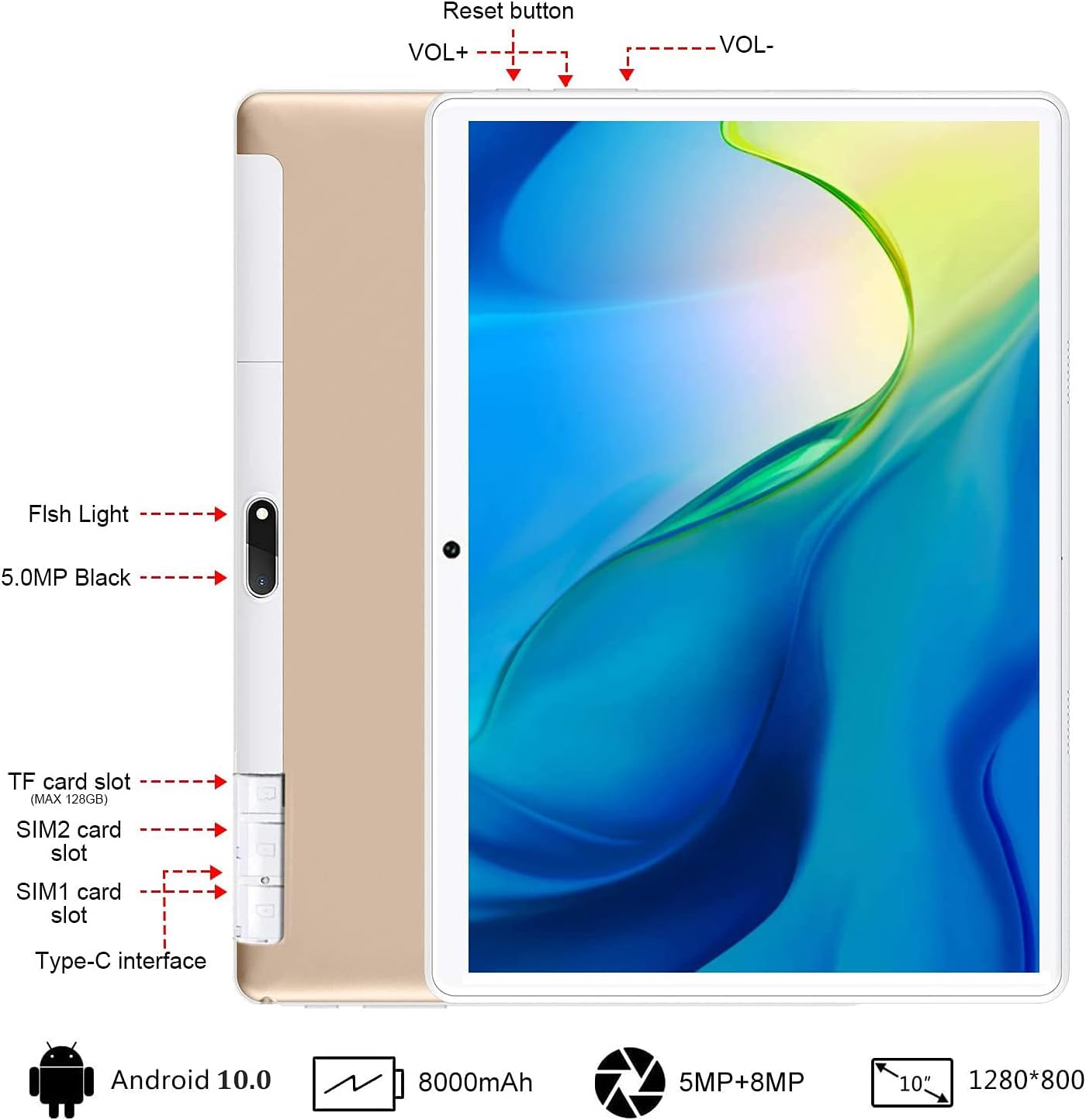
Whakaahua: Rear view of the GOWIN tablet, highlighting the TF card slot, SIM card slots, Type-C interface, reset button, volume controls, and camera.
- Kāniwha Kāri TF: For expandable storage (up to 128GB).
- SIM1/SIM2 Card Slots: For dual 4G cellular connectivity.
- Atanga Momo-C: Mo te utu me te whakawhiti raraunga.
- VOL+ / VOL-: Volume up and down buttons.
- Patene Tautuhi Anō: To restart the device if unresponsive.
- Ngā Kāmera: 5MP front-facing and 8MP rear-facing cameras.
4. Tatūnga
4.1 Whakataki Tuatahi
Before first use, fully charge the tablet using the provided AC charger and USB cable. The 8000mAh battery provides extended usage time.

Image: The GOWIN tablet screen showing a full battery indicator, emphasizing its 8000mAh capacity.
4.2 Te whakauru i nga kaari SIM me nga kaari SD
Carefully insert your SIM cards and/or a microSD card into the designated slots as shown in the device layout section. Ensure the tablet is powered off before inserting or removing cards.
4.3 Connecting Keyboard and Mouse
The included keyboard and mouse connect via Bluetooth. Refer to their individual instructions for pairing. Once paired, they provide a laptop-like experience.

Image: A user's hands typing on the detachable Bluetooth keyboard connected to the GOWIN tablet, with the wireless mouse nearby.
4.4 Attaching Tablet Case
The tablet case provides protection and can be folded into a stand for multiple viewnga koki.

Image: The GOWIN tablet positioned in its protective case, illustrating how the case can be folded to create various viewnga koki.
5. Nga Tohutohu Whakahaere
5.1 Hiko / Whakaweto
- Hei Whakahiko: Patohia ka mau te paatene Mana kia marama ra ano te mata.
- Hei Whakaweto: Press and hold the Power button, then select "Power off" from the options.
5.2 Whakaterenga Taketake (Android 10.0)
The tablet runs on Android 10.0, offering an intuitive user interface. Swipe gestures and on-screen buttons are used for navigation. Access Google Play Store to download applications like YouTube and Netflix.
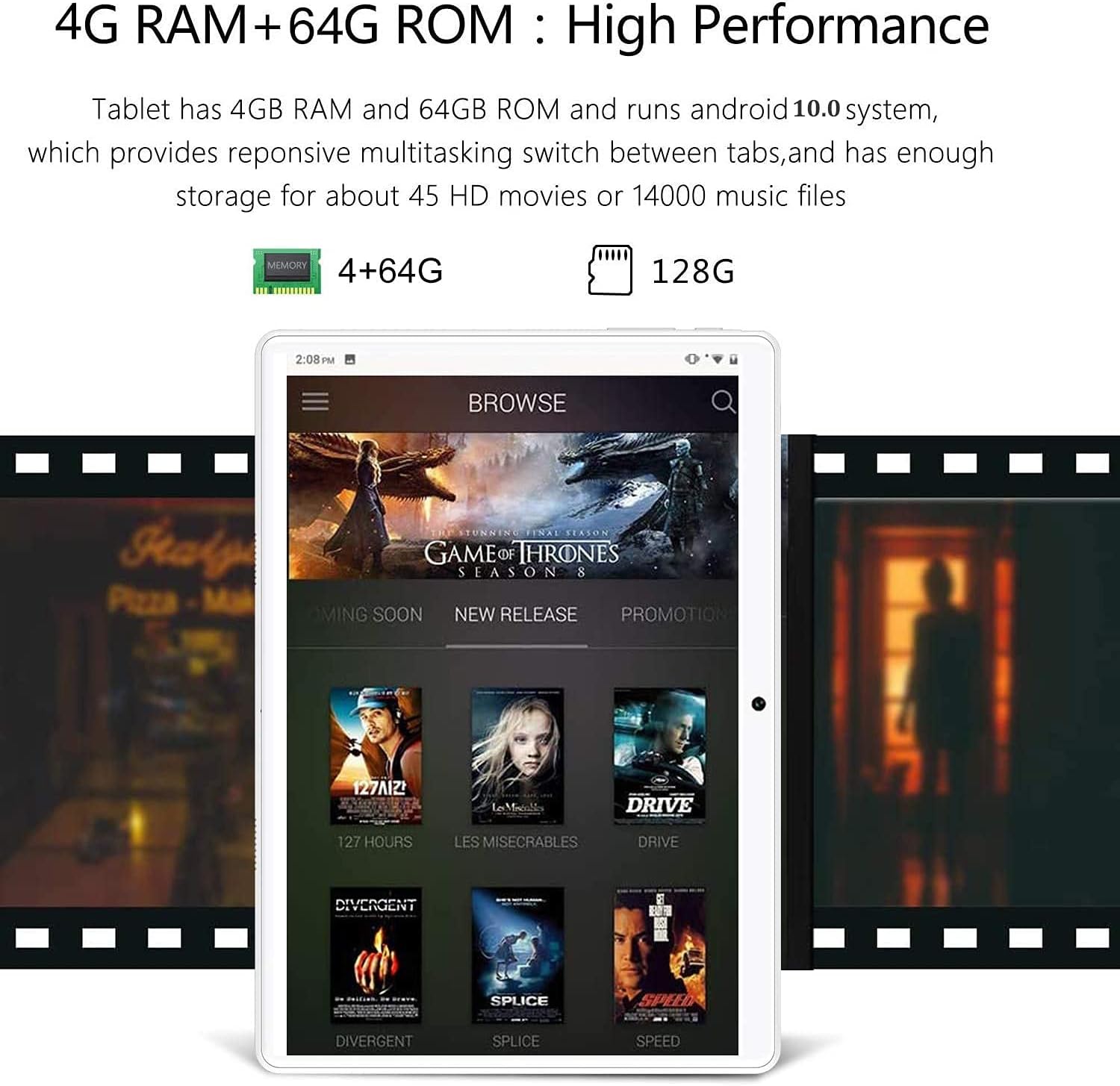
Image: The GOWIN tablet's display showing the Android 10.0 interface with various media applications, demonstrating its high performance and storage capacity.
5.3 Hononga
- Wi-Fi: Haere ki Tautuhinga> Whatunga & ipurangi> Wi-Fi ki te hono ki nga whatunga e waatea ana.
- Nihokikorangi: Haere ki Tautuhinga> Nga taputapu hono> Nihokikorangi ki te hono ki nga taputapu Nihokikorangi.
- Raraunga Pūkoro: If SIM cards are inserted, enable mobile data in Settings > Network & internet > Mobile network.
5.4 Whakamahinga Kaamera
The tablet is equipped with a 5MP front camera and an 8MP rear camera for photos and videos. Open the Camera app from the home screen or app drawer.

Image: The GOWIN tablet screen showcasing a vibrant image, illustrating the quality of its 8MP rear camera.
6. Tiaki
- Te horoi: Whakamahia he kakahu ngohengohe, kore-miro hei horoi i te mata me te tinana. Āta karohia ngā kaihoroi whakakoi, ngā whakarewa rānei.
- Tiaki Pūhiko: To prolong battery life, avoid extreme temperatures and do not let the battery fully drain frequently.
- Whakahōu Pūmanawa: Periodically check for system updates in Settings > System > System update to ensure optimal performance and security.
7. Te Raru
- Device is Slow/Apps Crashing: Close unused applications, clear cache, or restart the tablet. Ensure sufficient storage space is available.
- Kore Whakautu Mata: Perform a soft reset by pressing and holding the power button until the device restarts. If unresponsive, use the reset button (refer to Section 3).
- Cannot Connect to Wi-Fi/Bluetooth: Ensure Wi-Fi/Bluetooth is enabled. Restart the tablet and the router/Bluetooth device.
- Ka Paheke te Pūhiko: Whakaitihia te kanapa o te mata, whakakorehia nga ahuatanga kaore i whakamahia (Wi-Fi, Nihokikorangi, GPS), me te kati i nga taupānga papamuri.
For further assistance, please contact customer service through Amazon. We aim to provide a satisfactory answer within 24 hours.
8. Whakatakotoranga
| Āhuahira | Whakatakotoranga |
|---|---|
| Waitohu | GOWIN |
| Ingoa Tauira | Touch (K6) |
| Pūnaha Mahi | Android 10 |
| Rahi Mata | 10.1 Inihi |
| Whakatau Mata | 1280 x 800 pika (IPS) |
| Tukatuka | 1.5 GHz Quad-Core (MediaTek) |
| RAM | 4 GB |
| Rokiroki Roto | 64 GB |
| Rokiroki Whakawhanui | Up to 128 GB (microSD) |
| Kāmera Whakamuri | 8 MP |
| Kāmera Mua | 5 MP |
| Pūhiko Raukaha | 8000 mah |
| Hononga | Dual 4G Cellular, Wi-Fi, Bluetooth |
| Taumaha Tūemi | 1.2 pauna |
| Tae | Koura |
9. Pūtāhui me te Tautoko
GOWIN provides a one-month free replacement policy and 365 days of free repair service for non-human damage. For any questions or support needs, please contact our customer service team via Amazon. We are committed to providing a satisfactory resolution within 24 hours.
For more information about DUODUOGO products, visit the official brand store: DUODUOGO Store on Amazon.


