Kupu Whakataki
This manual provides detailed instructions for the setup, operation, and maintenance of your SOMMER 4019 Pearl Vibe garage remote control. Designed for ease of use, this remote offers reliable control over your garage door system.
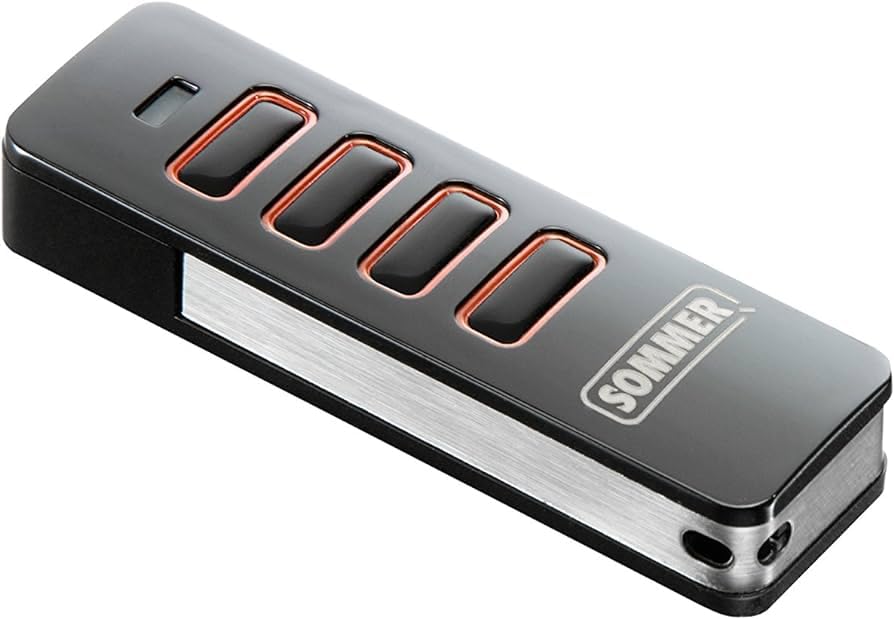
Figure 1: SOMMER 4019 Pearl Vibe Remote Control
Āhuatanga matua:
- Ability to check door position or receiver status.
- Tactile feedback (vibration) for command confirmation.
- Efficient vibration motor for extended battery life.
- Interference-resistant radio signal with 128-bit encoding.
- Shock-resistant design for durability.
- Bidirectional radio communication.
Tatūnga me te Papatonotanga
To program your SOMMER 4019 Pearl Vibe remote control, follow these steps. Ensure you have access to your garage door opener's radio receiver.
- Whakahohehia te Aratau Ako: Press the learning button on your radio receiver. The LED indicator on the receiver will illuminate, indicating it is in learning mode.
- Program Remote Button: On your new remote control, press the desired button for 1-2 seconds. The receiver's LED will flash, confirming the signal reception.
- Mahi Whakamatau: Press the programmed remote control button again to confirm that the garage door opener responds normally.
For a visual guide on programming, please refer to the following video:
Video 1: Programming a SOMMER Remote Control to a Receiver. This video demonstrates the steps to link your new remote control to your garage door opener's radio receiver, showing the LED indicators on the receiver and remote during the process.
Additional programming demonstrations:
Video 2: 868MHz Remote Control Programming. This video illustrates the programming sequence for an 868MHz remote control with a receiver, highlighting button presses and indicator responses.
Video 3: SOMMER 868 Remote Control Programming. A vertical format video demonstrating the programming steps for a SOMMER 868 remote control, showing interaction with the receiver.
Nga Tohutohu Whakahaere
The SOMMER 4019 Pearl Vibe remote control is designed for simple and intuitive operation.
- Whakatuwhera/Kati: Press the programmed button once to activate your garage door. The door will open or close depending on its current state.
- Te Whakamutu i te Nekehanga: Press the button again while the door is in motion to stop it.
- Urupare Wiri: The remote provides a subtle vibration to confirm that your command has been sent.
- Status Check (if supported by receiver): Some advanced receivers allow you to check the door's current position or the receiver's status. Refer to your garage door opener's manual for specific instructions on this feature.
Te tiaki
Hei whakarite i te mahi tino pai me te roa o te wā e whakamahia ana tō mana mamao, whai i ēnei aratohu tiaki:
- Te horoi: Horoia te mana mamao ki te kakahu ngohengohe, maroke. Kaua e whakamahi i ngā kaihoroi whakakoi, i ngā whakarewa rānei.
- Whakakapinga Pūhiko: The SOMMER 4019 Pearl Vibe uses an alkaline battery. When the remote's indicator light dims or its range decreases, it's time to replace the battery.
Nga Mahi Whakakapi Puhiko:
- Carefully slide open the remote control casing.
- Remove the old battery, noting its polarity.
- Insert a new alkaline battery (e.g., CR2032 type, if applicable, though not specified in JSON, common for remotes), ensuring correct polarity.
- Katia te mana mamao casing haumaru.
For a visual demonstration of battery replacement, refer to the following video:
Video 4: Remote Control Battery Replacement. This video shows how to open a similar remote control and replace its internal battery, demonstrating the process of disassembling and reassembling the unit.
- Rokiroki: Penapenahia te mana mamao ki te wāhi maroke, kia matara atu i ngā pāmahana tino kino me te rā tika.
Raparongoā
If you encounter issues with your SOMMER 4019 Pearl Vibe remote control, try the following solutions:
- Mamao Kaore i te Whakautu:
- Tirohia te pākahiko. Whakakapia mēnā e tika ana.
- Me whakarite kei roto koe i te awhe mahi (tae atu ki te 10 mita).
- Verify that the remote is correctly programmed to your receiver. If unsure, repeat the programming steps.
- Awhe Whakaitihia:
- Whakakapihia te pākahiko.
- Check for any obstructions between the remote and the receiver (e.g., metal objects, thick walls).
- Ensure the receiver's antenna is not obstructed or damaged.
- Mahi Mokowhiti:
- This could indicate a low battery.
- Check for sources of radio interference in the vicinity (e.g., other wireless devices, power lines).
If problems persist after trying these steps, consult a qualified technician or contact SOMMER customer support.
Whakatakotoranga
| Āhuahira | Taipitopito |
|---|---|
| Waitohu | AOME |
| Tau tauira | 4019 |
| Tae | Pango |
| Hangarau Hononga | Radio Frequency (868 MHz, implied by videos) |
| Nga waahanga motuhake | Ergonomic, Vibration Feedback, 128-bit Encoding, Shock Resistant, Bidirectional Radio |
| Pūrere Hototahi | Nga Tuwhera Kuaha Karati |
| Momo Pūhiko | Alkaline (Non-rechargeable) |
| Awhe Morahi | 10 mita (tata ki te 33 putu) |
Pūtāhui me te Tautoko
For warranty information, please refer to the documentation provided with your purchase or visit the official SOMMER website. For technical support or further assistance, please contact SOMMER customer service directly.


