Kupu Whakataki
Thank you for choosing the VISION Talking Analog and Digital Watch. This watch is designed to provide clear time announcements in Spanish, making it ideal for individuals with visual impairments, children, and the elderly. It features both an analog display for traditional time-telling and a digital display for precise readings, along with an alarm function.

Whakaahua 1: Mua view of the VISION Talking Analog and Digital Watch.
Tatūnga
1. Te Wetewete me te Tirotiro Tuatahi
Carefully remove the watch from its packaging. Inspect the watch for any visible damage. The watch comes with a battery pre-installed and is ready for initial setup.

Figure 2: The watch as it appears in its original clear plastic case.
2. Initial Time Setting (Digital)
The digital time needs to be set first. Refer to the 'Operating Instructions' section for detailed steps on setting the digital time using the 'MODE', 'HOUR', and 'MINUTE' buttons.
3. Initial Time Setting (Analog)
The analog hands are set independently using the crown (small knob) on the side of the watch. Pull out the crown and rotate it to adjust the analog hands to match the digital time. Push the crown back in to secure the setting.
Nga Tohutohu Whakahaere
Nga Mahi Patene
- Pātene MODE: Used to cycle through different modes (Time, Alarm Setting).
- TALKING Button: Press to hear the current time announced in Spanish.
- Pātene HĀORA: Used to adjust the hour in setting modes.
- MINUTE Button: Used to adjust the minute in setting modes.
- Karauna: Used to set the analog hands.
Telling Time
- Pānui Reo: Pehia te TE TANGI button to hear the current time spoken aloud in Spanish.
- Whakaaturanga Mamati: The digital display shows the time in a 12-hour format (AM/PM).
- Whakaatu Anarite: The traditional hands indicate the hour and minute.
Te Tautuhi Wa Mamati
- Pehia te MODE pēhi i te pātene kia maha ngā wā tae noa ki te whakaatu mai o te mata matihiko i te aratau tautuhinga wā (e tohuhia ana e ngā mati e kimo ana).
- Whakamahia te HOUR button to adjust the hour. Pay attention to AM/PM indicators.
- Whakamahia te MINI patene hei whakatika i nga meneti.
- Pehia te MODE button again to confirm and exit the time setting mode.
Tautuhinga Whakaoho
- Pehia te MODE button until the alarm setting mode is displayed (often indicated by an alarm icon or 'AL').
- Whakamahia te HOUR pātene hei whakarite i te hāora whakaoho e hiahiatia ana.
- Whakamahia te MINI pātene hei whakarite i ngā meneti whakaoho e hiahiatia ana.
- Pehia te MODE button to activate the alarm and exit the setting mode.
- To turn off a sounding alarm, press any button.
Te tiaki
Te horoi
Hei horoi i tō mātaaratanga, murua mārire ki te kakahu ngohengohe, maroke. Mō te paru uaua, he paku paruamp cloth can be used, but ensure no moisture enters the watch. Avoid using harsh chemicals or abrasive materials.
Whakakapinga Pūhiko
The watch uses a Lithium-metal battery. When the voice announcement becomes faint or the digital display dims, it's time to replace the battery. It is recommended to have battery replacement performed by a qualified watch technician to ensure proper sealing and function.
Ātete wai
This watch is marked as "WATER RESISTANT." This typically means it can withstand splashes, rain, or brief immersion in water, such as washing hands. It is kaore suitable for swimming, showering, or diving. Prolonged exposure to water or submersion may cause damage.
Raparongoā
- No Voice Announcement:
- Tirohia te taumata o te pākahiko. Whakakapia mēnā he iti.
- Ensure the TALKING button is pressed firmly.
- Ko te Whakaaturanga Mamati he Putea, he Ataahua ranei:
- Battery may be depleted. Replace the battery.
- Kāore i te tika te wā:
- Re-set the digital time following the instructions in the 'Operating Instructions' section.
- Ensure the analog hands are synchronized with the digital time by adjusting the crown.
- Low battery can affect timekeeping accuracy. Consider battery replacement.
- Kore oro te oro:
- Ensure the alarm is set correctly and activated.
- Tirohia te taumata pākahiko.
Whakatakotoranga
| Āhuahira | Whakaahuatanga |
|---|---|
| Waitohu | ORANGA |
| Tauira | 861ZTS-GRN-MEX |
| Momo Waea | Analog me te Matihiko |
| Te nekehanga | Electronic Digital and Analog |
| Mahi Reo | Yes (Spanish) |
| Mahi Whakaoho | Ae |
| Rauemi Take | Kirihou |
| Te Diamita o te keehi | 40 mm (1.57 inihi) |
| Whanui Whanui | 18 mm (0.71 inihi) |
| Te Matotoru Take | 16 mm (0.63 inihi) |
| Momo Pūhiko | 1 Lithium-metal (included) |
| Ātete wai | Water Resistant (Splash/Rain proof, not for submersion) |
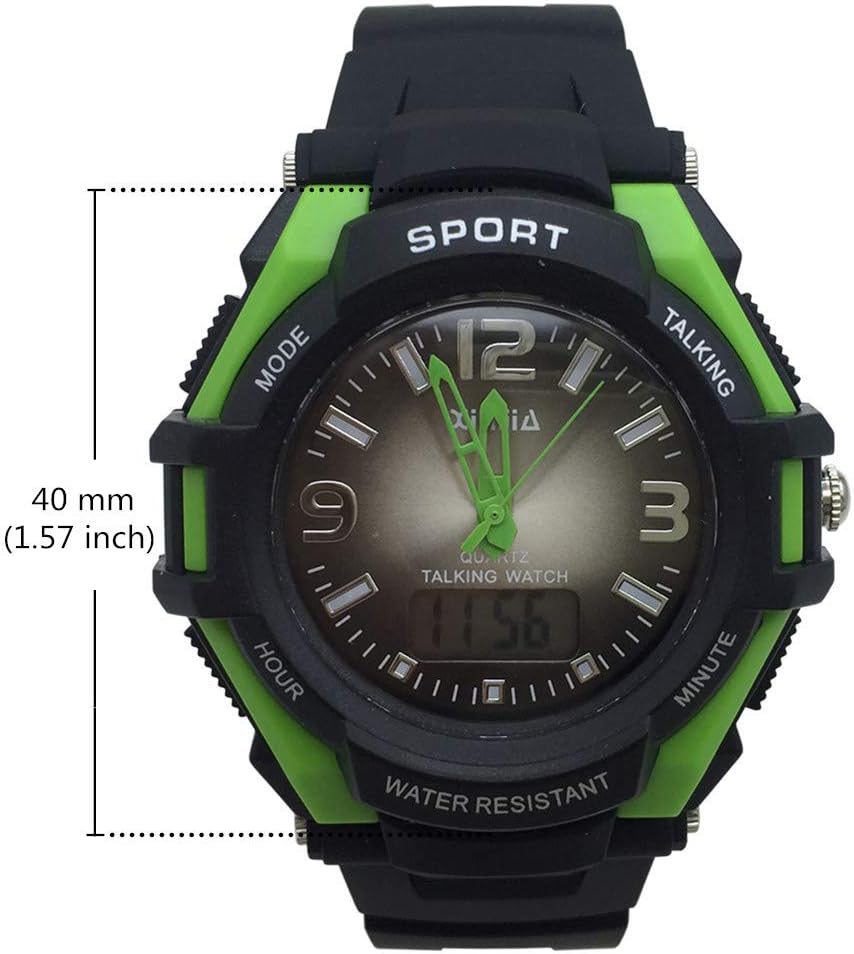
Figure 3: Watch face diameter measurement (40 mm).
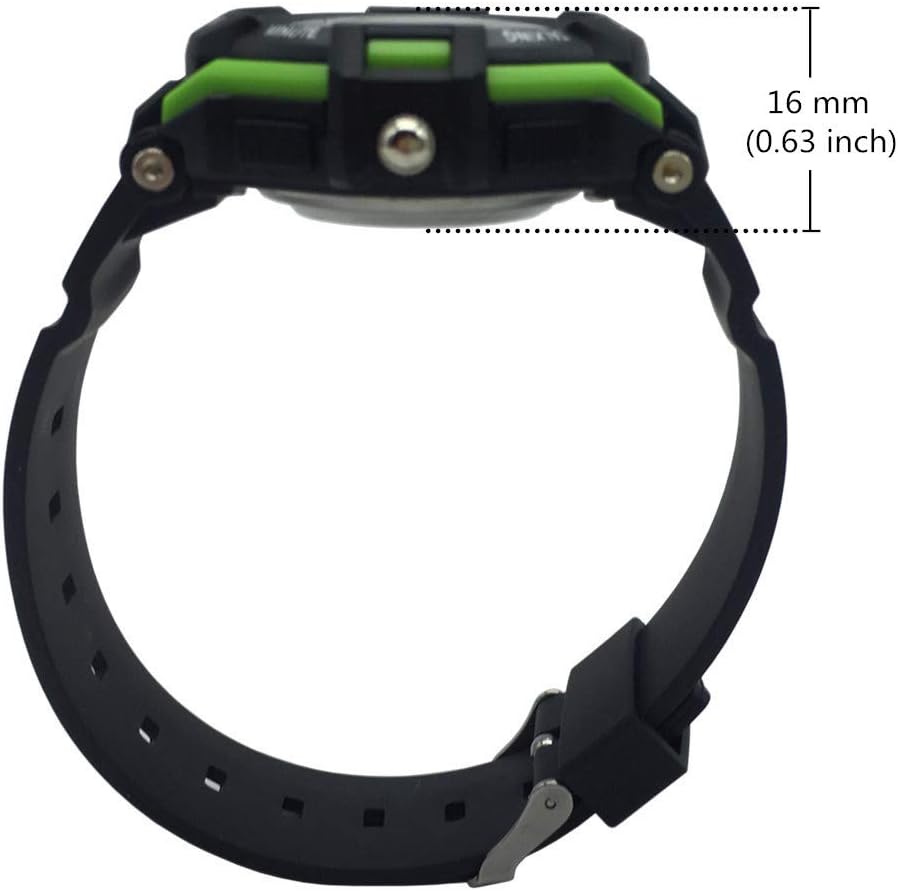
Figure 4: Watch case thickness measurement (16 mm).

Figure 5: Watch strap width measurement (18 mm).
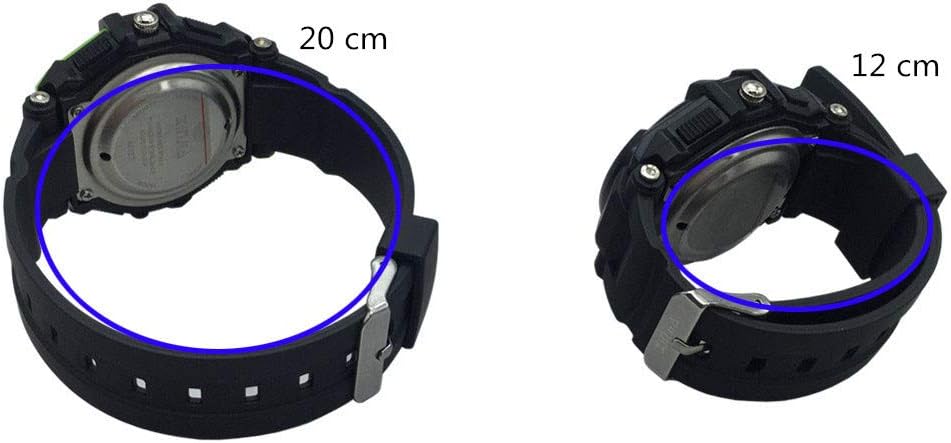
Whakaahua 6: Examples of wrist circumference fit (20 cm and 12 cm).
Pūtāhui me te Tautoko
For warranty information or technical support, please refer to the documentation included with your purchase or contact the seller/manufacturer directly. Keep your proof of purchase for any warranty claims.


