1. Kupu Whakataki
Thank you for choosing the WorkPro LED Desk Lamp. Tenei pūkenga lamp is designed to enhance your workspace with adjustable illumination, convenient wireless charging, and a USB charging port. Please read this manual thoroughly to ensure proper setup, operation, and maintenance of your new desk lamp.

Image 1.1: The WorkPro LED Desk Lamp, featuring a modern brushed metal finish and adjustable arm.
2. Nga Hua o te Hua
- Whakamarama Whakaritea: 5 color temperatures and 6 brightness levels for customized lighting.
- Whakataunga Ahokore: Integrated wireless charging pad on the base for compatible mobile devices.
- Tauranga Kaihoko USB: A 2.4-amp USB port located at the back of the base for additional device charging.
- Hoahoa Hangawari: Adjustable arm, head, and rotatable base for precise light positioning.
- Mana Pa: Intuitive touch control panel with memory function.
- Taumahi Matawā: Built-in 1-hour timer for automatic shut-off.
- Maama po: Integrated night light feature.
- LED Pungao: Pre-wired 10-watt LEDs with an average life of approximately 50,000 hours.
- Hanga Roa: Brushed metal body with a modern design.

Image 2.1: The WorkPro LED Desk Lamp integrated into a modern workspace, highlighting its functional design.
3. Ihirangi mokete
Tena koa tirohia te kete mo nga mea e whai ake nei:
- WorkPro LED Desk Lamp Waeine
- Pūurutau Hiko
- Pukapuka Kaiwhakamahi (tenei tuhinga)
4. Nga korero haumaru
Hei whakaiti i te tupono o te ahi, te wiri hiko, te whara ranei, me whai i nga whakatupatotanga haumaru e whai ake nei:
- Kaua e whakahaerehia te lamp me te taura kua pakaru, te mono ranei.
- Kaua e whakamahia te lamp i te makuku ranei damp tikanga.
- Me whakarite he hototahi te urutau hiko ki to tuku hiko o to rohe.
- Kaua e ngana ki te wetewete, ki te whakatika ranei i te lamp. Contact qualified service personnel for assistance.
- Kia mau ki te lamp mawehe atu i nga puna wera me te ra tika.
- Kāore e taea te whakakapi i te pūtake rama LED. Kaua e ngana ki te whakakapi i ngā rama LED.
- Whakanohoia te lamp i runga i te papa tuturu, papatahi kia kore ai e pakaru.
5. Tatūnga
Follow these steps to set up your WorkPro LED Desk Lamp:
- Wewete: Kia ata tangohia nga waahanga katoa mai i te kete.
- Tūnga: Whakanohoia te lamp te turanga i runga i te mata papatahi.
- Hono Hono: Insert the power adapter cable into the power input port on the back of the lamp turanga. Monohia te urutau hiko ki tētahi putanga hiko paerewa.
- Whakarite: Whakatikatika i te lamp ringa me te upoko ki to waahi e hiahiatia ana. Ko te lamp features multiple pivot points for flexibility.

Image 5.1: Lamp adjustability, showing 90-degree head rotation, 120-degree arm articulation, 90-degree base rotation, and 145-degree head tilt.
6. Nga Tohutohu Whakahaere
6.1. Touch Control Panel Overview
Kei teamp is operated via a touch-sensitive control panel located on the base. The icons represent various functions:
- Pātene Hiko: Ka huri te lamp on/off.
- Whakaritenga Tirohanga: Ka whakarerekē i te kaha o te mārama (6 ngā taumata).
- Te Whakarereketanga Te Mahana Tae: Changes light color (5 modes).
- Pātene Matawā: Activates the 1-hour timer.
- Patene Maama Po: Activates the night light feature.
6.2. Whakakahuria/Weto
Tap te Pātene Hiko once to turn the lamp i runga. Patohia ano kia huri te lamp off. The lamp will remember your last brightness and color temperature settings.
6.3. Te Whakarite Tirohanga
Me te lamp on, tap the Whakaritenga Tirohanga icons ( /
/  ) to cycle through the 6 available brightness levels.
6.4. Te Whakarereke i te Pawera Tae
Me te lamp on, tap the Te Whakarereketanga Tae ata ( ) to cycle through the 5 available color temperature modes (e.g., warm white to cool white).

Image 6.1: Visual representation of the 5 color temperature modes and 6 brightness levels.
6.5. Te Whakamahi i te Taima
Tap te Pātene Matawā ( ) to activate the 1-hour timer. The lamp will automatically turn off after 60 minutes. Tap again to deactivate.
6.6. Activating the Night Light
Tap te Patene Maama Po ( ) to turn on the integrated night light. Tap again to turn it off.
6.7. Whakatau Ahokore
Place your Qi-compatible mobile device directly onto the wireless charging pad on the lamp base. Ensure the device is centered for optimal charging. A charging indicator (if present on your device) will confirm charging has begun.

Image 6.2: A smartphone being charged wirelessly on the lampte turanga.
6.8. USB Whakahaa
Connect your mobile device's USB charging cable to the 2.4-amp USB port located on the back of the lamp base. Plug the other end into your device to begin charging.
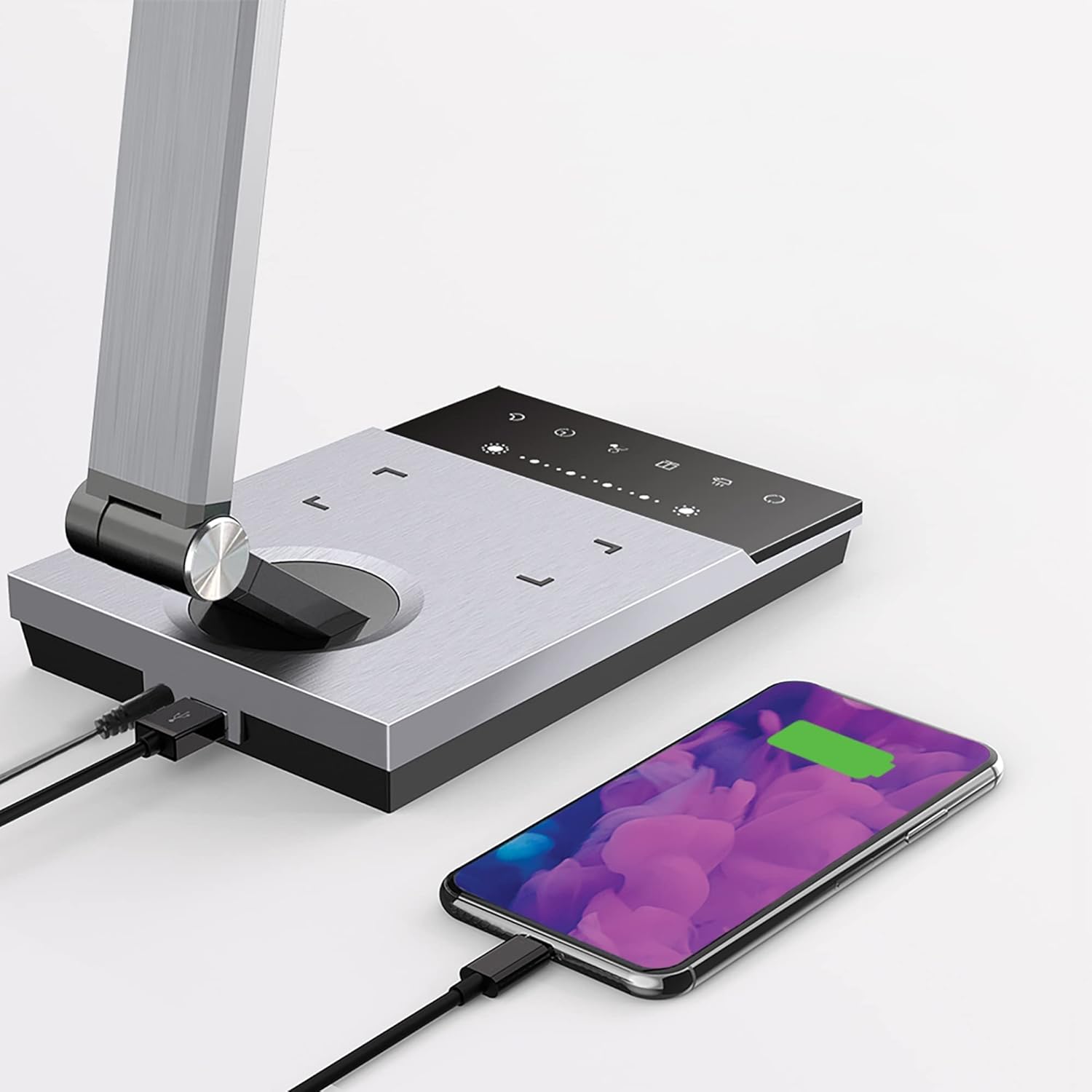
Image 6.3: Simultaneous charging of devices via the USB port and wireless charging pad.
7. Tiaki
To keep your WorkPro LED Desk Lamp in optimal condition:
- Te horoi: Momotuhia te hiko i mua i te horoinga. Horoia te rūma.amp with a soft, dry cloth. Do not use abrasive cleaners, solvents, or harsh chemicals.
- Rokiroki: Mena kei te penapena i te lamp for an extended period, disconnect it from power and store it in a cool, dry place.
- Tiaki LED: Kua hangaia te pūtake rama LED whakauru mō te whakamahinga roa, ā, kāore e hiahiatia he whakakapinga.
8. Te Raru
| Raruraru | Take pea | Rongoā |
|---|---|---|
| Lamp kaore e huri. | Kaore he hononga hiko. | Me whakarite kia mau te urutau hiko ki te lamp me te putanga taiepa. |
| Karekau te utu ahokore e mahi. | Device not Qi-compatible or not positioned correctly. | Verify your device supports Qi wireless charging. Reposition the device on the charging pad to ensure proper alignment. Remove any thick phone cases. |
| Kāore e mahi ana te utunga USB. | USB cable or device issue. | Try a different USB cable or device to isolate the problem. Ensure the lamp kua whakakahangia. |
| Ka whiti te marama, ka pouri ranei. | Te tuku hiko koretake, te take o roto ranei. | Whakamātauria te mono i te lamp ki tetahi putanga rereke. Mena kei te haere tonu te raru, whakapā atu ki te tautoko a te kaihoko. |
9. Whakatakotoranga
| Tau tauira | WP3000S |
| Puna Maama | LED whakauru |
| Wattage | 10 Watts |
| Putanga Lumen | 600 Lumens |
| Te Paemahana Tae | 5 Taumata |
| Taumata Tirohanga | 6 Taumata |
| Putanga USB | 2.4 Amp |
| Rauemi | Kotara Paraihe |
| Ahu (L x W x H) | 17.5 x 6.5 x 4 inihi |
| Taumaha Tūemi | 5.45 pauna |
| Puna Mana | Hiko Hiko |
| Tikanga Mana | Paa |
10. Pūtāhui me te Tautoko
WorkPro products are manufactured to high-quality standards. For warranty information or technical support, please refer to the warranty card included with your purchase or visit the official WorkPro webpae. Tena koa pupurihia to tohu mo te hoko mo nga kereme whakamana.
For further assistance, you may contact the retailer or manufacturer directly.


