Kupu Whakataki
The EVOLVEO EASYPHONE FM is a user-friendly mobile phone designed for straightforward communication. It features large, separated keys, a clear display, and essential functions to ensure ease of use. This manual provides instructions for setting up, operating, and maintaining your device.
1. Ihirangi mokete
Tena koa tirohia te kete mo nga mea e whai ake nei:
- EVOLVEO EASYPHONE FM Mobile Phone
- Tauranga Whakatau
- Pūurutau AC
- Li-ion 1000 mAh Battery
- Pukapuka Kaiwhakamahi
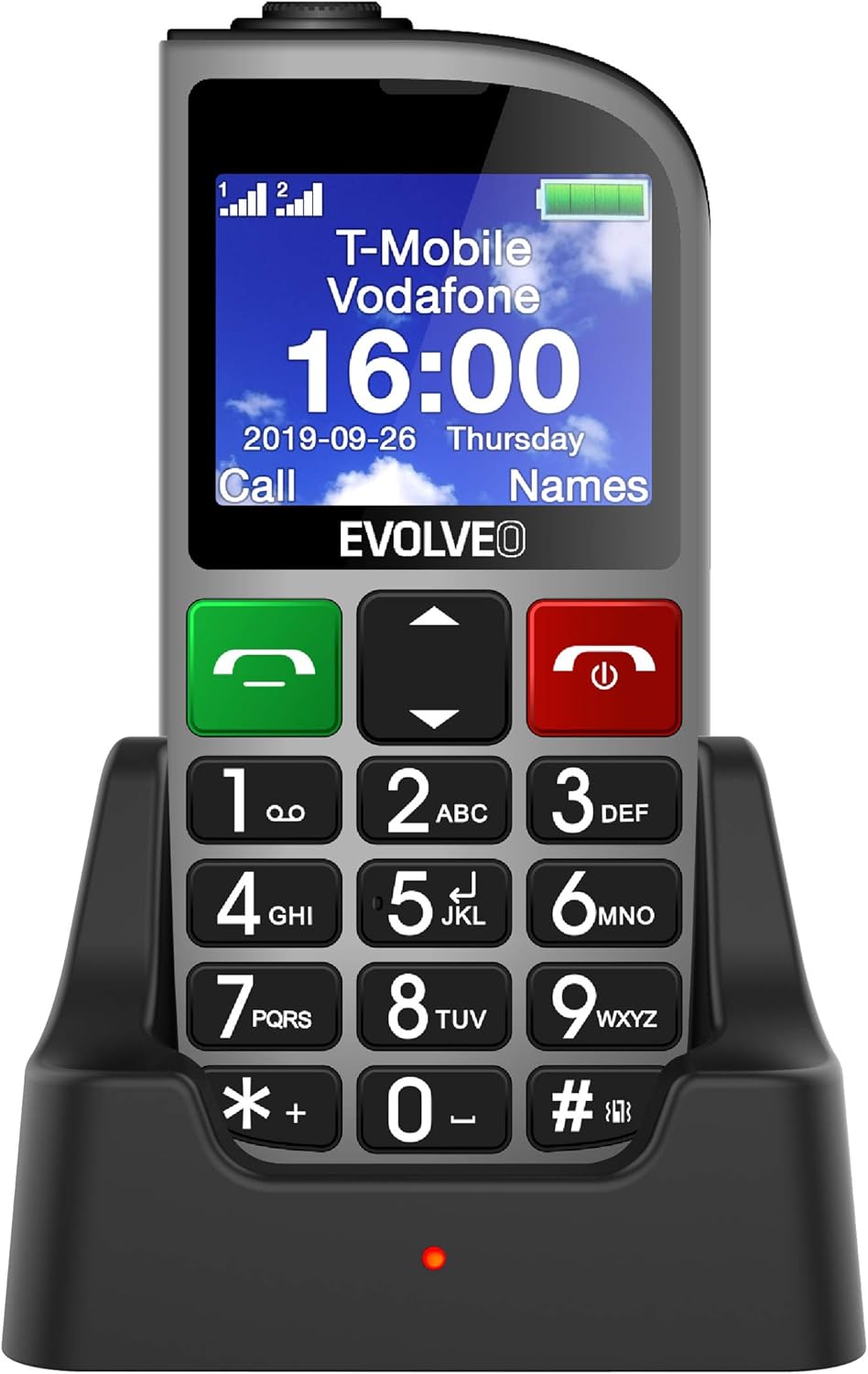
Whakaahua 1.1: EVOLVEO EASYPHONE FM placed in its charging dock. The phone features a large display showing time and network information, with prominent green call and red end call buttons, and a numeric keypad below.
2. Tatūnga
2.1. Tāuta Pūhiko me te Whakatau
- Tangohia te uhi o muri o te waea.
- Insert the Li-ion 1000 mAh battery, ensuring the contacts align correctly.
- Whakakapihia te taupoki o muri.
- Connect the AC adapter to the charging dock.
- Place the phone into the charging dock. The charging indicator light will illuminate.
- Allow the phone to charge fully before first use.
2.2. Kōkuhu Kāri SIM (ngā)
The phone supports two SIM cards (Dual SIM) for GSM/GPRS 850/900/1800/1900 MHz networks.
- Me mohio kua weto te waea.
- Tangohia te uhi o muri me te pākahiko.
- Locate the SIM card slots.
- Insert your SIM card(s) into the designated slots, ensuring correct orientation.
- Whakauruhia ano te pākahiko me te uhi o muri.
2.3. Inserting a MicroSDHC Card
You can expand the phone's storage for music, photos, and other files by inserting a MicroSDHC card.
- Me mohio kua weto te waea.
- Tangohia te uhi o muri me te pākahiko.
- Locate the MicroSDHC card slot.
- Gently insert the MicroSDHC card until it clicks into place.
- Whakauruhia ano te pākahiko me te uhi o muri.
3. Nga Tohutohu Whakahaere
3.1. Te Hiko / Whakaweto
- Hei whakakaha: Patohia me te pupuri i te Red End Call/Power patene kia marama ra ano te mata.
- Hei whakaweto: Pēhi me te pupuri i te Red End Call/Power button until the power off options appear, then confirm.

Whakaahua 3.1: Mua view of the EVOLVEO EASYPHONE FM, highlighting the large display, call buttons, and numeric keypad for easy dialing.
3.2. Hanga me te Whiwhi Waea
- Te Waea: Dial the number using the numeric keypad and press the Karanga Kakariki pātene.
- Waea Tere: The phone supports quick access to 8 popular contacts. Assign numbers to keys 2-9 for speed dialing. Press and hold the assigned key to dial.
- Whiwhi Waea: Pehia te Karanga Kakariki pātene hei whakautu i te waea taumai.
- Whakamutua te Waea: Pehia te Red End Call/Power button to end an active call.
3.3. Te Tuku me te Whiwhi Karere SMS
The separated keyboard keys facilitate easy writing of SMS messages.
- Navigate to the Messaging menu.
- Select "Write Message" to compose a new SMS.
- Whakauruhia te nama o te kaiwhiwhi, tohua ranei mai i nga hoapaki.
- Patohia to karere ma te whakamahi i te papapātuhi.
- Pēhia te "Tukuna" hei tuku i te karere.
3.4. Mana Rōrahi
Adjust the call and ringtone volume using the dedicated volume control button located on the left side of the phone.

Whakaahua 3.2: Left side of the phone, showing the volume control buttons and the FM radio activation button.
3.5. Patene Ohotata SOS
The SOS button, located on the back of the device, allows for quick emergency calls and messages.
- Before use, configure up to five emergency contact numbers in the phone settings.
- Mēnā he āhuatanga ohorere, pēhia, pupuritia hoki te pātene SOS pātene.
- The phone will automatically dial the predefined emergency numbers sequentially and send an emergency message to these contacts.

Whakaahua 3.3: Whakamuri view of the EVOLVEO EASYPHONE FM, showing the prominent red SOS emergency button and the camera lens.
3.6. Irirangi FM
The phone includes an FM radio with a dedicated activation button.
- To turn on the FM radio, press the independent FM button on the side of the device.
- The radio can play in the background, allowing you to use other phone functions.
- During an incoming or outgoing call, the radio will automatically mute and resume playback after the call ends.
3.7. Maama
A powerful flashlight is integrated into the phone, activated by a dedicated button.
- Press the dedicated flashlight button on the side of the phone to turn the flashlight on or off.

Whakaahua 3.4: Right side of the phone, showing the dedicated flashlight button.
3.8. Ētahi atu āhuatanga
- Kāmera: The phone includes a VGA camera for basic photo capture.
- Kaiwaiata Waiata: Whakatangi puoro files stored on your MicroSDHC card.
- Digital Recorder (Dictaphone): Record voice notes.
- Maramataka: Kia mau ki nga ra me nga huihuinga nui.
- Karaka Whakaoho: Whakaritea nga whakaoho mo nga whakamaumahara.
- Kalikete: Mahia nga tatauranga taketake.
- Karaehe Whakarahi: Utilize the screen as a magnifying glass.
4. Tiaki
4.1. Te horoi i te Pūrere
- Use a soft, dry cloth to clean the phone's surface and screen.
- Avoid using liquid cleaners or abrasive materials, as they may damage the device.
- Kia tino mohio kei uru te makuku ki te putanga utu, ki ētahi atu pūaha rānei.
4.2. Tiaki Pūhiko
- Kia roa te ora o te pākahiko, karohia te waea ki te wera nui.
- Charge the battery regularly, but avoid overcharging or letting it completely drain for extended periods.
- If the phone will not be used for a long time, charge the battery to about 50% before storing it.
5. Te Raru
If you encounter issues with your EVOLVEO EASYPHONE FM, refer to the following common problems and solutions:
5.1. Kaore te Waea e Huri
- Me whakarite kia tika te whakauru me te utu o te pākahiko.
- Connect the phone to the charger and wait a few minutes before attempting to power it on again.
- Tirohia mehemea he ma nga hoapaki pākahiko.
5.2. Cannot Make or Receive Calls
- Check if the SIM card(s) are correctly inserted and activated.
- Ensure you have network coverage.
- Verify that the phone is not in airplane mode (if applicable).
- Check your account balance or subscription status with your service provider.
5.3. FM Radio Not Working
- Ensure you are in an area with good FM signal reception.
- Check if the FM radio is properly activated using its dedicated button.
5.4. Whakaatu Take
- If the display is dim, check the brightness settings.
- If the screen is unresponsive, try restarting the phone.
6. Whakatakotoranga
| Waitohu | Evolveo |
| Tauira | EASYPHONE FM |
| Rahi Whakaatu | 1.8 inihi |
| Whakaatu Whakatau | 320 x 240 px |
| Hangarau Pūkoro | 2G (GSM/GPRS 850/900/1800/1900 MHz) |
| Tautoko SIM | Sim rua |
| Hononga | Nihokikorangi, Hononga 3.5 mm |
| Pūhiko | Li-ion 1000 mAh |
| Ahu | 130 × 61 × 16.5 mm |
| Taumaha | 105 g (me te pākahiko) |
| Kāmera | VGA |
| Roha Rokiroki | Mokamoka kāri MicroSDHC |
Tuhipoka: Ko nga korero ka huri ki te kore korero i mua.
7. Pūtāhui me te Tautoko
For warranty information and technical support, please refer to the warranty card included in your package or visit the official Evolveo webpae. Puritia to tohu hoko mo nga kereme whakamana.


