1. Kupu Whakataki
This manual provides detailed instructions for setting up, operating, and maintaining your Supersonic SC-1097BT portable 3-band radio. This versatile device offers AM/FM/SW reception, Bluetooth connectivity, MP3 playback via USB, SD, and AUX inputs, and a built-in flashlight, making it suitable for various uses from daily listening to emergency situations.
2. Nga Hua o te Hua
- Whakangahau maha: Enjoy a Portable AM/FM/SW Band Receiver with MP3 Playback capability, perfect for radio and music.
- Hononga Tuturu: Built-in Bluetooth enables effortless pairing with smartphones, tablets, laptops, MP3 players, and various devices for a wide range of audio options.
- Tairongo Tino: Benefit from a high-sensitivity receiver that ensures clear reception and excellent audio quality.
- Multi-Input Compatibility: Equipped with USB, SD, Micro SD, and AUX inputs, this device accommodates various media sources, enhancing your listening experience. A powerful speaker ensures quality sound.
- Multi-Function Utility: With a built-in torch light, powerful speaker, and long-lasting rechargeable battery, this device is perfect for outdoor adventures and emergency situations.
3. Ihirangi mokete
Me whakarite kei roto katoa ngā taonga i te wā e wetewetehia ai:
- Supersonic SC-1097BT Portable 3 Band Radio
- Te Kawe i te Here
- Pukapuka a te Kaipupuri
- Tauira Whakatau USB
- Pūhiko Whakahoki Anō (kua tāutahia, kua wehea rānei)
4. Mana me nga Mahi
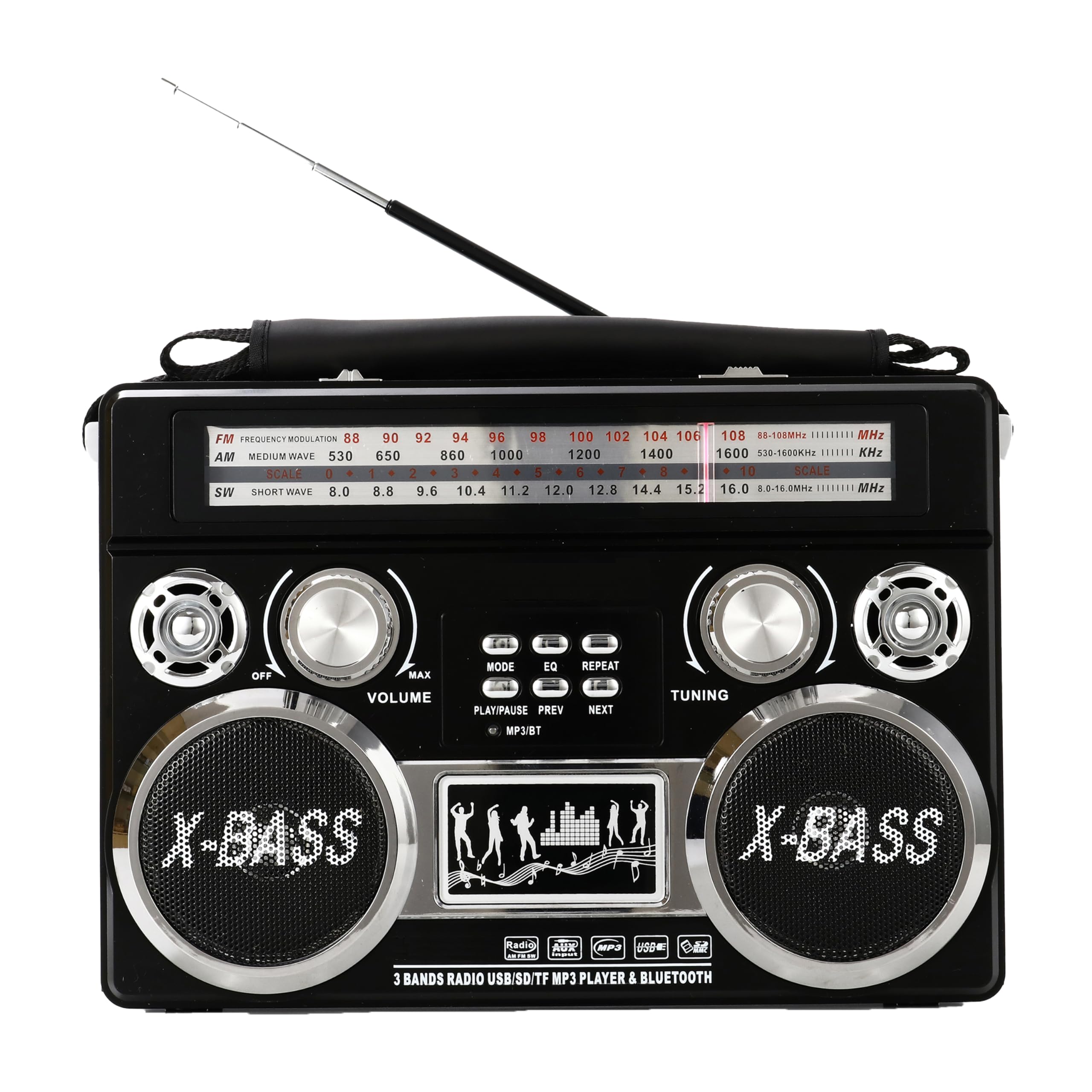
Whakaahua 1: Mua View. Shows the main speaker grille, frequency display, volume knob, tuning knob, and band selection switches. The X-BASS branding is visible below the speaker.

Whakaahua 2: Taha View. Features the built-in LED flashlight on the left side. Input ports for USB, SD card, Micro SD card, and AUX are located on the top right side, along with the volume and tuning controls.

Whakaahua 3: Hoki View. Displays the battery compartment cover, AC power input, and the telescopic antenna in its retracted position. Ventilation grilles are also visible.
Ataata Mutuview o Mana
Video 1: Great Radio, Great Sound, Lots of Features. This video provides a visual demonstration of the radio's features, including its controls, sound quality, and various functions. It highlights the ease of use and the overall design of the unit.
5. Tatūnga
5.1 Whakakaha i te Reo Irirangi
The SC-1097BT can be powered in two ways:
- Pūhiko Rechargeable: The radio comes with a built-in rechargeable battery. To charge, connect the provided USB cable to the radio's charging port and to a compatible USB power adapter (not included). The charging indicator will illuminate.
- D-Cell Batteries: For extended portable use, the radio can also operate on D-cell batteries (not included). Open the battery compartment on the back of the unit and insert the required number of D-cell batteries, ensuring correct polarity.
- Mana AC: For continuous use indoors, connect the AC power cord (not included) to the AC input on the back of the radio and plug it into a wall outlet.
5.2 Tatūnga Antenna
For optimal radio reception, extend the telescopic antenna fully. For Shortwave (SW) bands, adjusting the antenna's direction may improve signal clarity.
6. Nga Tohutohu Whakahaere
6.1 Turning On/Off & Volume Control
- To turn the radio ON, rotate the ROTO puku o te karaka.
- To adjust the volume, rotate the ROTO knob. Clockwise increases volume, counter-clockwise decreases it.
- To turn the radio OFF, rotate the ROTO knob counter-clockwise until it clicks.
6.2 Radio Operation (AM/FM/SW)
- Select your desired band (FM, AM, SW) using the band selector switch.
- Hurihia te WHAKARANGA knob to scan for stations. The frequency display will show the current station.
- Adjust the telescopic antenna for best reception.
6.3 Takirua Nihokikorangi
- Switch the radio to Bluetooth mode (refer to the mode button if available, or it may automatically switch when a Bluetooth device is detected).
- On your external device (smartphone, tablet), enable Bluetooth and search for available devices.
- Select "SC-1097BT" from the list of devices to pair.
- Kia takirua, ka taea e koe te rere ororongo mai i to taputapu ki te reo irirangi.
6.4 MP3 Playback (USB/SD/AUX)
- USB/SD/Micro SD: Insert a USB drive or SD/Micro SD card containing MP3 audio files into the corresponding port. The radio should automatically switch to MP3 playback mode. Use the playback controls (Play/Pause, Next, Previous) to manage your music.
- Tāuru AUX: Connect an external audio device (e.g., MP3 player, phone) to the AUX input jack using a 3.5mm audio cable (not included). Switch the radio to AUX mode if necessary.
6.5 Te Mahi Rarama
To activate the built-in torch light, locate the flashlight switch on the side of the radio and slide it to the ON position. Slide it back to OFF to turn it off.
7. Te Raru
- Kore Mana: Check battery installation/charge level or ensure AC adapter is securely connected.
- Te Manaaki Reo Irirangi Kino: Whakaroahia te pūihi karu, ā, whakatikatikahia. Ngāna kia nekehia te reo irirangi ki tētahi atu wāhi.
- No Sound from MP3/Bluetooth: Ensure volume is turned up on both the radio and the connected device. Check if the correct input mode (USB/SD/AUX/Bluetooth) is selected. For Bluetooth, ensure the device is properly paired.
- Nihokikorangi Kaore i te Tuhono: Ensure the radio is in Bluetooth mode and your device's Bluetooth is enabled and discoverable. Try unpairing and re-pairing the device.
8. Tiaki
- Te horoi: Whakamahia he kakahu ngohengohe, maroke hei horoi i te taha waho o te reo irirangi. Kaua e whakamahi i ngā wai horoi, i ngā rauemi whakakoi rānei.
- Tiaki Pūhiko: If using D-cell batteries, remove them if the radio will not be used for an extended period to prevent leakage. For the rechargeable battery, charge it regularly to maintain its lifespan.
- Rokiroki: Whakaorangia te reo irirangi ki te waahi makariri, maroke atu i te ra tika me te wera nui.
9. Whakatakotoranga
| Āhuahira | Taipitopito |
|---|---|
| Hunga Hua | 11.31 x 3.38 x 7.63 inihi |
| Taumaha Tūemi | 2.89 pauna |
| Tau tauira | SC-1097BT |
| Kua Tautokohia nga Roopu Irirangi | 3-Band (AM/FM/SW) |
| Hangarau Hononga | Awhina, Nihokikorangi |
| Puna Mana | Battery Powered (Rechargeable, D-Cell), AC Input |
| Āhuahira Motuhake | Portable, Built-in Flashlight |
| Nga Waahanga kei roto | Carrying Strap, Owner's Manual |
10. Pūtāhui me te Tautoko
For warranty information or technical support, please refer to the contact details provided with your purchase documentation or visit the official Supersonic webpae. Puritia to tohu hoko mo etahi kereme whakamana.


