1. Hua Neke Atuview
The Baseus W09 TWS Wireless Earphones (Model: Encok W09) are designed for convenient audio playback and communication. These in-ear earphones feature touch control and connect wirelessly via Bluetooth, offering a stereo bass sound experience.

Image 1: The Baseus W09 TWS Wireless Earphones securely placed within their charging case. The case is open, revealing both earbuds.
2. Tatūnga
2.1 Te Whakautu i ngā Taringa me te Pouaka
Before initial use, ensure both the earphones and the charging case are fully charged. The charging case contains a built-in Lithium Ion battery.
- Whakanohoia nga taringa ki roto i te putea utu.
- Connect the charging case to a power source using a compatible charging cable (not specified, assume USB).
- He 1.5 haora pea te utu katoa.
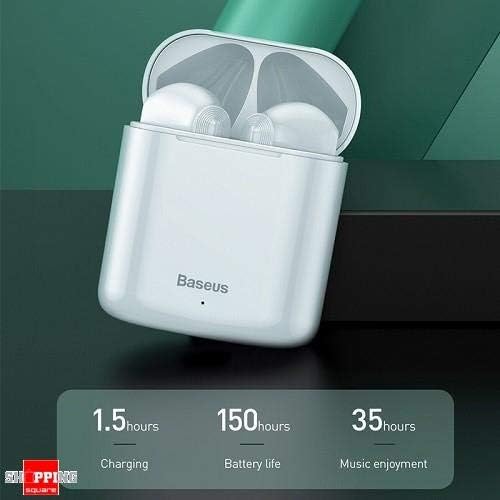
Image 2: The Baseus W09 charging case, illustrating its charging time of 1.5 hours, a standby battery life of 150 hours, and 35 hours of music enjoyment.
2.2 Takirua Nihokikorangi
The Baseus W09 earphones are designed for quick and instant connection.
- Me mohio kei te utu nga taringa.
- Whakatuwherahia te putea utu.
- Tangohia nga taringa mai i te pukoro utu. Ka uru aunoa ratou ki te aratau takirua.
- I runga i to taputapu (smartphone, tablet, etc.), whakahohea te Nihokikorangi me te rapu mo nga taputapu e waatea ana.
- Select "Baseus Encok W09" or a similar name from the list to connect.
- Once connected, you will hear an audio prompt, and the earphones will be ready for use.
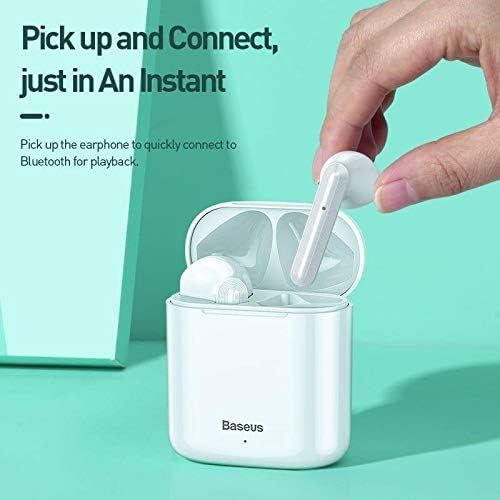
Image 3: A hand demonstrating the "Pick up and Connect" feature, showing an earphone being removed from its charging case, initiating quick Bluetooth connection.
3. Nga Tohutohu Whakahaere
3.1 Te mau i nga Waea-taringa
Gently insert each earphone into the corresponding ear canal (L for left, R for right). Adjust them for a comfortable and secure fit to ensure optimal sound quality and stability.
3.2 Nga Mahi Mana Pa
The Baseus W09 earphones feature intelligent touch controls for various functions. Specific gestures may vary; please refer to the product packaging or the official Baseus website for detailed touch control instructions.
- Purei/Tatari: Typically a single tap on either earphone.
- Whakautu/Whakamutu Waea: Usually a single tap during an incoming call.
- Panuku Panuku / O Mua: Often a double or triple tap on a specific earphone.
- Whakahohe i te Kaiawhina Reo: May involve a long press or specific tap sequence.
3.3 Te Ora Pūhiko
The Baseus W09 earphones and charging case offer extended usage times:
- Music Enjoyment: Up to 35 hours (with charging case).
- Wā tūtatari: Tae atu ki te 150 haora.
4. Tiaki
4.1 Te horoi
- Use a soft, dry, lint-free cloth to clean the earphones and charging case.
- Kaua e whakamahia nga kai horoi, te waipiro, te whakarewa matū ranei.
- Ensure no moisture enters the earphone speakers or charging ports.
4.2 Rokiroki
- Ina kore e whakamahia, rongoatia ngā taringaoro ki roto i te pouaka utu hei tiaki i a rātou, hei pupuri hoki i te utunga.
- Whakaorangia ki te waahi makariri, maroke atu i te ra tika me te wera nui.
5. Te Raru
If you encounter issues with your Baseus W09 earphones, try the following steps:
- Kore Oro: Ensure earphones are charged, connected to your device, and volume is up on both the earphones and your device.
- Kaore e taea te takirua: Make sure Bluetooth is enabled on your device and the earphones are in pairing mode. Try turning Bluetooth off and on again on your device.
- Hononga Mokowhiti: Ensure there are no obstructions between the earphones and your device. Try moving closer to your device.
- Nga take utu: Check the charging cable and power adapter. Ensure the charging contacts on the earphones and case are clean.
- Tautuhi: If issues persist, try resetting the earphones. Refer to the official Baseus website or product packaging for specific reset instructions.
6. Whakatakotoranga
| Āhuahira | Taipitopito |
|---|---|
| Waitohu | Baseus |
| Tau tauira | Encok W09 |
| Momo | I te Taringa |
| Hangarau Hononga | Ahokore (Nihokikorangi) |
| Tikanga Mana | Paa |
| Kei te hopuorooro | Ae |
| Whakakore Haruru | Kao |
| Momo Pūhiko | Lithium Ion (kei roto) |
| Waa Whakatau | Approx. 1.5 haora |
| Music Enjoyment Time | Ki runga ki te 35 haora (me te nama tohutohutia) |
| Wā tūtatari | Tae atu ki te 150 haora |
| Hototahi Ki | Nga taputapu Bluetooth-whakahohea katoa |
| Tae | Mā |
| Ahu mōkihi | 14.6 x 11 x 4 cm |
| Taumaha Tūemi | 170 g |
7. Pūtāhui me te Tautoko
For warranty information, technical support, or further assistance, please refer to the documentation included with your product or visit the official Baseus webpae. Puritia to tohu hoko mo nga kereme whakamana.


