1. Kupu Whakataki
This manual provides detailed instructions for the proper operation and maintenance of your WOUXUN KG-UV2D Dual Band Two-Way Radio. Please read this manual thoroughly before using the radio to ensure safe and efficient operation. Keep this manual for future reference.
2. Nga korero haumaru
To prevent personal injury or property damage, observe the following safety precautions:
- Kaua e whakahaeretia te reo irirangi i roto i nga hau pupuhi (hei tauira, nga hau mura, matūriki puehu, paura whakarewa).
- Kaua e tuku kōrero mēnā kāore he pūihi e piri ana.
- Use only WOUXUN approved batteries and chargers. Improper use may cause fire, explosion, or injury.
- Kaua e whakaatu te reo irirangi ki te rā tika mō te wā roa, kaua hoki e waiho ki te taha o ngā taputapu whakamahana.
- Puritia te reo irirangi mai i nga taputapu rongoa kia kore ai e pokanoa.
- Kaua e wetewetehia, e whakarerekētia rānei te reo irirangi. Me mahi anake ngā mahi whakatikatika e ngā tohunga hangarau whai tohu.
3. Ihirangi mokete
Manatokona kei roto katoa nga mea kei roto i to kete:
- WOUXUN KG-UV2D Transceiver
- 7.4V 1700mAh Lithium-ion Battery
- Antenna
- Smart Desktop Charger (220 VAC)
- Quick Charge Clip
- Microphone/Headset
- English User Manual (Printed)
4. Hua Neke Atuview
The WOUXUN KG-UV2D is a robust dual-band two-way radio designed for reliable communication. It features a durable construction and an advanced menu system for various functions. Key features include:
- Mahi Takirua: E tautoko ana i ngā auau VHF (136-174 MHz) me te UHF (400-480 MHz).
- Extended Receive Band: Capable of receiving 88-108 MHz (FM radio), 136-174 MHz, and 400-480 MHz.
- Taonga Mataara Tuarua: Allows simultaneous monitoring of two frequencies (VV, VU, UU) with on-screen indication.
- Kaiwaehere DTMF: Mō te tohu me te whakahaere matatau.
- CTCSS/DCS Tones: Programmable sub-audio and digital codes for selective calling.
- Whakaoho Ohotata: Dedicated button activates a loud alarm and flashing LEDs, transmitting a digital identification signal.
- Mahi VOX: Voice-activated transmission with adjustable sensitivity.
- Whakaaturanga LCD Backlit: Clear display with blue illumination during transmission.
- Ka taea te whakarite i te rorohiko: Customize settings and channels via optional PC software and cable.
- Customizable Welcome Message: Personalize the radio's power-on display.
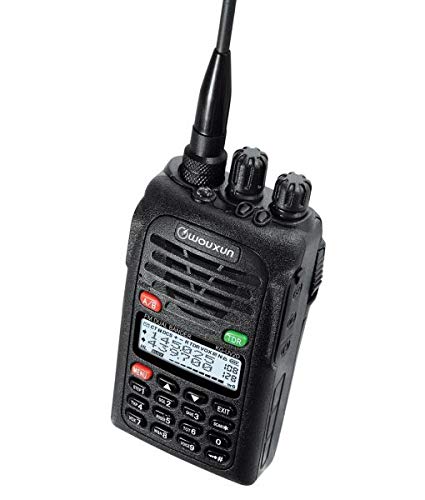
Image 1: The WOUXUN KG-UV2D Dual Band Two-Way Radio. This image shows the front of the radio, including the antenna, control knobs, speaker grille, LCD display, and keypad. The display shows frequency information, and the keypad includes numeric buttons and function keys.
5. Tatūnga
5.1 Tāuta Pūhiko
- Tiarohia te putea pākahiko ki nga awaawa kei muri o te reo irirangi.
- Kiriatahia te putea pākahiko ki runga kia paato noa ki te waahi.
- Hei tango, pēhi i te pūmau tuku pākahiko (mēnā kei a koe) ka nekehia te pākahiko ki raro.
5.2 Whakapiri Antenna
- Whakawirihia te pūihi kia tika ki roto i te hononga kei runga o te reo irirangi kia mau ra ano.
- Kaua e whakakaha rawa.
5.3 Whakataki Tuatahi
I mua i te whakamahinga tuatahi, utua katoahia te papahiko.
- Place the radio with the battery installed into the smart desktop charger.
- Ensure the charging indicator light on the charger illuminates (typically red).
- Charge for approximately 4-5 hours, or until the indicator light turns green, indicating a full charge.
6. Mahi Taketake
6.1 Hiko / Whakaweto
Hurihia te Puka Mana/Roi (top-left knob) clockwise to turn the radio on. Continue rotating to adjust the volume. Rotate counter-clockwise until a click is heard to turn the radio off.
6.2 Frequency/Channel Selection
- Aratau VFO (Aratau Auau): Directly enter frequencies using the numeric keypad. Use the Paihi pere Runga/Raro to fine-tune the frequency.
- Aratau Channel: Whakamahia te Paihi pere Runga/Raro to scroll through programmed memory channels.
- Pehia te VFO/MR button (often labeled A/B or similar) to switch between VFO and Channel modes.
6.3 Transmitting (PTT)
Hei tuku, pehia me te pupuri i te PTT (Pana-Ki-Korero) paatene on the side of the radio. Speak clearly into the microphone. Release the PTT button to stop transmitting and return to receive mode.
6.4 Whiwhi
When the radio is on and tuned to an active frequency or channel, you will hear incoming transmissions through the speaker. Adjust the Puka Mana/Roi for desired audio level.
7. Āhuatanga Arā
7.1 Dual Watch (TDR)
The Dual Watch function allows the radio to monitor two different frequencies or channels simultaneously. If a signal is detected on either frequency, the radio will switch to that frequency. To activate/deactivate, press the TDR button (often green, located near the display).
7.2 Ngā Oro CTCSS/DCS
CTCSS (Continuous Tone-Coded Squelch System) and DCS (Digital Coded Squelch) tones are used to filter out unwanted signals and allow for private group communication. These can be programmed via the radio's menu or PC software. Refer to the detailed menu section in the printed manual for specific programming steps.
7.3 Mahi VOX
VOX (Voice Operated Transmit) enables hands-free operation. When VOX is active, the radio will automatically transmit when it detects your voice. The sensitivity of the VOX function can be adjusted through the radio's menu.
7.4 Whakaoho Ohotata
Pressing the dedicated Pātene ohorere (often red, labeled 'MENU' or 'EMG') will activate a loud audible alarm and cause the radio's LEDs to flash. It will also transmit a digital identification signal. Press the button again to deactivate the alarm.
7.5 Te Hōtaka Rorohiko
The WOUXUN KG-UV2D can be programmed using a computer and optional programming software/cable. This allows for easier management of memory channels, CTCSS/DCS settings, and other advanced parameters. Software is typically available for download from the manufacturer's webpae.
8. Tiaki
8.1 Te horoi
Horoia te mata o te reo irirangi ki te ngohengohe, damp kakahu. Kaua e whakamahi i nga matū kino, i nga horoi horoi ranei. Me whakarite kua maroke te reo irirangi i mua i te whakamahinga.
8.2 Tiaki Pūhiko
- Always use the specified charger.
- Kaua e porotiti-poto nga pito o te pākahiko.
- Ki te kore e whakamahia te reo irirangi mo te wa roa, tangohia te pākahiko ka penapena ki te waahi matao, maroke.
- A ape i te tukunga katoa i te pākahiko kia roa ai tona roanga.
9. Te Raru
| Raruraru | Take pea | Rongoā |
|---|---|---|
| Kare te reo irirangi e kaha ana | He iti te pākahiko, kaore ranei i te tika te whakauru. | Charge the battery. Reinstall the battery securely. |
| Kaore e taea te tuku | Incorrect frequency/channel. PTT button not pressed. Transmit power too low. | Verify frequency/channel. Press PTT firmly. Check transmit power settings. |
| He pai te powhiri, kaore he ororongo | Volume too low. Squelch level too high. Antenna not connected. Incorrect CTCSS/DCS. | Increase volume. Adjust squelch level. Ensure antenna is attached. Verify CTCSS/DCS settings. |
| Ko te papapātuhi kaore i te aro | Kei te hohe te maukati papapātuhi. | Deactivate keypad lock (refer to the printed manual for specific key combination). |
10. Whakatakotoranga
| Āhuahira | Whakatakotoranga |
|---|---|
| Waitohu | WOUXUN |
| Tau tauira | KG-UV2D |
| Tae | Pango |
| Awhe Auautanga | VHF: 136-174 MHz; UHF: 400-480 MHz |
| Te maha o nga hongere | 32 |
| Voltage | 7.4 Volts |
| Pūhiko Raukaha | 1700 mAh Lithium-ion |
| Te aukati | 50 ohm |
| Taumata Atete Wai | Ehara i te parewai |
| Pūrere Hototahi | Microphone, Headset |
| Nga waahanga motuhake | Dual band, DTMF encoder, Tone scan, Dual watch, CTCSS/DCS tones, Sub-audio tones, Emergency alarm with flashing LEDs, VOX |
11. Pūtāhui me te Tautoko
Information regarding specific warranty terms for the WOUXUN KG-UV2D is not available in the provided product details. For warranty claims, technical support, or service inquiries, please contact your authorized WOUXUN dealer or the manufacturer directly. Keep your purchase receipt as proof of purchase.


