1. Kupu Whakataki
Thank you for choosing the Lepro WL4000 Solar Motion Sensor Wall Light. This product is designed to provide efficient and reliable outdoor illumination using solar power. Featuring adjustable heads and a motion-activated sensor, it enhances security and convenience for various outdoor spaces.
2. Nga korero haumaru
- Pānuihia nga tohutohu katoa i mua i te whakauru me te whakamahi.
- Do not disassemble, repair, or modify the product. This may cause electric shock, fire, or damage.
- Ensure the solar panel is exposed to direct sunlight for optimal charging. Avoid shaded areas.
- Puritia te hua kia matara atu i te ahi, i ngā pāmahana tiketike rānei.
- This product is IP65 waterproof, suitable for outdoor use, but do not immerse it in water.
- Makahia ngā pākahiko kia rite ki ngā ture ā-rohe. Kaua e tahuna.
3. Ihirangi mokete
Manatokohia kei te noho nga waahanga katoa i roto i te kete:
- Solar Light (2 units)
- Wall Plug (4 units)
- Ngā tīwiri whakamau (4 ngā waeine)
- Wall Bracket (2 units)
- Pukapuka Tohutohu (1 waeine)
Image: Contents of the product package, showing two solar lights, mounting hardware, and the user manual.
4. Hua Neke Atuview
4.1 Nga waahanga
- Tikanga-a-ra: Charges during the day using sunlight for nighttime illumination.
- Hoahoa Ue-3 Ka taea te whakarite: Three independently adjustable panels provide a wide 270° lighting angle.
- Pūoko Whakahohe-Nuku: Automatically activates when motion is detected within a 16-26 feet range.
- IP65 Whakatauranga parewai: I hoahoatia kia tu ki nga ahuatanga huarere o waho.
- Tāuta Hangore: Includes a 16-foot connecting cable for optimal solar panel placement.
4.2 Waehanga

Whakaahua: Taipitopito view of the solar light components, including the solar panel, motion sensor, and three adjustable LED light heads with their dimensions.
- Paewhiri Solar: Converts sunlight into electrical energy to charge the internal battery.
- LED Light Heads (3): Provide bright illumination and can be adjusted to direct light.
- Pūoko Nekehanga: Detects movement to activate the lights automatically.
- Whakawhiti Whakaka/Weto: Located on the unit for manual control.
5. Tatūnga me te Tāuta
Follow these steps to properly set up and install your solar motion sensor wall light:
- Kōwhiria he Tauwāhi Tāuta: Select a location that receives direct sunlight for at least 6-8 hours daily to ensure optimal charging of the solar panel. The recommended installation height is 1.5-3.5 meters (5-12 feet).
- Maunga te Taiapa Taiepa: Use the provided mounting screws and wall plugs to securely fix the wall bracket to your desired surface.
- Whakahohehia te Maama: Locate the ON/OFF switch on the underside of the solar light unit. Slide the switch to the 'ON' position.
- Attach the Solar Light: Carefully slide the solar light unit onto the fixed wall bracket until it clicks securely into place.
- Whakaritea nga Upoko Maama: Adjust the three light heads and the solar panel to your preferred angles to maximize light coverage and solar exposure. The light heads offer a 270° wide lighting angle.
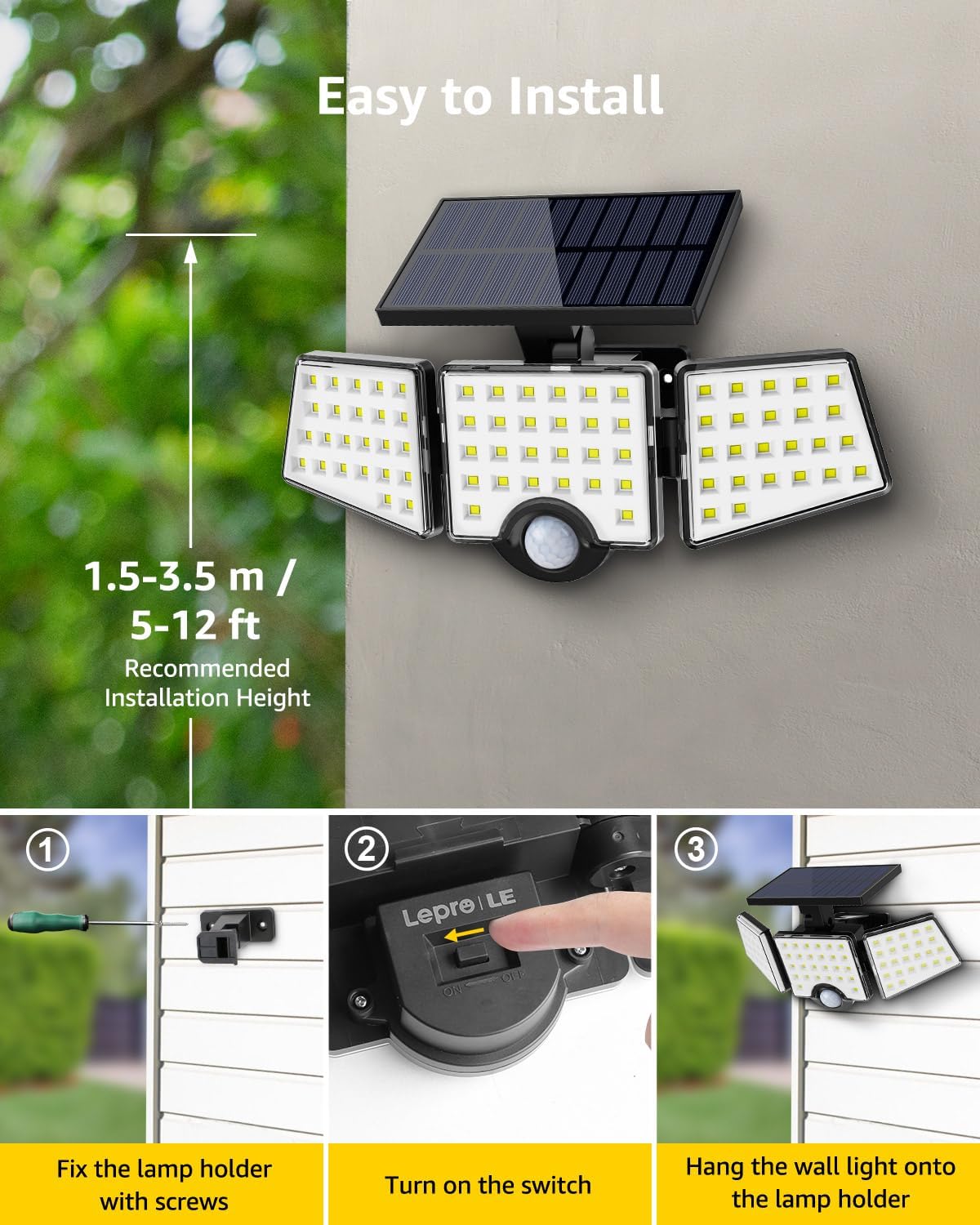
Image: Visual guide for installation, illustrating the steps of securing the bracket, activating the light, and attaching it to the wall.
6. Nga Tohutohu Whakahaere
The Lepro WL4000 Solar Motion Sensor Wall Light operates automatically once installed and activated:
- Mahinga awatea: The solar panel charges the internal lithium-ion battery during daylight hours. The light will remain off.
- Mahi i te po: At dusk, the light will enter standby mode. When motion is detected within its 16-26 feet range, the light will automatically turn on at full brightness.
- Taumahi-Aunoa: The light will remain on as long as motion is detected. After approximately 20 seconds of no detected motion, the light will automatically turn off to conserve battery power.

Image: Visual representation of the light's operational cycle: charging in daylight, activating with motion at night, and automatically turning off.
7. Tiaki
To ensure the longevity and optimal performance of your solar light, follow these maintenance tips:
- Horoia te Paewhiri Solar: Me horoi i nga wa katoa te panui solar ki te ngohengohe, damp he kakahu hei tango i te puehu, te paru, te para ranei. Ma te panui maamaa e whakarite kia pai te utu.
- Tirotiro mo te kino: Periodically check the light unit and wiring for any signs of damage. If damage is found, contact customer support.
- Ūkui Ārai: Ensure no new obstructions (e.g., growing branches, new structures) are blocking direct sunlight from reaching the solar panel.
8. Te Raru
If your solar light is not functioning as expected, refer to the following common issues and solutions:
| Raruraru | Take pea | Rongoā |
|---|---|---|
| Kare te rama e mura i te po. | He iti rawa te utu o te ra. | Me whakarite kia whiti te rā ki te papa rā mō ngā hāora 6-8 i te rā. Horoia te papa rā. |
| Light is dim or stays on for a short period. | Te utu iti o te papahiko. | Tukua te rama kia utu mō te rā katoa i raro i te rā tika. |
| Ko te pūoko nekehanga karekau e kitea te neke. | Kua āraia, kua paru rānei te pūoko. | Clear any obstructions from the sensor. Wipe the sensor clean. Ensure the light is installed within the recommended height and detection range. |
| Ka mura te rama i te awatea. | Light sensor malfunction or external light interference. | Ensure the solar panel is not covered or in a dark area during the day. If the problem persists, contact customer support. |
9. Whakatakotoranga
| Waitohu | Repera |
| Tau tauira | 640003-DW |
| Tae | Pango, Ma |
| Rauemi | Acrylonitrile Butadiene Styrene, Polycarbonate |
| Puka Maama | Rama Waipuke |
| Hunga Hua | 11.1"L x 4.65"W x 5.87"H |
| Mahinga o roto/waho | Waho |
| Puna Mana | Ko te hiko o te ra |
| Āhuahira Motuhake | Pūoko Motini, Parewai |
| Momo Puna Maama | LED |
| Te maha o nga puna marama | 3 |
| Voltage | 3.7 Volts (DC) |
| Tae Maama | Mā |
| Taumaha Tūemi | 1.1 Pauna |
| Wattage | 14 watts |
| Momo Whakawhiti | Pūoko Motini |
| Taumata Atete Wai | IP65 parewai |
| Tirohanga | 1000 Rumeni |
| Pūhiko | 1 te pākahiko Lithium Ion e hiahiatia ana (kei roto) |
10. Pūtāhui me te Tautoko
For warranty information or technical support, please refer to the contact details provided with your purchase documentation or visit the official Lepro webpae. Puritia to riiki hoko hei tohu mo te hoko.


