1. Kupu Whakataki
Thank you for choosing the Xtorm 15W Go Power Bank XG1021. This manual provides essential information for the safe and efficient operation, maintenance, and troubleshooting of your device. Please read this manual thoroughly before using the power bank and retain it for future reference.
2. Hua Neke Atuview
The Xtorm 15W Go Power Bank XG1021 is a compact and portable external battery designed to charge your mobile devices on the go. Featuring a 10,000 mAh capacity and 15W USB-C output, it offers efficient power delivery.

Figure 2.1: The Xtorm 15W Go Power Bank XG1021 in Space Grey, showcasing tona hoahoa kiko, kiato.
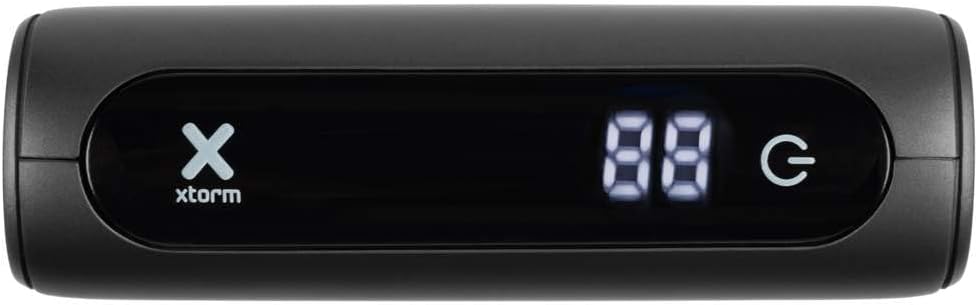
Figure 2.2: Front display of the power bank, indicating battery percentage and power status.
2.1. Hototahi Ao
This power bank is designed for broad compatibility, capable of charging various devices including smartphones, tablets, and portable gaming consoles.

Figure 2.3: Illustration of the power bank's compatibility with different device types.
2.2. Hoahoa Kawe
The Xtorm Go Power Bank is engineered for portability, making it an ideal travel companion. Its compact dimensions and light weight ensure it can be easily carried.

Figure 2.4: The power bank's compact size, suitable for travel.
3. Tatūnga
3.1. Te Wetewete me te Tirotiro Tuatahi
Upon opening the package, ensure all components are present and undamaged. The box should contain the Xtorm 15W Go Power Bank, a USB-C cable, and this user manual.

Figure 3.1: Contents included in the Xtorm Power Bank Go package.
3.2. Te Whakatau Tuatahi o te Peeke Hiko
Before first use, it is recommended to fully charge the Xtorm Go Power Bank. Connect the provided USB-C cable to the power bank's USB-C input port and the other end to a compatible USB wall charger (not included). The digital display will show the charging progress. Once 100% is displayed, the power bank is fully charged and ready for use.
4. Nga Tohutohu Whakahaere
4.1. Te Whakautu i ngā Pūrere o Waho
- Honoa te taura utu o tō pūrere ki tētahi o ngā tauranga putanga o te pēke hiko (USB-A, USB-C rānei).
- Whakauruhia tetahi atu pito o te taura ki to rorohiko.
- Ka tīmata aunoa te pēke hiko ki te utu i tō pūrere. Ka whakaatuhia e te mata matihiko te ōrau pākahiko e toe ana.tage o te peeke hiko.
- Hei whakamutu i te utu, momotu noa i tō pūrere.
The 15W USB-C output allows for faster charging of compatible devices.

Figure 4.1: Fast charging an external device using the power bank.
4.2. Te Tirohanga Taumata Pūhiko
The digital display on the front of the power bank indicates the current battery percentage. This display activates automatically when a device is connected or when the power bank is being charged.
5. Tiaki
- Te horoi: Whakamahia he kakahu maeneene, maroke hei horoi i te peeke hiko. A ape i te whakamahi i nga matū kino, i nga taonga abrasive ranei.
- Rokiroki: Rokirokihia te pēke hiko ki te wāhi hauhautanga, maroke, kia matara atu i te rā tika me te pāmahana tino kino. Mō te rokiroki roa, e taunakihia ana kia utua te pēke hiko ki te 50-70% ia toru marama hei pupuri i te hauora o te pākahiko.
- Tiaki Pūhiko: Do not expose the power bank to water or moisture. Avoid dropping or subjecting the device to strong impacts.
6. Te Raru
- Karekau te putea hiko e utu ana: Ensure the USB-C cable is securely connected to both the power bank's input and the wall charger. Try a different cable or wall charger.
- Kāore te pūrere e utu mai i te peeke hiko: Ensure the charging cable is securely connected to both the power bank's output and your device. Check if the power bank has sufficient charge. Try a different cable or output port.
- Puturi te utu: Ensure you are using a compatible cable and that your device supports fast charging. The power bank's output may be limited by the connected device's input capabilities.
- Power bank feels warm during use: It is normal for the power bank to become slightly warm during charging or discharging. If it becomes excessively hot, disconnect it immediately and contact support.
7. Whakatakotoranga
Detailed technical specifications for the Xtorm 15W Go Power Bank XG1021:
| Āhuahira | Whakatakotoranga |
|---|---|
| Ingoa Tauira | XG1021 |
| Waitohu | Xtorm |
| Pūhiko Raukaha | 10,000 mAh (9800mAh / 36.2Wh Li-ion) |
| Momo Tuhono | Momo USB C |
| Tāuru (USB-C) | 5V=3A (15W) |
| Putanga (USB-C) | 5V=3A (15W) |
| Putanga (USB-A) | 5V=3A |
| Putanga Tapeke | 15W |
| Hanganga Pūhiko | Lithium-ion |
| Āhuahira Motuhake | Kiato |
| Whakamahi Manakohia | Waea atamai |
| Puna Mana | Waea Hiko |
| Tae | Space Grey |

Figure 7.1: Back of the power bank displaying printed specifications and regulatory marks.
8. Nga korero haumaru
Hei whakarite i te haumaru o te mahi, me te ārai i te kino o te taputapu, me whai i ngā aratohu haumaru e whai ake nei:
- Do not expose the power bank to extreme temperatures (above 45°C or below -10°C) or direct sunlight.
- Kaua e whakaaturia te pēke hiko ki te wai, ki te makuku, ki te haumākū nui rānei.
- Do not disassemble, modify, or attempt to repair the power bank yourself. This will void the warranty and may cause safety hazards.
- A ape i te tuku, te tuku ranei i te peeke hiko ki nga paanga kaha.
- Keep the power bank away from flammable materials and explosive environments.
- Whakamahia anake nga taura utu whaimana me nga urutau.
- Kaua e taea e nga tamariki.

Figure 8.1: Internal safety mechanisms of the Xtorm Power Bank.
9. Pūtāhui me te Tautoko
Xtorm products are manufactured to high quality standards. For information regarding warranty terms and conditions, please refer to the official Xtorm webte waahi, te kaari whakamana ranei kei roto i to hokonga.
For technical support, troubleshooting assistance, or general inquiries, please visit the Xtorm Support Helpdesk online or contact their customer service. You can also find more information and updates on Xtorm's official social media channels.
- Xtorm Support Helpdesk: www.xtorm.eu/support
- Pāpāho pāpori: Rapua "Xtorm" on major platforms.


