1. Kupu Whakataki
This manual provides detailed instructions for the installation, operation, and maintenance of your MoesGo Smart RF433 WiFi Wall Switch. This smart switch is designed for convenient control of your lighting, offering multiple control methods including touch, app, voice, and RF433 remote.
Āhuatanga matua:
- Kaore he waea kore e hiahiatia mo te whakaurunga.
- Supports 2.4GHz WiFi connectivity for Smart Life/Tuya App control.
- Compatible with Alexa and Google Home for hands-free voice control.
- RF433 frequency support for remote control (remote not included).
- Programmable timing schedules and countdowns.
- Relay status memory and backlight preferences.

Image 1.1: MoesGo Smart RF433 WiFi Wall Switch, showcasing its sleek design and "No neutral" indicator.
2. Nga korero haumaru
WARNING: Electrical installation should only be performed by a qualified electrician. Always turn off power at the circuit breaker before installation or maintenance.
- Ensure the power supply is disconnected before handling any wiring.
- This device is designed for 2.4GHz Wi-Fi networks only. It is not compatible with 5.0GHz Wi-Fi.
- A capacitor is required for proper operation and must be connected to both ends of the bulb.
- Only use with certified bulbs that have a rated power of 5W or higher.
- This switch is not designed for use as a 3-way switch.
- The capacitor may produce a faint humming sound during operation. This is normal.
3. Ihirangi mokete
Tena koa tirohia te kete mo nga mea e whai ake nei:
- MoesGo Smart RF433 WiFi Wall Switch (1 unit)
- Capacitor (1 unit)
- Ngā tīwiri whakamau (2 ngā waeine)
- Pukapuka Kaiwhakamahi (Tenei tuhinga)
4. Whakatakotoranga
| Āhuahira | Taipitopito |
|---|---|
| Waitohu | MoesGo |
| Tau tauira | WS-EU1-LB-N-MG |
| Aratau Mahi | ON-OFF |
| Momo Whakapā | Katia te tikanga |
| Rauemi | Karaihe |
| Momo Whakaeke | Maunga Taiepa |
| Whakatauranga Tiaki o te Ao | IP65 |
| Tae | Pango |
| Ahu (Pake) | 11 x 10.2 x 5.1 cm |
| Taumaha (Pake) | 193 karamu |

Image 4.1: Detailed dimensions of the MoesGo Smart Switch and a basic wiring diagram for single-wire installation with capacitor.
5. Tāuta me te Tatūnga
5.1 Rarangi Arowhai i mua i te whakaurunga
- Me manatoko kei te 2.4GHz tō whatunga Wi-Fi. Kāore e tautokona ngā whatunga 5GHz.
- Ensure the bulbs connected to the switch have a rated power of 5W or higher.
- Confirm you are not attempting to install this as a 3-way switch.
- Have the included capacitor ready.
5.2 Nga Tohutohu Waea
- Whakawetohia te Mana: Kimihia tō pūwhiti hiko, ka whakaweto i te hiko o te pana e whakakapia ana e koe. Tirohia mēnā kua whakawetohia te hiko mā te whakamahi i te pūoko hiko.tage Kaiwhakamatautau.
- Tango Whakawhiti Tawhito: Carefully remove your existing wall switch from the wall box.
- Connect Capacitor: The included capacitor is essential for stable operation with no neutral wire. Connect the capacitor across the two terminals of the light bulb (in parallel with the load). This helps prevent flickering and ensures proper functionality.
- Whakawaea te Pātene Atamai:
- Connect the live wire (L) from your electrical box to the 'L IN' terminal on the MoesGo switch.
- Connect the load wire (L1) going to your light fixture to the 'L OUT' terminal on the MoesGo switch.
- Me whakarite kia mau nga hononga katoa.
- Maunga te Whakawhiti: Gently push the wired switch into the wall box and secure it with the provided screws. Attach the glass panel.
- Whakaora i te Mana: Whakahokia ano te hiko i te ara iahiko.

Image 5.1: Visual guide highlighting critical installation requirements: 2.4GHz Wi-Fi, minimum 5W bulb power, not for 3-way use, and no neutral wire needed.

Image 5.2: Illustration showing the capacitor and its importance for the MoesGo Smart Switch, indicating it should be connected to the bulb.
5.3 App Pairing (Smart Life/Tuya)
- Tikiake App: Tikiake i te taupānga "Smart Life" "Tuya Smart" rānei mai i te toa taupānga o tō waea atamai (iOS, Android rānei).
- Rēhita/Takiuru: Whakatuwheratia te taupānga ka rehita mo tetahi kaute hou, takiuru ranei me tetahi kaute.
- Whakauruhia te Aratau takirua: On the MoesGo switch, press and hold the touch button for approximately 5-10 seconds until the indicator light starts blinking rapidly. This indicates it's in pairing mode.
- Tāpiri Pūrere: In the app, tap the "+" icon (usually in the top right corner) to add a device. Select "Switch (Wi-Fi)" or "Wall Switch".
- Whakaū i te Kimo: Confirm that the indicator light on the switch is blinking rapidly in the app.
- Whakauruhia nga Taipitopito Wi-Fi: Tāuruhia te ingoa me te kupuhipa o tō whatunga Wi-Fi 2.4GHz.
- Tūhono: The app will begin connecting to the switch. Once connected, the indicator light on the switch will stop blinking and remain solid.
- Whakaingoa anō i te Pūrere: You can rename the switch in the app for easier identification (e.g., "Living Room Light").
6. Mahi
The MoesGo Smart Switch offers multiple ways to control your lighting:
6.1 Mana Pa
Simply touch the designated area on the glass panel of the switch to turn the light ON or OFF. The touch control functions independently of app or voice commands.

Image 6.1: A hand touching the MoesGo Smart Switch, illustrating the touch control functionality.
6.2 App Control (Smart Life/Tuya)
Once paired with the Smart Life or Tuya Smart app, you can control your switch from anywhere with an internet connection.
- Mamao ON/OFF: Tap the switch icon in the app to turn the light ON or OFF.
- Relay Status Settings: Access the switch settings in the app to configure the relay status after a power outage (ON/OFF/Remember last status). You can also adjust backlight preferences.
- Mana Tiri: Share control of the switch with family members or friends through the app, allowing multiple users to manage the device.
- Mana Rōpū: Create groups within the app to control multiple smart switches simultaneously.

Image 6.2: Screenshot of the Smart Life/Tuya app interface showing options for setting relay status and backlight preferences for the MoesGo Smart Switch.
6.3 Mana Reo (Alexa me Google Home)
Integrate your MoesGo Smart Switch with Amazon Alexa or Google Home for convenient hands-free voice control.
- Hononga Pūkete: In the Alexa or Google Home app, enable the "Smart Life" or "Tuya Smart" skill/service and link your account.
- Tirohia nga Pūrere: Ask Alexa or Google Home to discover new devices.
- Tono Reo: Whakamahia ngā whakahau pēnei i:
- "Alexa, turn on [Switch Name]"
- "Hey Google, turn off [Switch Name]"
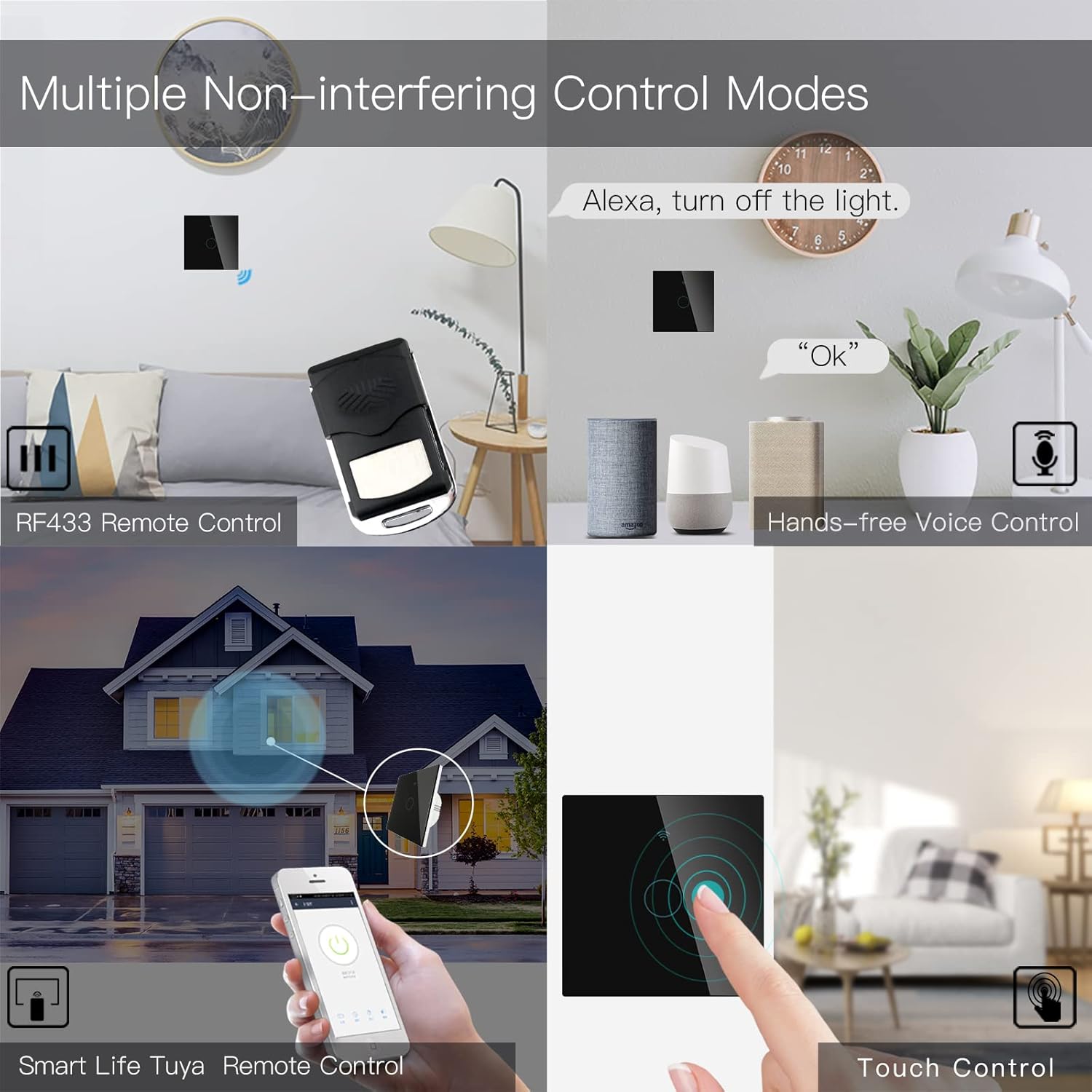
Image 6.3: Depiction of the MoesGo Smart Switch being controlled via voice commands using Amazon Alexa and Google Home devices.
6.4 RF433 Remote Control
The switch supports RF433 frequency for remote control. An RF433 remote (not included) with 1527 encoding can be paired with the switch.
- Enter RF Pairing Mode: In the Smart Life/Tuya app, navigate to the switch settings and find the "RF area" to enter pairing mode.
- Takirua Mamao: Press a button on your RF433 remote. Ensure a one-second delay between presses to avoid errors. The switch will confirm successful pairing.
6.5 Timing Schedules and Countdown
Utilize the Smart Life/Tuya app to set up automated schedules for your lights.
- Ngā Hōtaka: Program specific times for the light to turn ON or OFF daily or on selected days of the week.
- Whakawhiwhinga: Set a countdown timer for the light to turn OFF after a specified duration (e.g., 1, 5, 30 minutes, 1 hour).

Whakaahua 6.4: He example of setting a timing schedule in the Smart Life/Tuya app, showing lights turning on at 7:00 AM and off at 10:00 PM.
7. Tiaki
To maintain your MoesGo Smart Switch:
- Te horoi: Gently wipe the glass panel with a soft, dry cloth. Avoid abrasive cleaners or solvents.
- Whakahōu Firmware: Periodically check the Smart Life/Tuya app for available firmware updates to ensure optimal performance and security.
8. Te Raru
- Kāore te pana e whakautu:
- Tirohia mehemea kei te KIA te wehenga iahiko.
- Ensure the wiring is correct and secure.
- Verify the capacitor is properly installed across the bulb terminals.
- Korikori Maama:
- This often indicates an issue with the capacitor installation or an incompatible bulb. Ensure the capacitor is correctly wired and the bulb meets the 5W minimum power requirement.
- Kāore e taea te Tūhono ki Wi-Fi:
- Whakaūtia ko tō whatunga Wi-Fi he 2.4GHz.
- Ensure the switch is in pairing mode (rapidly blinking indicator light).
- Tirohia to kupuhipa Wi-Fi mo te tika.
- Move the switch closer to your Wi-Fi router during pairing.
- Faint Humming Sound:
- A faint humming sound from the capacitor is normal for no-neutral switches. If the sound is loud or concerning, recheck the capacitor installation and bulb compatibility.
- RF433 Remote Pairing Issues:
- Ensure the switch is in RF pairing mode via the app.
- Press remote buttons with a one-second delay between presses.
- Verify the remote uses 1527 encoding.
9. Pūtāhui me te Tautoko
For warranty information and technical support, please refer to the official MoesGo website or contact their customer service directly. Details are typically provided on the product packaging or the manufacturer's official online resources.


