Kupu Whakataki
The Deity V-Mic D4 DUO is a compact, dual-capsule video microphone designed to capture high-quality audio from both the front and rear of your camera simultaneously. This manual provides detailed instructions for setting up, operating, maintaining, and troubleshooting your D4 DUO microphone to ensure optimal performance.
He aha kei roto i te Pouaka
- 1x Deity V-Mic D4 DUO Microphone
- 1x Rycote Shockmount
- 2x Faux Fur Windscreens
- 1x TRS Camera Cable
- 1x TRRS Phone Cable

Image: All components included with the Deity V-Mic D4 DUO microphone.
Tatūnga
1. Attaching the Microphone to Your Camera
- Slide the Rycote Shockmount onto your camera's hot shoe or cold shoe mount.
- Tighten the locking wheel on the shockmount to secure it in place.
- Gently insert the Deity V-Mic D4 DUO microphone into the shockmount's clip.

Image: The D4 DUO microphone securely attached to a camera's hot shoe mount.
2. Te hono i nga Tauera
- Mo nga kamera: Use the provided TRS (3-pole) camera cable. Plug one end into the microphone's 'output' jack and the other end into your camera's microphone input.
- Mo nga Waea atamai: Use the provided TRRS (4-pole) phone cable. Plug one end into the microphone's 'output' jack and the other end into your smartphone's 3.5mm headphone/microphone jack. (Note: iPhones may require a lightning to 3.5mm adapter, sold separately).

Image: The D4 DUO microphone connected to a camera using the coiled TRS cable.
3. Powering the Microphone
The V-Mic D4 DUO operates using 3V Plug-In Power supplied directly from your camera's microphone jack. No batteries are needed for the microphone itself. This power also passes through the 3.5mm input, enabling the use of passive TRS lavalier microphones without additional power sources.
Nga Tohutohu Whakahaere
1. Dual Microphone Design
The D4 DUO features two cardioid condenser capsules: one facing forward and one facing backward. This unique design allows for simultaneous audio capture from both directions, ideal for interviews, vlogging, or capturing both the subject and the operator's audio.
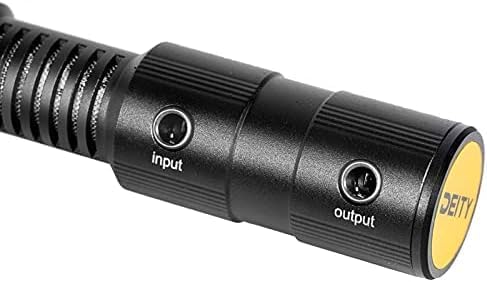
Image: Detail of the microphone's input and output ports.
2. Toggle Switch for Capture Modes
A single toggle switch on the microphone allows you to select between different recording modes:
- Front-only (Stereo): Records audio primarily from the front capsule, delivering a stereo signal.
- Front and Rear (Dual Mono): Records audio from both front and rear capsules simultaneously, outputting them as separate mono channels (left and right). This allows for flexible audio mixing in post-production.
3. 3.5mm AUX Whakauru
The V-Mic D4 DUO features a 3.5mm AUX input that sends audio to your camera's right channel. This allows you to easily connect an external lavalier microphone or wireless receiver, eliminating the need for complex splitter cables and reducing cable clutter.
4. Wind Protection
Two faux fur windscreens are included to minimize wind noise during outdoor recordings, ensuring clear audio even in windy conditions (rated for up to 20mph wind).

Image: The D4 DUO microphone with both faux fur windscreens installed, mounted on a camera.
5. Shock Mount
The custom-designed Rycote shockmount effectively isolates the microphone from vibrations and handling noise, preventing unwanted sounds from being transferred to your audio recordings.
6. Ataata Whakaaturanga Hua
Video: An official product video demonstrating the features and usage of the DEITY D4 DUO Microphone.
Te tiaki
- Te horoi: Use a soft, dry cloth to clean the microphone body. Do not use liquid cleaners or solvents.
- Matahau: The faux fur windscreens can be gently cleaned with a soft brush to remove dust or debris. Avoid harsh washing.
- Rokiroki: Store the microphone in a dry, dust-free environment when not in use. Avoid extreme temperatures and humidity.
Raparongoā
| Raruraru | Take pea | Rongoā |
|---|---|---|
| Kaore he putanga ororongo | Incorrect cable connection; camera mic input disabled; insufficient plug-in power. | Ensure cables are securely connected. Check camera settings to confirm external mic input is enabled and providing 3V plug-in power. |
| Distorted or low audio | Microphone gain too high/low on camera; excessive wind noise; incorrect mode selected. | Adjust camera's audio input gain. Ensure windscreens are properly installed for outdoor use. Verify the toggle switch is in the desired mode (Front-only or Dual Mono). |
| Excessive handling noise | Microphone not properly seated in shockmount; direct contact with microphone body. | Ensure the microphone is securely and correctly placed in the Rycote shockmount. Avoid touching the microphone body directly during recording. |
Whakatakotoranga
| Whakatakotoranga | Uara |
|---|---|
| Taumaha Tūemi | 40 Karamu (1.41 hekere) |
| Waea Puka Whakaoho | Pū pū |
| Puna Mana | Corded Electric (3V Plug-In Power from camera) |
| Rauemi | Konumohe |
| Tohu Waitohu-ki-Toi | 120 dB |
| Pūmārō Pūmārō | Kāmera |
| Te maha o nga hongere | 2 |
| Whakautu auau | 20 KHz |
| Ingoa Tauira | V-Mic D4 DUO |
| Hangarau Hononga | Tautoko |
| Momo Tuhono | 3.5 mm Jack |
| Āhuahira Motuhake | Mute Function (via external device if connected to AUX input) |
| Pūrere Hototahi | Camera, Smartphone, Audio Recorders |
| Tae | Pango |
| Tauira Poara | Takirua (Cardioid) |
Pūtāhui me te Tautoko
Deity Microphones is committed to providing unique and effective products. For warranty information and support, please refer to the warranty card included in your product packaging or visit the official Deity Microphones website. Registering your product online may extend your warranty coverage.


