Ka mutu te huaview
The Refoss Wireless Garage Door Keypad provides keyless entry for your garage, offering convenience and security. This keypad is designed to work specifically with garage door openers featuring a purple learn button, operating on a 315 MHz frequency. It supports control of up to three individual garage doors with unique PINs.

Image: Refoss Wireless Garage Door Keypad. This image displays the keypad with its protective cover lifted, revealing the numeric buttons and the specific compatibility label for purple learn buttons.
Hototahi
This Refoss Wireless Garage Door Keypad is only compatible with garage door openers that have a PURPLE learn button. It works with Security+ 315 MHz Chamberlain, LiftMaster, and Craftsman garage openers manufactured between 2006 and 2014. Please verify your garage door opener's learn button color before proceeding with installation or programming.
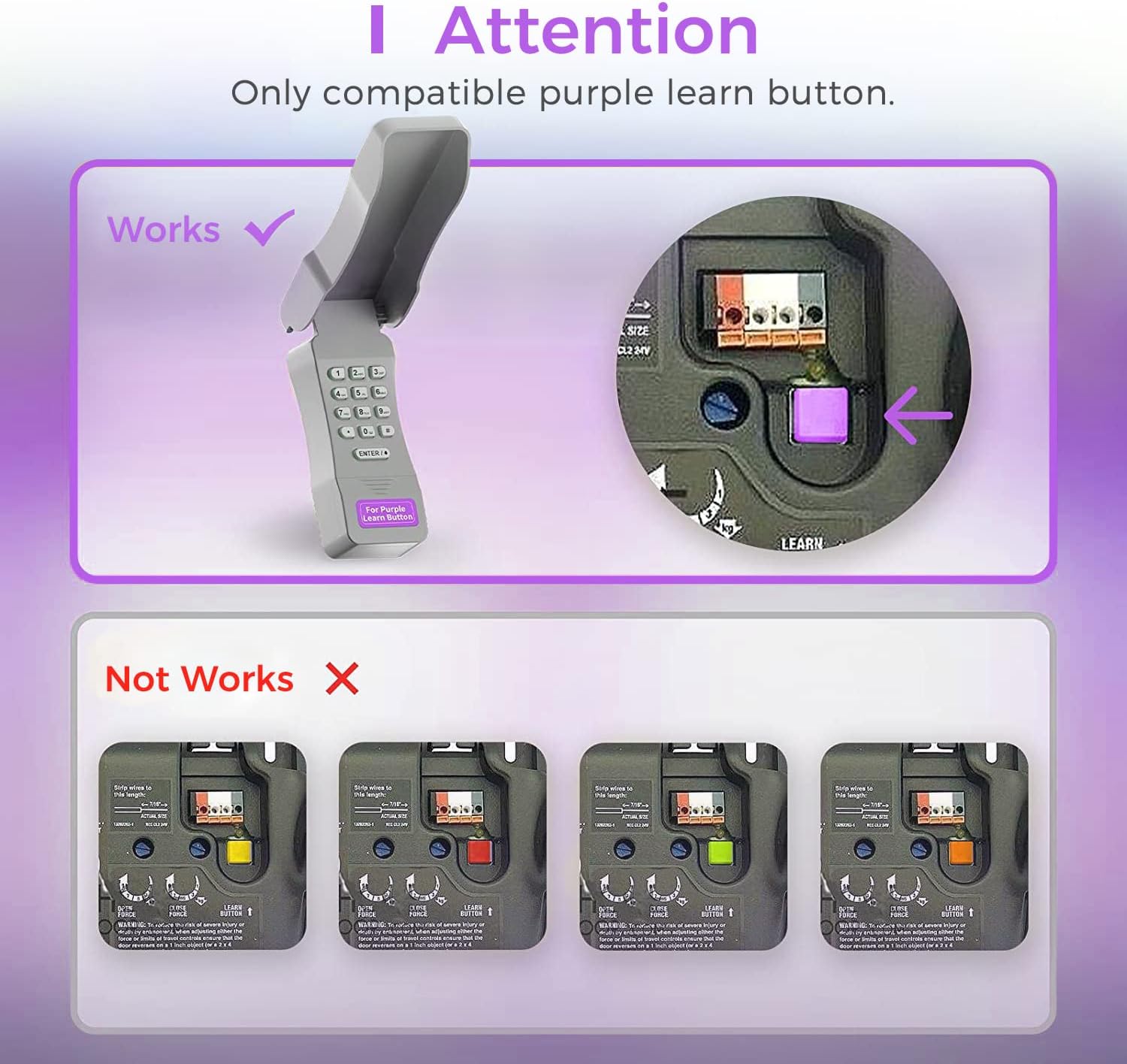
Image: Compatibility Diagram. This visual guide illustrates the correct purple learn button for compatibility and shows examples of incompatible learn button colors (red, orange, green, yellow).
Ihirangi mokete
I mua i te tiimata o te whakaurunga, tirohia kei te noho nga waahanga katoa i roto i te kete:
- 1 x Refoss Wireless Keypad
- 1 x Manual Kaiwhakamahi (tenei tuhinga)
- 4 x Tiuri
- 4 x Nga Punga Tiu
- 4 x 3M Ripene Taarua
- 1 x 9V Pūhiko

Image: Package Contents. This illustration details all items included in the product box, ensuring users can verify they have everything needed for installation.
Tatūnga me te Papatonotanga
The Refoss Wireless Keypad is designed for easy, wireless programming. Follow these steps carefully to set up your keypad and program it to your garage door opener.
Hipanga 1: Tāuta Pūhiko
- Open the battery compartment on the back of the keypad.
- Whakauruhia te pākahiko 9V kei roto, kia tika ai te polarity.
- Katia kia mau te wahanga pākahiko.
Hipanga 2: Papatonohia te papapātuhi
This keypad can control up to three garage doors. Each door requires its own unique PIN.
- Kimihia te PURPLE Learn Button on your garage door opener motor unit. This button is typically found on the back or side panel of the motor.
- Patohia ka tukuna tonutia te PURPLE Learn Button. The learn indicator light on the opener will glow steadily for 30 seconds.
- Within 30 seconds, enter your desired 4-digit PIN on the Refoss keypad.
- Patohia me te pupuri i te ENTER / # button on the keypad until the garage door opener lights flash or two clicks are heard. This indicates successful programming.
- Test the keypad by entering your PIN and pressing ENTER / #. The garage door should activate.
To program additional garage doors (up to three), repeat Step 2 for each door, using a different 4-digit PIN for each.
Nga Tohutohu Whakahaere
Opening/Closing a Garage Door
- Enter your 4-digit PIN for the desired garage door.
- Pehia te ENTER / # pātene.
- The garage door will open or close.
Controlling Multiple Doors
The keypad supports individual PINs for up to three garage doors. Simply enter the specific PIN for the door you wish to operate.

Image: One Keypad for Three Doors. This image visually represents the keypad's capability to manage up to three distinct garage doors using individual access codes.
Te tiaki
Whakakapinga Pūhiko
The keypad uses one 9V alkaline battery. When the keypad backlight dims or the keypad becomes unresponsive, it is time to replace the battery.
- Open the battery compartment on the back of the keypad.
- Tangohia te pākahiko 9V tawhito.
- Whakauruhia he pākahiko kawakore 9V hou, kia tika te polarity.
- Katia kia mau te wahanga pākahiko.
Te horoi
Horoia te mata o te papapātuhi ki te wai ngohengohe,amp kakahu. Kaua e whakamahi i nga kai horoi me nga whakarewa.
Parenga Huarere
The keypad features a weatherproof protective cover designed to shield it from various weather conditions. Ensure the cover is properly closed when not in use to maximize its protective capabilities.

Image: Weatherproof and Fluorescent Features. This image demonstrates the keypad's durability against outdoor elements and its illuminated keys for visibility in low-light conditions.
Raparongoā
| Raruraru | Take pea | Rongoā |
|---|---|---|
| Kaore te papapātuhi e whakautu. | Kua mate, iti ranei te pākahiko. | Whakakapihia te papahiko 9V. |
| Garage door does not open/close after entering PIN. | Keypad not programmed correctly or incompatible opener. |
|
| Keypad backlight is dim. | He iti te pākahiko. | Whakakapihia te papahiko 9V. |
| Cannot program multiple doors. | Incorrect programming sequence for additional doors. | Ensure you are using a unique PIN for each door and repeating the programming steps for each. |
Whakatakotoranga
- Tauira: RGR545
- Hototahi: Chamberlain, LiftMaster, Craftsman garage door openers with PURPLE learn button (Security+ 315 MHz, manufactured 2006-2014)
- Auautanga: 315 MHz
- Te maha o nga tatau e tautokona ana: Tae atu ki te 3
- Puna Hiko: 1 x 9V Alkaline Battery
- Ahu: Tata ki te 2 x 6 x 1 inihi
- Taumaha: Tata ki te 7.8 hekere
- Nga waahanga motuhake: Weatherproof, Fluorescent Keypad
Nga korero Whakaputanga
This Refoss Wireless Garage Door Keypad comes with a 1-tau pūtāhui mai i te rā i hokona ai. Ka hipokina e tēnei pūtāhui ngā hapa o ngā rauemi me te mahi toi i raro i te whakamahinga noa. Kāore e hipokina ngā kino i puta mai i te whakamahi hē, te aituā, te whakarerekētanga kāore i whakamanahia, te tāutanga hē rānei.
Tena koa pupurihia to tohu mo te hoko mo nga kereme whakamana.
Tautoko Kiritaki
For any questions, technical assistance, or support regarding your Refoss Wireless Garage Door Keypad, please contact our customer support team. We offer caring customer support 7 days a week.
Refer to the product packaging or the Refoss official webpae mo nga korero whakapā o naianei.


