Kupu Whakataki
The Amazon Echo Show 5 (2nd Gen, 2021 release) is a smart display designed to simplify your daily routines and enhance your connected home experience. This certified refurbished device has been tested and certified to function like new, offering all the features of a new unit.
With Alexa built-in, you can manage your day, stay entertained, and connect with others using just your voice. The compact 5.5-inch screen provides visual feedback for alarms, timers, news, video calls, and more.

Image: The Echo Show 5 on a nightstand, illustrating its use as a smart display for time and daily information.
Tatūnga
Setting up your Echo Show 5 is a straightforward process. The device is designed for simple setup, allowing you to connect to your Wi-Fi network with ease.
He aha kei roto i te Pouaka:
- Echo Show 5 taputapu
- Glacier White power adapter (15W) with cable (4.9 ft.)
- He aratohu timata tere
Hipanga Tatūnga Tuatahi:
- Mono Mai: Honoa te urutau hiko ki to Echo Show 5 ka hono atu ki te putanga o te pakitara.
- Whaia nga Tohutohu I-Mata: The device will power on and guide you through the initial setup process on its touch screen.
- Tūhono ki Wi-Fi: Select your Wi-Fi network from the list and enter the password. The Echo Show 5 supports dual-band 802.11a/b/g/n/ac Wi-Fi networks.
- Waitohu ki te Pūkete Amazon: Takiuru mā te whakamahi i ō taipitopito pūkete Amazon.
- Whakawhaiaro i nga Tautuhinga: Customize settings such as time zone, device name, and privacy preferences.
- Tikiake i te taupānga Alexa: For full functionality and advanced controls, download the Alexa app on your Fire OS, Android, or iOS device. The app is also accessible via a web pūtirotiro.
Amazon's Wi-Fi simple setup technology helps streamline the connection process, making it easier to get your device up and running quickly.
Te whakahaere i to Whakaaturanga Echo 5
The Echo Show 5 offers a wide range of functionalities, primarily controlled by voice commands to Alexa and through its interactive touch screen.
Daily Assistance:
- Whakaoho me nga Taima: Set alarms and timers with voice commands.
- Calendar & News: Check your calendar, get news updates, and view matapae huarere.
- Ngā mahinga: Create routines to automate actions, such as gradually turning on compatible lights in the morning.
Mana Kainga Ataata:
Manage compatible smart home devices using the interactive display, your voice, or motion detection.
- Kāmera Hanga-roto: Use the 2 MP camera to look in on your home when you're away.
- Mana Pūrere: Control lights, cameras, and other smart devices.

Image: A man carrying a laundry basket, with an Echo Show 5 in the foreground, demonstrating how the device can be used to control smart home devices, possibly through motion detection.
Whakawhitiwhiti:
- Waea Ataata: Make video calls to friends and family who have the Alexa app or an Echo device with a screen using the 2 MP camera.
- Panuitanga: Send announcements to other compatible devices in your home.

Image: The Echo Show 5 displaying an active video call, highlighting its communication capabilities.
Whakangahau:
- Rere ana: Play TV shows and movies from services like Prime Video and Netflix on the 5.5-inch screen.
- Waiata me te Ororongo: Stream music from Amazon Music, Apple Music, Spotify, and others.
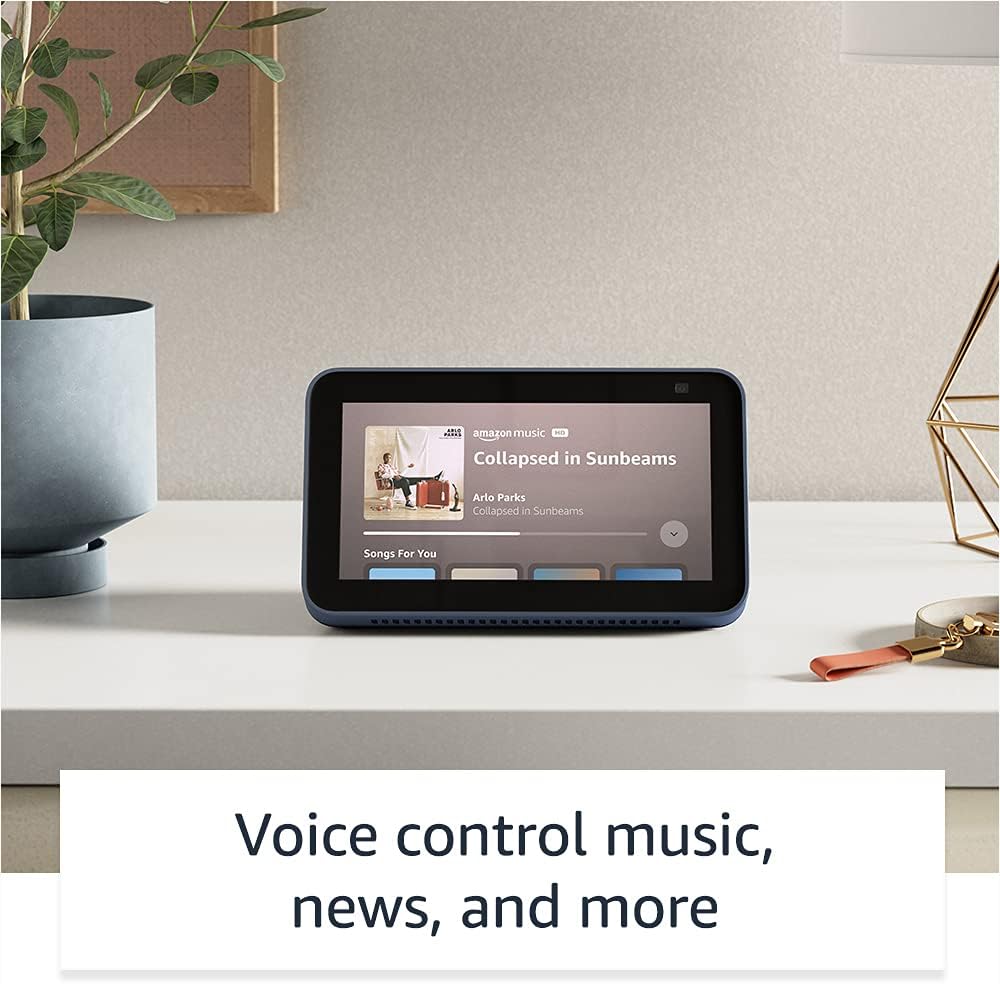
Image: The Echo Show 5 displaying a music playback screen, demonstrating its entertainment features.
Whakawhaiaro:
- Anga Whakaahua Mamati: Use Amazon Photos to turn your home screen into a digital photo frame.

Image: The Echo Show 5 displaying a personal photo, illustrating its use as a digital photo frame.
Ngā Āhuatanga Tūmataitinga:
He maha ngā paparanga o ngā mana whakahaere tūmataiti kua hangaia mō te Echo Show 5:
- Mic/Camera Off Button: He patene tinana hei momotu hiko i nga hopuoro me te kamera.
- Ārai Kāmera Whakauru: A physical shutter to cover the camera lens.
- Voice Recording Controls: Te kaha ki te view me te whakakore i o rekoata reo.
- Hangarau Wake Word: The device only begins listening after detecting your chosen wake word.
- Tohu Rere: Ka whakaatu nga tohu tirohanga i te wa e rere ana te ororongo, ataata ranei ki te kapua.

Whakaahua: He tata view of the Echo Show 5's top, highlighting the physical camera shutter button for privacy control.
Ngā Āhuatanga Āheitanga:
Kei roto i te Echo Show 5 ngā āhuatanga urunga maha hei whakawhaiaro i a Alexa ki ō pūkenga. Ka taea te uru atu ki ēnei mā te Tautuhinga → Wāteatanga i runga i to taputapu.
- Pato ki a Alexa: Whakawhitiwhiti ki a Alexa ma te pa atu ki nga taera mata-mata, ma te papapātuhi ranei.
- Whakarongo Urutau: Ka nui ake te wa ki te whakaoti korero i mua i te whakautu a Alexa.
- Rereke Korero Manakohia: Whakahaerehia te tere, te puhoi ranei o te korero a Alexa.
- Tapanga: Alexa Captioning, Call Captioning, and Closed Captioning provide text for supported content.
- Whakaatu me te Kōrero: Ka awhina i te tautuhi i nga hua mo nga kaiwhakamahi matapo, hauaa ranei.
- ReoView Kaipānui Mata: Enables access for blind or visually impaired users.
- Whakarahi Mata: Topa roto/waho me te panuku huri noa i te mata.
- Whakamōhio Ina Tata: Ka purei i nga oro whakamohiotanga ina kitea tata ki te taputapu.
- Kindle Panui Nui: Ka taea e Alexa te pānui i ō pukapuka Kindle.
- Kuputuhi Wā Tūturu: Patohia he kuputuhi ora i te wā o te waea ataata.
- Ngā tautuhinga tāpiri mō te Hurihuri Tae, te Whakatika Tae, te Tono Oro, me ētahi atu.
Te tiaki
The Certified Refurbished Echo Show 5 has undergone rigorous testing and certification to ensure it looks and works like new. Regular maintenance is minimal.
- Te horoi: Gently wipe the screen and device exterior with a soft, lint-free cloth. Avoid abrasive cleaners or sprays.
- Whakahōu Pūmanawa: Ensure your device is connected to Wi-Fi to receive automatic software security updates, which are guaranteed for at least four years after the device is last available for purchase as a new unit.
Raparongoā
If you encounter issues with your Echo Show 5, consider the following general troubleshooting steps:
- Hurihanga Hiko: Unplug the device from the power outlet, wait for 30 seconds, and then plug it back in.
- Tirohia te Hononga Wi-Fi: Ensure your Wi-Fi network is active and the device is connected. You can check network status in the device settings.
- Verify Internet Connectivity: Confirm your internet service is working by testing other devices on the same network.
- Check Microphone/Camera: Ensure the mic/camera off button is not activated and the camera shutter is open if you are trying to use these features.
- Alexa App: Use the Alexa app on your smartphone or tablet to manage device settings, check for updates, and access further support resources.
- Tono Reo: Speak clearly and ensure you are within range of the device's microphones.
For more detailed troubleshooting or specific issues, refer to the help section within the Alexa app or visit the official Amazon support webpae.
Whakatakotoranga
| Āhuahira | Taipitopito |
|---|---|
| Rahi | 5.8" x 3.4" x 2.9" (148mm x 86mm x 73mm) |
| Taumaha | 14.5 oz (410 karamu) |
| Whakaatu | 5.5 ”mata pa |
| Kāmera | Kāmera 2 MP me te kati whakauru |
| Hononga WiFi | Dual-band wifi (802.11a/b/g/n/ac). Does not support ad-hoc networks. |
| Hononga Nihokikorangi | A2DP support for audio streaming; AVRCP for voice control of connected mobile devices. PIN-code speakers not supported. |
| Ororongo | Full range 1.65” built-in speaker |
| Tukatuka | MediaTek MT 8163 |
| Whakatupuranga | Echo Show 5 (2nd Gen) - 2021 release |
| Reo | Ka korero a Alexa i te reo Ingarihi me te Paniora |
Pūtāhui me te Tautoko
Your Certified Refurbished Echo Show 5 comes with the same limited warranty as a new device. For specific details regarding your warranty, please refer to the documentation included with your device or visit the official Amazon website for Certified Refurbished Amazon devices.
For customer support, troubleshooting, and to manage your device settings, utilize the Alexa app on your compatible smartphone or tablet. You can also find extensive support resources and FAQs on the Amazon support webpae.
Whakahōu Pūmanawa Haumarutanga: Ka whiwhi tenei taputapu i nga whakahoutanga haumarutanga raupaparorohiko tae noa ki te wha tau i muri i te wa e waatea ana te taputapu mo te hoko hei waahanga hou i runga i te Amazon. webpae.
Tuhinga e pa ana - Echo Show 5 (Turanga Tuarua, 2 tuku)
 |
Amazon Echo Show 8 (2nd Gen) Aratohu Timata Tere He aratohu ki te timata me to Amazon Echo Show 8 (Generan Tuarua), e hipoki ana i te tatūnga, nga ahuatanga, me te muna. |
 |
Amazon Echo Show 8 (2nd Gen) Aratohu Kaiwhakamahi He aratohu kaiwhakamahi matawhānui mo te Amazon Echo Show 8 (Gen 2), e whakaatu ana i nga tatūnga, nga ahuatanga tūmataiti, nga whakahau reo, me nga tohutohu mo te whakamahi i te Alexa. |
 |
Amazon Echo & Alexa Tohu Aratohu Whakamahi mo nga Hoa o waho Ko nga aratohu whai mana mo nga hoa o waho mo te whakamahi tika i nga rawa o te tohu Amazon Echo me te Alexa, tae atu ki nga waitohu, te tuhi, nga tae, me te whakaatu i nga taonga hokohoko. Me whakarite kia rite tonu te waitohu me te pono. |
 |
Amazon Echo Show 8 (2nd Gen) Aratohu Timata Tere: Tatūnga me nga ahuatanga Akohia me pehea te whakarite me te whakamahi i to Amazon Echo Show 8 (Whakatupuranga Tuarua). Ko tenei aratohu e hipoki ana i nga ahuatanga o te taputapu, nga mana motuhake, me nga whakahau a Alexa mo nga mahi o ia ra. |
 |
Amazon Echo Show 5 (2nd Gen) Aratohu Timata Tere He aratohu timatanga tere mo te Amazon Echo Show 5 (Whakatupuranga Tuarua), e hipoki ana i te tatūnga, nga ahuatanga tūmataiti, me te whakamahi taketake me Alexa. |
 |
Amazon Echo Show 5 (2nd Gen) Aratohu Timata Tere Tīmata ki tō Amazon Echo Show 5 (2nd Generation). Kei roto i tēnei aratohu te tatūnga, ngā āhuatanga o te taputapu, ngā mana whakahaere tūmataiti, me te whakamahi i a Alexa mō te whakangahau, te kāinga atamai, me te whakawhitiwhiti kōrero. |