1. Kupu Whakataki
Mauruuru koe mo te hokoasing the SHARP XL-B512 Stereo Sound System. This micro sound system offers a rich 45-watt sound experience with versatile connectivity options including Bluetooth, CD player, USB, and FM radio. Its elegant design with a wooden speaker housing and LED display complements any living space. This manual provides essential information for setting up, operating, and maintaining your device to ensure optimal performance and longevity.
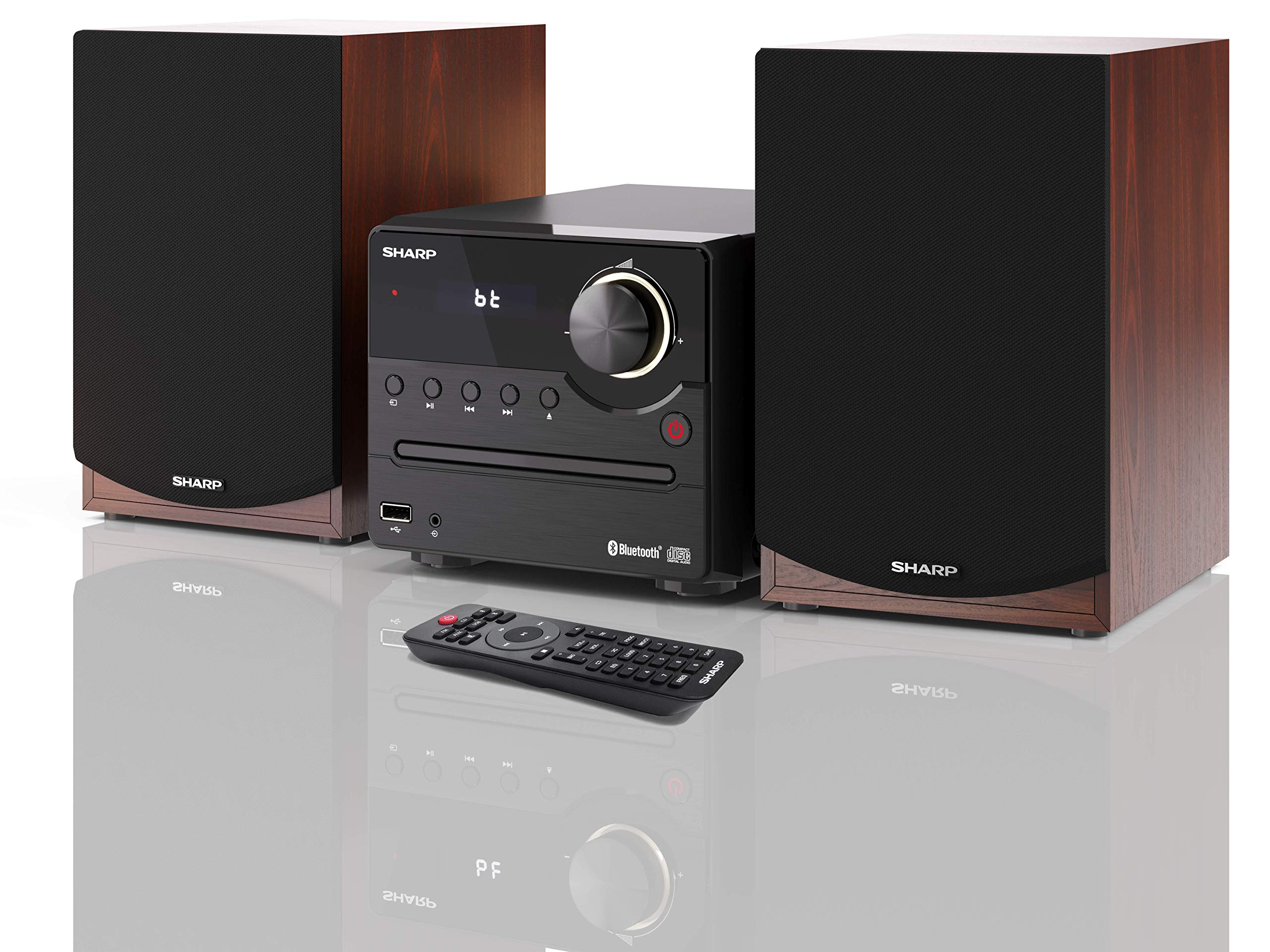
Whakaahua 1: SHARP XL-B512 Stereo Sound System. This image shows the central unit flanked by two wooden-cased speakers, reflecting on a polished surface.
2. Nga korero haumaru
Tena panuihia nga tohutohu haumaru katoa i mua i te whakamahi i te hua. Puritia tenei pukapuka hei tohutoro a meake nei.
- Puna Hiko: Whakamahia anake te pūtake hiko kua tohua. Kia tino tika te hikotage ōrite ana ki to tuku hiko rohe.
- Whakahau: Kaua e araia nga whakatuwheratanga hau. Whakaaetia he waahi mokowhiti huri noa i te waahanga mo te rere tika.
- Te wai me te makuku: Kaua e whakaaturia te waeine ki te ua, ki te makuku, ki ngā wai e turuturu ana/e tauhiuhi ana rānei. Kaua e whakatakoto i ngā mea kī tonu i te wai, pērā i ngā vase, ki runga i te taputapu.
- wera: Tiakina te waeine mai i nga puna wera penei i nga radiators, nga rehita wera, nga umu, me etahi atu taputapu (tae atu ki ampkaiwhakaora) e whakaputa ana i te wera.
- Te horoi: Wewetehia te waeine mai i te putanga o te pakitara i mua i te horoi. Whakamahia he kakahu maroke anake.
- Ratonga: Kaua e tarai ki te mahi i tenei hua maau ake. Tirohia nga ratonga katoa ki nga kaimahi tohu tohu.
3. Ihirangi mokete
Manatokohia ko nga mea katoa kei raro nei kei roto i to kete:
- SHARP XL-B512 Micro Sound System (Main Unit)
- Two Speakers (with wooden housing)
- Waea Hiko
- Mana Mamao (me nga pākahiko)
- Pukapuka Tohutohu (tenei tuhinga)
- Aratohu Timata Tere
4. Tatūnga
4.1 Hononga Tukuoro
Connect the two speakers to the main unit using the provided speaker cables. Ensure correct polarity (positive to positive, negative to negative) for optimal sound quality.
4.2 Hononga Hiko
Connect the power cable to the AC IN port on the rear of the main unit, then plug it into a wall outlet.

Whakaahua 2: Rear panel connections. This image displays the back of the central unit with ports for speaker wires and the AC power input, alongside the rear of the two speakers.
4.3 Hiko Tuatahi
Pēhia te pātene Mana i te waeine matua, i te mana mamao rānei hei whakakā i te pūnaha. Ka tiaho te mata LCD.
5. Nga Tohutohu Whakahaere
5.1 Mana Paewhiri Mua

Whakaahua 3: Front panel controls. This close-up shows the central unit's display, volume knob, and various control buttons for playback and source selection.
- Pātene Hiko: Ka whakakā, whakaweto rānei i te kōwae.
- Pene Puna: Cycles through available input sources (CD, FM, Bluetooth, USB, AUX).
- Matapihi Rōrahi: Whakaritea te taumata oro matua.
- Mana Purei: Play/Pause, Stop, Skip Forward/Backward for CD and USB modes.
- Tauranga USB: For connecting USB storage devices for music playback.
- Tāuru AUX: 3.5mm jack mo te hono i nga taputapu oro o waho.
5.2 Whakahoki CD
- Pehia te Puna button to select 'CD' mode.
- Open the CD tray by pressing the Eject button.
- Place a CD (CD/CD-R/CD-RW/MP3 format) with the label side up into the tray.
- Close the CD tray. The system will read the disc and begin playback automatically or display track information.
- Whakamahia ngā mana purei anō (Pūrei/Whakamutu, Kati, Tīpoka) hei whakahaere i tō puoro.
5.3 FM Radio
- Pehia te Puna button to select 'FM' mode.
- The system will automatically search for available stations or you can manually tune.
- To save a station as a preset, tune to the desired station, then press and hold the Tatūkē button (if available on remote) or follow on-screen instructions. The system supports 40 preset memories.
- Whakamahia te Tatūkē Runga/Whakararo patene hei whakatere ma nga teihana kua tiakina.
5.4 Takirua Nihokikorangi
- Pehia te Puna button to select 'Bluetooth' mode. The display will show 'bt' and flash, indicating it's in pairing mode.
- I runga i to taputapu pūkoro, whakaaheihia te Nihokikorangi ka rapua nga taputapu e waatea ana.
- Select 'SHARP XL-B512' from the list of devices.
- Once paired, the 'bt' indicator on the system's display will stop flashing. You can now stream audio from your device.
5.5 Whakahoki USB
- Kōkuhuhia he pūrere rokiroki USB ki te tauranga USB kei te papa o mua.
- Pehia te Puna button to select 'USB' mode.
- The system will automatically detect and play compatible audio files (MP3).
- Whakamahia ngā mana purei anō hei whakatere i ngā ara.
5.6 AUX Whakauru
- Connect an external audio device (e.g., smartphone, MP3 player) to the AUX IN jack on the front panel using a 3.5mm audio cable (not supplied).
- Pehia te Puna button to select 'AUX' mode.
- Play audio from your connected device. The sound will be output through the SHARP XL-B512 system.
5.7 Tautuhinga Whakaorite
The system features 6 preset equalizers with independent treble and depth control. Use the EQ button on the remote control or main unit to cycle through the presets and adjust sound to your preference.
6. Tiaki
6.1 Te Whakapai i te Waeine
Horoia te waeine ki te kakahu ngohengohe, maroke. Kaua e whakamahi i ngā kaihoroi whakakoi, ngā ware pi, ngā whakarewa rānei, nā te mea ka kino pea te āhua o te taputapu. Me whakarite kia momotu te waeine i te mono i mua i te horoinga.
6.2 Tiaki CD
Handle CDs by their edges. Keep them clean and free of scratches. Store CDs in their cases when not in use.
6.3 Te Manaaki i te Kaikōrero
The wooden speaker housing can be cleaned with a soft, dry cloth. Avoid placing heavy objects on the speakers or exposing them to direct sunlight or extreme temperatures.
7. Te Raru
If you encounter any issues with your SHARP XL-B512 system, refer to the following table for common problems and solutions.
| Raruraru | Take pea | Rongoā |
|---|---|---|
| Karekau he kaha | Power cable not connected securely; Power outlet not active. | Tirohia te hononga o te taura hiko; whakamātauria tētahi putanga hiko rerekē. |
| Karekau he tangi | Volume too low; Incorrect source selected; Speaker cables disconnected. | Increase volume; Select correct input source; Check speaker cable connections. |
| Ko te Nihokikorangi kaore i te takirua | System not in pairing mode; Device too far; Bluetooth disabled on device. | Ensure system is in Bluetooth pairing mode; Move device closer; Enable Bluetooth on your device. |
| CD kaore i te purei | CD inserted incorrectly; CD is dirty or scratched; Incorrect format. | Reinsert CD correctly; Clean CD; Ensure CD is a supported format (CD/CD-R/CD-RW/MP3). |
| Ko te mana mamao kaore e mahi | Kua mate ngā pākahiko, kua hē rānei te whakaurunga; He arai kei waenganui i te mana mamao me te taputapu. | Whakakapihia nga pākahiko; Me whakarite tika te polarity pākahiko; Tango i nga arai. |
Mena ka mau tonu te raru i muri i te whakamatau i enei otinga, tena koa whakapā atu ki te tautoko a te kaihoko.
8. Whakatakotoranga
Below are the technical specifications for the SHARP XL-B512 Stereo Sound System:
- Tauira: XL-B512
- Te Mana Putanga Tapeke: 45 Watts
- Aratau Putanga Ororongo: Tirooro
- Speaker Output Channel Quantity: 2
- Hōputu Ororongo Tautokona: MP3, CD, CD-R, CD-RW
- Hangarau Tuner: FM PLL Tuner
- Raupaparorohiko FM: 87.5 ki te 108 MHz
- FM Preset Memory: 40 teihana
- Hononga: Nihokikorangi, USB, Āwhina (3.5mm)
- Nga waahanga motuhake: 6 Preset Equalizers, LCD Display with white backlight
- Sound System Dimensions (W x H x D): 17 x 22 x 15 cm
- Ngā Ahu o te Kaikōrero (Wh x H x D): 14.5 x 17.7 x 22.3 cm (each)
- Taumaha Tūemi: 4 kg
- Puna Hiko: Hiko Hiko
- Mana Mamao: Ae (kei roto nga pākahiko)
9. Pūtāhui me te Tautoko
Your SHARP XL-B512 Stereo Sound System comes with a standard manufacturer's warranty. Please refer to the warranty card included in your package for specific terms and conditions, including the warranty period and coverage details.
For technical support, service inquiries, or further assistance, please contact your local SHARP customer service center. Contact information can typically be found on the manufacturer's webpae, i roto ranei i nga tuhinga whakamana.