1. Kupu Whakataki
This manual provides essential information for the safe and efficient operation of your iFFALCON 40F2A 40-inch Full HD Android Smart LED TV. Please read these instructions thoroughly before using the television and retain them for future reference.
The iFFALCON 40F2A is a 40-inch Full High Definition (1920x1080) Smart LED TV powered by Android, offering a rich entertainment experience with built-in Google Assistant, HDR10 support, and integrated streaming services.

Whakaahua: Mua view of the iFFALCON 40F2A 40-inch Full HD Android Smart LED TV.
2. Tatūnga
2.1 Te Wetewete pouaka me nga Ihirangi
Tangohia marietia te pouaka whakaata i roto i tōna takai. Kia tino kitea ngā wāhanga katoa:
- 1 x iFFALCON 40F2A LED TV
- 1 x Ripanga Runga Tu
- 1 x Manual Kaiwhakamahi (tenei tuhinga)
- 1 x Kaari Rarangi
- 1 x Mana Mamao
- 2 x AAA Pūhiko
2.2 Whakaturanga Tu
If using the table-top stand:
- Tuhia te mata-whakararo pouaka whakaata ki runga i te mata ngawari, papatahi kia kore ai e pakaru.
- Whakahāngaihia ngā whāriki tū ki ngā kōhao tīwiri kei raro o te pouaka whakaata.
- Whakapaia te turanga ma te whakamahi i nga wiri kua whakaratohia.
- Āta hiki ake te pouaka whakaata ki tētahi tūranga poutū i runga i tētahi mata pumau, papatahi.
2.3 Whakapuru Taiepa (Kōwhiringa)
For wall mounting, consult a professional installer and refer to the wall mount kit's instructions. Ensure the wall mount is compatible with the TV's VESA mounting pattern.
2.4 Te hono i nga taputapu o waho
Connect your external devices (e.g., set-top box, gaming console, Blu-ray player) to the TV's ports. The TV features HDMI, USB, VGA, and Headphone ports.
- HDMI: Mo te ororongo me te ataata whakamaramatanga teitei.
- USB: Mo te hono i nga taputapu rokiroki USB.
- Itarangi: Mo te hononga ipurangi waea.
- Pūoro: Mō te putanga oro ki ngā pane whakarongo.
2.5 Hononga Hiko me te Tatūnga Tuatahi
- Whakauruhia nga pākahiko AAA kua whakaratohia ki te mana mamao.
- Honoa te taura hiko ki te pouaka whakaata, katahi ki te putanga hiko.
- Pēhia te pātene hiko i runga i te mana mamao hei whakakā i te pouaka whakaata.
- Whaia nga tohutohu i runga-mata hei whakaoti i te tatūnga tuatahi, tae atu ki te kowhiringa reo, te hononga whatunga (Wi-Fi, Ethernet ranei), me te takiuru pūkete Google.
3. Te whakahaere i te pouaka whakaata
3.1 Nga Mahi Mana Mamao
The remote control provides access to all TV functions. It includes dedicated buttons for popular streaming services like Netflix, Amazon Prime Video, and Zee5, as well as a Google Assistant button for voice commands.

Image: The iFFALCON 40F2A Smart Remote Control, highlighting the Google Assistant and Netflix hotkey buttons.
3.2 Atanga TV Android
Navigate the Android TV interface using the remote's directional pad and OK button. The home screen displays recommended content, installed applications, and settings.

Image: The Android TV home screen on the iFFALCON 40F2A, showing various apps and features.
3.3 Kaiawhina a Google
Pēhia te pātene Kaiawhina Google i tō mana mamao ka kōrero ki te hopuoro hei whakahaere i tō pouaka whakaata, hei rapu ihirangi, hei tiki whakautu, me te whakahaere i ngā taputapu kāinga atamai.
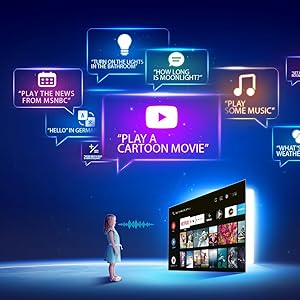
Image: Illustration of using Google Assistant voice commands with the TV.
3.4 Ngā Taupānga Rerema
Access a wide range of pre-installed streaming applications such as Netflix, Amazon Prime Video, YouTube, Disney+Hotstar, Zee5, and more. Additional apps can be downloaded from the Google Play Store.

Image: The iFFALCON 40F2A displaying various streaming application logos.
3.5 Chromecast Hanga-i roto
Use the built-in Chromecast feature to cast content from your compatible smartphone, tablet, or computer directly to your TV screen.

Image: A smartphone casting content to the iFFALCON 40F2A TV via Chromecast.
4. Nga ahuatanga
4.1 Full HD Display with HDR10
Experience clear and vibrant visuals with Full HD (1920x1080) resolution. HDR10 support enhances contrast and color accuracy, providing a more dynamic picture.

Image: A side-by-side comparison of a scene without HDR10 and with HDR10, showing enhanced detail and color.
4.2 Te Whakaiti Iti
Micro Dimming analyzes video content in hundreds of separate zones to adjust brightness and darkness independently, improving contrast and picture quality.

Image: A comparison showing a city skyline without Micro Dimming and with Micro Dimming, highlighting improved contrast.
4.3 iPQ Engine
The iPQ Engine intelligently processes image quality, optimizing brightness, color range, and other visual parameters for a superior viewte wheako.

Image: Visual representation of the iPQ Engine's high brightness precision and intelligent color range control technologies.
4.4 Dolby Ororongo
Enjoy immersive sound with Dolby Audio. The TV features 20 Watts speakers (10W + 10W) for clear and powerful audio output.

Image: Graphic illustrating the 10W + 10W Dolby Audio speakers for enhanced sound.
4.5 Hoahoa Angiangi
The iFFALCON 40F2A features a sleek and slim design, allowing it to blend seamlessly into any living space.

Image: A hand demonstrating the slim profile of the iFFALCON TV.
5. Tiaki
5.1 Te horoi i te Mata
Me ata horoia te mata ki te kakahu ngohengohe, kore-puru. Mo nga tohu pakeke, paku dampen te kakahu ki te wai ranei he horoi mata motuhake. A ape i te whakamahi i nga matū kino, i nga taonga abrasive ranei.
5.2 Te horoi i te tinana pouaka whakaata
Wipe the TV's frame and stand with a soft, dry cloth. Do not use liquid cleaners directly on the TV.
5.3 Tiakitanga Whanui
- A ape i te tuku i te pouaka whakaata ki te taha o te ra, ki te wera nui ranei.
- Me whakarite kia pai te hau huri noa i te pouaka whakaata kia kore ai e wera rawa.
- Wewetehia te pouaka whakaata i te wa e uira ana te tupuhi, i te wa ranei e kore e whakamahia mo nga wa roa.
6. Te Raru
Mena ka raru koe ki to pouaka whakaata, tirohia nga raru me nga otinga e whai ake nei:
| Raruraru | Take pea | Rongoā |
|---|---|---|
| Karekau he kaha | Kua momotu te taura hiko; He raruraru putanga hiko kua pāngia. | Check power cord connection; Try a different outlet; Press power button on TV/remote |
| Karekau he pikitia, engari he oro | Pūtake tāuru hē; Taura HDMI/AV wetekina | Select correct input source; Reconnect cables securely |
| Karekau he oro, engari he pikitia kei reira | Volume muted or too low; Audio cable issue | Unmute or increase volume; Check audio settings; Reconnect audio cables |
| Ko te mana mamao kaore e mahi | Ngā pākahiko mate; Ārai; Kāore te mana mamao i honoa | Replace batteries; Remove obstructions; Re-pair remote if necessary |
| Kaore e taea te hono ki Wi-Fi | Kupuhipa hē; raruraru pouara; tawhiti rawa te pouaka whakaata i te pouara | Verify password; Restart router; Move TV closer or use Ethernet |
| He puhoi, he mīti ranei nga taupānga | Insufficient memory; Network issue; App malfunction | Close unused apps; Check internet connection; Clear app cache/data or reinstall app |
Mena ka mau tonu te raru i muri i te whakamatau i enei otinga, tena koa whakapā atu ki te tautoko a te kaihoko.
7. Whakatakotoranga
Detailed technical specifications for the iFFALCON 40F2A Smart LED TV:

Image: Diagram showing the dimensions of the iFFALCON 40F2A TV.
| Āhuahira | Whakatakotoranga |
|---|---|
| Waitohu | iFFALCON |
| Tauira | 40F2A |
| Rahi Mata | 40 Inihi (102 cm) |
| Hangarau Whakaatu | LED, A+ Grade Panel |
| Whakatau | HD Katoa (1920 x 1080 Pika) |
| Rere tāmata | 60 Hz |
| Wā Whakautu | 8.5 Milihekona |
| Viewing Koki | 178 Waeine |
| Ahuatanga Atahanga | 16:09 |
| Ratio Whakaorite Whakaahua | 5000:1 |
| Pūnaha Mahi | Android |
| Rahi kua whakauruhia te mahara RAM | 1 GB |
| Te Rokiroki Mamati | 8 GB |
| Kaitukatuka Whakairoiro | Mali470x2 |
| Putanga Ororongo | 20 Watts (Dolby Audio) |
| Hangarau Hononga | Ethernet, HDMI, USB, Wi-Fi, Bluetooth |
| Atanga Pūmārō | HDMI, Headphone, USB, VGA |
| Tauranga USB katoa | 1 |
| Puna Mana | AC |
| Wattage | 75 Watts (On-mode power consumption) |
| Rahi Hua (LxWxH) | 90.5 x 18.5 x 57.7 cm (me te turanga) |
| Taumaha Tūemi | 6.1 kg |
| Pūhiko | 2 pākahiko AAA (kei roto mo te mamao) |
8. Pūtāhui me te Tautoko
8.1 Nga Korero Whakaputanga
Your iFFALCON 40F2A TV comes with a 1 Tau Rarangi from the date of purchase. Please refer to the included Warranty Card for detailed terms and conditions. Retain your purchase receipt as proof of purchase for warranty claims.
8.2 Tautoko Kiritaki
For technical assistance, service requests, or any inquiries regarding your iFFALCON TV, please contact the manufacturer's customer support. Contact details can typically be found on the warranty card or the official iFFALCON webpae.


