1. Kupu Whakataki
Thank you for choosing the Xtorm Power Bank 20W Fuel Series 4 (FS402). This manual provides essential information for the safe and efficient use of your power bank. Please read these instructions carefully before use and retain them for future reference.
The Xtorm FS402 is a high-capacity portable charger designed to provide fast and reliable power to your mobile devices, including smartphones and tablets, on the go.
2. Hua Neke Atuview
The Xtorm Power Bank FS402 features a robust design and multiple charging ports to keep your devices powered throughout the day.

Whakaahua 2.1: Runga-raro view of the Xtorm Power Bank FS402, showcasing its textured surface and port layout.
Āhuatanga matua:
- Raukaha Teitei: 20,000 mAh pākahiko mo nga utu taputapu maha.
- Whakataki Tere: 20W USB-C Power Delivery (PD) and 18W USB-A Quick Charge (QC) 3.0 outputs.
- Tauranga Maha: Two USB-A output ports and one USB-C input/output port.
- Āhuatanga Haumaru: Automatic shut-off to prevent overcharging and overheating.
- Hoahoa Kiato: Portable and travel-friendly dimensions.

Image 2.2: The Xtorm Power Bank FS402 highlighting its universal compatibility with various devices via USB-A and USB-C ports.
3. Tatūnga
Whakataunga Tuatahi o te Peeke Hiko:
- Honoa te taura USB-C kua whakaratohia ki te tauranga USB-C i runga i te peeke hiko.
- Connect the other end of the USB-C cable to a compatible USB wall charger (not included). For fastest charging, use a 20W Power Delivery charger.
- The LED indicators on the power bank will illuminate to show the charging status. Allow the power bank to fully charge before its first use.
4. Nga Tohutohu Whakahaere
Kei te utu i o taputapu:
The Xtorm Power Bank FS402 allows you to charge up to three devices simultaneously.
- Honoa te taura utu o tō pūrere ki tētahi o ngā tauranga putanga USB-A, ki te tauranga tāuru/putanga USB-C rānei i runga i te pēke hiko.
- Whakauruhia tetahi atu pito o te taura ki to rorohiko.
- Ka timata te peeke hiko ki te utu aunoa i to taputapu. Ki te kore, pehia te paatene hiko kia kotahi hei timata i te utu.
- Ka whakaatuhia e ngā tohu LED te toenga o te pākahiko o te peeke hiko.
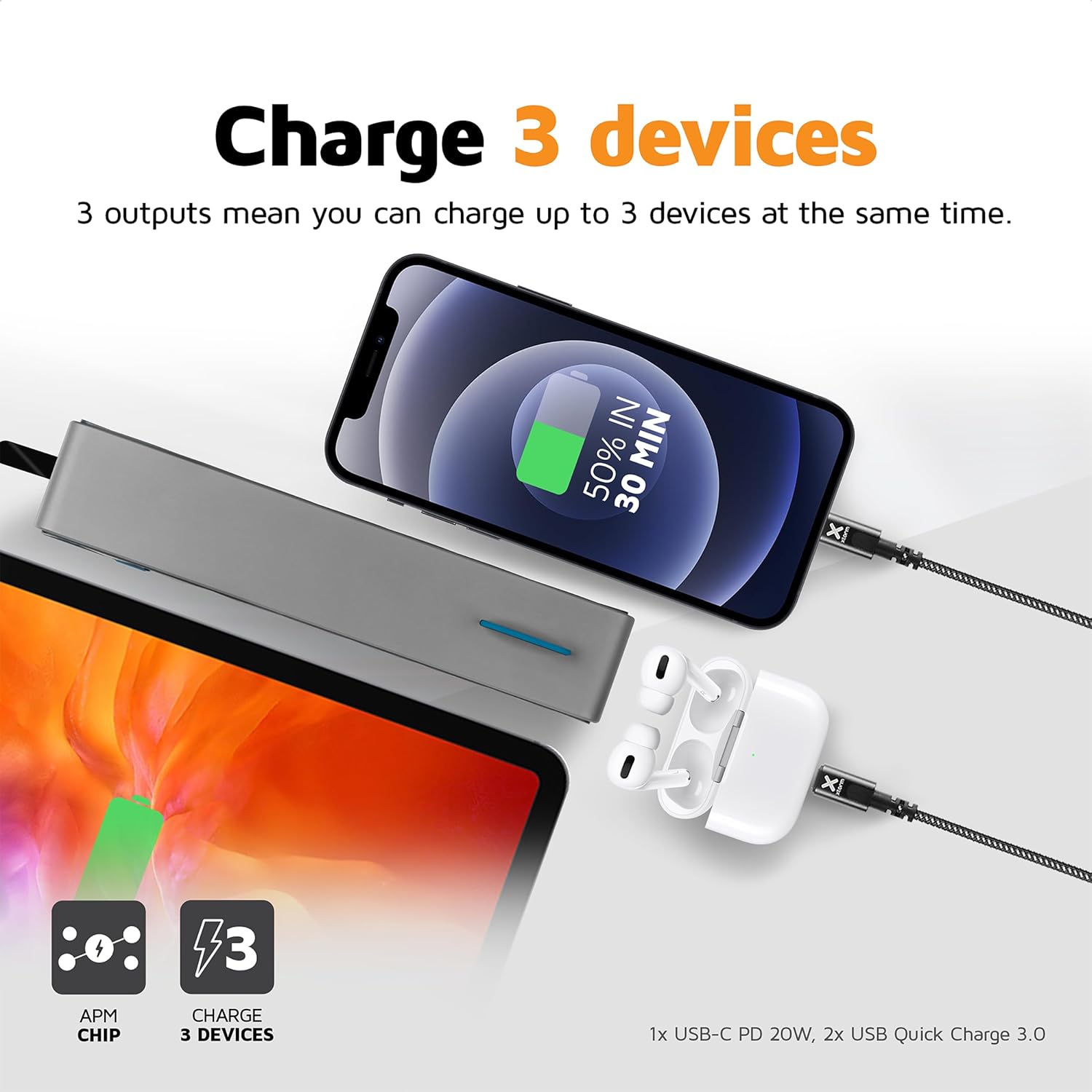
Image 4.1: The Xtorm Power Bank FS402 demonstrating its ability to charge three devices concurrently using its USB-C and two USB-A ports.
Nga Whakaaetanga Tere:
The power bank supports Power Delivery (PD) via the USB-C port and Quick Charge (QC) 3.0 via the USB-A ports, enabling rapid charging for compatible devices.
- Pūrere USB-C (20W): Ideal for fast charging modern smartphones and tablets.
- USB-A QC 3.0 (18W): Provides quick charging for a wide range of Android devices.

Image 4.2: Visual representation of the Xtorm Power Bank FS402's 20W fast charging capability, showing a device reaching 50% charge in 30 minutes.
5. Nga korero haumaru
Your safety is paramount. The Xtorm Power Bank FS402 incorporates several safety features to ensure reliable operation.
- Kaua e tukuna te peeke hiko ki te wera nui, te ra tika, te ahi ranei.
- A ape i te tuku, te tuku ranei i te peeke hiko ki nga paanga kaha.
- Kaua e ngana ki te wetewete, ki te whakatika, ki te whakarereke ranei i te taputapu.
- Kaua e taea e nga tamariki.
- Makahia te peeke hiko kia rite ki nga ture o te rohe.
Āhuatanga Haumaru Whakauru:
- Parenga iahiko-poto: Ka ārai i ngā kino o ngā poto hiko.
- Tiaki Taumaha: Ka mutu aunoa te utu ina kī tonu te pākahiko.
- Mana Pawera: Ka aroturuki me te whakahaere i te pāmahana o roto hei ārai i te wera nui.
- Ngā Pūhiko Akomanga-A: Utilizes high-quality lithium-polymer cells for enhanced safety and performance.

Image 5.1: Diagram illustrating the Xtorm Power Bank FS402's internal safety mechanisms, including control chip, A-Class batteries, temperature control chip, short-circuit protection, and battery temperature sensor.
6. Tiaki
- Horoia te pēke hiko ki te kakahu ngohengohe, maroke. Kaua e whakamahi i ngā kaihoroi whakakoi, i ngā whakarewa rānei.
- Penapenahia te peeke hiko ki te wāhi hauhautanga, maroke, kia matara atu i te rā tika me te makuku.
- Mena ka roa te rokiroki, utua te pākahiko ki te 50% pea i ia toru marama hei pupuri i te hauora o te pākahiko.
7. Te Raru
Nga take me nga otinga noa:
- Karekau te putea hiko e utu ana: Ensure the charging cable is securely connected to both the power bank and the wall charger. Try a different cable or wall charger.
- Kāore te pūrere e utu mai i te peeke hiko: Ensure the power bank has sufficient charge. Press the power button to activate charging. Try a different cable or port.
- Puturi te utu: Verify that your device and cable support fast charging. Ensure you are using the correct port (USB-C for PD, USB-A for QC).
- Kāore e mahi ana ngā tohu LED: The power bank might be fully discharged or require a reset. Try charging it for a few hours.
8. Whakatakotoranga
| Whakatakotoranga | Uara |
|---|---|
| Ingoa Tauira | FS402 |
| Waitohu | Xtorm |
| Pūhiko Raukaha | 20,000 mah |
| Hanganga Pūhiko | Lithium-polymer |
| USB-C Huaputa/Tauru | 20W Tuku Hiko (PD) |
| USB-He Putanga (x2) | 18W Quick Charge (QC) 3.0 |
| Momo Tuhono | Momo USB C, Momo USB A |
| Whakamahi Manakohia | Waea atamai, Papa |
| Taumaha Tūemi | 376 Karamu |
| Tae | Kerei |

Image 8.1: The Xtorm Power Bank FS402 showcasing its compact dimensions (136mm x 71mm x 26mm) and travel-friendly features, including its weight of 379 grams.
9. Pūtāhui me te Tautoko
The Xtorm Power Bank 20W Fuel Series 4 (FS402) comes with a 2-tau pūtāhui mai i te ra o te hokonga, e kapi ana i nga hapa hangahanga.

Image 9.1: The Xtorm Power Bank FS402 highlighting its design and the included 2-year warranty.
For warranty claims, technical support, or any questions regarding your product, please contact Xtorm customer service through their official website or your retailer's support channels. Please have your proof of purchase and product model number (FS402) ready.


