1. Kupu Whakataki
This manual provides essential information for the safe and efficient operation of your Einhell Cordless Impact Drill TE-ID 18 Li Solo. This tool is a high-performance member of the Einhell Power X-Change family, designed for drilling and impact drilling tasks. Please read these instructions carefully before first use and keep them for future reference.

Figure 1: Einhell Cordless Impact Drill TE-ID 18 Li Solo. This image shows the main drill unit with an auxiliary handle and depth stop installed, ready for use. A battery is shown faded in the background, indicating it is not included.
2. Nga Tohutohu Haumaru Whanui
Always observe the following safety precautions when using power tools to reduce the risk of electric shock, fire, and serious injury.
- Haumaru Wāhi Mahi: Kia ma to waahi mahi me te whakamarama pai. Ko nga waahi pouri, nga waahi pouri ranei ka pa mai nga aitua. Kaua e whakamahia nga taputapu hiko i roto i nga hau pupuhi, penei i te waahi o te wai ka mura, te hau, te puehu ranei.
- Haumaru Hiko: A ape i te pa atu ki te tinana ki nga papa whenua, ki runga ranei i te whenua penei i te paipa, te radiators, te awhe, me te pouaka whakamatao. Ka nui ake te mate o te wiri hiko mena ka noho to tinana ki te whenua ranei.
- Haumaru Whaiaro: Always wear eye protection. Use hearing protection when operating impact drills. Wear a dust mask if drilling generates dust. Dress properly; avoid loose clothing or jewelry.
- Te Whakamahi me te Tiaki Taputapu: Kaua e kaha te taputapu hiko. Whakamahia te taputapu hiko tika mo to tono. Momotuhia te putea pākahiko mai i te taputapu hiko i mua i te whakarereketanga, te whakarereke i nga taputapu, te penapena taputapu hiko ranei.
- Utauta Pūhiko Whakamahi me te Tiaki: Whakaorangia anake me te riihi kua tohua e te kaihanga. Whakamahia nga taputapu hiko me nga kete pākahiko kua tohua.
3. Waenga Hua
Familiarize yourself with the various parts of your Einhell Cordless Impact Drill for proper and safe operation.
- Chuck Kīkore: Mo nga huringa moka tere me te ngawari.
- Whakawhiti Kaitohu Aratau: To switch between drilling and impact drilling.
- Speed Control Trigger: For variable speed adjustment.
- Whakawhiti Whakamua/Whakamuri: To change rotation direction.
- Kakau awhina: Ka whakarato i te pupuri me te mana whakahaere.
- Kati Hohonu: Mō te whakahaere tika i te hohonu o te keri.
- Atanga Pūhiko: For connecting Power X-Change batteries (sold separately).
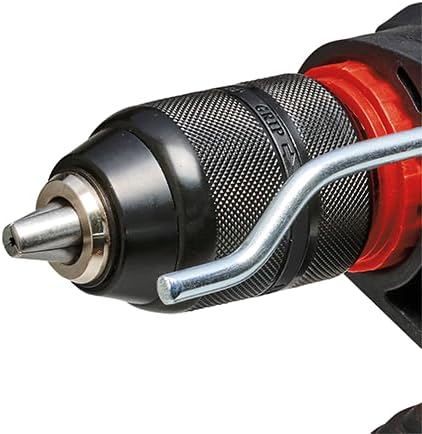
Whakaahua 2: Whakatata view of the 13 mm quick-change chuck. This component allows for tool-free bit changes.
4. Tatūnga
4.1 Battery Installation (Battery and Charger Not Included)
The Einhell TE-ID 18 Li Solo is part of the Power X-Change family and requires an 18V Power X-Change battery and charger, which are sold separately. Ensure the battery is fully charged before use.
- Align the charged Power X-Change battery with the battery interface on the base of the drill.
- Kiriatahia te pākahiko ki te waahi kia paoho pai.
- Hei tango, pehia te paatene tuku i runga i te pākahiko ka paheke ki waho.

Figure 3: Illustration indicating that the battery and charger are not included with the drill unit. These items must be purchased separately as part of the Einhell Power X-Change system.

Whakaatu 4: Neke Atuview of the Einhell Power X-Change system, demonstrating the wide range of compatible tools that can use the same battery. This highlights the modularity of the system.
4.2 Auxiliary Handle and Depth Stop Installation
- Wewetehia te kakau awhina ma te huri i te taha karaka.
- Peia te kakau ki mua o te tinana wiri.
- Insert the depth stop into the designated hole on the auxiliary handle.
- Adjust the auxiliary handle to a comfortable position and tighten it by rotating clockwise.
- Whakatikatikahia te aukati hohonu ki te hohonutanga keri e hiahiatia ana mā te neke ki roto, ki waho rānei.
4.3 Te Whakanoho i nga Paraka Drill
- Me whakaweto te wiri, ā, me tango te pākahiko hei haumaru.
- Hurihia te karaka karaka hei whakatuwhera i nga kauae.
- Whakauruhia katoatia te moka porowhita ki roto i te putu.
- Rotate the chuck clockwise to securely tighten the jaws around the drill bit. Ensure the bit is centered and firmly gripped.
5. Nga Tohutohu Whakahaere
5.1 Te Whakakaha/Whakaweto me te Mana Tere
The drill is activated by pressing the speed control trigger. The speed is variable, increasing with greater pressure on the trigger. To turn off, release the trigger.

Figure 5: Close-up of the drill's trigger and forward/reverse switch. The trigger provides variable speed control, and the switch above it controls the direction of rotation.
5.2 Te Huri Whakamua/Whakamuri
The forward/reverse switch, located above the trigger, controls the direction of rotation. Push it to the left for forward rotation (drilling) and to the right for reverse rotation (removing screws or jammed bits). Ensure the switch is in the central position to lock the trigger for safety when not in use.
5.3 Drilling and Impact Drilling Mode
The mode selector switch allows you to choose between standard drilling and impact drilling. For drilling into wood, metal, or plastic, select the drilling mode (drill bit symbol). For drilling into masonry or concrete, select the impact drilling mode (hammer symbol).

Figure 6: Close-up of the mode selector switch on the top of the drill. The left symbol indicates drilling mode, and the right symbol indicates impact drilling mode.
5.4 Tohutohu Keri Whanui
- Always secure your workpiece.
- Start drilling at a low speed and gradually increase.
- Whakanohia kia mau tonu, ahakoa te pehanga. Kaua e tohe te keri.
- Mō ngā kōhao hōhonu, tangohia te mata o te kōhao i ia wā hei tango i ngā paru.
- Use appropriate drill bits for the material.

Figure 7: A person demonstrating the use of the Einhell cordless impact drill for drilling into a wall. Proper grip and posture are shown, emphasizing safe operation.
6. Tiaki
Mā te tiaki auau ka roa te ora me te mahi tino pai o tō wiri.
- Te horoi: Keep the ventilation slots clean to prevent overheating. Use a soft brush or compressed air to remove dust and debris. Do not use water or chemical cleaners.
- Rokiroki: Store the drill in a dry, secure place out of reach of children. Remove the battery pack before storage.
- Tiaki Chuck: Horoia ngā kauae o te chuck i ia wā, kia pai ai te pupuri a ngā mata wiri.
7. Te Raru
| Raruraru | Take pea | Rongoā |
|---|---|---|
| Kaore e timata te drill. | Kaore i tika te whakaurunga o te pākahiko, kua tukuna ranei. | Kia tino whakaurua te pākahiko. Whakakīia, whakakapia rānei te pākahiko. |
| He iti te kaha, te tere ranei. | Battery low or drill bit dull. | Charge battery. Replace or sharpen drill bit. |
| Drill bit jams. | Excessive pressure or incorrect bit for material. | Reduce pressure. Use appropriate bit. Use reverse rotation to free. |
| Te werawera. | Kua aukatihia nga waahi hau, te whakamahi taumaha tonu ranei. | Clean ventilation slots. Allow drill to cool down. |
8. Whakatakotoranga Hangarau
| Āhuahira | Uara |
|---|---|
| Tauira | TE-ID 18 Li Solo (Part No. 4513960) |
| Waitohu | Einhell |
| Puna Mana | Battery Powered (Power X-Change 18V Li-Ion) |
| Voltage | 18 Volts |
| Tere Hurihuri Morahi | 260 RPM |
| Rahi Chuck Morahi | 13 Mirimita |
| Rakau Raukaha Te Keri | 25 Mirimita |
| Te Mahi Whakarewa | 10 Mirimita |
| Taumaha Tūemi | 1.65 Kirokaramu (3.63 pauna) |
| Rahi Hua (L x W x H) | 11.14" x 2.64" x 7.87" |
| Nga waahanga motuhake | Adjustable, Wireless, Speed Electronics, Forward/Reverse Rotation |
9. Pūtāhui me te Tautoko
For warranty information and customer support, please refer to the documentation included with your purchase or visit the official Einhell webpae. Puritia to tohu hoko mo etahi kereme whakamana.
Einhell Official Webpae: www.einhell.com


